iOS
Download
聚焦模式
字号
业务流程
本节汇总了 1V1 音视频通话中一些常见的业务流程,帮助您更好地理解整个场景的实现过程。
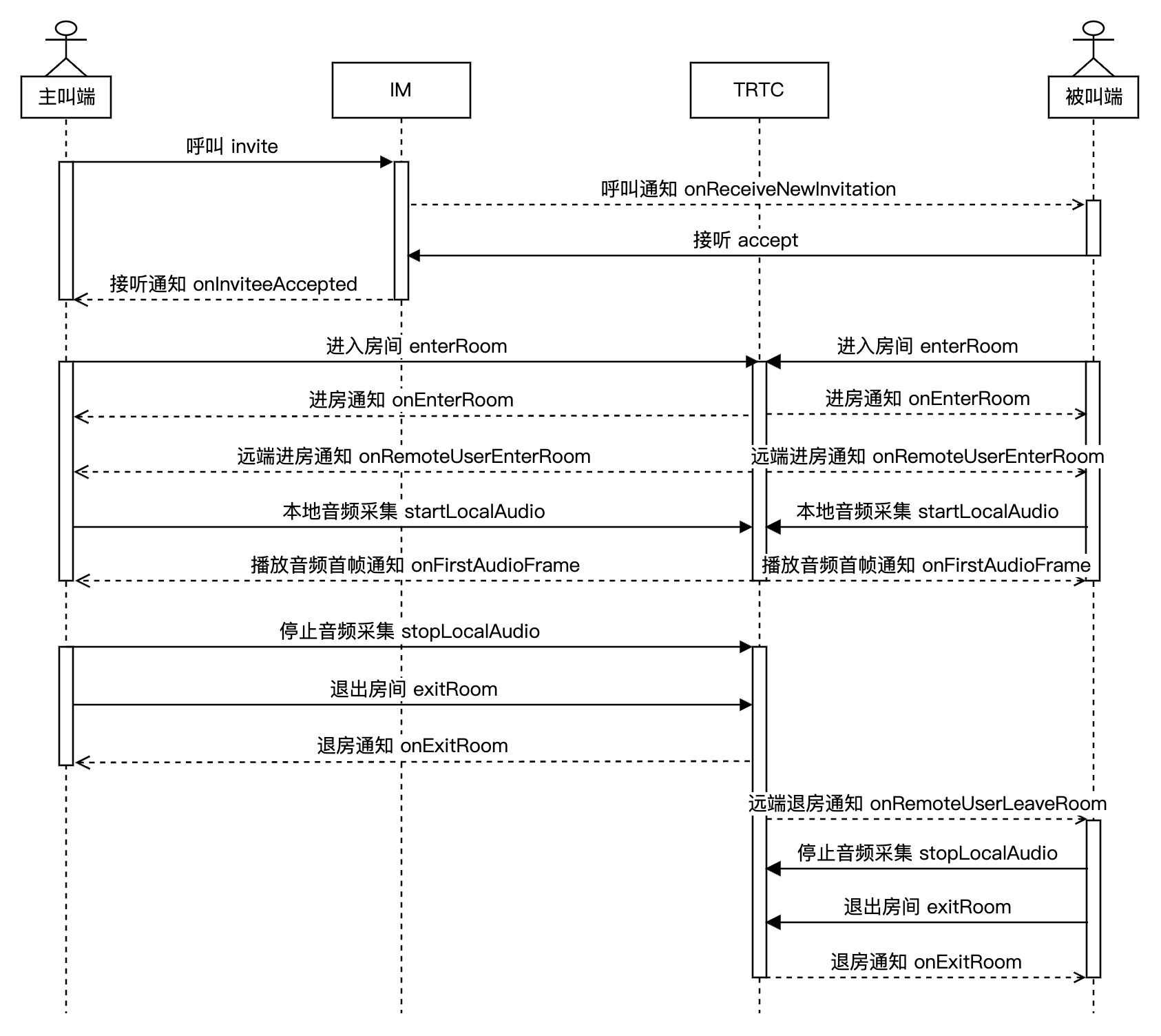
下图展示了 1V1 语音通话的序列图,其中包含呼叫、接听、通话、挂断等流程。
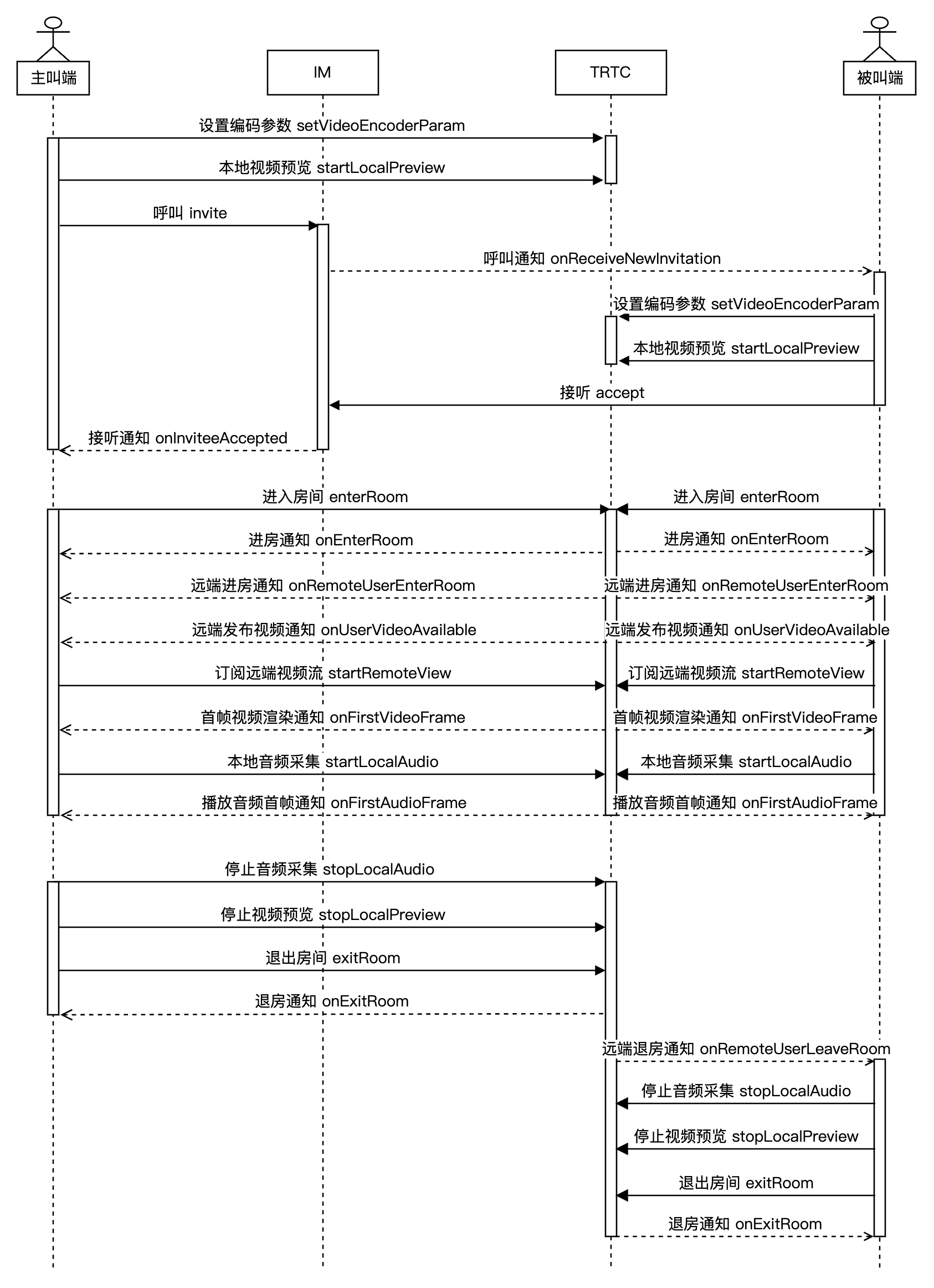
下图展示了 1V1 视频通话的序列图,其中包含呼叫、接听、通话、挂断等流程。
接入准备
步骤一:开通服务
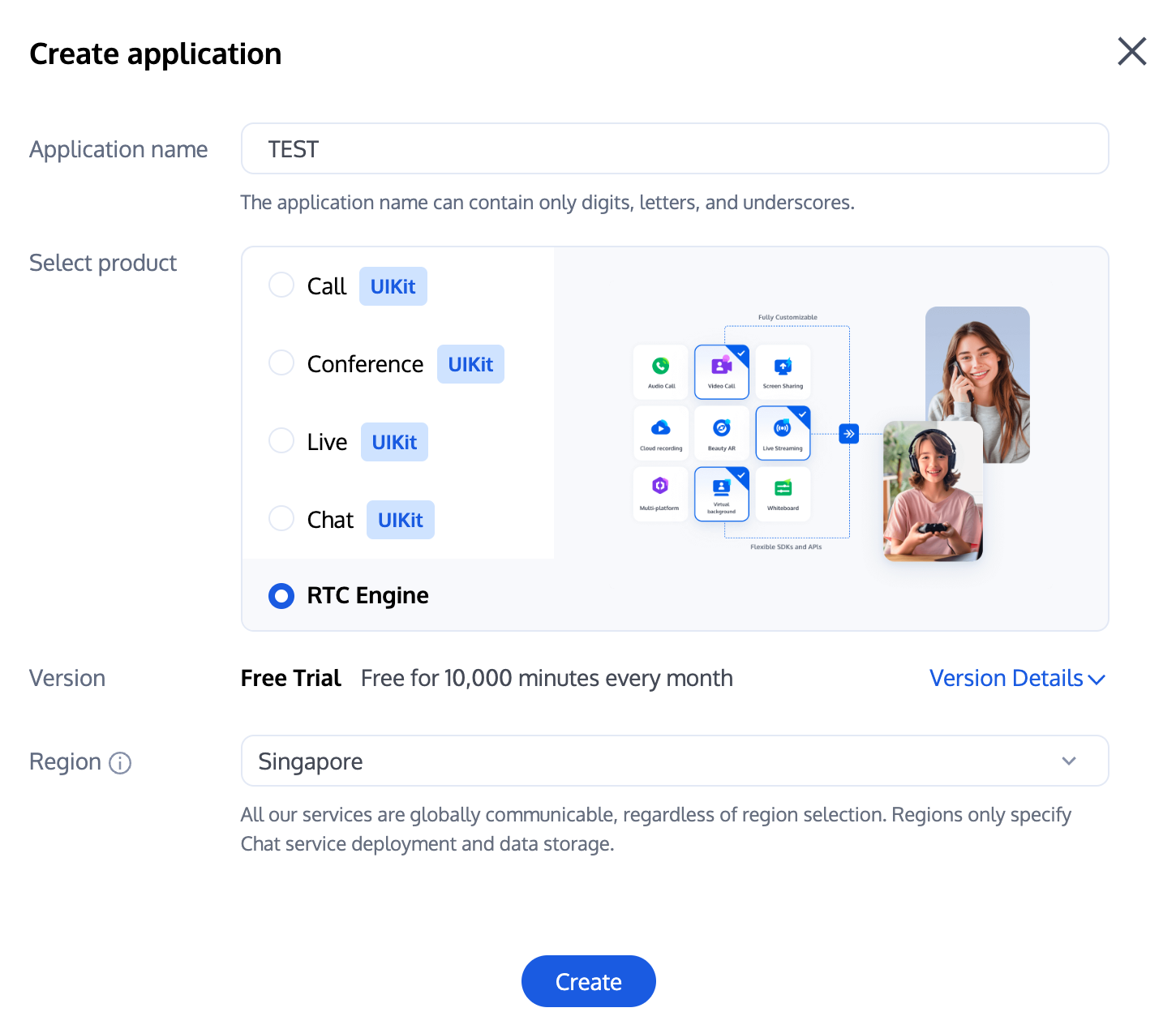
1. 首先您需要登录 实时音视频 TRTC 控制台 创建应用,此时在 即时通信 IM 控制台 会同步自动创建一个与当前 TRTC 应用相同 SDKAppID 的 IM 体验版应用,二者账号与鉴权体系可复用。后续您可根据需要选择升级 TRTC 或 IM 应用版本,例如高级版本可解锁更多增值功能服务。
说明:
建议创建两个应用分别用于测试环境和生产环境,一年内每个腾讯云账号(UIN)每月赠送10,000分钟免费时长。
TRTC 包月套餐分为体验版(默认)、基础版和专业版,可解锁不同的增值功能服务,详情可见 版本功能与包月套餐说明。
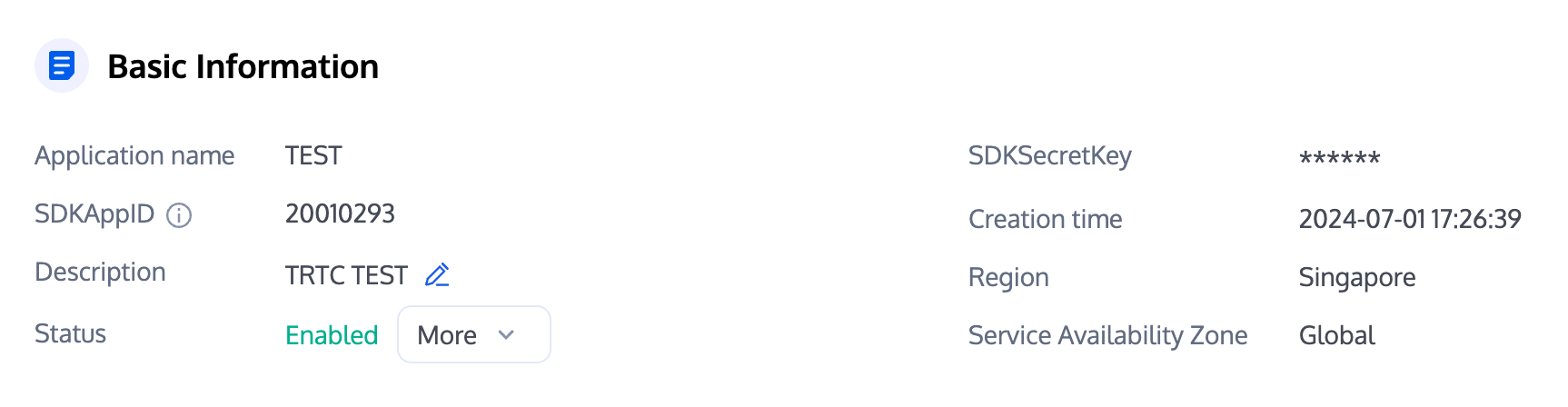
2. 创建应用完毕之后,您可以在应用管理 > 应用概览栏目看到该应用的基本信息,其中需要您保管好 SDKAppID、SDKSecretKey 便于后续使用,同时应避免密钥泄露造成流量盗刷。
步骤二:导入 SDK
TRTC SDK 和 IM SDK 已经发布到 CocoaPods,建议您通过 CocoaPods 集成 SDK。
1. 安装 CocoaPods。
在终端窗口中输入如下命令(需要提前在 Mac 中安装 Ruby 环境):
sudo gem install cocoapods
2. 创建 Podfile 文件。
进入项目所在路径,输入以下命令行之后项目路径下会出现一个 Podfile 文件。
pod init
3. 编辑 Podfile 文件。
根据您的项目需要选择合适的版本,并编辑 Podfile 文件。
platform :ios, '8.0'target 'App' do# TRTC 精简版# 安装包体积增量最小,仅支持实时音视频(TRTC)和 直播播放器(TXLivePlayer)两项功能。pod 'TXLiteAVSDK_TRTC', :podspec => 'https://liteav.sdk.qcloud.com/pod/liteavsdkspec/TXLiteAVSDK_TRTC.podspec'# Add the IM SDKpod 'TXIMSDK_Plus_iOS'# pod 'TXIMSDK_Plus_iOS_XCFramework'# pod 'TXIMSDK_Plus_Swift_iOS_XCFramework'# If you need to add the Quic plugin, please uncomment the next line.# Note: This plugin must be used with the Objective-C edition or XCFramework edition of the IM SDK, and the plugin version number must match the IM SDK version number.# pod 'TXIMSDK_Plus_QuicPlugin'end
4. 更新并安装 SDK。
在终端窗口中输入如下命令以更新本地库文件,并安装 SDK。
pod install
或使用以下命令更新本地库版本。
pod update
pod 命令执行完后,会生成集成了 SDK 的 .xcworkspace 后缀的工程文件,双击打开即可。
说明:
若 pod 搜索失败,建议尝试更新 pod 的本地 repo 缓存。更新命令如下。
pod setuppod repo updaterm ~/Library/Caches/CocoaPods/search_index.json
除了 CocoaPods 集成方式,您还可以选择下载 SDK 并手动导入,详见 手动集成 TRTC SDK 和 手动集成 IM SDK。
步骤三:工程配置
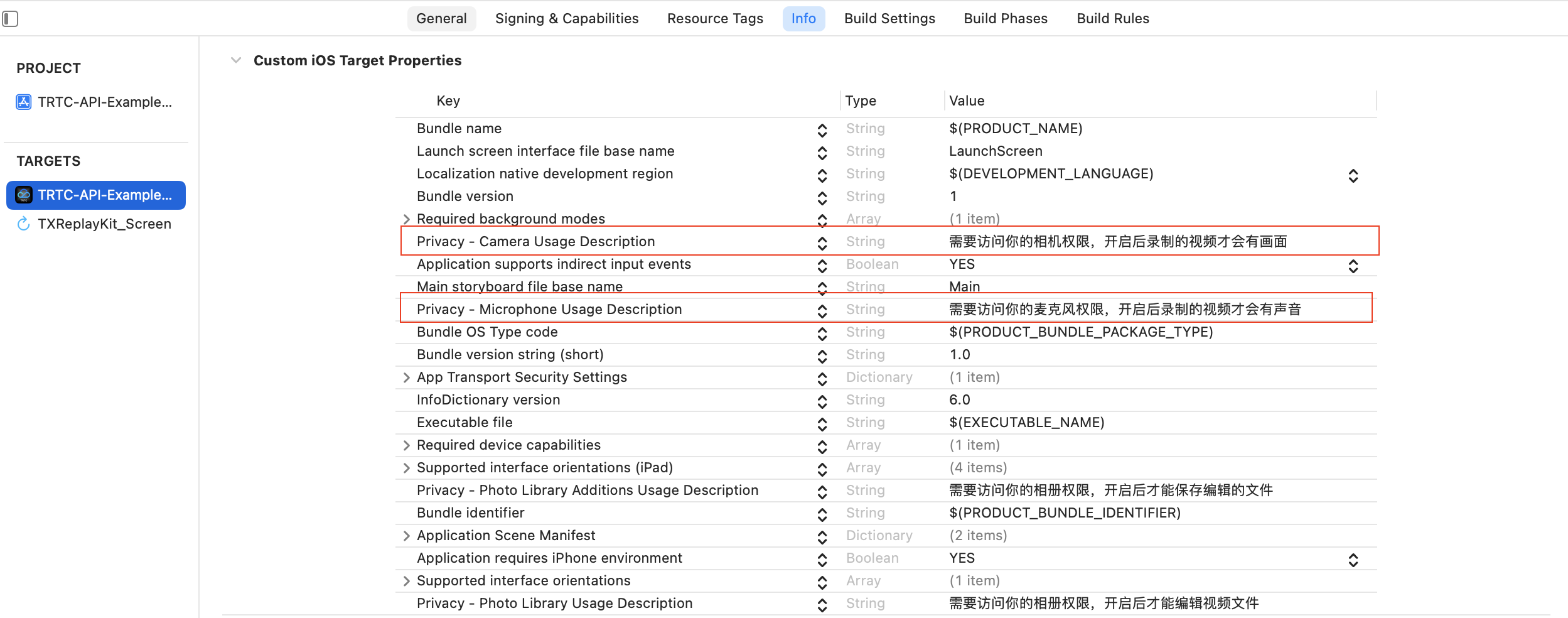
1. 1V1 音视频通话场景下 TRTC SDK 及 IM SDK 需要 App 授权麦克风和摄像头权限,在 App 的 Info.plist 中添加以下内容,对应麦克风及摄像头在系统弹出授权对话框时的提示信息。
Privacy - Microphone Usage Description, 同时填入麦克风使用目的提示语Privacy - Camera Usage Description,并填入摄像头使用目的提示语。
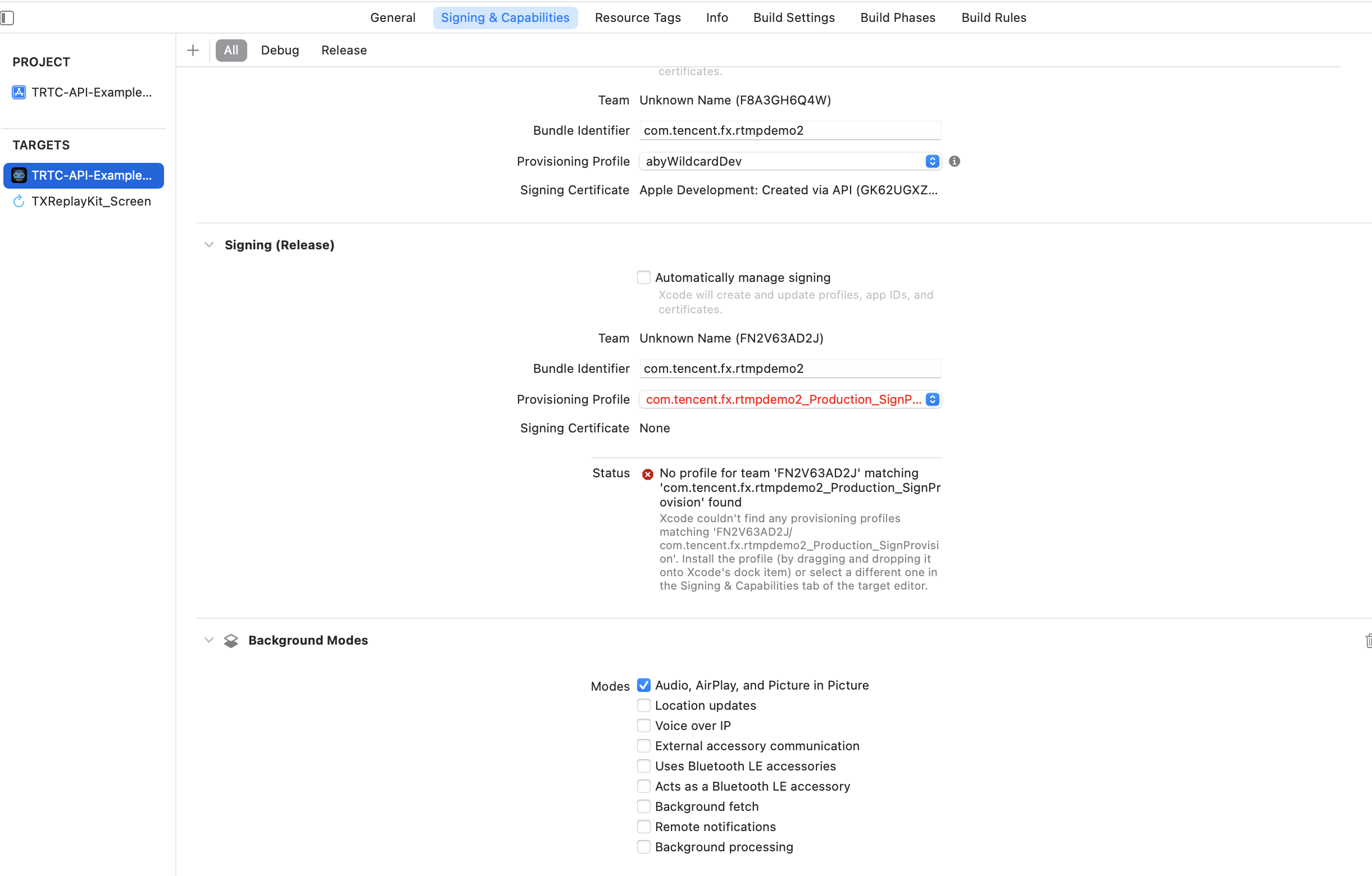
2. 如需 App 进入后台仍然运行相关功能,可在 Xcode 中选中当前工程项目,并在 Capabilities 下将设置项 Background Modes 设定为 ON,并勾选 Audio,AirPlay and Picture in Picture ,如下图所示:
步骤四:鉴权凭证
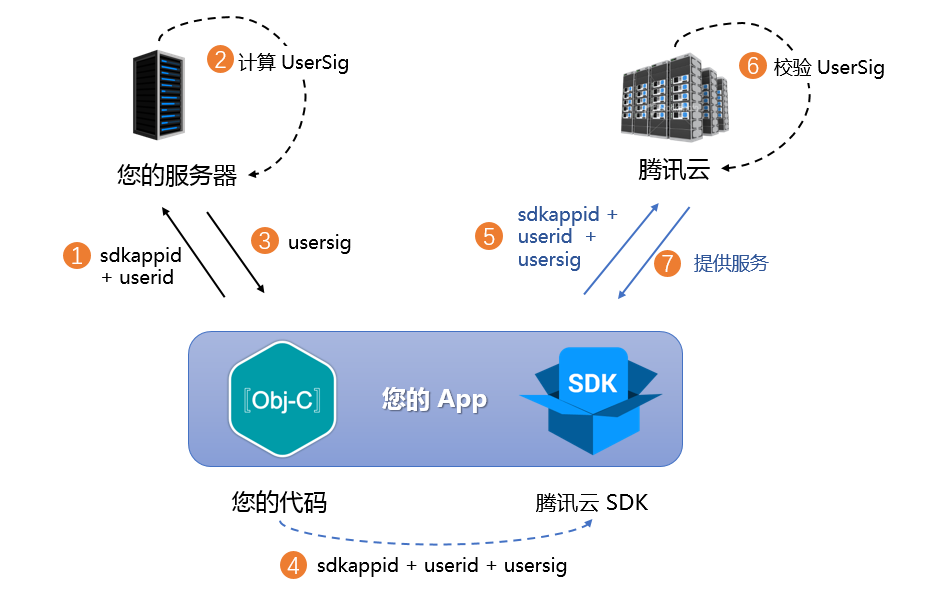
UserSig 是腾讯云设计的一种安全保护签名,目的是为了阻止恶意攻击者盗用您的云服务使用权。腾讯云实时音视频(TRTC)、即时通信(IM)服务都采用了该套安全保护机制,TRTC 在进房时鉴权,IM 在登录时鉴权。
正式运行阶段:推荐安全等级更高的服务端计算 UserSig 方案,防止客户端被逆向破解泄露密钥。
具体实现流程如下:
1. 您的 App 在调用 SDK 的初始化函数之前,首先要向您的服务器请求 UserSig。
2. 您的服务器根据 SDKAppID 和 UserID 计算 UserSig。
3. 服务器将计算好的 UserSig 返回给您的 App。
4. 您的 App 将获得的 UserSig 通过特定 API 传递给 SDK。
5. SDK 将 SDKAppID + UserID + UserSig 提交给腾讯云服务器进行校验。
6. 腾讯云校验 UserSig,确认合法性。
7. 校验通过后,会向 IM SDK 提供即时通信服务、TRTC SDK 提供实时音视频服务。
注意:
调试跑通阶段的本地 UserSig 计算方式不推荐应用到线上环境,容易被逆向破解导致密钥泄露。
我们提供了多个语言版本(Java/GO/PHP/Nodejs/Python/C#/C++)的 UserSig 服务端计算源代码,详见 服务端计算 UserSig。
步骤五:初始化 SDK
1. IM SDK 初始化与添加事件监听器。
// 从即时通信 IM 控制台获取应用 SDKAppID。// 添加 V2TIMSDKListener 的事件监听器,self 是 id<V2TIMSDKListener> 的实现类,如果您不需要监听 IM SDK 的事件,这个步骤可以忽略。[[V2TIMManager sharedInstance] addIMSDKListener:self];// 初始化 IM SDK,调用这个接口后,可以立即调用登录接口。[[V2TIMManager sharedInstance] initSDK:sdkAppID config:config];// SDK 初始化后会抛出一些事件,例如连接状态、登录票据过期等- (void)onConnecting {NSLog(@"IM SDK 正在连接到腾讯云服务器");}- (void)onConnectSuccess {NSLog(@"IM SDK 已经成功连接到腾讯云服务器");}// 移除事件监听器// self 是 id<V2TIMSDKListener> 的实现类[[V2TIMManager sharedInstance] removeIMSDKListener:self];// 反初始化 SDK[[V2TIMManager sharedInstance] unInitSDK];
说明:
如果您的应用生命周期跟 SDK 生命周期一致,退出应用前可以不进行反初始化。若您只在进入特定界面后才初始化 SDK,退出界面后不再使用,可以对 SDK 进行反初始化。
2. TRTC SDK 创建实例与设置事件监听器。
// 创建 TRTC SDK 实例(单例模式)self.trtcCloud = [TRTCCloud sharedInstance];// 设置事件监听器self.trtcCloud.delegate = self;// 来自 SDK 的各类事件通知(比如:错误码,警告码,音视频状态参数等)- (void)onError:(TXLiteAVError)errCode errMsg:(nullable NSString *)errMsg extInfo:(nullable NSDictionary *)extInfo {NSLog(@"%d: %@", errCode, errMsg);}- (void)onWarning:(TXLiteAVWarning)warningCode warningMsg:(nullable NSString *)warningMsg extInfo:(nullable NSDictionary *)extInfo {NSLog(@"%d: %@", warningCode, warningMsg);}// 移除事件监听器self.trtcCloud.delegate = nil;// 销毁 TRTC SDK 实例(单例模式)[TRTCCloud destroySharedIntance];
说明:
接入过程
步骤一:登录
初始化 IM SDK 后,您需要调用 SDK 登录接口验证账号身份,获得账号的功能使用权限。因此在使用其他功能之前,请务必确保登录成功,否则可能导致功能异常或不可用。如您仅需使用 TRTC 音视频服务,可忽略此步骤。
时序图
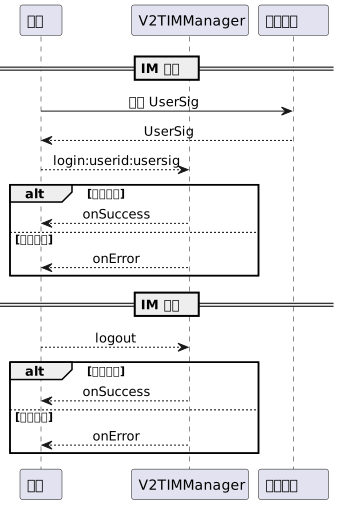
登录操作
// 登录:userID 可自定义,userSig 参考步骤一生成获取[[V2TIMManager sharedInstance] login:userID userSig:userSig succ:^{NSLog(@"success");} fail:^(int code, NSString *desc) {// 如果返回以下错误码,表示使用 UserSig 已过期,请您使用新签发的 UserSig 进行再次登录。// 1. ERR_USER_SIG_EXPIRED(6206)// 2. ERR_SVR_ACCOUNT_USERSIG_EXPIRED(70001)// 注意:其他的错误码,请不要在这里调用登录接口,避免 IM SDK 登录进入死循环。NSLog(@"failure, code:%d, desc:%@", code, desc);}];
登出操作
// 登出[[V2TIMManager sharedInstance] logout:^{NSLog(@"success");} fail:^(int code, NSString *desc) {NSLog(@"failure, code:%d, desc:%@", code, desc);}];
说明:
如果您的应用生命周期跟 IM SDK 生命周期一致,退出应用前可以不登出。若您只在进入特定界面后才使用 IM SDK,退出界面后不再使用,可以进行登出操作和对 IM SDK 进行反初始化。
步骤二:呼叫
时序图
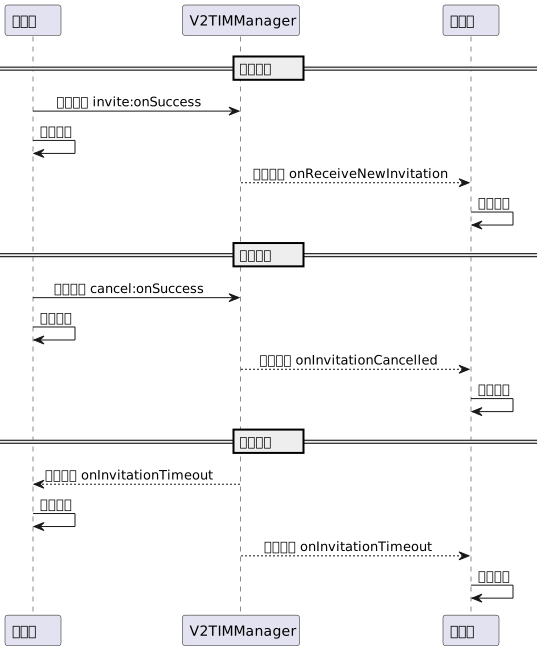
发起呼叫
1. 主叫端本地画面预览(仅视频通话,语音通话忽略此步骤)。
- (void)setupTRTC {// 设置视频编码参数,决定远端用户看到的画面质量TRTCVideoEncParam *encParam = [[TRTCVideoEncParam alloc] init];encParam.videoResolution = TRTCVideoResolution_960_540;encParam.videoFps = 15;encParam.videoBitrate = 850;encParam.resMode = TRTCVideoResolutionModePortrait;[self.trtcCloud setVideoEncoderParam:encParam];// 开启本地摄像头预览(可指定使用前置/后置摄像头进行视频采集)[self.trtcCloud startLocalPreview:self.isFrontCamera view:self.previewView];}
注意:
您可根据业务需求自行设置视频编码参数 TRTCVideoEncParam,各档位最佳分辨率和码率搭配详见 分辨率码率参照表。
2. 主叫端发送呼叫邀请信令。
// 构造自定义数据NSDictionary *dic = @{@"cmd": @"av_call",@"msg": @{// 指定通话类型(视频通话、语音通话)@"callType": @"videoCall",// 指定 TRTC 房间号(主叫端可随机生成)@"roomId": @"xxxRoomId",},};NSData *jsonData = [NSJSONSerialization dataWithJSONObject:dicoptions:NSJSONWritingPrettyPrintederror:nil];if (jsonData) {NSString *jsonString = [[NSString alloc] initWithData:jsonData encoding:NSUTF8StringEncoding];// 发送呼叫邀请信令[[V2TIMManager sharedInstance] invite:self.receiverId data:jsonString onlineUserOnly:false offlinePushInfo:self.offlinePushInfo timeout:self.timeout succ:^{// 发送呼叫邀请信令成功// 渲染呼叫页面,播放呼叫铃声} fail:^(int code, NSString *desc) {// 发送呼叫邀请信令失败// 提示呼叫失败,可以尝试重试}];}
注意:
音视频通话场景中,通常需要在邀请信令中配置离线推送信息
offlinePushInfo,详情参见 离线推送消息。建议在邀请信令中设置合理的超时时间参数
timeout,单位为秒,SDK 会进行超时检测,从而实现呼叫超时自动挂断。3. 被叫端收到呼叫邀请通知。
[[V2TIMManager sharedInstance] addSignalingListener:self];#pragma mark - V2TIMSignalingListener// 被叫用户收到呼叫请求, inviteID 为该条请求 ID,inviter 为主叫用户 ID- (void)onReceiveNewInvitation:(NSString *)inviteID inviter:(NSString *)inviter groupID:(NSString *)groupID inviteeList:(NSArray<NSString *> *)inviteeList data:(NSString *)data {if (data && ![data isEqualToString:@""]) {NSData *jsonData = [data dataUsingEncoding:NSUTF8StringEncoding];NSDictionary *dictionary = [NSJSONSerialization JSONObjectWithData:jsonDataoptions:NSJSONReadingMutableContainerserror:nil];if (dictionary) {NSString *command = dictionary[@"cmd"];NSDictionary *msg = dictionary[@"msg"];if ([command isEqualToString:@"av_call"]) {NSString *callType = msg[@"callType"];NSString *roomId = msg[@"roomId"];// 渲染呼叫页面,播放呼叫铃声}}}}
注意:
主叫端发起呼叫请求、被叫端收到呼叫请求时,业务侧需要自行实现呼叫页面的渲染,以及呼叫铃声的播放。
4. 被叫端本地画面预览(仅视频通话,语音通话忽略此步骤)。
if ([callType isEqualToString:@"videoCall"]) {// 设置视频编码参数,决定远端用户看到的画面质量TRTCVideoEncParam *encParam = [[TRTCVideoEncParam alloc] init];encParam.videoResolution = TRTCVideoResolution_960_540;encParam.videoFps = 15;encParam.videoBitrate = 850;encParam.resMode = TRTCVideoResolutionModePortrait;[self.trtcCloud setVideoEncoderParam:encParam];// 开启本地摄像头预览(可指定使用前置/后置摄像头进行视频采集)[self.trtcCloud startLocalPreview:self.isFrontCamera view:self.previewView];}
取消呼叫
1. 主叫端取消呼叫请求。
[[V2TIMManager sharedInstance] cancel:inviteId data:data succ:^{// 取消呼叫请求成功// 销毁呼叫页面,停止播放呼叫铃声} fail:^(int code, NSString *desc) {// 取消呼叫请求失败// 提示取消失败,可以尝试重试}];
2. 被叫端收到取消通知。
#pragma mark - V2TIMSignalingListener- (void)onInvitationCancelled:(NSString *)inviteID inviter:(NSString *)inviter data:(NSString *)data {// 销毁呼叫页面,停止播放呼叫铃声}
呼叫超时
主叫端和被叫端均会收到超时通知,同时销毁呼叫页面并停止播放呼叫铃声。
#pragma mark - V2TIMSignalingListener- (void)onInvitationTimeout:(NSString *)inviteID inviteeList:(NSArray<NSString *> *)inviteeList {// 提示呼叫超时,销毁呼叫页面,停止播放呼叫铃声}
步骤三:接听
接听信令
1. 被叫端发送同意接听信令。
[[V2TIMManager sharedInstance] accept:inviteId data:data succ:^{// 接听成功,渲染通话页面,停止播放呼叫铃声if ([callType isEqualToString:@"videoCall"]) {// 开始视频通话[self startVideoCall];} else {// 开始语音通话[self startAudioCall];}} fail:^(int code, NSString *desc) {// 接听失败,提示异常或重试}];
2. 主叫端收到同意接听通知。
#pragma mark - V2TIMSignalingListener- (void)onInviteeAccepted:(NSString *)inviteID invitee:(NSString *)invitee data:(NSString *)data {if ([self.callType isEqualToString:@"videoCall"]) {// 开始视频通话[self startVideoCall];} else {// 开始语音通话[self startAudioCall];}}
语音通话
1. 主叫端和被叫端均进入同一个 TRTC 房间,开始语音通话。
- (void)startAudioCall {TRTCParams *params = [[TRTCParams alloc] init];// TRTC鉴权凭证, 在服务端生成params.sdkAppId = SDKAPPID;// TRTC应用标识, 在控制台获取params.userSig = USERSIG;// 以字符串房间号为例params.strRoomId = self.roomId;// 用户名, 建议和IM保持同步params.userId = self.userId;[self.trtcCloud startLocalAudio:TRTCAudioQualitySpeech];[self.trtcCloud enterRoom:params appScene:TRTCAppSceneAudioCall];}
注意:
语音通话模式下,TRTC 进房场景需选用
TRTCAppSceneAudioCall,同时无需指定进房角色 TRTCRoleType。开始音频采集
startLocalAudio 可同时设置音质参数,语音通话模式建议采用 TRTCAudioQualitySpeech。SDK 默认的自动订阅模式下,用户进入房间后,会立刻接收到该房间中的音频流,音频会自动解码播放,无需手动拉流。
2. 进房结果通知,标识通话状态。
// 标记是否正在通话中@property (nonatomic, assign) BOOL isOnCalling;#pragma mark - TRTCCloudDelegate// 进房结果事件回调- (void)onEnterRoom:(NSInteger)result {if (result > 0) {// 进房成功,标识正在通话中self.isOnCalling = YES;} else {// 进房失败,提示通话异常self.isOnCalling = NO;}}
视频通话
1. 主叫端和被叫端均进入同一个 TRTC 房间,开始视频通话。
- (void)startVideoCall {TRTCParams *params = [[TRTCParams alloc] init];// TRTC鉴权凭证, 在服务端生成params.sdkAppId = SDKAPPID;// TRTC应用标识, 在控制台获取params.userSig = USERSIG;// 以字符串房间号为例params.strRoomId = self.roomId;// 用户名, 建议和IM保持同步params.userId = self.userId;[self.trtcCloud startLocalAudio:TRTCAudioQualitySpeech];[self.trtcCloud enterRoom:params appScene:TRTCAppSceneVideoCall];}
注意:
视频通话模式下,TRTC 进房场景需选用
TRTCAppSceneVideoCall,同时无需指定进房角色 TRTCRoleType。开始音频采集
startLocalAudio 可同时设置音质参数,视频通话模式建议采用 TRTCAudioQualitySpeech。SDK 默认的自动订阅模式下,音频会自动解码播放,视频需要手动调用
startRemoteView 拉取远端视频流渲染播放。2. 进房结果通知,标识通话状态,拉取远端视频流。
// 标记是否正在通话中@property (nonatomic, assign) BOOL isOnCalling;#pragma mark - TRTCCloudDelegate// 进房结果事件回调- (void)onEnterRoom:(NSInteger)result {if (result > 0) {// 进房成功,标识正在通话中self.isOnCalling = YES;} else {// 进房失败,提示通话异常self.isOnCalling = NO;}}// 拉取远端视频流- (void)onUserVideoAvailable:(NSString *)userId available:(BOOL)available {// 远端用户发布/取消了主路视频画面if (available) {// 订阅远端用户的视频流,并绑定视频渲染控件[self.trtcCloud startRemoteView:userId streamType:TRTCVideoStreamTypeBig view:self.previewView];} else {// 停止订阅远端用户的视频流,并释放渲染控件[self.trtcCloud stopRemoteView:userId streamType:TRTCVideoStreamTypeBig];}}
步骤四:拒接
时序图
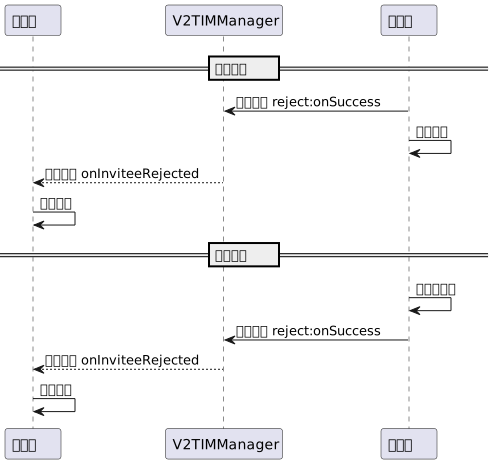
主动拒接
1. 被叫端发送拒绝接听信令。
NSDictionary *dic = @{@"cmd": @"av_call",@"msg": @{// 指定通话类型(视频通话、语音通话)@"callType": @"videoCall",// 指定拒接类型(主动拒接、忙线拒接)@"reason": @"active",},};NSData *jsonData = [NSJSONSerialization dataWithJSONObject:dicoptions:NSJSONWritingPrettyPrintederror:nil];if (jsonData) {NSString *jsonString = [[NSString alloc] initWithData:jsonData encoding:NSUTF8StringEncoding];[[V2TIMManager sharedInstance] reject:self.inviteId data:jsonString succ:^{// 拒接成功,销毁呼叫页面,停止播放呼叫铃声} fail:^(int code, NSString *desc) {// 拒接失败,提示异常或重试}];}
2. 主叫端收到拒绝接听通知。
#pragma mark - V2TIMSignalingListener- (void)onInviteeRejected:(NSString *)inviteID invitee:(NSString *)invitee data:(NSString *)data {if (data && ![data isEqualToString:@""]) {NSData *jsonData = [data dataUsingEncoding:NSUTF8StringEncoding];NSDictionary *dictionary = [NSJSONSerialization JSONObjectWithData:jsonDataoptions:NSJSONReadingMutableContainerserror:nil];if (dictionary) {NSString *command = dictionary[@"cmd"];NSDictionary *msg = dictionary[@"msg"];if ([command isEqualToString:@"av_call"]) {NSString *reason = msg[@"reason"];if ([reason isEqualToString:@"active"]) {// 提示对方拒绝接听} else if ([reason isEqualToString:@"busy"]) {// 提示对方忙线中}// 销毁呼叫页面,停止播放呼叫铃声}}}}
忙线拒接
被叫端收到新的呼叫邀请,若判断本地通话状态为正在通话中,则自动忙线拒接。
- (void)onReceiveNewInvitation:(NSString *)inviteID inviter:(NSString *)inviter groupID:(NSString *)groupID inviteeList:(NSArray<NSString *> *)inviteeList data:(NSString *)data {if (data && ![data isEqualToString:@""]) {NSData *jsonData = [data dataUsingEncoding:NSUTF8StringEncoding];NSDictionary *dictionary = [NSJSONSerialization JSONObjectWithData:jsonDataoptions:NSJSONReadingMutableContainerserror:nil];if (dictionary) {NSString *command = dictionary[@"cmd"];NSDictionary *msg = dictionary[@"msg"];if ([command isEqualToString:@"av_call"] && self.isOnCalling) {NSDictionary *dic = @{@"cmd": @"av_call",@"msg": @{// 指定通话类型(视频通话、语音通话)@"callType": @"videoCall",// 指定拒接类型(主动拒接、忙线拒接)@"reason": @"busy",},};NSData *jsonData = [NSJSONSerialization dataWithJSONObject:dicoptions:NSJSONWritingPrettyPrintederror:nil];if (jsonData) {NSString *jsonString = [[NSString alloc] initWithData:jsonData encoding:NSUTF8StringEncoding];// 本地正在通话中,发送忙线拒接信令[[V2TIMManager sharedInstance] reject:inviteID data:jsonString succ:^{// 忙线拒接成功} fail:^(int code, NSString *desc) {// 忙线拒接失败}];}}}}}
注意:
步骤五:挂断
时序图
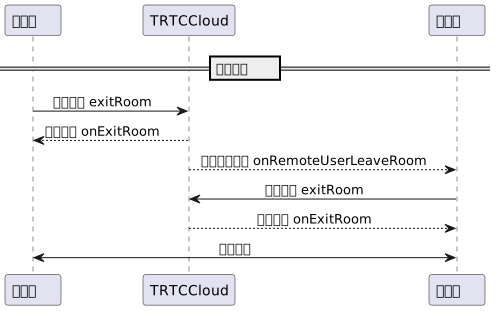
挂断通话
1. 任一端退出房间,重置本地通话状态。
- (void)hangup {[self.trtcCloud stopLocalAudio];[self.trtcCloud stopLocalPreview];[self.trtcCloud exitRoom];}#pragma mark - TRTCCloudDelegate- (void)onExitRoom:(NSInteger)reason {// 已成功退出房间并挂断通话self.isOnCalling = NO;}
2. 另一端收到远端退房通知,本地执行退房并重置通话状态。
#pragma mark - TRTCCloudDelegate- (void)onRemoteUserLeaveRoom:(NSString *)userId reason:(NSInteger)reason {[self hangup];}- (void)onExitRoom:(NSInteger)reason {// 已成功退出房间并挂断通话self.isOnCalling = NO;}
步骤六:功能控制
打开关闭麦克风
// 打开麦克风[self.trtcCloud muteLocalAudio:NO];// 关闭麦克风[self.trtcCloud muteLocalAudio:YES];
打开关闭扬声器
// 打开扬声器[self.trtcCloud muteAllRemoteAudio:NO];// 关闭扬声器[self.trtcCloud muteAllRemoteAudio:YES];
打开关闭摄像头
// 打开摄像头, 指定前置或后置摄像头及渲染控件[self.trtcCloud startLocalPreview:self.isFrontCamera view:self.previewView];// 关闭摄像头[self.trtcCloud stopLocalPreview];
听筒免提切换
// 切换听筒[[self.trtcCloud getDeviceManager] setAudioRoute:TXAudioRouteEarpiece];// 切换免提[[self.trtcCloud getDeviceManager] setAudioRoute:TXAudioRouteSpeakerphone];
摄像头切换
// 判断当前是否为前置摄像头BOOL isFrontCamera = [[self.trtcCloud getDeviceManager] isFrontCamera];// 切换前置或后置摄像头, true: 切换为前置; false: 切换为后置[[self.trtcCloud getDeviceManager] switchCamera:!isFrontCamera];
高级功能
网络状态提示
音视频通话过程中,通常需要在对方网络状态较差时给予提示,从而会有通话卡顿的心理预期。
#pragma mark - TRTCCloudDelegate- (void)onNetworkQuality:(TRTCQualityInfo *)localQuality remoteQuality:(NSArray<TRTCQualityInfo *> *)remoteQuality {if (remoteQuality.count > 0) {switch(remoteQuality[0].quality) {case TRTCQuality_Excellent:NSLog(@"对方网络非常好");break;case TRTCQuality_Good:NSLog(@"对方网络比较好");break;case TRTCQuality_Poor:NSLog(@"对方网络一般");break;case TRTCQuality_Bad:NSLog(@"对方网络较差");break;case TRTCQuality_Vbad:NSLog(@"对方网络很差");break;case TRTCQuality_Down:NSLog(@"对方网络极差");break;default:NSLog(@"未定义");break;}}}
注意:
localQuality 代表本地用户网络质量评估结果,其 userId 字段为空。remoteQuality 代表远端用户网络质量评估结果,其结果受远端和本地共同影响。通话时长统计
推荐使用 TRTC 远端用户进房时间作为统计通话时长的开始时间,本地用户退房时间作为统计通话时长的结束时间。
// 开始通话时间@property (nonatomic, assign) NSTimeInterval callStartTime;// 结束通话时间@property (nonatomic, assign) NSTimeInterval callFinishTime;// 通话持续时长(秒)@property (nonatomic, assign) NSInteger callDuration;// 远端用户进房回调- (void)onRemoteUserEnterRoom:(NSString *)userId {self.callStartTime = [[NSDate date] timeIntervalSince1970];}// 本地用户退房回调- (void)onExitRoom:(NSInteger)reason {self.callFinishTime = [[NSDate date] timeIntervalSince1970];self.callDuration = (NSInteger)(self.callFinishTime - self.callStartTime);}
注意:
视频美颜特效
TRTC 支持接入第三方美颜特效产品,下面以腾讯特效为例,展示第三方美颜接入流程。
1. 集成腾讯特效 SDK、申请授权 License,详情请参照 秀场直播-接入准备 步骤实现。
2. 设置 SDK 素材资源路径(如有)。
NSString *beautyConfigPath = [NSSearchPathForDirectoriesInDomains(NSDocumentDirectory, NSUserDomainMask, YES) lastObject];beautyConfigPath = [beautyConfigPath stringByAppendingPathComponent:@"beauty_config.json"];NSFileManager *localFileManager=[[NSFileManager alloc] init];BOOL isDir = YES;NSDictionary * beautyConfigJson = @{};if ([localFileManager fileExistsAtPath:beautyConfigPath isDirectory:&isDir] && !isDir) {NSString *beautyConfigJsonStr = [NSString stringWithContentsOfFile:beautyConfigPath encoding:NSUTF8StringEncoding error:nil];NSError *jsonError;NSData *objectData = [beautyConfigJsonStr dataUsingEncoding:NSUTF8StringEncoding];beautyConfigJson = [NSJSONSerialization JSONObjectWithData:objectDataoptions:NSJSONReadingMutableContainerserror:&jsonError];}NSDictionary *assetsDict = @{@"core_name":@"LightCore.bundle",@"root_path":[[NSBundle mainBundle] bundlePath],@"tnn_"@"beauty_config":beautyConfigJson};// 初始化SDK:width和height分别是texture的宽高self.xMagicKit = [[XMagic alloc] initWithRenderSize:CGSizeMake(width,height) assetsDict:assetsDict];
3. 设置第三方美颜的视频数据回调,将美颜 SDK 处理每帧数据结果传入 TRTC SDK 内部做渲染处理。
// TRTC SDK 设置第三方美颜的视频数据回调[self.trtcCloud setLocalVideoProcessDelegete:self pixelFormat:TRTCVideoPixelFormat_Texture_2D bufferType:TRTCVideoBufferType_Texture];#pragma mark - TRTCVideoFrameDelegate// 构造 YTProcessInput 传入到 SDK 内做渲染处理- (uint32_t)onProcessVideoFrame:(TRTCVideoFrame *_Nonnull)srcFrame dstFrame:(TRTCVideoFrame *_Nonnull)dstFrame {if (!self.xMagicKit) {[self buildBeautySDK:srcFrame.width and:srcFrame.height texture:srcFrame.textureId];//初始化XMagic SDKself.heightF = srcFrame.height;self.widthF = srcFrame.width;}if(self.xMagicKit!=nil && (self.heightF!=srcFrame.height || self.widthF!=srcFrame.width)){self.heightF = srcFrame.height;self.widthF = srcFrame.width;[self.xMagicKit setRenderSize:CGSizeMake(srcFrame.width, srcFrame.height)];}YTProcessInput *input = [[YTProcessInput alloc] init];input.textureData = [[YTTextureData alloc] init];input.textureData.texture = srcFrame.textureId;input.textureData.textureWidth = srcFrame.width;input.textureData.textureHeight = srcFrame.height;input.dataType = kYTTextureData;YTProcessOutput *output = [self.xMagicKit process:input withOrigin:YtLightImageOriginTopLeft withOrientation:YtLightCameraRotation0];dstFrame.textureId = output.textureData.texture;return 0;}
注意:
步骤1、步骤2根据不同的第三方美颜产品实现方式有所不同,而步骤3是 TRTC 集成第三方美颜的通用且重要步骤。
场景化集成腾讯美颜特效指引详见 TRTC SDK 集成腾讯特效,独立集成腾讯美颜特效指引详见 独立集成腾讯特效。
大小窗口切换
TRTC 中有很多需要操控视频画面的接口,这些接口都需要您指定视频渲染控件。
如果您业务涉及到切换显示区域的交互场景,可以使用 TRTC SDK 更新本地预览画面、更新远端用户视频渲染控件功能实现。
// 更新本地预览画面渲染控件[self.trtcCloud updateLocalView:self.previewView];// 更新远端用户视频渲染控件[self.trtcCloud updateRemoteView:self.previewView streamType:TRTCVideoStreamTypeBig forUser:self.userId];
注意:
streamType 仅支持 TRTCVideoStreamTypeBig 和 TRTCVideoStreamTypeSub。离线推送消息
音视频通话场景通常需要用到离线推送消息,使得被叫用户 App 不在线时也能收到来电消息。离线推送集成指引详见 离线消息推送,下面我们重点介绍其中步骤五:发送离线推送消息、步骤六:解析离线推送消息 的实现方法。
发送离线推送消息
调用 invite 发送通话邀请时,您可通过 V2TIMOfflinePushInfo 设置离线推送参数。调用 V2TIMOfflinePushInfo 的 ext 设置自定义 ext 数据,当用户收到离线推送启动 App 的时候,可以在系统回调中获取到 ext 字段,然后根据 ext 字段内容跳转到指定的 UI 界面。
NSDictionary *dic = @{@"cmd": @"av_call",@"msg": @{// 指定通话类型(视频通话、语音通话)@"callType": @"videoCall",// 指定 TRTC 房间号(主叫端可随机生成)@"roomId": @"xxxRoomId",},};NSData *jsonData = [NSJSONSerialization dataWithJSONObject:dic options:NSJSONWritingPrettyPrinted error:nil];NSString *jsonString = [[NSString alloc] initWithData:jsonData encoding:NSUTF8StringEncoding];V2TIMOfflinePushInfo *pushInfo = [[V2TIMOfflinePushInfo alloc] init];pushInfo.title = self.nickName;pushInfo.desc = @"You have a new call invitation";NSDictionary *ext = @{@"entity" : @{@"action" : @1,@"content" : jsonString,@"sender" : self.senderId,@"nickname" : self.nickName,@"faceUrl" : faceUrl,}};NSData *data = [NSJSONSerialization dataWithJSONObject:ext options:NSJSONWritingPrettyPrinted error:nil];pushInfo.ext = [[NSString alloc] initWithData:data encoding:NSUTF8StringEncoding];pushInfo.iOSSound = @"phone_ringing.mp3";// 以下是兼容安卓的字段,需要填写pushInfo.AndroidOPPOChannelID = @"tuikit";pushInfo.AndroidSound = @"phone_ringing";pushInfo.AndroidHuaWeiCategory = @"IM";pushInfo.AndroidVIVOCategory = @"IM";[[V2TIMManager sharedInstance] invite:@"receiverId" data:jsonString onlineUserOnly:false offlinePushInfo:pushInfo timeout:self.timeout succ:^{// 发送呼叫邀请信令成功} fail:^(int code, NSString *desc) {// 发送呼叫邀请信令失败}];
解析离线推送消息
当用户收到离线推送并启动 App 的时候,可以在
AppDelegate -> didReceiveRemoteNotification 系统回调获取到 ext 字段,然后根据 ext 字段内容跳转到指定的 UI 界面。// 启动 APP 后会收到以下回调- (void)application:(UIApplication *)application didReceiveRemoteNotification:(NSDictionary *)userInfofetchCompletionHandler:(void (^)(UIBackgroundFetchResult result))completionHandler {// 解析推送扩展字段if ([userInfo[@"ext"]) {// 跳转到指定的 UI 界面}}
异常处理
TRTC 异常错误处理
UserSig 相关
枚举 | 取值 | 描述 |
ERR_TRTC_INVALID_USER_SIG | -3320 | 进房参数 userSig 不正确,请检查 TRTCParams.userSig 是否为空。 |
ERR_TRTC_USER_SIG_CHECK_FAILED | -100018 | UserSig 校验失败,请检查参数 TRTCParams.userSig 是否填写正确或已经过期。 |
进退房相关
进房失败请先检查进房参数是否正确,且进退房接口必须成对调用,即便进房失败也需要调用退房接口。
枚举 | 取值 | 描述 |
ERR_TRTC_CONNECT_SERVER_TIMEOUT | -3308 | 请求进房超时,请检查是否断网或者是否开启 VPN,您也可以切换4G进行测试。 |
ERR_TRTC_INVALID_SDK_APPID | -3317 | 进房参数 sdkAppId 错误,请检查 TRTCParams.sdkAppId 是否为空 |
ERR_TRTC_INVALID_ROOM_ID | -3318 | 进房参数 roomId 错误,请检查 TRTCParams.roomId 或 TRTCParams.strRoomId 是否为空,注意 roomId 和 strRoomId 不可混用。 |
ERR_TRTC_INVALID_USER_ID | -3319 | 进房参数 userId 不正确,请检查 TRTCParams.userId 是否为空。 |
ERR_TRTC_ENTER_ROOM_REFUSED | -3340 | 进房请求被拒绝,请检查是否连续调用 enterRoom 进入相同 Id 的房间。 |
设备相关
可监听设备相关错误,在出现相关错误时 UI 提示用户。
枚举 | 取值 | 描述 |
ERR_CAMERA_START_FAIL | -1301 | 打开摄像头失败,例如在 Windows 或 Mac 设备,摄像头的配置程序(驱动程序)异常,禁用后重新启用设备,或者重启机器,或者更新配置程序。 |
ERR_MIC_START_FAIL | -1302 | 打开麦克风失败,例如在 Windows 或 Mac 设备,麦克风的配置程序(驱动程序)异常,禁用后重新启用设备,或者重启机器,或者更新配置程序。 |
ERR_CAMERA_NOT_AUTHORIZED | -1314 | 摄像头设备未授权,通常在移动设备出现,可能是权限被用户拒绝了。 |
ERR_MIC_NOT_AUTHORIZED | -1317 | 麦克风设备未授权,通常在移动设备出现,可能是权限被用户拒绝了。 |
ERR_CAMERA_OCCUPY | -1316 | 摄像头正在被占用中,可尝试打开其他摄像头。 |
ERR_MIC_OCCUPY | -1319 | 麦克风正在被占用中,例如移动设备正在通话时,打开麦克风会失败。 |
普通消息收不到离线推送
首先,请检查下 App 的运行环境和证书的环境是否一致,如果不一致,收不到离线推送。
其次,检查下 App 和证书的环境是否为生产环境。如果是开发环境,向苹果申请
deviceToken 可能会失败,生产环境暂时没有发现这个问题,请切换到生产环境测试。自定义消息收不到离线推送
自定义消息的离线推送和普通消息不太一样,自定义消息的内容我们无法解析,不能确定推送的内容,所以默认不推送,如果您有推送需求,需要您在 sendMessage 的时候设置 offlinePushInfo 的 desc字段,推送的时候会默认展示 desc 信息。
关闭离线推送消息的接收
收不到推送且后台报错 bad deviceToken
如果使用的是 Release 环境编译,则
- application:didRegisterForRemoteNotificationsWithDeviceToken: 回调返回的是发布环境的 token,此时 businessID 需要设置生产环境的 证书 ID。如果使用的是 Debug 环境编译,则
- application:didRegisterForRemoteNotificationsWithDeviceToken: 回调返回的是开发环境的 token,此时 businessID 需要设置开发环境的 证书 ID。V2TIMAPNSConfig *confg = [[V2TIMAPNSConfig alloc] init];/* 用户自己到苹果注册开发者证书,在开发者账号中下载并生成证书(p12 文件),将生成的 p12 文件传到腾讯证书管理控制台,控制台会自动生成一个证书 ID,将证书 ID 传入以下 busiId 参数中。*///推送证书 IDconfg.businessID = sdkBusiId;confg.token = self.deviceToken;[[V2TIMManager sharedInstance] setAPNS:confg succ:^{NSLog(@"%s, succ, %@", __func__, supportTPNS ? @"TPNS": @"APNS");} fail:^(int code, NSString *msg) {NSLog(@"%s, fail, %d, %@", __func__, code, msg);}];
iOS 开发环境下,注册偶现不返回 deviceToken 或提示 APNs 请求 token 失败
此问题现象是由于 APNs 服务不稳定导致的,可尝试通过以下方式解决:
1. 给手机插入 SIM 卡后使用4G网络测试。
2. 卸载重装、重启 App、关机重启后测试。
3. 打生产环境的包测试。
4. 更换其它 iOS 系统的手机测试。
文档反馈