场景解决方案
Download
聚焦模式
字号
场景介绍
在线娃娃机是基于视频流和远程操控技术,让用户通过智能手机、平板电脑或电脑等设备远程实时控制实体娃娃机的爪子,进行抓取玩具或其他奖品的游戏,可获得媲美线下抓娃娃的体验感,同时还能引来线上其他观众的围观交流。腾讯云 RTC Engine 支持音视频端到端延迟低于300ms,支持多个平台互通,用户在微信小程序、iOS、Android、Web 上运行,可随时随地参与游戏。云端录制还能录制抓娃娃的精彩瞬间,用于市场推广、提升应用的影响力。

实现方案
功能模块 | 关键动作及功能点 |
媒体服务 | 音视频推流、音视频拉流 |
信令服务 | 远程操控 |
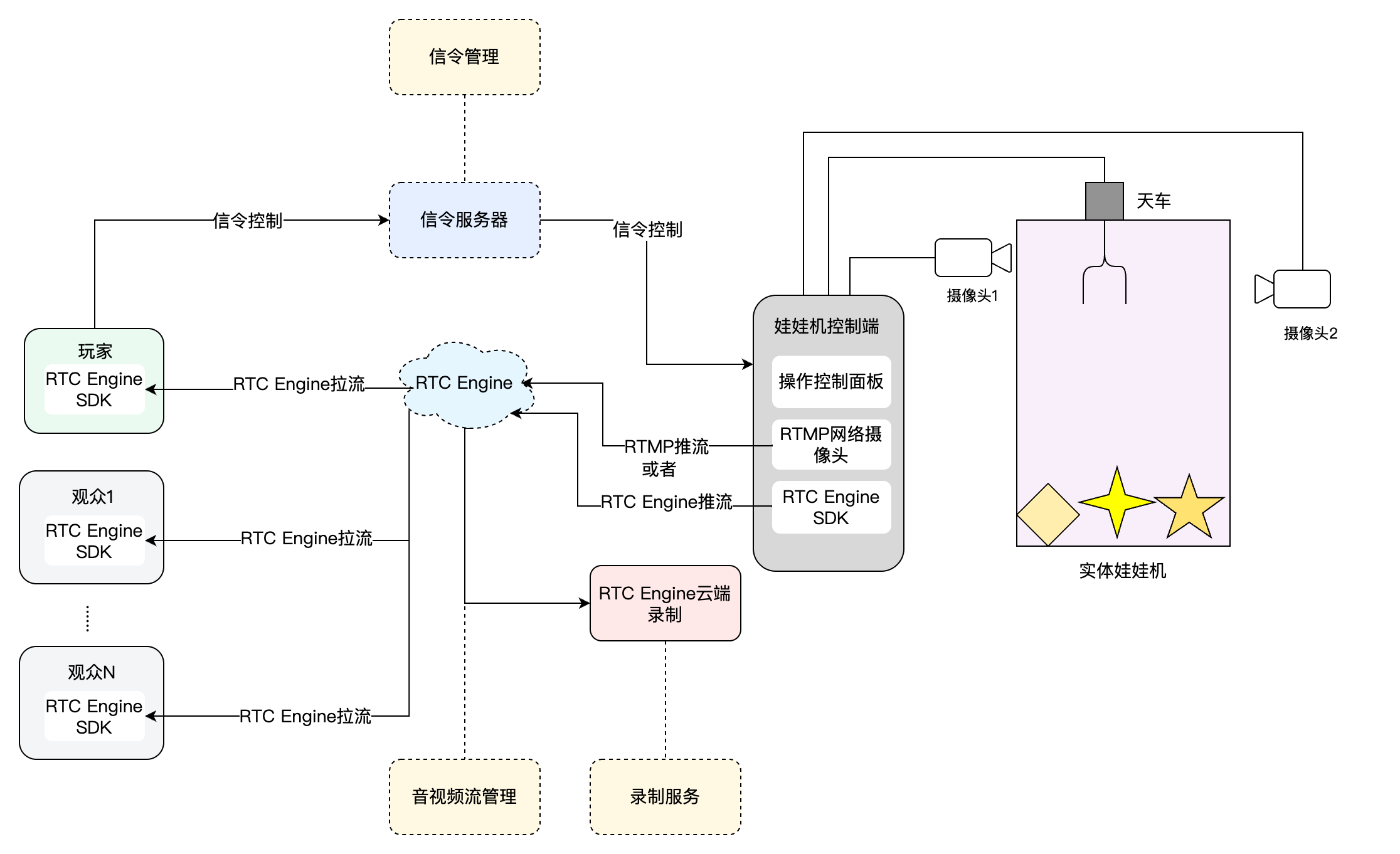
在线娃娃机的整体业务架构如下所示。娃娃机控制端配置了两个摄像头机位,用于对娃娃机进行视频采集和推流。当玩家进入游戏界面后,玩家会进入与该娃娃机相对应的 RTC Engine 房间,从而可以看到娃娃机摄像头采集的视频流。在进行游戏投币或充值后,玩家便可以开始控制娃娃机的爪子来抓取玩偶。观众同样可以加入游戏,观看玩家抓取的过程。
媒体服务
音视频推流
RTMP 推流上行
大多数市面上的网络摄像头或推流盒都具备 RTMP 推流的功能。利用腾讯云实时音视频 RTC Engine 的 RTMP 推流进房 功能,您可以将网络摄像头或推流盒推送的视频流直推到 RTC Engine 的房间中。

具体的流程如下:
1. 利用腾讯云实时音视频服务的 RTMP 生成规则,生成对应的 RTMP 推流地址。
2. 手动将 RTMP 推流地址配置到您的娃娃机上的网络摄像头或推流盒。
3. 启动 RTMP 网络摄像头或推流盒,使其将视频流推送到 RTC Engine 房间。
注意:
相关费用如下:
功能位解锁:RTMP 推流进房功能需订阅的 RTC-Engine 包月套餐 标准版或专业版解锁。
用量费用:
使用推流功能会进行转码操作,产生转码费用,详情请参见 混流转码与旁路转推计费说明。
收取推流机器人在房产生的音频时长费用(注:输入在线媒体流功能产生的机器人在房费用将限免至2024年8月15日,从2024年8月16日起开始收取)。
房间内观众订阅推流进房的音视频内容会正常产生音视频通话费用,详情请参见 音视频时长计费说明。
RTC Engine 推流上行
市面上也有与腾讯云实时音视频合作的硬件厂商,他们会在网络摄像头或推流盒上集成腾讯云 RTC Engine SDK,从而能直接采集视频并推送到 RTC Engine 房间。

大致的流程如下:
1. 手动将 SDKAppID、UserId、RoomId、Usersig 配置到您的娃娃机上的 RTC Engine 网络摄像头或推流盒。
2. 启动 RTC Engine 网络摄像头或推流盒,使其将视频流推送到 RTC Engine 房间。
音视频拉流
当娃娃机成功将音视频流推送至腾讯云 RTC Engine 房间后,无论用户是作为玩家还是观众,都可以通过进入相应的 RTC Engine 房间来实时观看娃娃机的画面。

大致的流程如下:
1. 业务 App 集成腾讯云实时音视频 SDK。
2. 业务服务器负责将必要的 SDK 参数,包括 SDKAppID、UserId、RoomId 以及 Usersig 等,发至业务应用程序。
3. 用户通过业务应用程序进入娃娃机对应的 RTC Engine 房间,并调用 RTC Engine SDK 提供的拉流接口,以接收并观看实时的音视频流。
信令服务
信令服务负责控制信令同步。通常,市场上有现成的控制硬件模块,这些模块配置了多种网络通信模式,无需相应的开发工作量,只需进行配置和调试。
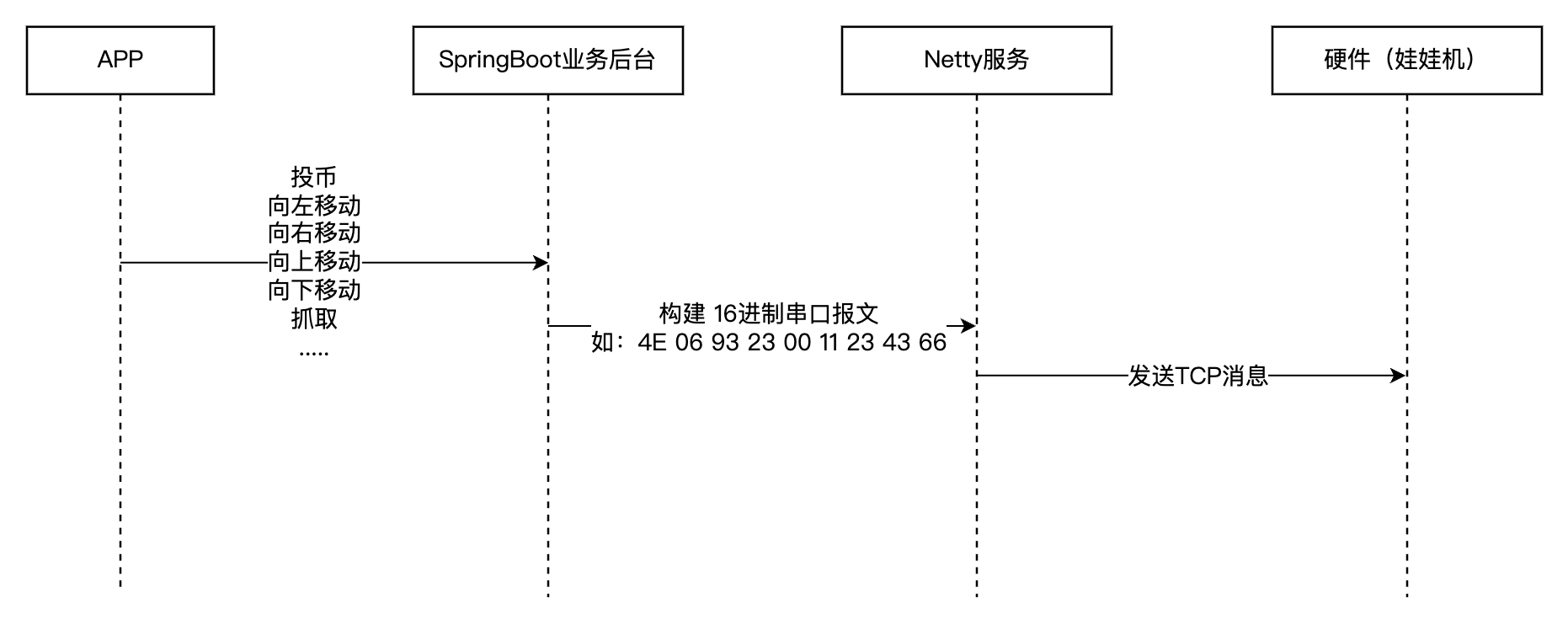
信令服务通信流程如下:
1. 应用程序 App 调用业务后台的指令接口。
2. 业务后台构建16进制串口报文,随后通过 Netty 服务发送至硬件网络模块。
3. 硬件网络模块处理串口报文,并通过操作硬件的串口来控制娃娃机。
录制服务
精彩回放的功能能够显著提升用户的观看体验和互动效果。用户可以随时回看抓娃娃的精彩瞬间,尤其是成功抓取娃娃的时刻。这不仅让用户能够再次体验到成功的喜悦,还帮助他们分析并提升抓娃娃的技巧。为此借助腾讯云音视频的 RTC Engine 云端录制的能力,能轻松实现回放的录制。
RTC Engine 云端录制
RTC Engine 的云端录制功能,不依赖云直播的能力,使用 RTC Engine 内部的实时录制后台进行音视频的录制,拥有更完整统一的录制体验。
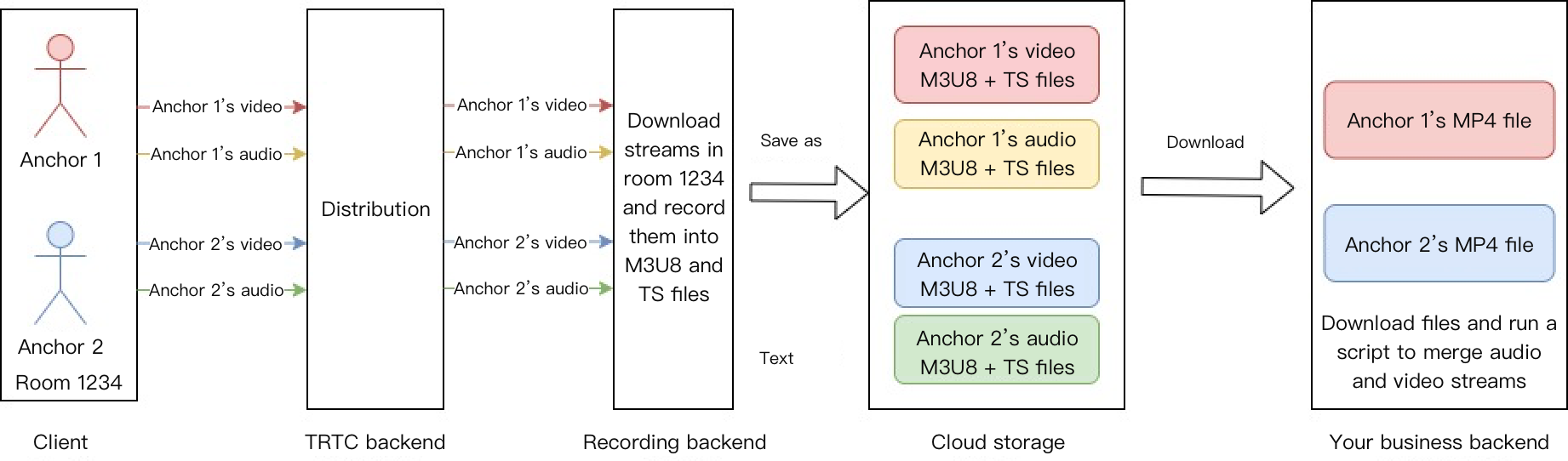
通过 RTC Engine 的云端录制功能,您可以将房间中的每一个用户的音视频流都录制成独立的文件(单流录制):
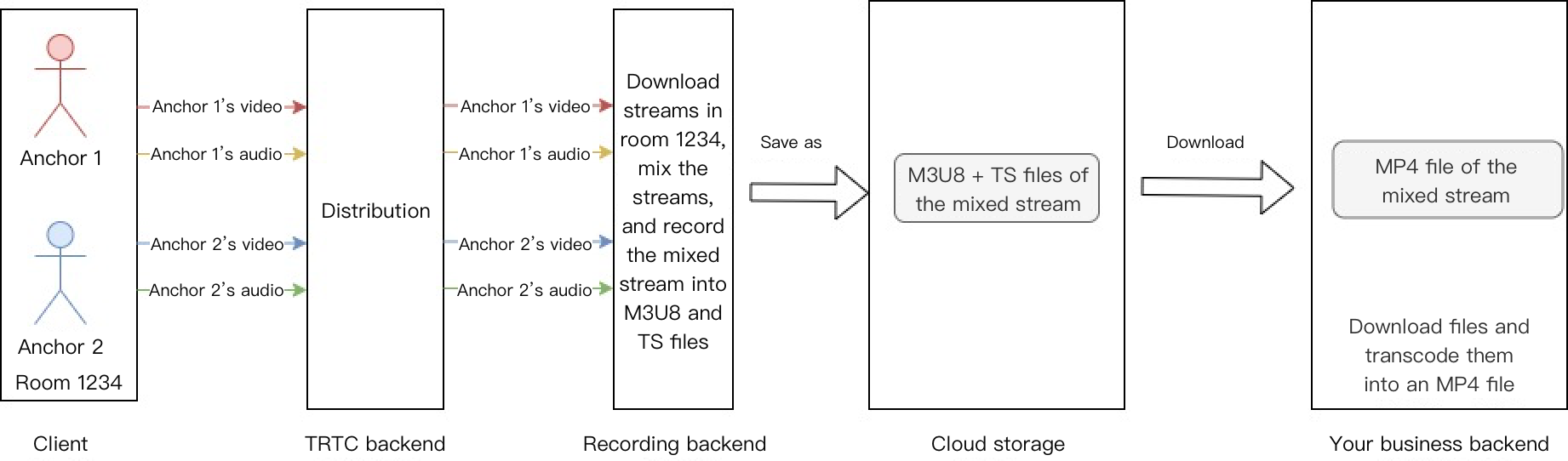
或者把同一个房间的音视频媒体流合流录制成一个文件(合流录制):
关键业务逻辑
低时延优化方案
在线抓娃娃机方案中,对延迟的容忍度很低,因为需要配合信令对远端的机器进行控制,而信令的传输时间也是比较短的,但在一般场景下 RTC Engine 延迟300ms到500ms之间,满足不了业务需求,所以需要将 RTC Engine 的时延降低到100ms - 300ms甚至更低。以下将通过在整个传输链路的每个点上对延迟进行优化。
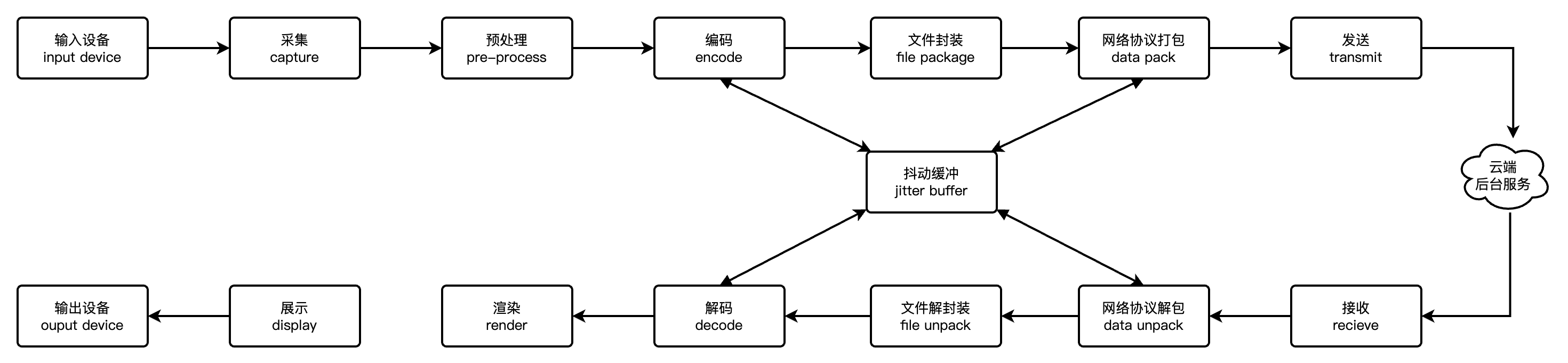
使用 RTC Engine SDK 采集推流
1. 使用 RTC Engine SDK 采集推流。
通过集成腾讯云 RTC Engine SDK 的网络摄像头或推流盒进行采集并直接推流至 RTC Engine 房间,省去了使用普通网络摄像头并通过 RTMP 流转协议分发至 RTC Engine 房间的步骤。这样,端到端延时可以从300ms - 500ms 进一步优化至100ms - 300ms。
2. 设置低延迟拉流。
设置低延迟拉流的话,需要将缓冲区的 Buffer 调整为80 - 100,并设置软解码,具体的代码如下:
JSONObject jsonObject = new JSONObject();try {jsonObject.put("api", "SetAudioCacheParams");JSONObject params = new JSONObject();params.put("min_cache_time", 80); // 音频本地最小cache时长params.put("max_cache_time", 100); // 音频本地最大cache时长jsonObject.put("params", params);mTRTCCloud.callExperimentalAPI(String.format(Locale.ENGLISH, jsonObject.toString()));} catch (JSONException e) {e.printStackTrace();}JSONObject jsonObject = new JSONObject();try {jsonObject.put("api", "setDecoderStrategy");JSONObject params = new JSONObject();params.put("codecType", 1); // 设置软解jsonObject.put("params", params);mTRTCCloud.callExperimentalAPI(String.format(Locale.ENGLISH, jsonObject.toString()));} catch (JSONException e) {e.printStackTrace();}
NSDictionary *jsonDic = @{@"api": @"SetAudioCacheParams",@"params": @{@"min_cache_time": @(80),@"max_cache_time": @(100)}};NSData *jsonData = [NSJSONSerialization dataWithJSONObject:jsonDic options:NSJSONWritingPrettyPrinted error:nil];NSString *jsonString = [[NSString alloc] initWithData:jsonData encoding:NSUTF8StringEncoding];[trtcCloud callExperimentalAPI:jsonString];NSDictionary *jsonDic = @{@"api": @"setDecoderStrategy",@"params": @{@"codecType": @(1)}};NSData *jsonData = [NSJSONSerialization dataWithJSONObject:jsonDic options:NSJSONWritingPrettyPrinted error:nil];NSString *jsonString = [[NSString alloc] initWithData:jsonData encoding:NSUTF8StringEncoding];[trtcCloud callExperimentalAPI:jsonString];.... // 进房的相关代码
const trtc = TRTC.create();// 进入房间try {await trtc.enterRoom({strRoomId,scene:'rtc',sdkAppId,userId,userSig,playoutDelay: { min: 0, max: 0 } // 修改本地延迟});console.log('进房成功');} catch (error) {console.error('进房失败' + error);}
注意:
要在客户端(Android、iOS)设置低延迟的接口,需要在 RTC Engine 12.4 及以上版本上进行,使用低于12.4的版本会导致本地配置覆盖云控配置。
要在 Web 端设置低延迟的接口,需要在 RTC Engine Web 5.10.0 及以上版本进行,使用低于5.10.0的版本不会生效。
上述延迟配置仅适用于测试阶段。如需正式上线,请 联系我们 进行云控配置。
如果延迟还达不到您的需求的话,请 联系我们,对延迟进一步优化。
3. 升级最新的摄像头固件。
集成腾讯云 RTC Engine SDK 的网络摄像头或推流盒固件正在不断进行优化升级。在降低延迟方面,硬件厂商与 RTC Engine SDK 团队正协同努力进行优化。因此,当发现存在延迟问题时,可以通过将摄像头固件升级至最新版本来优化。
4. 设置采集和编码视频参数。
# 视频编码设置编码格式:H264分辨率 : 1080P/720P/540P/360P # 根据清晰度设置比特率控制: VBR # 可变码率I帧间隔:50 # 1-200 I帧间隔越低延迟越低比特率:2000kbps/1200kbps/850kbps/550kbps # 码率设置,码率越高,清晰度越高帧率: 30 # 帧率 20-60帧BaseProfile:启用 # BaseProfile不开启B帧,能进一步降低延迟
5. 云控优化。
首帧耗时优化方案
在线上抓娃娃机/推币机场景中,首帧加载速度直接影响用户进入直播间的体验。首帧耗时是指用户点击直播间到画面首次渲染的总时长。其瓶颈可能存在于业务接口响应(如鉴权、房间信息获取)或者是业务组件加载与拉流网络资源的竞争中。因此,需要在关键链路上进行打点分析以定位瓶颈,并据此进行针对性的优化,如下图所示。

针对性优化:
1. 接口预加载:提前异步请求鉴权和房间信息,减少关键路径依赖。
2. RTC 优先拉流:优先保障 RTC Engine 的进房拉流。在 RTC Engine 拉流成功后,再加载其他业务。
3. 动态降级:在弱网环境下关闭非必要功能(如礼物动画)。
Android 摄像头视频质量优化方案
部分摄像头未默认集成 RTC Engine SDK,需配合特定 Android 系统主板才能实现推流功能。为提升旧设备利用率,使用 RTC Engine 时可参考以下优化方案,充分发挥主板的硬件编码性能,从而提升视频推流的清晰度和流畅度,优化用户体验。
1. 自定义视频采集:直接调用系统 API 进行摄像头画面采集,可以灵活调整摄像头参数,便于代码调试。
// 开启自定义视频采集mTRTCCloud.enableCustomVideoCapture(TRTCCloudDef.TRTC_VIDEO_STREAM_TYPE_BIG, true);mTRTCCloud.setDefaultStreamRecvMode(false, false);// 自定义摄像头采集private CustomCameraCapture mCustomCameraCapture;private CustomFrameRender mCustomFrameRender;// 使用视频纹理处理采集数据,降低内存消耗,并发送视频帧private CustomCameraCapture.VideoFrameReadListener mVideoFrameReadListener = new CustomCameraCapture.VideoFrameReadListener() {@Overridepublic void onFrameAvailable(EGLContext eglContext, int textureId, int width, int height) {TRTCCloudDef.TRTCVideoFrame videoFrame = new TRTCCloudDef.TRTCVideoFrame();videoFrame.texture = new TRTCCloudDef.TRTCTexture();videoFrame.texture.textureId = textureId;videoFrame.texture.eglContext14 = eglContext;videoFrame.width = width;videoFrame.height = height;videoFrame.pixelFormat = TRTCCloudDef.TRTC_VIDEO_PIXEL_FORMAT_Texture_2D;videoFrame.bufferType = TRTCCloudDef.TRTC_VIDEO_BUFFER_TYPE_TEXTURE;mTRTCCloud.sendCustomVideoData(TRTCCloudDef.TRTC_VIDEO_STREAM_TYPE_BIG ,videoFrame);}};mCustomCameraCapture = new CustomCameraCapture();mCustomFrameRender = new CustomFrameRender(mUserId, TRTCCloudDef.TRTC_VIDEO_STREAM_TYPE_BIG);// 开启摄像头采集mCustomCameraCapture.startInternal(mVideoFrameReadListener);// 设置自定义渲染mTRTCCloud.setLocalVideoRenderListener(TRTCCloudDef.TRTC_VIDEO_PIXEL_FORMAT_Texture_2D, TRTCCloudDef.TRTC_VIDEO_BUFFER_TYPE_TEXTURE, mCustomFrameRender);final TextureView textureView = new TextureView(this);mLocalRenderView.addVideoView(textureView);mCustomFrameRender.start(textureView);
说明:
2. 视频硬编码:使用实验性接口 callExperimentalAPI,设置宽高均为16的倍数来适配 Android 设备的硬件编码参数。以下是两组可供参考的视频参数:
高分辨率编码参数:768x1024 20fps 1500kbps。
中分辨率编码参数:480x640 20fps 900kbps。
public static final int ENCODE_WIDTH = 480;public static final int ENCODE_HEIGHT = 640;JSONObject jsonObject = new JSONObject();try {jsonObject.put("api", "setVideoEncodeParamEx");JSONObject params = new JSONObject();params.put("codecType", 1);params.put("videoWidth", ENCODE_WIDTH);params.put("videoHeight", ENCODE_HEIGHT);params.put("videoFps", 20);params.put("videoBitrate", 1500);params.put("minVideoBitrate", 300);params.put("streamType", 0);params.put("resolutionMode", 1);jsonObject.put("params", params);} catch (JSONException e) {throw new RuntimeException(e);}mTRTCCloud.callExperimentalAPI(jsonObject.toString());
3. Speech 音频采集:由于对低延迟的需求,需要使用音频功能。但 Android 设备的音频性能可能不足,若采用默认音质,性能可能无法满足要求。因此,建议调用 startLocalAudio 接口,并设置 TRTC_AUDIO_QUALITY_SPEECH 参数。
mTRTCCloud.startLocalAudio(TRTCCloudDef.TRTC_AUDIO_QUALITY_SPEECH);
4. 使用最新 Android SDK:新版本 Android 端的 SDK 会持续优化,所以请使用最新的 Android 进行调试。
方案配套产品
系统层级 | 产品名称 | 场景用途 |
接入层 | 提供低延时、高品质的音视频实时互动解决方案,是音视频通话场景的基础底座能力。 | |
云端服务 | 面向音视频媒体,提供制作上传、存储、转码、媒体处理、媒体 AI、加速分发播放、版权保护等一体化的高品质媒体服务。 | |
数据存储 | 提供音视频录制文件、音视频切片文件的存储服务。 |
文档反馈