手动搭建 LNMP 环境(Ubuntu)
Download
聚焦模式
字号
操作场景
LNMP 环境是指在 Linux 系统下,由 Nginx + MySQL/MariaDB + PHP 组成的网站服务器架构。本文档介绍如何在腾讯云云服务器(CVM)上手动搭建 LNMP 环境。
进行手动搭建 LNMP 环境,您需要熟悉 Linux 命令,并对所安装软件的使用及版本兼容性比较了解。
示例软件版本
本文搭建的 LNMP 环境软件组成版本及说明如下:
Linux:Linux 系统,本文以 Ubuntu 22.04 为例。
Nginx:Web 服务器程序,用来解析 Web 程序,本文以 Nginx 1.18.0 为例。
MySQL:一个数据库管理系统,本文以 MySQL 8.0.41 为例。
PHP:Web 服务器生成网页的程序,本文以 PHP 8.1.2 为例。
前提条件
操作步骤
步骤1:登录 Linux 实例
步骤2:安装配置 Nginx
1. 运行以下命令,更新 Ubuntu 系统内的软件包。
sudo apt update
2. 执行以下命令,安装 Nginx。
sudo apt -y install nginx
3. 运行以下命令,查看 Nginx 版本。
sudo nginx -v
返回结果类似如下所示,表示 Nginx 已成功安装。
nginx version: nginx/1.18.0 (Ubuntu)
4. 执行以下命令,修改 Nginx 默认配置文件。
sudo vim /etc/nginx/sites-enabled/default
5. 按 i 切换至编辑模式。
6. 找到 server{...} 并将其替换成以下内容。
server {listen 80 default_server;listen [::]:80 default_server;root /var/www/html;# Add index.php to the list if you are using PHPindex index.php index.html index.htm index.nginx-debian.html;server_name _;location / {# First attempt to serve request as file, then# as directory, then fall back to displaying a 404.try_files $uri $uri/ =404;}# pass PHP scripts to FastCGI server#location ~ \\.php$ {include snippets/fastcgi-php.conf;fastcgi_pass unix:/var/run/php/php8.1-fpm.sock;}}
7. 输入完成后,按 Esc,输入 :wq,保存文件并返回。
8. 执行以下命令,重启 Nginx 服务。
sudo systemctl restart nginx
9. 执行以下命令,新建
index.html 首页。sudo vi /var/www/html/index.html
10. 按 i 切换至编辑模式,输入以下内容:
<p> hello world!</p>
11. 输入完成后,按 Esc,输入 :wq,保存文件并返回。
12. 在浏览器中,访问 Ubuntu 云服务器实例公网 IP,查看 Nginx 服务是否正常运行。
13. 如下图所示,则说明 Nginx 安装配置成功。

步骤3:安装配置 MySQL
1. 执行以下命令,安装 MySQL。
sudo apt -y install mysql-server
2. 运行以下命令,查看 MySQL 版本。
sudo mysql -V
返回结果类似如下所示,表示 MySQL 已成功安装。
mysql Ver 8.0.41-0ubuntu0.22.04.1 for Linux on x86_64 ((Ubuntu))
3. 执行以下命令,首次登录 MySQL。
说明:
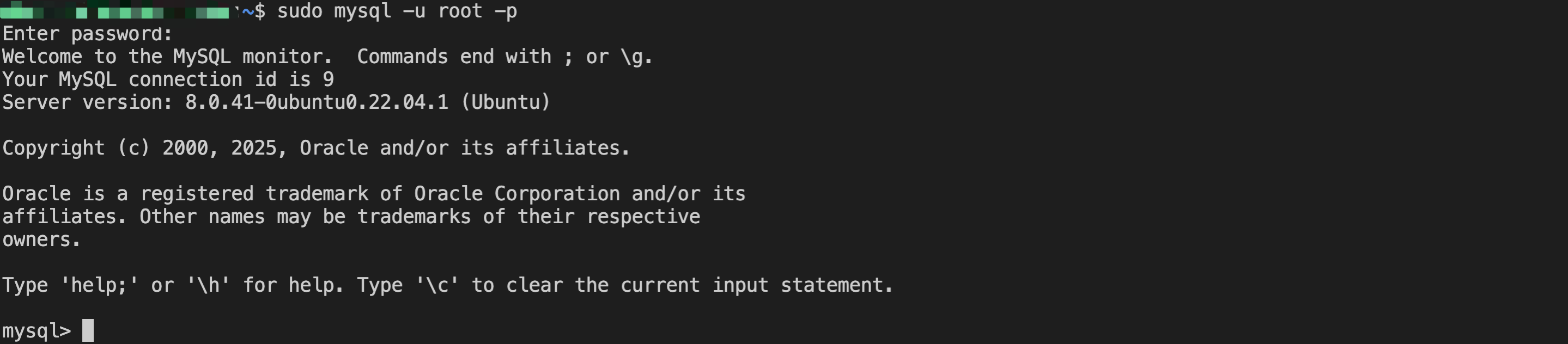
首次登录 MySQL 时,系统将提示输入密码,若不进行输入密码的操作,可直接按 Enter 进入 MySQL。
sudo mysql -u root -p
成功进入 MySQL,如下图所示。
4. 执行以下命令,修改 root 密码。
ALTER USER 'root'@'localhost' IDENTIFIED BY 'new_password';
5. 执行以下命令,使配置生效。
flush privileges;
6. 执行以下命令,退出 MySQL。
\\q
步骤5:安装配置 PHP
1. 执行以下命令,安装 PHP。
sudo apt -y install php-fpm
2. 运行以下命令,查看 PHP 版本。
sudo php -v
返回结果如下所示,表示 PHP 已成功安装。
PHP 8.1.2-1ubuntu2.19 (cli) (built: Sep 30 2024 16:25:25) (NTS)Copyright (c) The PHP GroupZend Engine v4.1.2, Copyright (c) Zend Technologieswith Zend OPcache v8.1.2-1ubuntu2.19, Copyright (c), by Zend Technologies
3. 运行以下命令,在 Nginx 网站根目录中,新建 phpinfo.php 文件。
sudo vim <网站根目录>/phpinfo.php
<网站根目录>为变量,可通过 Nginx 配置文件查看。本教程中 Nginx 配置文件为默认文件
/etc/nginx/sites-enabled/default,您可以运行cat /etc/nginx/sites-enabled/default命令查看文件内容,其中如下图所示的 /var/www/html 部分即为网站根目录。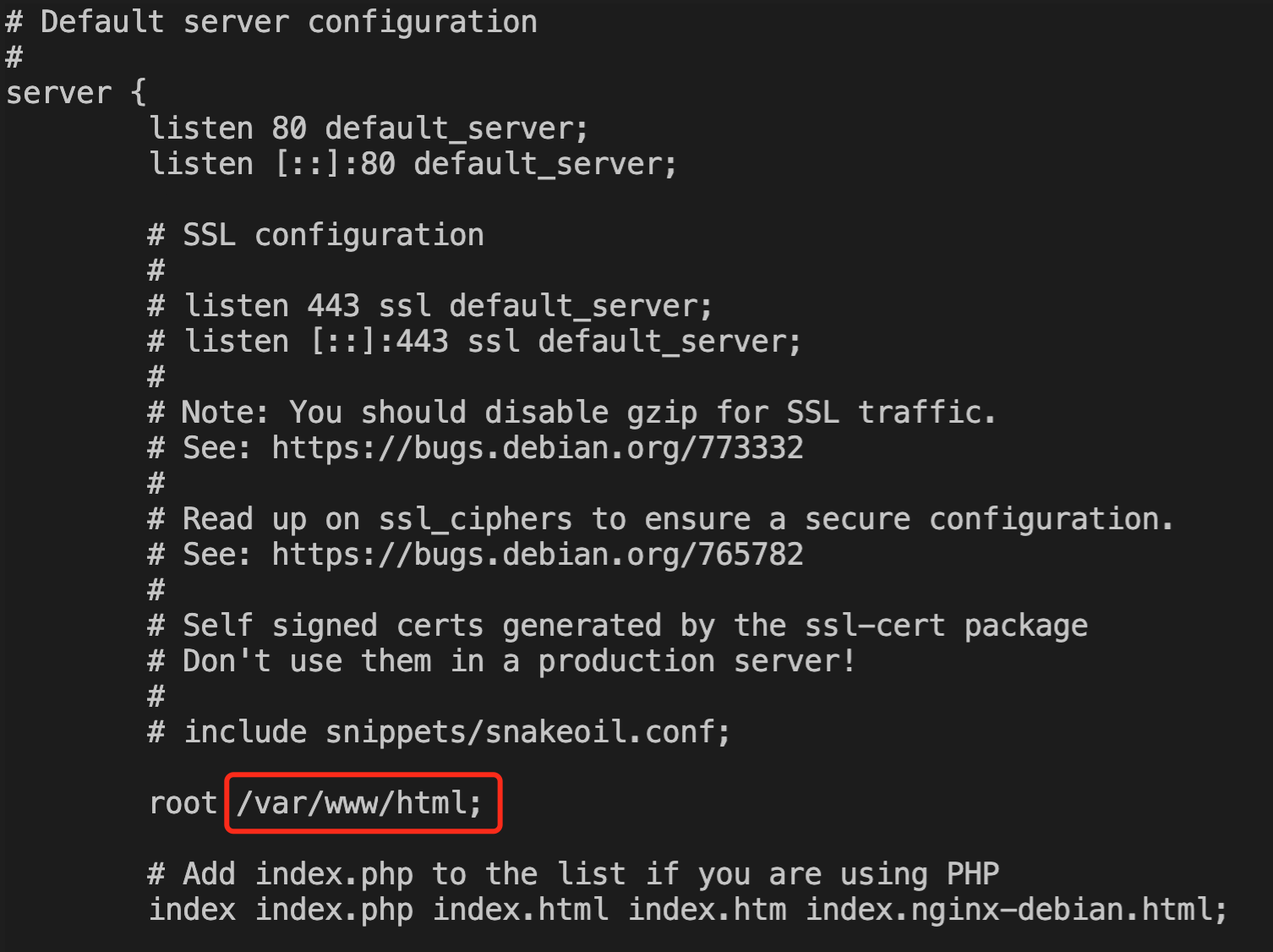
因此,对应的运行命令为:
sudo vim /var/www/html/phpinfo.php
4. 按 i 进入编辑模式,添加以下配置信息。
phpinfo() 函数会展示 PHP 的所有配置信息。
<?php echo phpinfo(); ?>
输入完成后,按 Esc,输入 :wq,保存文件并返回。
5. 运行以下命令,启动 PHP。
sudo systemctl start php8.1-fpm
验证环境配置
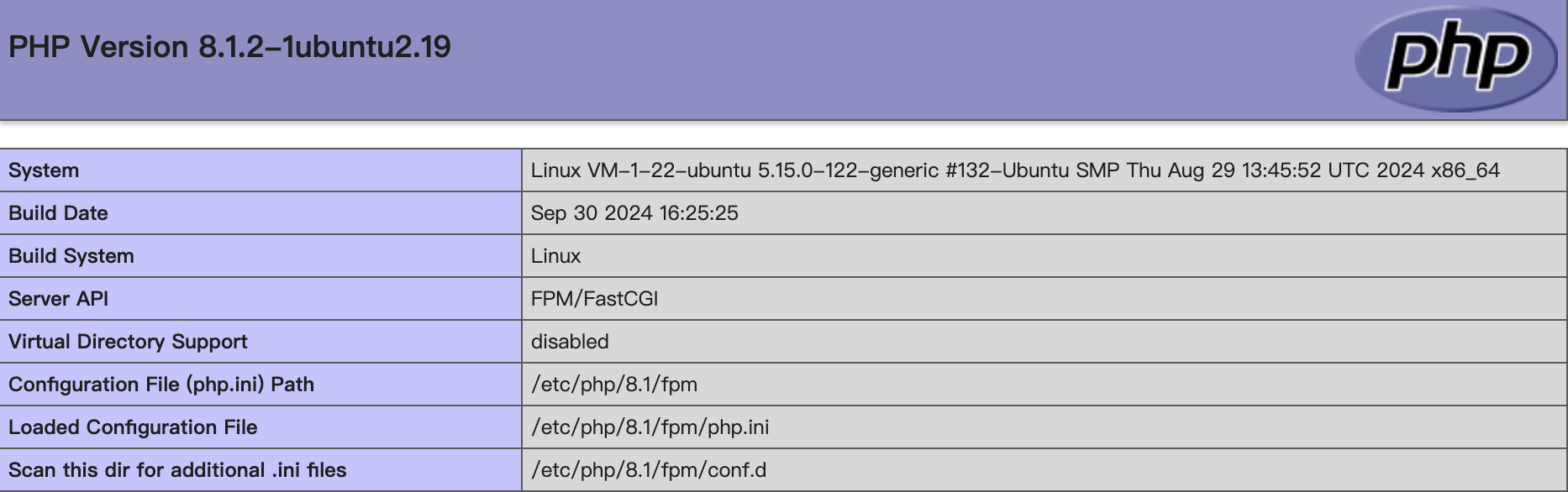
在浏览器中输入
http://<Ubuntu 实例公网 IP 地址 >/phpinfo.php 进行访问。如下图所示,成功查看到 PHP 配置信息页面,则 LNMP 环境搭建成功。
相关操作
常见问题
如果您在使用云服务器的过程中遇到问题,可参见以下文档并结合实际情况分析并解决问题:
文档反馈