产品动态
产品近期公告
关于 TRTC Live 正式上线的公告
关于TRTC Conference 正式版上线的公告
Conference 商业化版本即将推出
关于多人音视频 Conference 开启内测公告
关于音视频通话 Call 正式版上线的公告
关于腾讯云音视频终端 SDK 播放升级及新增授权校验的公告
关于 TRTC 应用订阅套餐服务上线的相关说明
AtomicXCore 框架中的 AudioEffectStore 和 DeviceStore 模块,为您的直播应用快速集成音效控制功能,包括麦克风音量、耳返监听,并添加多种趣味变声效果和混响效果。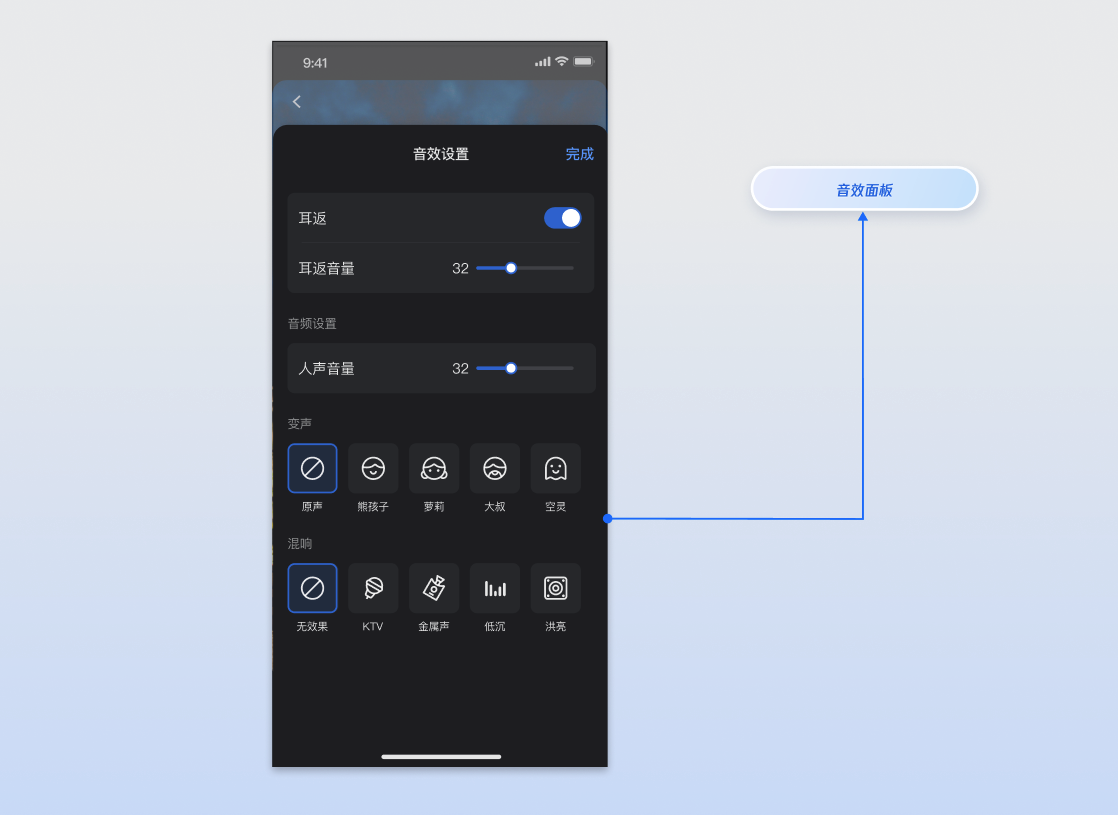
AudioEffectStore 和 DeviceStore,您将能实现以下核心功能:核心概念 | 类型 | 核心职责与描述 |
AudioChangerType | enum class | 变声效果枚举,例如,“小孩”,“男人”等。 |
AudioReverbType | enum class | 混响效果枚举,例如,“ktv”,“礼堂”等。 |
AudioEffectState | data class | 代表音效模块的当前状态,通常用于 UI 渲染。包括变声状态、混响状态、耳返开启状态、耳返音量。 |
AudioEffectStore | abstract class | 代表音效模块单例数据管理类。通过它您可以调用修改音效接口,当您调用接口后,相应的 state 属性会自动更新,可以通过订阅这个 state 响应式数据来接收和监听状态更新。 |
DeviceState | data class | 代表设备模块的当前状态,通常用于 UI 渲染。核心属性包括摄像头、麦克风的设备状态。 |
DeviceStore | abstract class | 代表设备模块单例数据管理类。通过它您可以调用操作摄像头、麦克风接口,当您调用接口后,相应的 state属性会自动更新,可以通过订阅这个 state 响应式数据来接收和监听状态更新。 |
AudioEffectStore 和 DeviceStore是单例对象,您可以直接通过 shared 属性在项目的任何位置获取实例。您也可以参考 TUILiveKit 开源UI demo项目中的 AudioEffectPanel.kt 文件来了解完整的实现逻辑。import io.trtc.tuikit.atomicxcore.api.device.AudioEffectStoreimport io.trtc.tuikit.atomicxcore.api.device.DeviceStoreval audioEffectStore = AudioEffectStore.shared()val deviceStore = DeviceStore.shared()
Switch控件实现开关耳返功能。SeekBar 控件实现左右拖动滑块来调节音量的功能,并将 SeekBar 的值映射成音量值,调用setVoiceEarMonitorVolume(volume)。请注意,该接口接收的参数范围是 [0, 150],所以您需要将 UI 控件的值(例如 UISlider 的 0 - 1.0)映射到 0 - 150 的范围。UI。import io.trtc.tuikit.atomicxcore.api.device.AudioEffectStoreimport kotlinx.coroutines.CoroutineScopeimport kotlinx.coroutines.Dispatchersimport kotlinx.coroutines.launch// 1. 开启耳返(建议提示用户插入耳机)audioEffectStore.setVoiceEarMonitorEnable(true)// 2. 调节耳返音量audioEffectStore.setVoiceEarMonitorVolume(80)// 3. 关闭耳返audioEffectStore.setVoiceEarMonitorEnable(false)// 4. 监听状态CoroutineScope(Dispatchers.Main).launch {audioEffectStore.audioEffectState.earMonitorVolume.collect {print("耳返音量: $it")//更新UI 显示数值}}
参数名 | 类型 | 描述 |
enable | Boolean | 是否开启耳返。 true:开启 false:关闭 |
参数名 | 类型 | 描述 |
volume | Int | 耳返音量大小。 取值范围: [0, 150] 默认值:100 |
DeviceStore的setCaptureVolume(volume)方法传入音量值即可。SeekBar 控件实现左右拖动滑块来调节音量的功能,并将 SeekBar 的值映射成音量值后调用setCaptureVolume(80)。请注意,该接口接收的参数范围是 [0, 150],所以您需要将 UI 控件的值(例如 SeekBar 的 0 - 150)映射到 0 - 150 的范围。import kotlinx.coroutines.CoroutineScopeimport kotlinx.coroutines.Dispatchersimport kotlinx.coroutines.launchimport io.trtc.tuikit.atomicxcore.api.device.AudioEffectStoreimport io.trtc.tuikit.atomicxcore.api.device.DeviceStore// 1. 调节音量deviceStore.setCaptureVolume(80)// 2. 监听数据变化CoroutineScope(Dispatchers.Main).launch {deviceStore.deviceState.captureVolume.collect {//更新显示数值print("采集音量: $it")}}
参数名 | 类型 | 描述 |
volume | Int | 采集音量大小。 取值范围: [0, 150] 默认值:100 |
setAudioChangerType(type)方法,传入相应的Type 枚举值即可切换效果。import io.trtc.tuikit.atomicxcore.api.device.AudioEffectStoreimport io.trtc.tuikit.atomicxcore.api.device.AudioChangerType// 示例:设置变声为“萝莉”audioEffectStore.setAudioChangerType(AudioChangerType.LITTLE_GIRL)// 示例:关闭变声audioEffectStore.setAudioChangerType(AudioChangerType.NONE)
参数名 | 类型 | 描述 |
type | AudioChangerType | 变声效果枚举。 |
setAudioReverbType(type) 方法,传入相应的Type 枚举值即可切换效果。import io.trtc.tuikit.atomicxcore.api.device.AudioEffectStoreimport io.trtc.tuikit.atomicxcore.api.device.AudioReverbType// 示例:设置混响为“KTV”audioEffectStore.setAudioReverbType(AudioReverbType.KTV)// 示例:关闭混响audioEffectStore.setAudioReverbType(AudioReverbType.NONE)
参数名 | 类型 | 描述 |
type | AudioReverbType | 混响效果枚举。 |
AudioEffectStore 和 DeviceStore 是单例,这意味着音效和设备设置是全局生效的,如果您在当前直播间的设置不想影响到您创建的其他直播间,就需要在当前直播间结束的时候重置音效和设备设置。store 的reset() 方法实现。import io.trtc.tuikit.atomicxcore.api.device.AudioEffectStoreimport io.trtc.tuikit.atomicxcore.api.device.DeviceStore// 一键重置所有变声和混响效果AudioEffectStore.shared().reset()DeviceStore.shared().reset()
AudioEffectStore和DeviceStore 的设置是全局生效的,您可以在进入直播间之前或之后随时调用相关接口(例如设置变声、混响或耳返),设置会立即生效并被保留。DeviceStore.setCaptureVolume() 设置。它决定了观众能听到的您的声音大小。AudioEffectStore.setVoiceEarMonitorVolume() 设置。它只决定了您自己在耳机里听到的音量大小,不会影响观众。AudioEffectStore和DeviceStore是单例,这意味着音效和设备设置是全局生效的,出现这种情况很可能是因为您之前设置过音效但是没有重置,需要在合适的地方调用reset()方法重置。DeviceStore 中的麦克风是开启状态(即已调用 openLocalMicrophone)。AudioChangerType 和 AudioReverbType 是可以叠加生效的。例如,您可以同时设置 AudioChangerType.LITTLE_GIRL 变声和 AudioReverbType.KTV 混响。文档反馈