In some cases, users may encounter exceptions and receive a response status code when accessing the site. In order to help users better understand the problems and solutions, EdgeOne provides a custom response page feature. This feature can help you inform users of the current website status through a specified custom response page, and avoid users from failing to determine the specific reason and handling method in case of request errors.
EdgeOne offers the custom response page feature in both site acceleration and security protection features. You can perform configuration according to actual scenarios.
Custom Site Origin-Pull Error Response Pages: You can customize the response page content for the origin-pull status codes 4xx or 5xx. For details, see Custom Error Page.
Custom Security Protection Policy Block Response Pages: You can customize the status code and response page content when Web protection or Bot protection block policies are triggered. For details, see Configuring Custom Response Pages in Security Protection.
Additionally, to facilitate management and usage, EdgeOne offers the Custom Response Page Template feature, which can be used to manage the response page content and be referenced by different feature modules. By editing this response page template, you can simultaneously apply the modified response page content to all referencing feature modules.
Configuring the Custom Response Page Template
You can customize the Content-Type and the included content information of the response page. Refer to the following steps for configuration:
1. Log in to the EdgeOne console, enter Service Overview in the left menu bar, and click the site to be configured under Website Security Acceleration.
2. On the site details page, click CustomResponse Page.
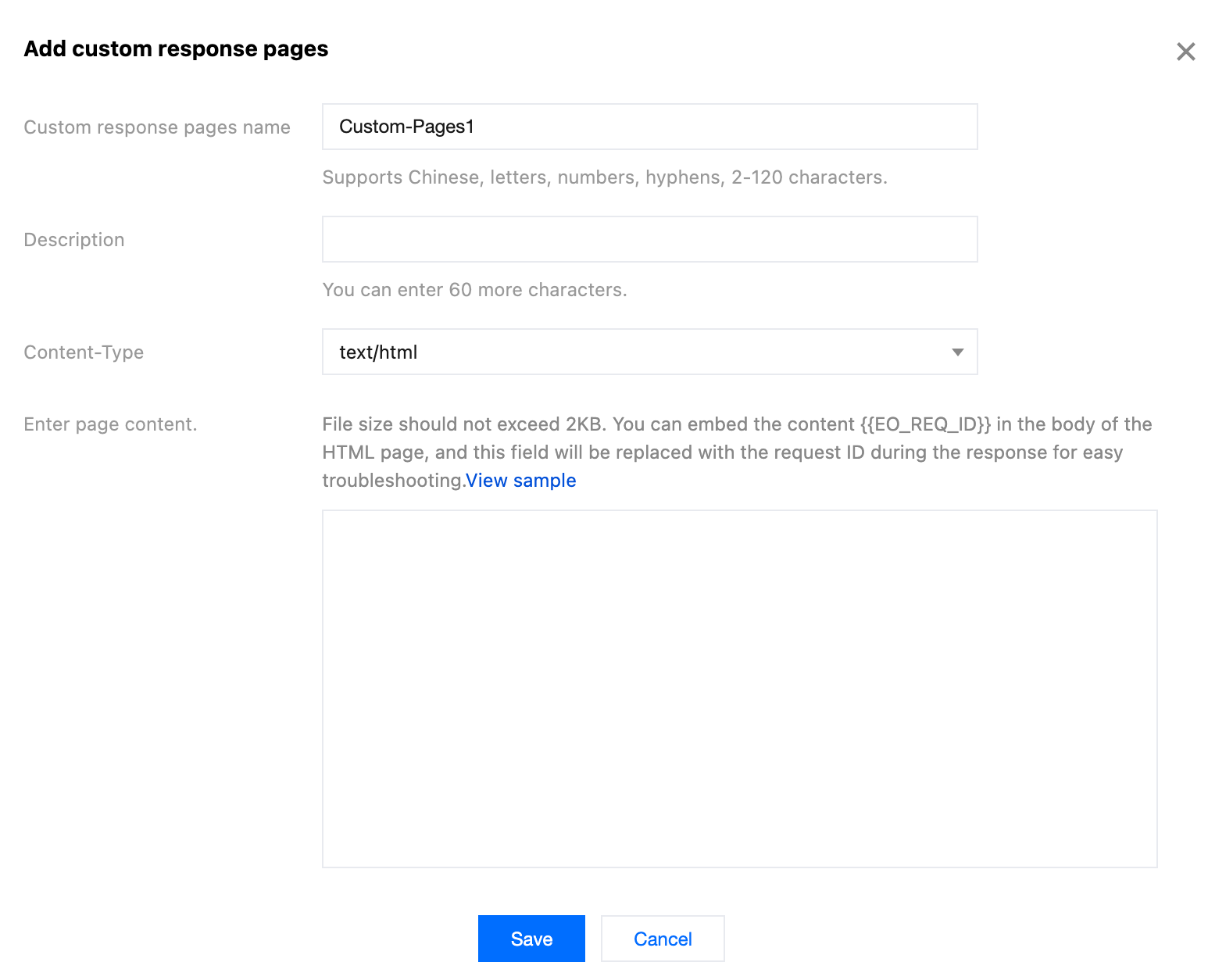
3. Click Add Custom Response Pages and configure the custom response page content. The related parameters are explained as follows:
Content-Type: The value of the HTTP response header Content-Type included in the custom response page during response. Supported values are application/html, application/json, text/plain, and application/xml. For example, if text/plain is selected, the HTTP response header Content-Type: text/plain will be returned when EdgeOne responds with the custom response page.
Page content: The body of the custom response page, not exceeding 2 KB. It is recommended to contain {{ EO_REQ_ID }} in the page content. This field will automatically get the user's request ID information during response, and will be replaced with the request ID to facilitate problem locating.
4. Click Save to complete the creation of the response page.
Note:
If the custom response page has already been referenced by other feature modules, it cannot be deleted. If deletion is required, navigate to the feature module referencing this page and dereference it first.
After a created custom response page is edited and saved, all feature modules referencing this custom response page will automatically apply the edited page.
Referenced in the custom interception page of security protection
Assume that a custom Web protection rule configured for the current site domain www.example.com only allows accesses by users within the Chinese mainland, and blocks accesses by users in other regions. When the users in other regions attempt to access, you should inform them of the block reason through a custom response page. You have referred to Configuring Custom Response Page Template to configure a custom response page named Custom-Pages1 . Then you can take the following steps to configure it:
1. Log in to the EdgeOne console, enter Service Overview in the left menu bar, and click the site to be configured under Website Security Acceleration.
2. Click Security > Web Security . By default, it is a site-level security policy. To configure differentiated security policies for a specific domain name under the current site, you can enter the Domain-level security policy tab and click the corresponding domain name to enter the configuration page for the domain-level security policy. The subsequent steps are the same.
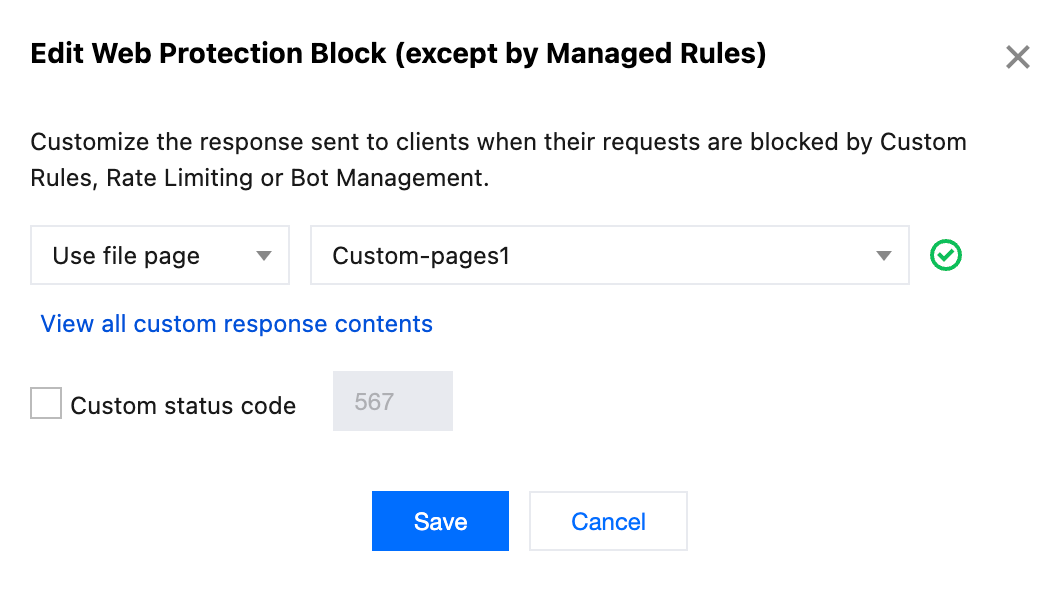
3. Under the custom block page classification, select the block page module you need to configure. For example, you can select the Web Protection Block (except by Managed Rules) page and click Edit .
4. On the edit page, configure the content of the custom response page, select Use file page for blocking, and choose the pre-configured page named Custom-Pages1.The configuration items are described as follows:
Page type: Supports three types: default page, URL page, and file page, where the file page refers to custom response page content.
Custom interception page status code: Supports configuring 200-299, 400-599 as custom interception page status codes. The default status code is used when not selected.