Mini Program Authorization Pop-Up
Download
Focus Mode
Font Size
Customize authorization pop-up
When a mini program calls an API that requires authorization, the SDK provides a default authorization UI style.
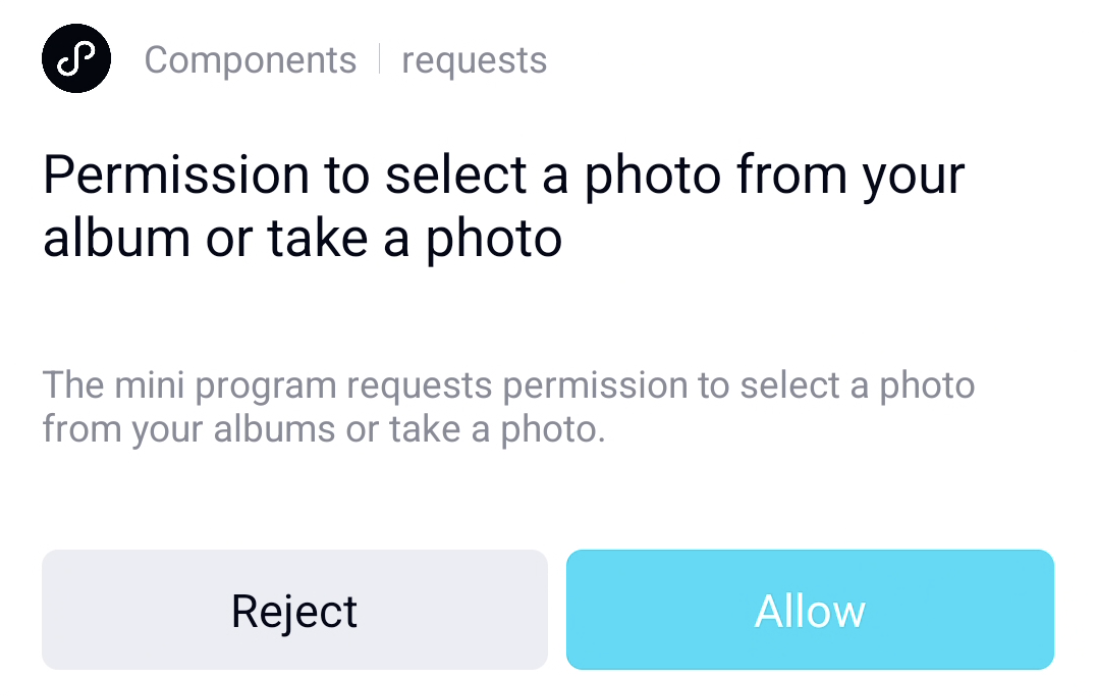
Developers can also customize the authorization UI style using the following method.
Customize authorization pop-up:
Override the showAuthView method of AbsMiniUiProxy.
The parameter Context indicates the context of the mini program process.
The parameter MiniAuthInfo contains the authorization information requested by the current mini program. For details, see MiniAuthInfo.
The API is defined as follows:
/*** Customizes the custom pop-up view* Calling environment: Subprocess** @param context Current page context* @param authInfo Authorization information* @return true if using custom authorization view; false if using built-in view*/boolean showAuthView(Activity context, MiniAuthInfo authInfo);
Note:
The refuseListener and grantListener in MiniAuthInfo represent the listeners for the authorization pop-up and must be properly called back; otherwise, it may lead to authorization exceptions in the mini program.
Example
@Overridepublic boolean showAuthView(Activity context, MiniAuthInfo authInfo) {AlertDialog.Builder builder = new AlertDialog.Builder(context);builder.setTitle(authInfo.authTitle);builder.setMessage(authInfo.authDesc);builder.setCancelable(false);buidbuilder.setPositiveButton("Grant", new DialogInterface.OnClickListener() {@Overridepublic void onClick(DialogInterface dialog, int which) {// Authorization successfulauthInfo.grantListener.onClick(null);}});builder.setNegativeButton("Refuse", new DialogInterface.OnClickListener() {@Overridepublic void onClick(DialogInterface dialog, int which) {authInfo.refuseListener.onClick(null);}});builder.create().show();return true;}
Customize mobile number authorization pop-up
When a mini program needs to obtain a phone number, user authorization is required. The SDK provides a default authorization pop-up, but you can customize it by overriding AbsMiniUiProxy.showGetPhoneDialog.
The parameter activity represents the Activity of the mini program.
The parameter MiniAuthInfo contains the authorization information requested by the current mini program. For details, see MiniAuthInfo.
/*** Displays the mobile number authorization pop-up* @param activity* @param authInfo Authorization information* @return true indicates using a custom dialog, false indicates using the SDK default dialog*/boolean showGetPhoneDialog(Activity activity, MiniAuthInfo authInfo);
Example:
@Overridepublic boolean showGetPhoneDialog(Activity context, MiniAuthInfo authInfo) {MiniCustomDialog dialog = DialogUtil.createCustomDialog(context, DialogUtil.ALERT_DIALOG);// Authorization pop-up titledialog.setTitle(authInfo.authTitle);// Authorization pop-up descriptiondialog.setMessage(authInfo.authDesc);// todo: Display masked phone number if needed using authInfo.maskValue// Set authorization callbackdialog.setPositiveButton("Grant", new DialogInterface.OnClickListener() {@Overridepublic void onClick(DialogInterface dialog, int which) {authInfo.grantListener.onClick(null);}});// Set rejection callbackdialog.setNegativeButton("Refuse", new DialogInterface.OnClickListener() {@Overridepublic void onClick(DialogInterface dialog, int which) {authInfo.refuseListener.onClick(null);}});dialog.setOnDismissListener(new DialogInterface.OnDismissListener() {@Overridepublic void onDismiss(DialogInterface dialog) {authInfo.refuseListener.onClick(null);}});dialog.show();return true;}
Customize email authorization pop-up
When a mini program requests an email address, it must first obtain user authorization. The SDK provides a default authorization pop-up, and you can also customize the pop-up by overriding AbsMiniUiProxy.showGetEmailDialog.
The parameter activity represents the Activity of the mini program.
The parameter MiniAuthInfo contains the authorization information requested by the current mini program. For details, see MiniAuthInfo.
/*** Displays the email authorization pop-up* @param activity* @param authInfo Authorization information* @return true indicates using a custom dialog, false indicates using the SDK default dialog*/boolean showGetEmailDialog(Activity activity, MiniAuthInfo authInfo);
Example:
@Overridepublic boolean showGetEmailDialog(Activity context, MiniAuthInfo authInfo) {MiniCustomDialog dialog = DialogUtil.createCustomDialog(context, DialogUtil.ALERT_DIALOG);// Authorization pop-up titledialog.setTitle(authInfo.authTitle);// Authorization pop-up descriptiondialog.setMessage(authInfo.authDesc);// todo: Display masked email address if needed using authInfo.maskValue// Set authorization callbackdialog.setPositiveButton("Grant", new DialogInterface.OnClickListener() {@Overridepublic void onClick(DialogInterface dialog, int which) {authInfo.grantListener.onClick(null);}});// Set rejection callbackdialog.setNegativeButton("Refuse", new DialogInterface.OnClickListener() {@Overridepublic void onClick(DialogInterface dialog, int which) {authInfo.refuseListener.onClick(null);}});dialog.setOnDismissListener(new DialogInterface.OnDismissListener() {@Overridepublic void onDismiss(DialogInterface dialog) {authInfo.refuseListener.onClick(null);}});dialog.show();return true;}
Help and Support
Was this page helpful?
You can also Contact sales or Submit a Ticket for help.
Help us improve! Rate your documentation experience in 5 mins.
Feedback