Method 1: Check the client IP in nginx logs (log path: /var/log/nginx/access.log)
Method 2: Check the client IP using tcpdump in Wireshark.
1. Run the following command on the backend server to capture the ENI.
sudo tcpdump -i eth0 -w dump.pcap
-i specifies an ENI to capture.
-w specifies a location for saving results.
2. After the client accesses the test URL, press Ctrl + C to stop capturing.
3. Download the dump.pcap file to your local PC using the sz command or any other method.
sz dump.pcap
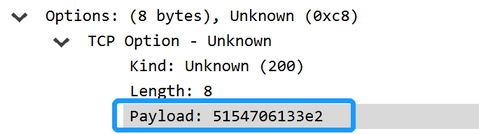
4. Open the downloaded file dump.pcap in Wireshark and check the real client IP in TCP Option.
The Payload field is in hexadecimal format. The last 4 bytes stands for the real client IP.