tencent cloud

Tencent Cloud TCHouse-D

Product Introduction
Overview
Concepts
Cluster Architecture
Strengths
Scenarios
Purchase Guide
Billing Overview
Renewal Instructions
Overdue Policy
Refund Instructions
Configuration Adjustment Billing Instructions
Getting Started
Using Tencent Cloud TCHouse-D Through the Console
Using Tencent Cloud TCHouse-D Through a Client
Operation Guide
Cluster Operation
Monitoring and Alarm Configuration
Account Privilege Management
Data Management
Query Management
Modify Configurations
Node Management
Log Analysis
SQL Studio
Enabling Resource Isolation
Development Guide
Design of Data Table
Importing Data
Exporting Data
Basic Feature
Query Optimization
Ecological Expansion Feature
API Documentation
History
Introduction
API Category
Making API Requests
Cluster Operation APIs
Database and Table APIs
Cluster Information Viewing APIs
Hot-Cold Data Layering APIs
Database and Operation Audit APIs
User and Permission APIs
Resource Group Management APIs
Data Types
Error Codes
Cloud Ecosystem
Granting CAM Policies to Sub-accounts
Query Acceleration for Tencent Cloud DLC
Practical Tutorial
Basic Feature Usage
Advanced Features Usage
Resource Specification Selection and Optimization Suggestions
Naming Specifications and Limits to the Database and Data Table
Table Design and Data Import
Query Optimization
Suggested Usage to Avoid
Accessing TCHouse-D via JDBC over the Public Network
Performance Testing
TPC-H Performance Testing
SSB Performance Testing
TPC-DS Performance Testing
FAQs
Common Operational Issues
Common Errors
Contact Us
Glossary
Product Policy
Service Level Agreement
Privacy Policy
Data Processing And Security Agreement

Node Management

PDF
Mode fokus
Ukuran font
Terakhir diperbarui: 2024-06-27 10:53:07

Feature Overview

The Nodes page displays the status list for various roles in the cluster, which include FE, BE, BROKER.
For each role, the health status, process status, node IP and last restart time are displayed (which corresponds to the time of the last manual service restart operation on the Role Management page).
On the Nodes page, you can perform restart, and start operations on each node. The types of restart include immediate restart, graceful restart, and rolling restart. Batch execution for the same type of nodes is supported.
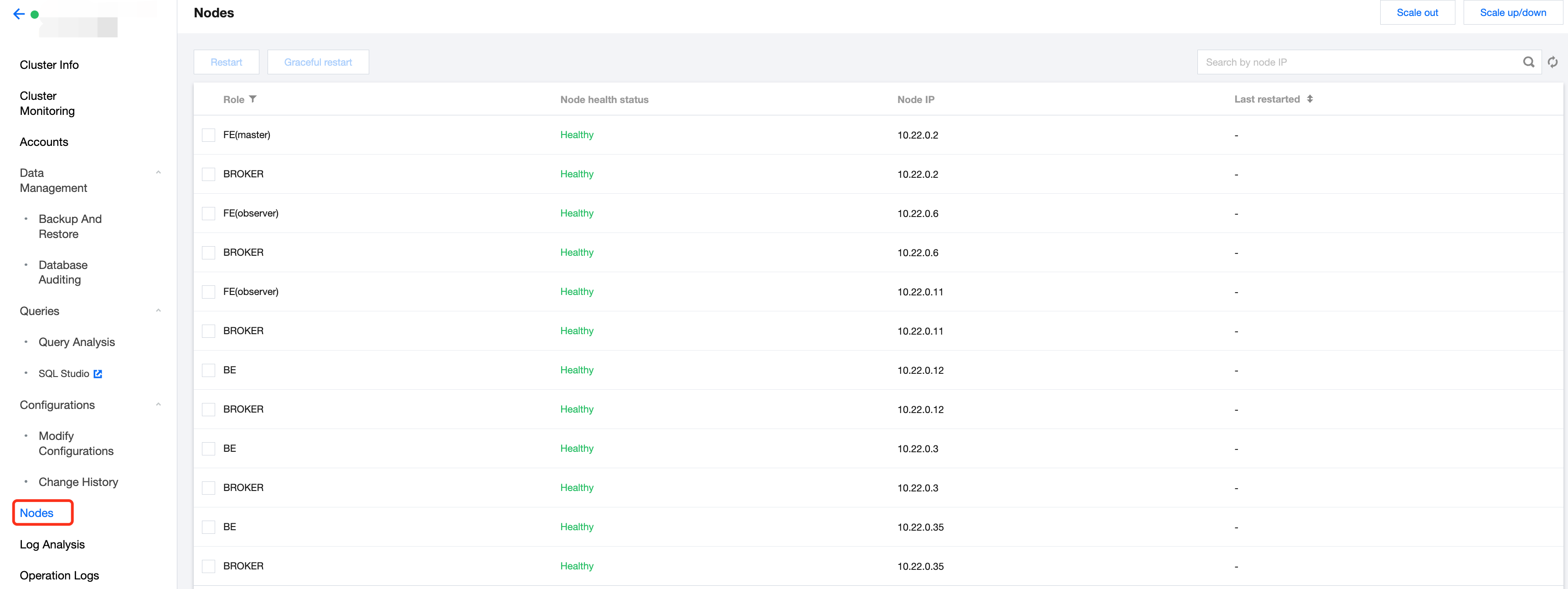
To ensure the high availability of each node, in addition to user's manual operations, each node runs a daemon process. If any node is detected to have an abnormal exit, the daemon process will immediately launch the corresponding node.
Note:
The restart operation generally takes 20-30 seconds. The page will automatically refresh to access the latest status during the execution.
Your operations on the Nodes page will be recorded on the Operation Logs page for any time reference.


Bantuan dan Dukungan

Apakah halaman ini membantu?

masukan