tencent cloud

Tencent Cloud Agent Development Platform

Release Notes and Announcements
Release Notes
Product Announcement
Product Introduction
Product Overview
Advantages
Use Cases
Model Introduction
Purchase Guide
Package Subscription
Previous Version
Getting Started
Agent Application and Its Three Modes
Creating a "Content Summary Assistant" in Standard Mode
Creating a “Webpage Scraping Assistant” in Single Workflow Mode
Creating a “Stand-up Comedy Content Creation Assistant” in Multi-Agent Mode
Operation Guide
Application Development
Workflow
Multi-Agent
Knowledge Base
Widget
Plugin Marketplace
Model List 
Prompt Templates
Application Templates
Platform Management
Business, Workspace and Permissions
API Documentation
History
API Category
Making API Requests
Atomic Capability APIs
Operation Optimization APIs
Document Library APIs
Q&A Database APIs
Knowledge Tag APIs
Application Management APIs
Enterprise Management APIs
Billing APIs
Release Management APIs
Dialogue Endpoint APIs
Data Statistics APIs
Data Types
Error Codes
Application API Documentation
Dialogue API Overview
Dialog API Documentation (WebSocket)
Dialog API Documentation (HTTP SSE)
Image Chat or File Chat (Real-time Document Parsing + Chat)
Offline Document Upload
Tencent Cloud Agent Development Platform Operation COS Guide
ADP Document Parsing Protocol
FAQs
Product FAQs
Technical FAQs
Related Agreements
Tencent Cloud Agent Development Platform Service Level Agreement
Tencent Cloud Agent Development Platform Service Specific Terms
Tencent Cloud Agent Development Platform Privacy Policy
Tencent Cloud Agent Development Platform Data Processing and Security Agreement
Open-Source License Statement
Lighthouse OpenClaw Connector Plugin Service Agreement
Contact Us
Glossary

Natural Language Generation

PDF
Mode fokus
Ukuran font
Terakhir diperbarui: 2026-02-03 14:33:59

Feature Overview

Natural language generation refers to the process where a large model automatically generates the basic structure and display style of a Widget based on the user's natural language description. Users do not need to manually write template code to quickly create a Widget that meets their requirements, suitable for rapid verification of ideas or building an initial version.

Applicable Scenarios

Hope to quickly generate an available initial version prototype of Widget.
For solution exploration or style reference.
Create requirements are clear, but not familiar with Widget development details.

Steps

You can refer to the following steps to generate a product display Widget:

Create a Widget

On the Widget development page, click Create Widget and select natural language generation.


2. Manually Input the Generate Command

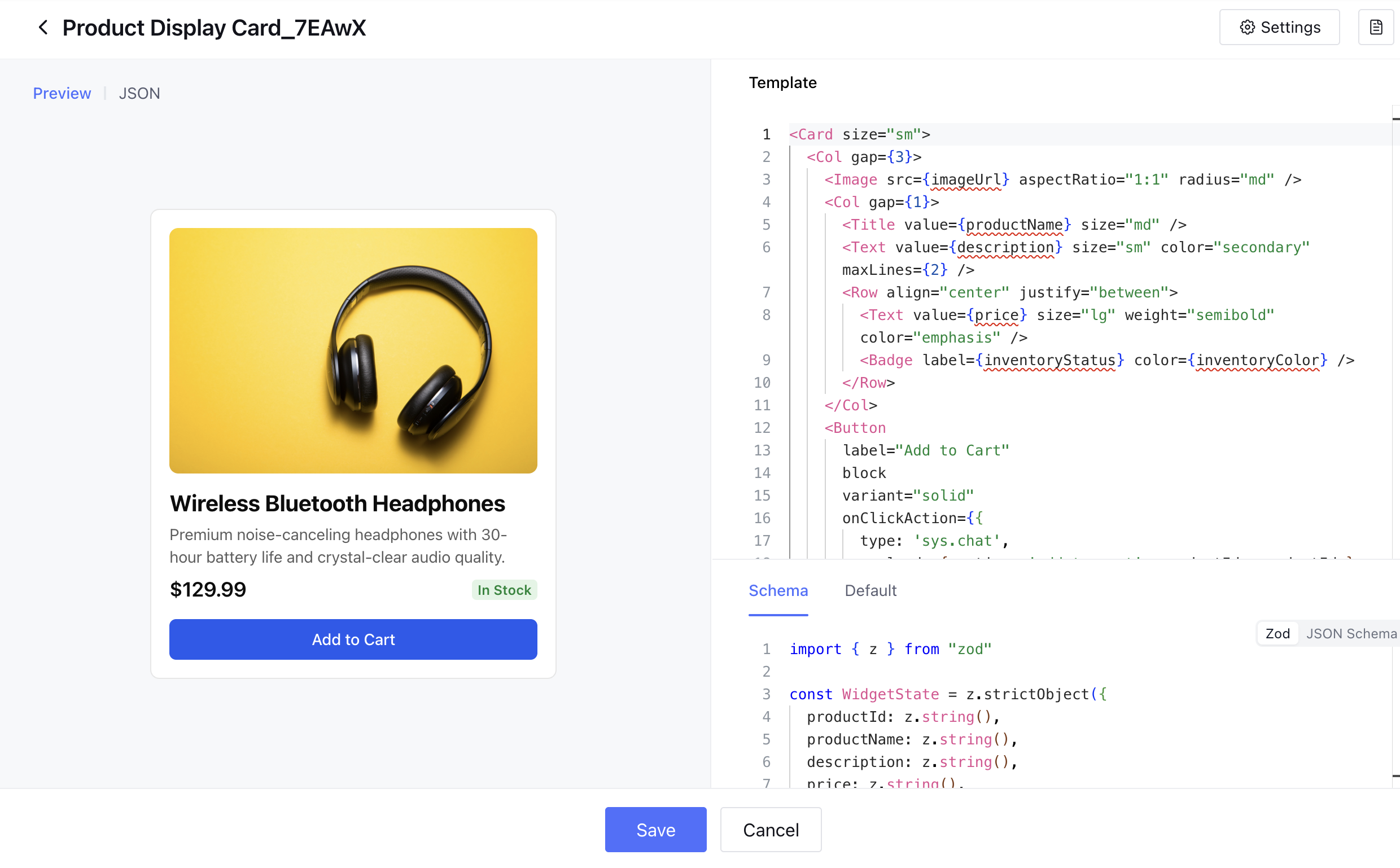
2.1 Choose appropriate model, input Widget generation command and click Confirm.
Input content in the prompt input box: generate a product display card with product image, name, description, price, inventory status and "add merchandise to the shopping cart" button, all elements arranged reasonably.


2.2 The system will automatically generate appropriate component code according to the prompt content. Wait patiently for loading complete. Generation time may vary depending on content complexity.

3. Edit and Save

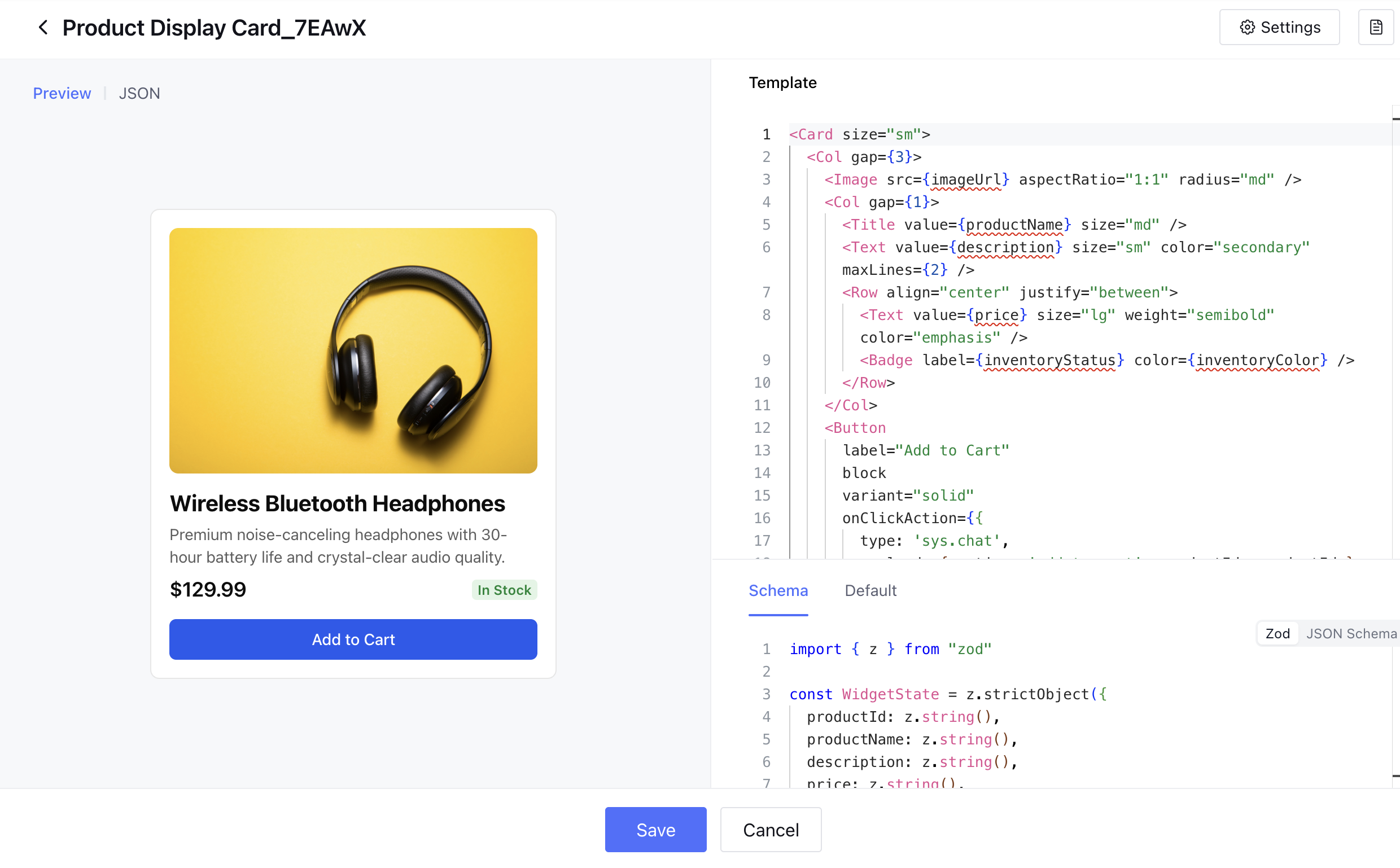
After generation completed, you can enter the editing page to adjust the Widget, including modify layout, style or data binding. For details on component usage and edit method, see Widget components. Confirm and click Save to complete Widget creation.
Generation effect as follows:


Bantuan dan Dukungan

Apakah halaman ini membantu?

masukan