tencent cloud

Service Registry and Governance

Fuse degradation

PDF
Mode fokus
Ukuran font
Terakhir diperbarui: 2026-05-07 18:12:23

Scenarios

This document describes how to develop a Java application locally, access Polaris (North Star) via the polaris-sdk, and implement the circuit breaking and degradation feature.

Prerequisite

Before development, please ensure you have downloaded and installed Java and Maven.

Operation Steps

Step 1: Introduce Polaris Dependencies

1. Introduce the polaris sdk Dependency

Modify the pom.xml in the application's root directory to add dependencyManagement for polaris-java:
<dependencyManagement>
<dependencies>
<dependency>
<groupId>com.tencent.polaris</groupId>
<artifactId>polaris-dependencies</artifactId>
<version>${version}</version>
<type>pom</type>
<scope>import</scope>
</dependency>
</dependencies>
</dependencyManagement>
Note:
For polaris-sdk version information, see: Version Information.

2. Introduce polaris starter

<dependencies>
<dependency>
<groupId>com.tencent.polaris</groupId>
<artifactId>polaris-all</artifactId>
</dependency>
</dependencies>:

Step 2: Add Polaris Configuration File polaris.yaml

1. Create a polaris.yml file in the project's main/resources directory to initialize the polaris-java SDK.
2. Configure the application name, polaris (North Star) server IP address, and other information in the polaris.yml file. For server IP address details, refer to: Engine Management > Client Access Address.
global:
serverConnectors:
- id: polaris
protocol: grpc
addresses:
# The IP address needs to be replaced with the client access IP address of the North Star engine you created.
- 127.0.0.1:8091
# Description: Configuration related to monitoring and log data reporting
statReporter:
# Description: Whether to Enable Reporting
enable: true
plugin:
prometheus:
type: push
# Description: Configure the pushgateway IP address, effective only when type == push
# The IP address needs to be replaced with the client access IP address of the North Star engine you created.
address: 127.0.0.1:9091
# Description: Set the execution interval for pushing metric data to pushgateway
# Range: [1s:...], Default value: 10s
pushInterval: 10s
For more polaris.yml configuration information, see default-config.yml.

Step 3: How to Use

Polaris supports circuit breaking and degradation at three dimensions: service-level, API-level, and instance-level.

1. Configure Circuit Breaking Rules in the Console

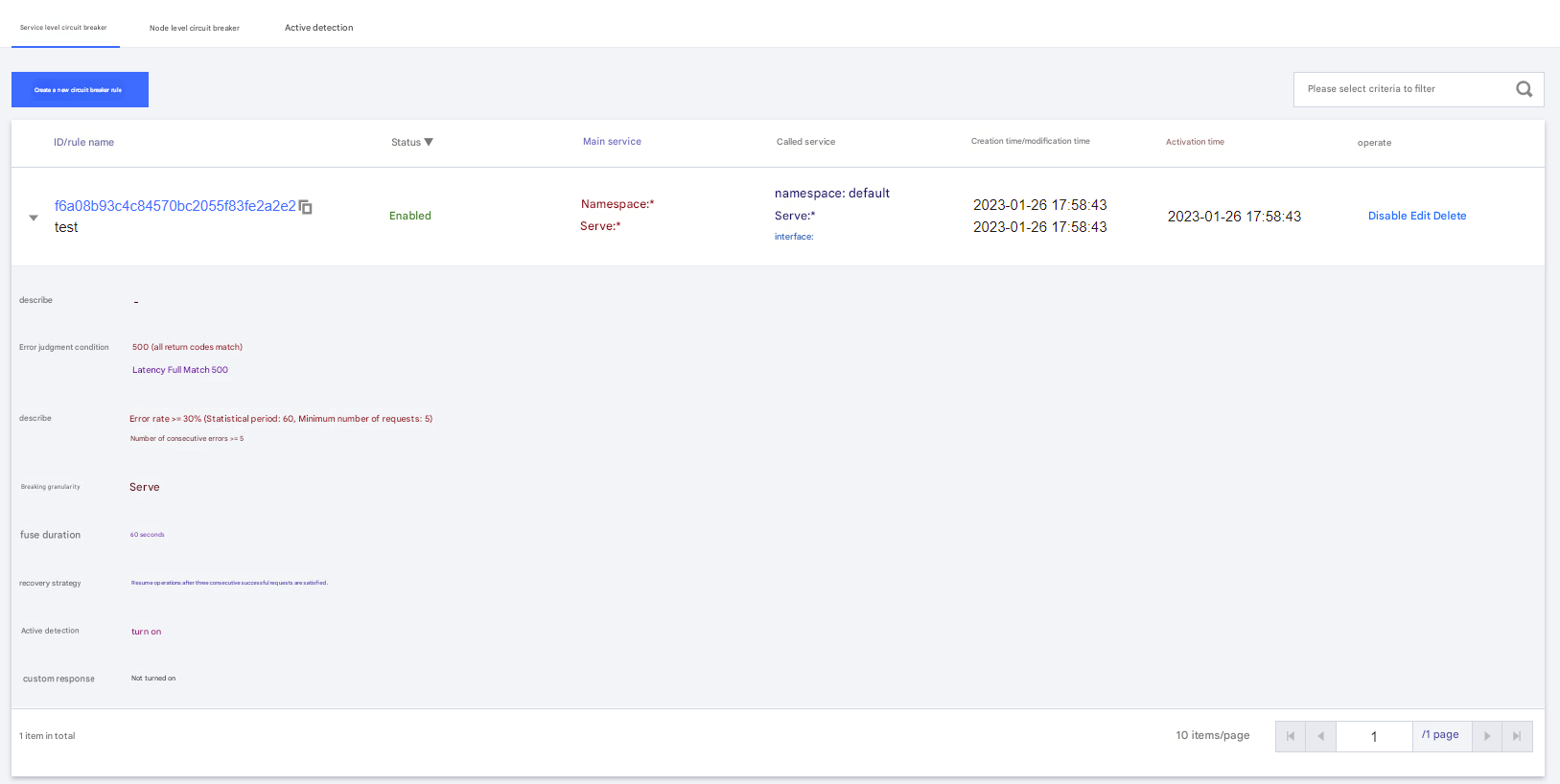
Please see the documentation on Service Governance Guide > Service Governance > Circuit Breaking and Degradation. The relevant page is as follows:


Circuit breaking rule configuration example: For all services in the default namespace, requests with latency exceeding 500 ms or returning status code 500 are marked as error requests. Circuit breaking is triggered when the error rate reaches 30% or higher within one minute, or when consecutive errors exceed 5.

2. Client Uses SDK to Perform Circuit Breaking Determination

Method Description:

Polaris Java SDK provides the following circuit breaking-related methods, all of which are provided in the com.tencent.polaris.circuitbreak.api.CircuitBreakAPI interface.
check: checks whether the resource can be invoked and requests a call for the resource. For half-open resources, if the call quota request is successful, returns true; otherwise, returns false.
report: This method is provided for users to report the invocation results, including return codes, latency, and other information, for circuit breaking logic to determine.
makeFunctionalDecorator: creates a functional call decorator FunctionalDecorator that can decorate Java functional interfaces. The decorated logic first checks whether the resource can be invoked via the check method before the actual function logic is executed. If the resource cannot be invoked, a circuit breaking exception (CallAbortedException) is thrown. After the call completes, the invocation result is reported via the report interface.
FunctionalDecorator contains the following methods:
decorateSupplier: encapsulates the functional interface Supplier.
decorateConsumer: encapsulates the functional interface Consumer.
decorateFunction: encapsulates the function Function.
decoratePredicate: encapsulates the functional interface Predicate.

2.2 Service-Level Circuit Breaking

// Create a CircuitBreakAPI instance
CircuitBreakAPI circuitBreakAPI = CircuitBreakAPIFactory.createCircuitBreakAPI();

// Create a FunctionalDecorator by providing the service name (testService1) and namespace (default)
FunctionalDecoratorRequest makeDecoratorRequest = new FunctionalDecoratorRequest();
makeDecoratorRequest.setService(new ServiceKey("default", "testService1"));
FunctionalDecorator decorator = circuitBreakAPI.makeFunctionalDecorator(makeDecoratorRequest);

// Wrap the functional interface
Consumer<Integer> integerConsumer = decorator.decorateConsumer(new Consumer<Integer>() {
@Override
public void accept(Integer object) {
// Execute the service invocation...
}
});

// Perform service invocation by executing the functional interface
// During the calling process, if circuit breaking occurs, a CallAbortedException will be thrown
for (int i = 0; i < 500; i++) {
try {
integerConsumer.accept(i);
} catch(CallAbortedException e) {
e.printStackTrace();
}
}

2.3 API-Level Circuit Breaking

// Create a CircuitBreakAPI instance
CircuitBreakAPI circuitBreakAPI = CircuitBreakAPIFactory.createCircuitBreakAPI();

// Create a FunctionalDecorator by providing the service name (testService1), namespace (default), and method name (foo)
FunctionalDecoratorRequest makeDecoratorRequest = new FunctionalDecoratorRequest();
makeDecoratorRequest.setService(new ServiceKey("default", "testService1"));
makeDecoratorRequest.setMethod("foo");
FunctionalDecorator decorator = circuitBreakAPI.makeFunctionalDecorator(makeDecoratorRequest);

// Wrap the functional interface
Consumer<Integer> integerConsumer = decorator.decorateConsumer(new Consumer<Integer>() {
@Override
public void accept(Integer object) {
// Execute the service interface invocation...
}
});

// Perform service invocation by executing the functional interface
// During the calling process, if circuit breaking occurs, a CallAbortedException will be thrown
for (int i = 0; i < 500; i++) {
try {
integerConsumer.accept(i);
} catch(CallAbortedException e) {
e.printStackTrace();
}
}


2.4 Instance-Level Circuit Breaking

When an instance is tripped by circuit breaking, it temporarily stops receiving requests. Requests originally routed to it will be routed to other instances. This process is automatically completed during service routing, and users do not need to perform additional operations such as circuit breaking status checks.
Perform service routing:
import com.tencent.polaris.factory.api.DiscoveryAPIFactory;


public static void main(String[] args) throws Exception {
ConsumerAPI consumerAPI = DiscoveryAPIFactory.createConsumerAPI();
// Perform service routing to select a single instance, during which instances in circuit breaking state will be automatically excluded
GetOneInstanceRequest getOneInstanceRequest = new GetOneInstanceRequest();
getOneInstanceRequest.setNamespace("default");
getOneInstanceRequest.setService("testService1");
InstancesResponse oneInstance = consumerAPI.getOneInstance(getOneInstanceRequest);
Instance targetInstance = oneInstance.getInstances()[0];
// Execute the service invocation
// invoke rpc call with targetInstance
// Report the invocation results for circuit breaking judgment
ServiceCallResult result = new ServiceCallResult();
result.setNamespace(namespace);
result.setService(service);
result.setHost(targetInstance.getHost());
result.setPort(targetInstance.getPort());
// Set the return code
result.setRetCode(code);
// Set the invocation latency
result.setDelay(delay);
// Use updateServiceCallResult to report the invocation results
consumerAPI.updateServiceCallResult(result);
}

Bantuan dan Dukungan

Apakah halaman ini membantu?

masukan