Database Resource Isolation
Download
Mode fokus
Ukuran font
Application Scenario
In some service scenarios, the database object database corresponds to related service logic. A typical example is the SaaS scenario where the database corresponds to the tenant. Therefore, it is necessary to address the issue of database resource isolation. This document mainly describes how to achieve CPU isolation for databases in TencentDB for PostgreSQL instances.
Setting Database Resource Isolation
Note:
Currently, only PostgreSQL 14 kernel versions of v14.11_r1.21 and later, PostgreSQL 15 kernel versions of v15.6_r1.10 and later, and PostgreSQL 16 kernel versions of v16.2_r1.3 and later support resource isolation capability. For details, refer to Kernel Version Release Note.
If you need to enable the database resource isolation mode, submit a ticket to contact us to enable the plug-in tencentdb_serverless and set relevant parameters.
The parameter tencentdb_serverless.min_cpu_cores is the minimum number of CPU cores that can be set for instances, and the parameter tencentdb_serverless.max_cpu_cores is the maximum number of CPU cores that can be set for instances. These two parameters are mainly used by the backend management system to control resource isolation of databases in instances. Users can view them but do not need to modify them.
All CPU resources are set to take effect immediately.
Currently, resource isolation for databases is only supported for primary instances.
Once you have enabled the tencentdb_serverless plugin and set the relevant plugin parameters tencentdb_serverless.min_cpu_cores and tencentdb_serverless.max_cpu_cores, you can start the configuration. You can use the following command to check that the plugin has been installed successfully:
postgres=> \\dx;List of installed extensionsName | Version | Schema | Description-----------------------+---------+------------+------------------------------------------------------------------------pg_stat_log | 1.0 | public | track runtime execution statistics of all SQL statements executedpg_stat_statements | 1.9 | public | track planning and execution statistics of all SQL statements executedplpgsql | 1.0 | pg_catalog | PL/pgSQL procedural languagetencentdb_serverless | 1.0 | public | extension for serverless modetencentdb_system_stat | 1.0 | public | track execution statistics of querssy executed(5 rows)
The initial values of the tencentdb_serverless.min_cpu_cores and tencentdb_serverless.max_cpu_cores parameters are the current number of cores of the instance. These two parameters are mainly used for the back-end management system to control the resource isolation of the database within the instance, and users do not need to modify them. If the instance configuration changes later, the two parameters will change accordingly. You can check the current value of the parameters using the following command.
postgres=> show tencentdb_serverless.min_cpu_cores;tencentdb_serverless.min_cpu_cores------------------------------------8(1 row)postgres=> show tencentdb_serverless.max_cpu_cores;tencentdb_serverless.max_cpu_cores------------------------------------8(1 row)
Note:
When there are multiple database objects in the instance, a CPU resource limit needs to be set for each database for the configuration to take effect.
After checking the plugin and parameters, you can start setting the upper and lower CPU resource limits for the database. We provide corresponding functions or views for you to call. Details are as follows:
Setting the CPU Resource Limits of the Specified Database
The function definition is as follows:
tencentdb_serverless.set_database_cpu_limit(database_name text [, min_cpu_cores numeric(5,1), max_cpu_cores numeric(5,1)])
Call example:
postgres=> select tencentdb_serverless.set_database_cpu_limit('tenant_001',2,2.5);set_database_cpu_limit------------------------(1 row)
Clearing the CPU Resource Limits of the Specified Database
The function definition is as follows:
tencentdb_serverless.reset_database_limit(database_name text)
Call example:
postgres=> select tencentdb_serverless.reset_database_limit('tenant_001');reset_database_limit----------------------(1 row)
Clearing the CPU Resource Limits of All Databases in the Instance
The function definition is as follows:
tencentdb_serverless.reset_all_database_limit()
Call example:
postgres=> select tencentdb_serverless.reset_all_database_limit();reset_all_database_limit--------------------------(1 row)
Viewing the Details of All Configured CPU Resource Limits in the Current Instance.
We offer the view tencentdb_serverless.resource_limit_view for you to view the details of all configured CPU resource limits in the current instance. The field definitions are as follows:
Column name | Meaning |
database_name | The name of the database |
min_cpu_cores | The minimum number of CPU cores that the current database can use |
max_cpu_cores | The maximum number of CPU cores that the current database can use |
min_mem_kilobytes | The maximum memory size that the current database can use, measured in kB. Reserved field, currently not in use. |
max_mem_kilobytes | The maximum memory size that the current database can use, measured in kB. Reserved field, currently not in use. |
Call example:
postgres=> select * from tencentdb_serverless.resource_limit_view;database_name | min_cpu_cores | max_cpu_cores | min_mem_kilobytes | max_mem_kilobytes---------------+---------------+---------------+-------------------+-------------------tenant_001 | 2.0 | 2.5 | |tenant_002 | 2.0 | 2.5 | |(2 rows)
Process Monitoring
When all databases in an instance are configured with CPU resource isolation, if the overall resource utilization of the instance is high, each database can ensure the use of the minimum configured CPU cores. Additionally, if you need to check which databases are using more resources in the current system, you can use Process Monitoring capabilities. To view the CPU resource usage details of all databases, you can use the following statement:
postgres=> select datname,sum(cpu_usage) as cpu_usage from tencentdb_process_system_usage where datname !='NULL' group by datname;datname | cpu_usage------------+-----------postgres | 3tenant_001 | 1.99tenant_002 | 1(3 rows)
When process monitoring finds that certain database resources have high utilization, you can adjust the CPU configuration of the database in real time. The configuration can take effect in real time.
Resource Migration
When a database corresponds to a tenant, and we discover through process monitoring that when the database's resource usage is consistently high and requires resource reintegration, TencentDB for PostgreSQL offers data migration capabilities. You can configure TencentDB for PostgreSQL's Logical Migration. The figure below shows how to configure a migration task:
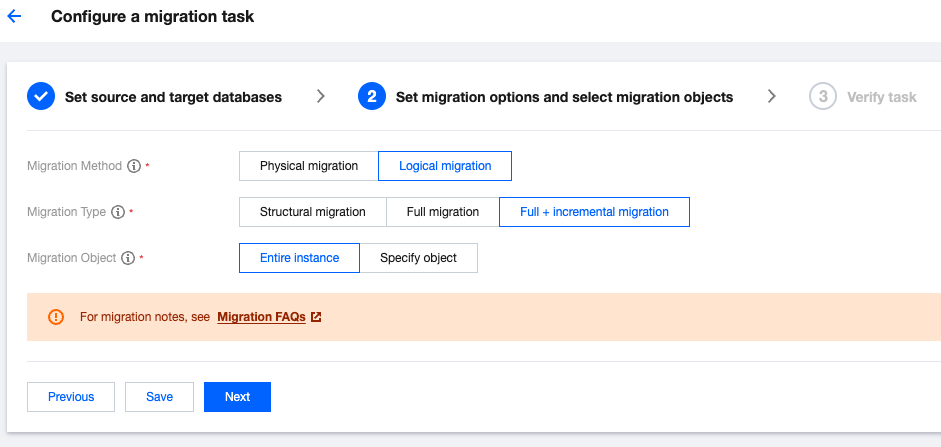
Disabling Database Resource Isolation
If you need to disable the database's CPU resource isolation mode, submit a ticket to contact us for data cleanup. After receiving the ticket, the back-end engineer will reset all of the CPU resource parameters tencentdb_serverless.min_cpu_cores and tencentdb_serverless.max_cpu_cores, remove all resource configurations, and finally delete the plugin tencentdb_serverless.
Bantuan dan Dukungan
Apakah halaman ini membantu?
Anda juga dapat Menghubungi Penjualan atau Mengirimkan Tiket untuk meminta bantuan.
masukan