When you activate the media processing service, the system will automatically create a user queue (queue-1) for you. When you submit a job, the job will be arranged in the queue first and executed in sequence according to the priority and order of submission. You can also set a callback rule to stay up to date with the job or workflow progress, and the system will send the processing result and status information to the specified address.
Note:
Currently, CI supports only one queue. If you want more concurrencies of a single queue, submit a ticket for assistance.
Enabling or Pausing a Queue
You can enable or pause a queue in its Operation column.
Directions
1. Log in to the CI console and click Bucket Management to enter the bucket management page.
2. Click the name of the desired bucket.
3. On the left sidebar, click Task and Workflow. Then, select the Queues and Callbacks tab.
4. In the Media Processing Queue column, enable or pause the queue.
Note:
After a queue is paused, you cannot use the job and workflow features on the console.
After the queue is paused, jobs in it will stop.
Setting a Callback Rule
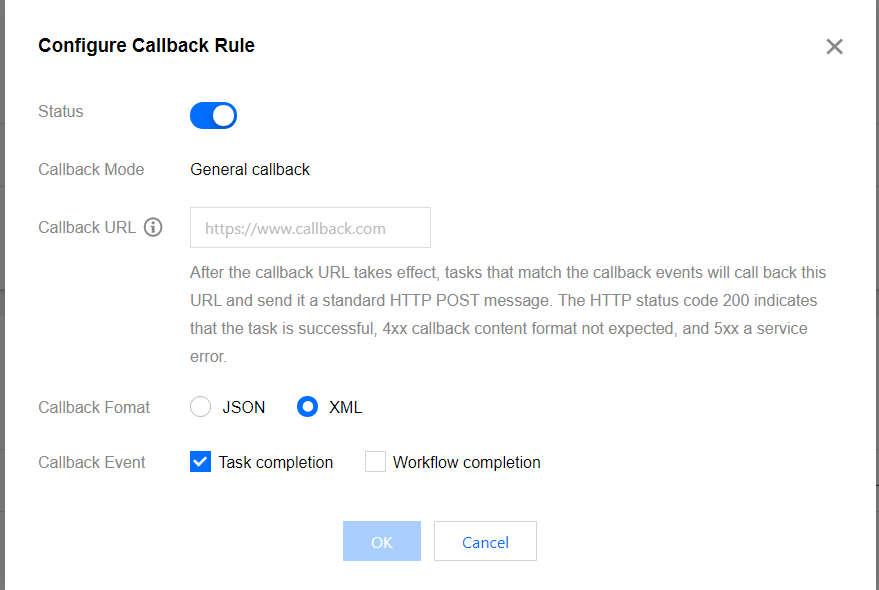
CI supports user-defined callback URLs. After an event is completed, the system sends an HTTP POST request whose body contains notification content to a user-defined callback URL. You can use the configured callback URL to learn about the processing progress and status of the event so that you can perform other operations as needed.
Directions
1. Log in to the CI console and click Bucket Management to enter the bucket management page.
2. Click the name of the desired bucket.
3. On the left sidebar, click Task and Workflow. Then, select the Queues and Callbacks tab.
4. Click Configure Callback Rule.
5. In the pop-up window, click the current status to enable or disable callback.
When enabling callback, you need to specify a URL for the system to send HTTP requests or select a TMDQ-CMQ message queue. For more information on callback, see Callback content.
Callback content
After a job is completed, the system will send the following callback content to the configured callback URL:
<Response>
<JobsDetail></JobsDetail>
<NonExistJobIds></NonExistJobIds>
</Response>
The nodes are described as follows:
Parameter
Description
Type
JobsDetail
Job details. Same as the Response.JobsDetail node in the CreateMediaJobs API.
Container
NonExistJobIds
List of non-existing job IDs queried. If all jobs exist, this parameter is not returned.