tencent cloud

Mobile Live Video Broadcasting

Release Notes and Announcements
TUILiveKit Release Notes
Live SDK Release Notes
User Guide
Product Introduction
Overview
Strengths
Performance Statistics
Concepts
Purchase Guide
TRTC Live Billing Overview
Billing of Video Live Component
Activating the Service (TUILiveKit)
Free Demo
Demo
Run Demo(TUILiveKit)
Integration Guide
Video Live Streaming
Preparation
Host Live Streaming
Audience Viewing
Live Stream List Live Stream List
Voice Chat Room
Preparation
Host Live Streaming
Audience Viewing
Live Stream List
Live Streaming Kit
Live Streaming Kit(Electron Desktop Application)
Live Streaming Kit(Web Desktop Browser)
Live Broadcast Monitoring
Monitoring Webpage (Web Desktop Browser React)
Monitoring Webpage (Web Desktop Browser Vue)
UI Customization
Live Stream Video Component
Video Source Editing Canvas
Audience List Component
Barrage Component
Media Source Configuration Panel
Link Management Panel
Live Gift Component
No UI Integration
Video Live Streaming
Voice Chat Room
Feature Guide
Follow Anchors (TUILiveKit)
Ultimate Image Quality (TUILiveKit)
Push Media Stream Into Room (TUILiveKit)
Gift System (TUILiveKit)
Client APIs
Android
iOS
Web
Server APIs (TUILiveKit)
Account System
REST API
Third-Party Webhooks
Error Codes (TUILiveKit)
FAQs
Platform Compilation
User Authentication
Live SDK
Product Introduction
Purchase Guide
Free Demo
Free Trial License
SDK Download
Licenses
Advanced Features
Client API
FAQs
Integration (No UI)
API Documentation
OSS information
OSS Attribution Notice

Follow Anchors (TUILiveKit)

PDF
フォーカスモード
フォントサイズ
最終更新日: 2026-03-10 16:58:28

Description of the Feature

In live streaming scenarios, the Follow the host feature is an important interaction method. It allows viewers to choose to follow specific hosts, thus establishing long-term interaction and follow relationships on the live streaming platform. The TUILiveKit has implemented the Follow the host feature through Chat.
Follow feature allows users to choose other users they are interested in so that they can get the latest updates, posts, or event information promptly. You can provide personalized content recommendations based on the user's Follow list.
Fans feature refers to the status of a user being followed by others. When User A follows User B, A becomes a Fan of B.
Through the Follow and Fans features, social applications and websites can create an active and interconnected user network, promoting the dissemination of information and the building of communities.

Use Instructions

Note:
TUILiveKit's Follow the host feature relies on the Chat Follow & Fan APIs, so you need to activate the related Package bundles for Chat. For details, please refer to the Follow&Fan documentation.
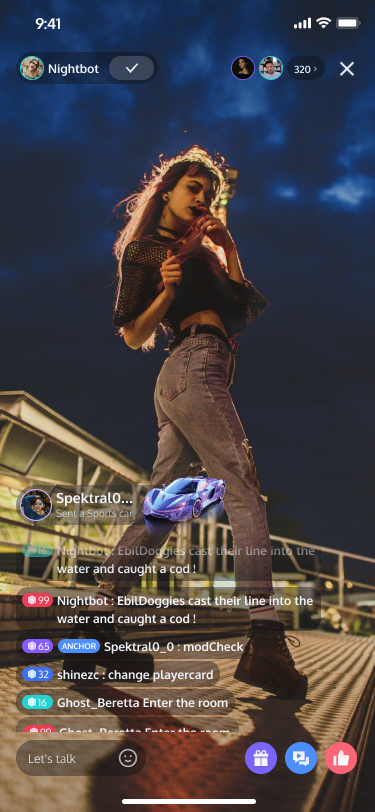
Unfollowed Status
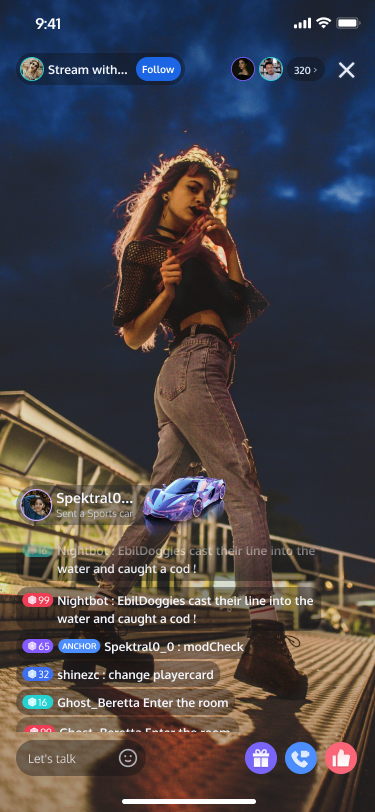
Followed Status
Broadcaster Info Panel


Follow the host: You can click the

button in the live room information area at the top left corner of the live streaming interface to follow the host
Unfollow: You can click the

button in the live room information area at the top left corner of the live streaming interface to unfollow the host
View the host's fan count: You can click the live room information area at the top left corner of the live streaming interface to pop up the live room details panel, which will display the host's fan count.

Feature customization

If the current UI does not meet your needs, you can achieve your desired UI effects by modifying the source code. For easier UI customization, an introduction to the files related to the follow feature is provided here.
Android
iOS
// File location: Android/tuilivekit/src/Main/java/com/trtc/uikit/livekit/common/uicomponent/

roominfo // Directory for implementing the live room information UI component
├── RoomInfoDetailView.java // Specific implementation of the Live Room Information Details Panel View
└── RoomInfoView.java // Specific implementation of the Live Room Information View. Clicking this view will show the Details Panel View
// File location: TUILiveKit/iOS/TUILiveKit/Sources/Component/LiveInfo/

LiveInfo // Implementation directory of Live Room Information UI Component
├── LiveInfoView.swift // Detailed implementation of Live Room Information Panel View
└── View
└── LiveInfoPanelView.swift // Detailed implementation of Live Room Information View, clicking this view will display the detailed panel view

Key code

Follow anchor

Android
iOS
Java
// File location: Android/tuilivekit/src/Main/java/com/trtc/uikit/livekit/service/impl/LiveServiceImpl.java

List<String> userIDList = new ArrayList<>();
userIDList.add("userId");

V2TIMManager.getFriendshipManager().followUser(userIDList,
new V2TIMValueCallback<List<V2TIMFollowOperationResult>>() {
@Override
public void onSuccess(List<V2TIMFollowOperationResult> results) {
}

@Override
public void onError(int code, String message) {
}
});
Swift
// File location: TUILiveKit/iOS/TUILiveKit/Sources/Component/LiveInfo/RoomInfoService

public func followUser(userId: String) {
let userInfo = TUIUserInfo()
userInfo.userId = userId
V2TIMManager.sharedInstance().followUser([userId]) { [weak self] followResultList in
guard let self = self, let result = followResultList?.first else { return }
if result.resultCode == 0, !self.state.followingList.contains(where: { $0.userId == userId }) {
self.state.followingList.insert(userInfo)
self.getFansNumber()
}
} fail: { code, message in
debugPrint("[RoomInfo] followUser failed, error:\\(code), message:\\(String(describing: message))")
}
}

Unfollow anchor

Android
iOS
Java
// File location: Android/tuilivekit/src/Main/java/com/trtc/uikit/livekit/service/impl/LiveServiceImpl.java

List<String> userIDList = new ArrayList<>();
userIDList.add("userId");

V2TIMManager.getFriendshipManager().unfollowUser(userIDList,
new V2TIMValueCallback<List<V2TIMFollowOperationResult>>() {
@Override
public void onSuccess(List<V2TIMFollowOperationResult> results) {
}

@Override
public void onError(int code, String message) {
}
});
Swift
// File location: TUILiveKit/iOS/TUILiveKit/Sources/Component/LiveInfo/RoomInfoService

public func unfollowUser(userId: String) {
V2TIMManager.sharedInstance().unfollowUser([userId]) { [weak self] followResultList in
guard let self = self, let result = followResultList?.first else { return }
if result.resultCode == 0 {
self.state.followingList = state.followingList.filter { $0.userId != userId}
}
} fail: { code, message in
debugPrint("[RoomInfo] unfollowUser failed, error:\\(code), message:\\(String(describing: message))")
}
}

View anchor's follow status

Android
IOS
Java
// File location: Android/tuilivekit/src/Main/java/com/trtc/uikit/livekit/service/impl/LiveServiceImpl.java

List<String> userIDList = new ArrayList<>();
userIDList.add("userId");

V2TIMManager.getFriendshipManager().checkFollowType(userIDList,
new V2TIMValueCallback<List<V2TIMFollowTypeCheckResult>>() {
@Override
public void onSuccess(List<V2TIMFollowTypeCheckResult> results) {
}

@Override
public void onError(int code, String message) {
}
});
// File location: TUILiveKit/iOS/TUILiveKit/Sources/Component/LiveInfo/RoomInfoService

public func isFollow(userId: String) {
let userInfo = TUIUserInfo()
userInfo.userId = userId
V2TIMManager.sharedInstance().checkFollowType([state.ownerId]) { [weak self] checkResultList in
guard let self = self, let result = checkResultList?.first else { return }
if result.followType == .FOLLOW_TYPE_IN_BOTH_FOLLOWERS_LIST || result.followType == .FOLLOW_TYPE_IN_MY_FOLLOWING_LIST {
if !self.state.followingList.contains(where: { $0.userId == userId }) {
self.state.followingList.insert(userInfo)
}
} else {
self.state.followingList = state.followingList.filter { $0.userId != userId}
}
} fail: { code, message in
debugPrint("[RoomInfo] isFollow failed, error:\\(code), message:\\(String(describing: message))")
}
}

Get number of followers

Android
iOS
Java
// File location: Android/tuilivekit/src/Main/java/com/trtc/uikit/livekit/service/impl/LiveServiceImpl.java

List<String> userIDList = new ArrayList<>();
userIDList.add("userId");

V2TIMManager.getFriendshipManager().getUserFollowInfo(userIDList,
new V2TIMValueCallback<List<V2TIMFollowInfo>>() {
@Override
public void onSuccess(List<V2TIMFollowInfo> results) {
}

@Override
public void onError(int code, String message) {
}
});
// File location: TUILiveKit/iOS/TUILiveKit/Sources/Component/LiveInfo/RoomInfoService

public func getFansNumber() {
V2TIMManager.sharedInstance().getUserFollowInfo([state.ownerId]) { [weak self] followInfoList in
guard let self = self, let followInfo = followInfoList?.first else { return }
self.state.fansNumber = Int(followInfo.followersCount)
} fail: { code, message in
debugPrint("[RoomInfo] getFansNumber failed, error:\\(code), message:\\(String(describing: message))")
}
}


ヘルプとサポート

この記事はお役に立ちましたか?

フィードバック