Live and Instant Messaging (Chat) share the same login authentication system, Instant Messaging (Chat) evolved from the QQ instant messaging system. We extracted QQ’s common modules and integrated them to build the integration-friendly Chat SDK and backend service.
The Chat SDK can be viewed as QQ without the user interface. Integrating the Chat SDK into your app is similar to integrating the QQ kernel.
You must log in to QQ before you can use it for messaging. While you log in to QQ with your QQ ID and password, you must log in to the Chat SDK with the specified username (UserID) and password (UserSig).
UserID: Formerly known as Identifier. This is the username for users to log in to Chat. It is actually the user ID in your app.
For example, if a user in your app has the ID of 27149, you can use 27149 as the UserID to log in to Chat.
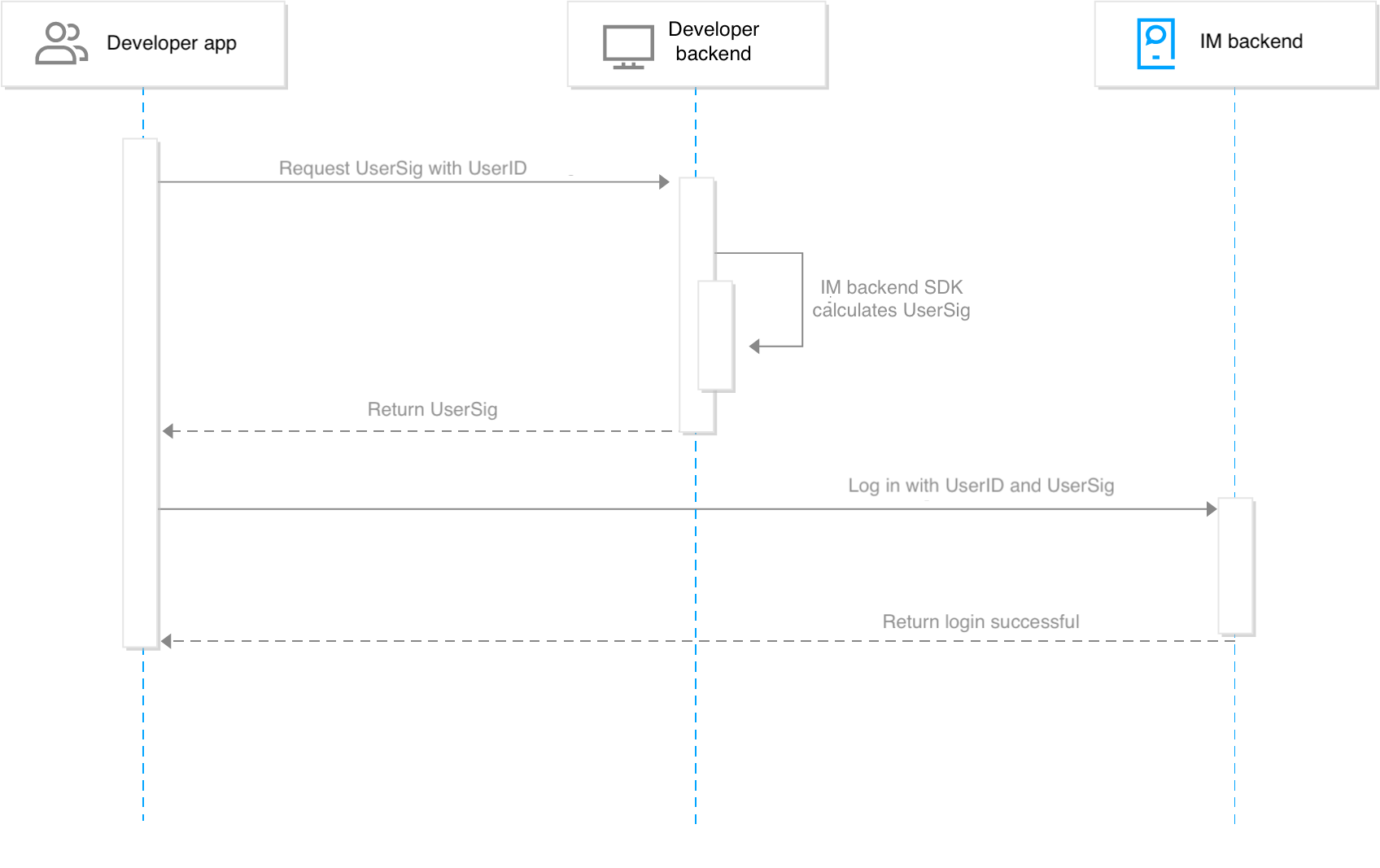
UserSig: This is the password with which the user logs in to Chat. It is the data generated after App Server uses the key to encrypt info such as UserID. For more information, see Generating UserSig.
App Login Process
We recommend that apps log in to Chat as follows:
Caution
The Chat backend completely trusts UserSig. To avoid affecting your data and business, you must ensure the security of the private key.
UserSigs generated by the default API of the Chat backend SDK are valid for 180 days. Developers can use the API with the validity parameter to customize the validity period. Developers must obtain a new UserSig from the developer backend before the original UserSig expires.
For more information on the Chat backend SDK that is used to generate UserSig, see Generating UserSig.
App Admin
Some Chat services require admin permissions, for example, calling RESTful APIs, disbanding a group, and pushing to all group members. Compared with ordinary accounts, the role of app admin has the highest level of privileges:
It has higher read permissions. For example, it can obtain all groups within the app and any information about any group.
It has higher operation permissions. For example, it can send messages to any user and add or delete members in any group.
You can only set app admins in the console. For more information on the procedure, see Configuring Account Admins.