Linuxインスタンスのetc/hostsファイルの設定の変更
ダウンロード
フォーカスモード
フォントサイズ
ユースケース
2018年3月1日以降、Tencent Cloudの公式サイトにより提供するLinuxパブリックイメージには、オープンソースツールCloud-Initがプリインストールされており、インスタンス上のすべての初期化操作は Cloud-Init 経由で行われるため、インスタンス内の操作がより透過的になります。詳細については、Cloud-Init をご参照ください。
Cloud-Init は毎回起動する時に
/etc/cloud/templates/hosts.${os_type}.tmpl テンプレートに基づいて新しいファイル /etc/hosts を生成し、インスタンスの元の /etc/hosts ファイルを上書きします。 したがって、ユーザーがインスタンス内部に /etc/hosts 構成を手動で変更してインスタンスを再起動すると、 /etc/hosts 構成が元のデフォルト構成に戻ることになりました。前提条件
Tencent Cloudは、Cloud-Init の上書き操作を最適化しました。2018年9月以降にパブリックイメージを使用して作成されたインスタンスは、再起動後に
/etc/hosts 構成が上書きされなくなりました。
2018 年 9 月より前に作成されたインスタンスの場合は、次の手順に従って変更します。操作手順
ソリューション1
1. Linux CVMにログインします。
2. 次のコマンドを実行して、
/etc/cloud/cloud.cfg 構成ファイル中の - update_etc_hosts を - ['update-etc-hosts', 'once-per-instance']に変更します。sed -i "/update_etc_hosts/c \\ - ['update_etc_hosts', 'once-per-instance']" /etc/cloud/cloud.cfg
3. 次のコマンドを実行して、
/var/lib/cloud/instance/sem/パスの下にconfig_update_etc_hostsファイルを作成します。touch /var/lib/cloud/instance/sem/config_update_etc_hosts
ソリューション2
説明:
このソリューションでは、CentOS7.2 OSを例として説明します。
hostsテンプレートファイルのパスを取得する
1. Linux CVMにログインします。
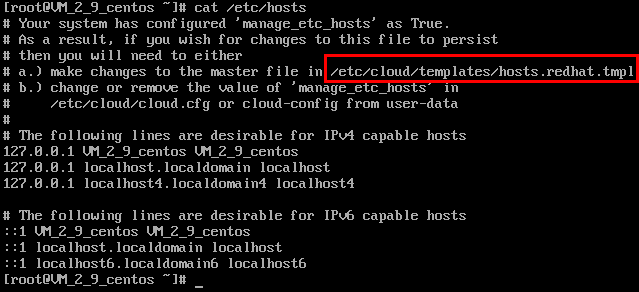
2. 次のコマンドを実行して、システムホストテンプレートファイルを確認します。
cat /etc/hosts
hosts テンプレート ファイルは次の図に示すとおりです:
hosts テンプレートファイルを変更する
説明:
127.0.0.1 test test の追加を例として、必要に応じて、hostsテンプレートファイルおよび/etc/hosts ファイルを変更します。
1. 次のコマンドを実行して、 hosts テンプレートファイルを変更します。
vim /etc/cloud/templates/hosts.redhat.tmpl
2. 「i 」を押して、編集モードに切り替えます。
3. ファイルの最後に次の内容を入力します。
127.0.0.1 test test
4. 入力が完了したら、Escキーを押して、「**:wq**」と入力し、ファイルを保存して戻ります。
/etc/hosts ファイルを変更する
1. 次のコマンドを実行して、
/etc/hostsファイルを変更します。vim /etc/hosts
2. iを押して、編集モードに切り替えます。
3. ファイルの最後に次の内容を入力します。
127.0.0.1 test test
4. 入力が完了したら、Escキーを押して、「**:wq**」と入力し、ファイルを保存して戻ります。
フィードバック