tencent cloud

TencentDB for SQL Server

Release Notes and Announcements
Release Notes
Product Announcements
User Guide
Product Introduction
Overview
Product Architecture
Strengths
Use Cases
Regions and AZs
Major Version Lifecycle Explanation
Features and Differences
Instance Types
Instance Specifications
Storage Types
Common Concepts
Network Environment
License Statement
Purchase Guide
Billing Overview
Product Pricing
Purchase Methods
Renewal Instructions
Payment Overdue
Refund
From Pay-as-You-Go to Monthly Subscription
Instance Adjustment Fees Description
Local Backup Space Billing
Cross-Region Backup Billing
Viewing Bill Details
Getting Started
Creating TencentDB for SQL Server Instance
Connecting to TencentDB for SQL Server Instance
Managing TencentDB for SQL Server Instance
Operation Guide
Constraints and Limits
Usage Specifications and Suggestions
Maintaining Instance
Adjusting Instance Configuration
Read-Only Instance
Network and Security
Account Management
Database Management
Data Security
Parameter Configuration
Monitoring and Alarms
Backup and Restoration 
Log Management
Publish-Subscribe
SSIS
Data Migration (New)
Data Migration (Legacy)
Data Synchronization (DTS) 
Practical Tutorial
TencentDB for SQL Server Methods for Regular Maintenance
TencentDB for SQL Server Optimization of Slow SQL
How to Better Use Tempdb
Cross-Account Backup Restoration
Creating VPC for TencentDB for SQL Server
Connecting Kingdee K/3 WISE to TencentDB for SQL Server
Account Permissions and Permission Control
Enabling and Disabling the CDC Feature
Shrinking a Database
API Documentation
History
Introduction
API Category
Making API Requests
Sales and fee related APIs
Instance Management related APIs
Operation and maintenance management related APIs
Network management related APIs
Account management related APIs
Database management related APIs
Security group management related APIs
Data security encryption related APIs
Parameter configuration related APIs
Extended Event related APIs
Log management related APIs
Read only instance management related APIs
Publish and subscribe related APIs
Backup related APIs
Rollback related APIs
Data migration (cold standby migration) related APIs
SQL Server Integration Services (SSIS) related APIs
Data migration (DTS old version) related APIs
Data Types
Error Codes
FAQs
Overview
Model Selection
Pricing and Selection
Connection and Network
Account and Permission
Backup and Rollback
Data Migration
Publish/Subscribe
Read-Only Instance
Version and Architecture Upgrade
Disk Space and Specification Adjustment
Monitoring and Alarms
Log-Related
Parameter Modification
Features
Performance, Space, and Memory-Related FAQs
Service Agreement
Service Level Agreement
Terms of Service
Performance Evaluation
Performance Test Report
Glossary
Contact Us

Single Node (Formerly Basic Edition)

PDF
フォーカスモード
フォントサイズ
最終更新日: 2025-11-20 15:31:43
TencentDB for SQL Server supports three deployment architectures: single-node, two-node, and multi-node. This document introduces the single-node architecture.

Supported Versions

SQL Server 2008 R2, 2012, 2014, 2016, 2017, 2019, and 2022 Enterprise.

Architecture

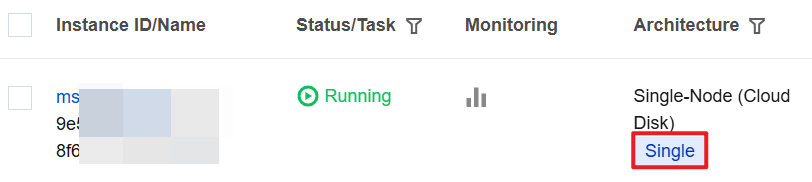
The architecture of a single-node primary instance displayed in the console is shown in the following figure.
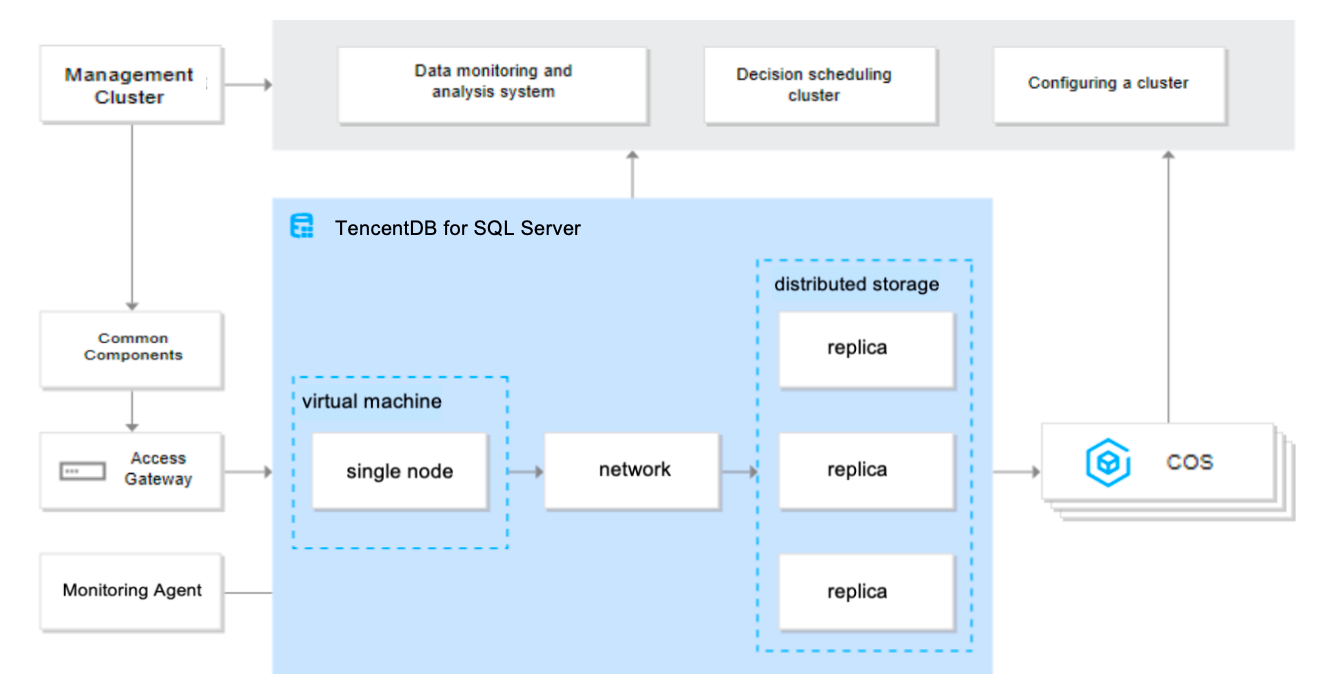
The single node architecture is deployed using a solitary node, offering an affordable solution with impressive cost-effectiveness. Its distinguishing features include:
Decoupling of computational and storage units allows for quick recovery by switching nodes in case of computational node failures. The underlying data is stored in triplicate on cloud disks, ensuring reliable data safeguarding. In the event of disk failures, rapid restoration is made possible through disk snapshot mode.
Offering over 20 monitoring metrics, such as database connections, access, and resource usage, the single node architecture supports setting up corresponding warning strategies. This is considerably more convenient compared to a self-built CVM while also offering significant cost advantages. Deployed on a CVM, the database performance provided by a single node is superior than a user-built system.
The single node architecture leverages premium cloud disks as its underlying storage medium, making it suitable for 90% of I/O scenarios. This attribute coupled with its reliable performance and cost-effectiveness highlights its quality and value.
Note:
Single-node instances are suitable for personal learning, small-to-medium sized enterprise’s ISV software (such as financial, CRM, ERP etc. software clients), web-based applications, non-core small enterprise systems, and TEST-IMAGE environments.
As the single node architecture comprises a singular node, the recovery time following a node failure would be slightly longer than a CVM, as this process involves instance startup and data restoration.
For businesses requiring high availability, it is recommended to use two-node instances (formerly High Availability/Cluster Edition).


ヘルプとサポート

この記事はお役に立ちましたか?

フィードバック