TencentDB for SQL Server Methods for Regular Maintenance
Download
フォーカスモード
フォントサイズ
TencentDB for SQL Server, as an enterprise-grade relational database, has its stable operation directly impacting business continuity and data security. Regular maintenance serves as a core approach to ensuring its performance, data integrity, and high availability. This article introduces routine maintenance methods for TencentDB for SQL Server from two aspects: regularly updating statistics and maintaining index fragmentation.
Regularly Update Statistics
SQL Server Query Optimizer uses statistics to create query plans that enhance query performance. For most query scenarios, the Query Optimizer can generate corresponding statistics for optimal query plans. However, in certain scenarios, creating new statistics is necessary to enable the optimizer to produce the best query plan. For example: For large tables with substantial data volume and frequent data changes, when the scope of data modifications does not reach the threshold for automatic updates of statistics, the Query Optimizer may fail to create the highest-performing query plan for the modified data range. This can lead to degraded SQL performance, which may result in business impact.
For this scenario, you can configure the Job in the Agent to regularly update table statistics. Example:
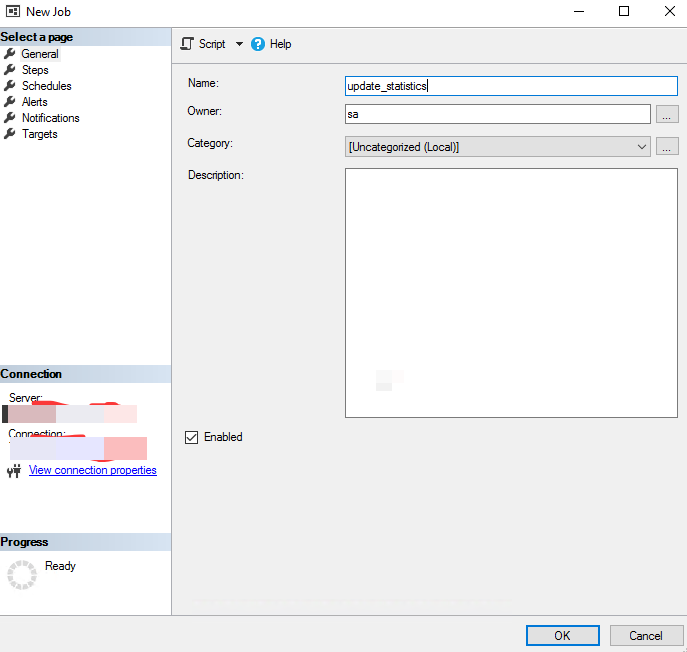
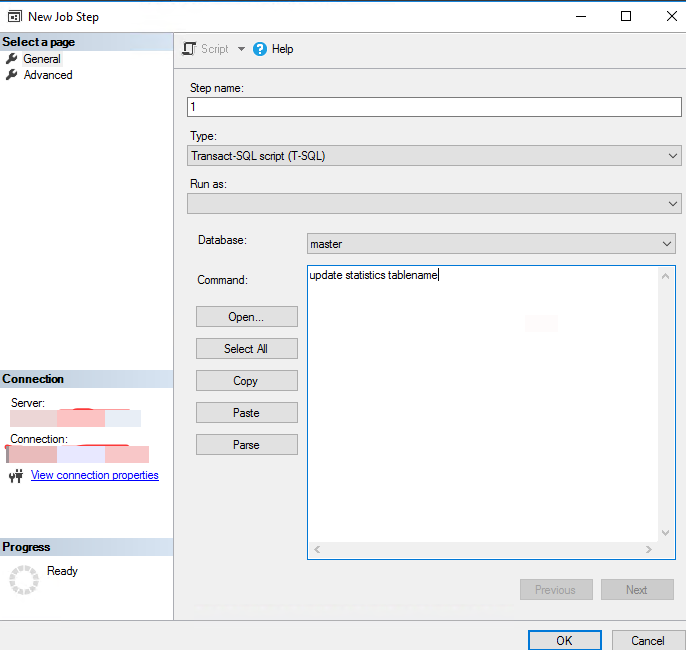
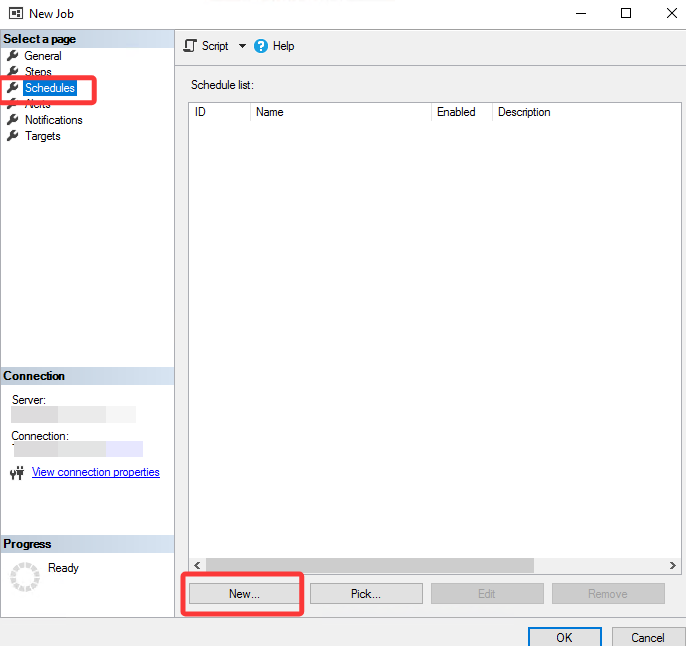
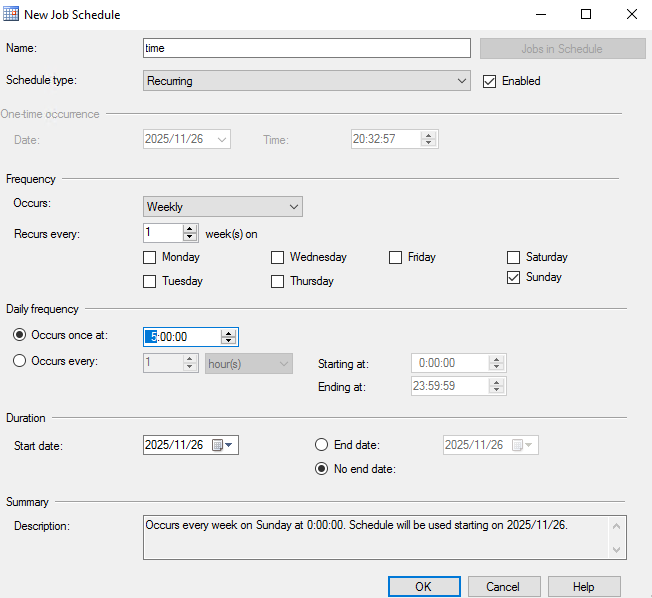
The above screenshot demonstrates the steps to create a Job for updating statistics at 05:00 daily for a specific table in a database. The table to be updated and the scheduled execution time can be evaluated and modified according to business requirements.
Regular Maintenance of Index Fragmentation
For tables with frequent data changes, index fragmentation occurs after prolonged and repeated data modifications. When index fragmentation becomes severe, the efficiency of related SQL queries decreases accordingly. Therefore, regularly checking index fragmentation and performing defragmentation is a crucial Ops task.
For this scenario, you can check indexes in the database with index fragmentation exceeding 50% and generate rebuild scripts.
Note:
Index rebuilding may cause blocking and significant log generation. It is recommended to perform this operation during off-peak business hours and ensure sufficient storage space is available on the instance.
use [dbname]SET NOCOUNT ONDECLARE @Objectid INT, @Indexid INT,@schemaname VARCHAR(100),@tablename VARCHAR(300),@ixname VARCHAR(500),@avg_fip float,@command VARCHAR(4000)DECLARE IX_Cursor CURSOR FORSELECT A.object_id,A.index_id,QUOTENAME(SS.name) AS schemaname,QUOTENAME(OBJECT_NAME(B.object_id,B.database_id))as tablename ,QUOTENAME(A.name) AS ixname,B.avg_fragmentation_in_percent AS avg_fip FROM sys.indexes A inner join sys.dm_db_index_physical_stats(DB_ID(),NULL,NULL,NULL,'LIMITED') AS BON A.object_id=B.object_id and A.index_id=B.index_idINNER JOIN sys.objects OS ON A.object_id=OS.object_idINNER JOIN sys.schemas SS ON OS.schema_id=SS.schema_idWHERE B.avg_fragmentation_in_percent>10 and B.page_count>20 AND A.index_id>0 AND A.is_disabled<>1--AND OS.name='book'ORDER BY tablename,ixnameOPEN IX_CursorFETCH NEXT FROM IX_Cursor INTO @Objectid,@Indexid,@schemaname,@tablename,@ixname,@avg_fipWHILE @@FETCH_STATUS=0BEGINIF @avg_fip>=50.0BEGINSET @command=N'ALTER INDEX '+@ixname+N' ON '+@schemaname+N'.'+ @tablename+N' REBUILD ';END--PRINT @commandEXEC(@command)FETCH NEXT FROM IX_Cursor INTO @Objectid,@Indexid,@schemaname,@tablename,@ixname,@avg_fipENDCLOSE IX_CursorDEALLOCATE IX_Cursor
Configuring the above script as a regularly scheduled Job enables regular maintenance of index fragmentation.
Note:
Methods for Job configuration can refer to the setup approach in Regularly Updating Statistics. Simply modify the script in the steps to the one above.
フィードバック