Account Permissions and Permission Control
Download
フォーカスモード
フォントサイズ
The permissions for TencentDB for SQL Server are mainly divided into 3 types: standard permission accounts, privileged permission accounts, and designated accounts. Each type of permission serves different functional purposes. This document will introduce the practices for account permissions and permission control.
Permission Category and Description
Standard permission account: It can grant read or write-related permissions for a single business database based on business needs.
Privileged permission account: It can grant the dbowner permission for ALL business databases, and an instance can only create one privileged permission account.
Designated account: It can grant permissions for special operations, such as viewing errorlog and specifying which databases it is allowed to access.
Creating Accounts with Different Permissions
1. Log in to the TencentDB for SQL Server console and find the target instance.
2. On the instance management page, select Account Management > Create Account, enter relevant information in the pop-up dialog box, and then click OK after confirmation.
Note:
Permission Control
Currently, the TencentDB for SQL Server console provides permission control at the table level. If there is a need for more fine-grained permission control, you can connect to the instance using a privileged permission account through SSMS to perform the operations.
Step 1: Creating a Privileged Permission Account
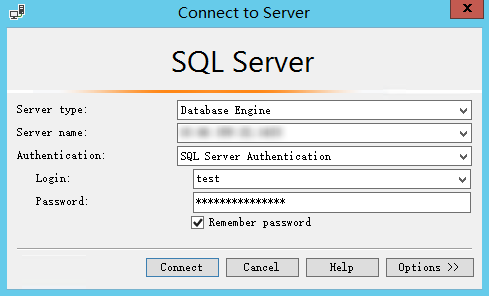
Step 2: Connecting to the SQL Server Instance Through SSMS
After connecting to the SQL Server instance through SSMS, you can perform fine-grained permission control. For detailed steps on connecting to the instance, see Connecting to TencentDB for SQL Server Instance from Local System. Note that you need to use the created privileged permission account and password to log in to SSMS.
Step 3: Authorizing Through Commands
Note:
When the following command is used, replace the variables with actual field information:
<Table name>: Replace <table name> with the actual name.
<Account name>: Replace <account name> with the actual name.
<Permission>: Replace <permission> with the actual SQL.
Example: Granting Permission to a Single Table
GRANT SELECT ON <table name> TO <account name>;--GRANT UPDATE ON <table name> TO <account name>;--GRANT INSERT ON <table name> TO <account name>;--GRANT DELETE ON <table name> TO <account name>;
It indicates granting <account name> the permission to perform query, update, insertion, or deletion operations in <table name>.
Example: Granting Permissions to Specific Fields of a Table
GRANT SELECT(col1,col2,col3) ON <table name> TO <account name>;
It indicates granting <account name> the permission to perform query operations on some columns (col1, col2, and col3) of <table name>.
Example: Granting Permissions to Execute Stored Procedures or Create a View
GRANT EXEC TO <account name>;--GRANT CREATE VIEW TO <account name>;
The first line of command indicates granting <account name> the permission to execute stored procedures.
The second line of command indicates granting <account name> the permission to create a view in the current database.
Example: Revoking Granted Fine-Grained Permissions
REVOKE <permission> TO <account name>;--For example, REVOKE CREATE VIEW TO <account name>;
フィードバック