This document uses the FIO test tool. To avoid damaging important system files, do not perform any FIO test on the system disk.
To avoid data corruption due to damaged metadata of the underlying file system, do not perform stress tests on the business data disk. Instead, use the cloud disk with no business data stored for tests and create a snapshot in advance to protect your data.
Ensure the /etc/fstab file configuration items do not contain the mounting configuration of the disk to be tested. Otherwise, CVM may fail to launch.
Metrics
Tencent Cloud CBS devices vary in performance and price by type. For more information, see Cloud Disk Types. Because different applications have different workloads, if the number of I/O requests is low, the cloud disk may not play its full performance.
The following metrics are generally used to measure the performance of a cloud disk:
IOPS: Read/write count per second. IOPS is determined by the underlying drive type of the storage device.
Throughput: Read/written data volume per second, in MB/s.
Latency: Time from I/O operation sending to receiving, in microseconds.
Test Tool
FIO is a tool for testing disk performance. It is used to perform stress test and verification on hardware. This document uses FIO as an example.
We recommend that you use FIO together with libaio's I/O engine to perform the test. Install FIO and libaio with reference to Tool Installation.
Recommended Test Objects
We recommend that you perform FIO test on empty disks that do not store important data, and re-create the file system after completing the test..
When testing disk performance, we recommend that you directly test raw data disks (such as /dev/vdb).
When testing file system performance, we recommend that you specify the specific file (such as /data/file) for testing.
2. Run the following command to check whether the cloud disk is 4KiB-aligned.
fdisk -lu
As shown below, if the Start value in the command output is divisible by 8, then the disk is 4KiB-aligned. Otherwise, complete 4KiB alignment before testing.
3. Run the following commands in sequence to install the testing tools, FIO and libaio.
yum install libaio -y
yum install libaio-devel -y
yum install fio -y
Once completed, start testing the cloud disk performance as instructed in the test example below.
Test Example
The testing formulas for different scenarios are basically the same, except the rw, iodepth, and bs (block size) parameters. For example, the optimal iodepth for each workload is different as it depends on the sensitivity of your application to the IOPS and latency.
Parameters:
Parameter
Description
Sample value
bs
Block size of each request, which can be 4 KB, 8 KB, or 16 KB.
4k
ioengine
I/O engine. We recommend that you use Linux's async I/O engine.
libaio
iodepth
Queue depth of an I/O request.
1
direct
Specifies direct mode.
True (1) indicates that the O_DIRECT identifier is specified, the I/O cache will be ignored, and data will be written directly.
False (0) indicates that the O_DIRECT identifier is not specified.
The default is True (1).
1
rw
Read and write mode. Valid values include read, write, randread, randwrite, randrw, and rw, readwrite.
read
time_based
Specifies that the time mode is used. As long as FIO runs based on the time, it is unnecessary to set this parameter.
N/A
runtime
Specifies the test duration, which is the FIO runtime.
600
refill_buffers
FIO will refill the I/O buffer at every submission. The default setting is to fill the I/O buffer only at the start and reuse the data.
N/A
norandommap
When performing random I/O operations, FIO overwrites every block of the file. If this parameter is set, a new offset will be selected without viewing the I/O history.
N/A
randrepeat
Specifies whether the random sequence is repeatable. True (1) indicates that the random sequence is repeatable. False (0) indicates that the random sequence is not repeatable. The default value is True (1).
0
group_reporting
When multiple jobs are concurrent, statistics for the entire group are printed.
N/A
`name`
Name of the job.
fio-read
size
Address space of the I/O test.
100 GB
filename
Test object, which is the name of the disk to be tested.
/dev/sdb
Common use cases are as follows:
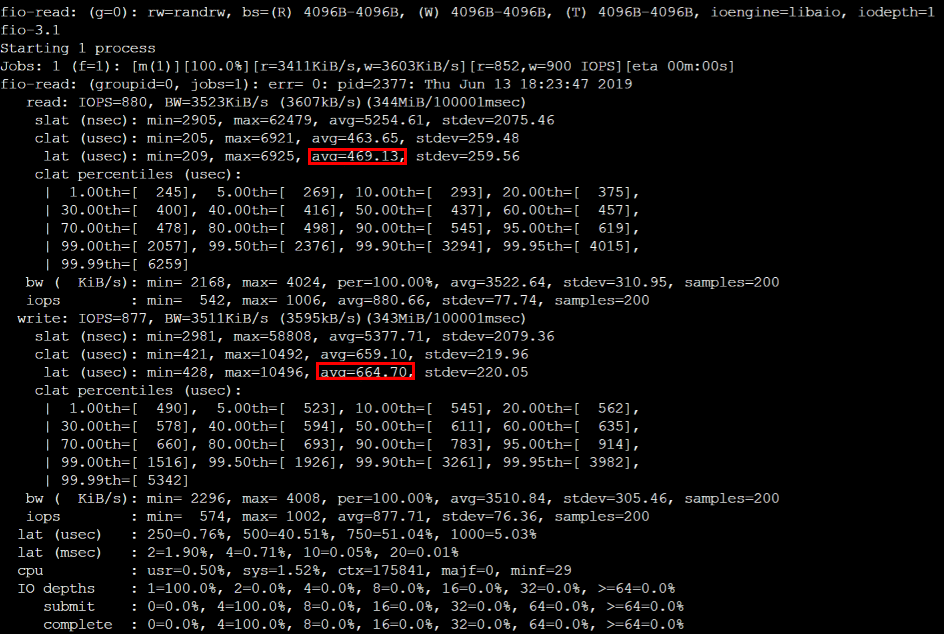
bs = 4k iodepth = 1: Random read/write test, which can reflect the disk latency.
Warning:
To avoid damaging important files in the system, do not perform FIO test on the system disk.
To avoid data corruption due to damaged metadata of the underlying file system, do not perform stress tests on the business data disk. Instead, use the cloud disk with no business data stored for tests and create a snapshot in advance to protect your data.
Run the following command to test the random read latency of the disk:
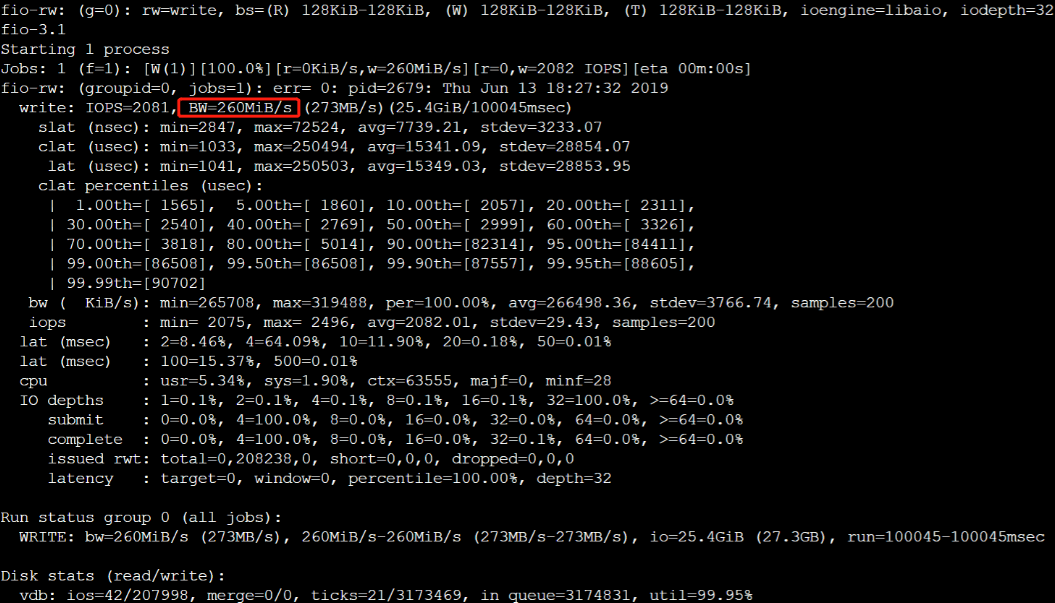
bs = 128k iodepth = 32: Sequential read/write test, which can reflect the disk throughput.
Warning:
To avoid damaging important files in the system, do not perform FIO test on the system disk.
To avoid data corruption due to damaged metadata of the underlying file system, do not perform stress tests on the business data disk. Instead, use the cloud disk with no business data stored for tests and create a snapshot in advance to protect your data.
Run the following command to test the sequential read throughput bandwidth:
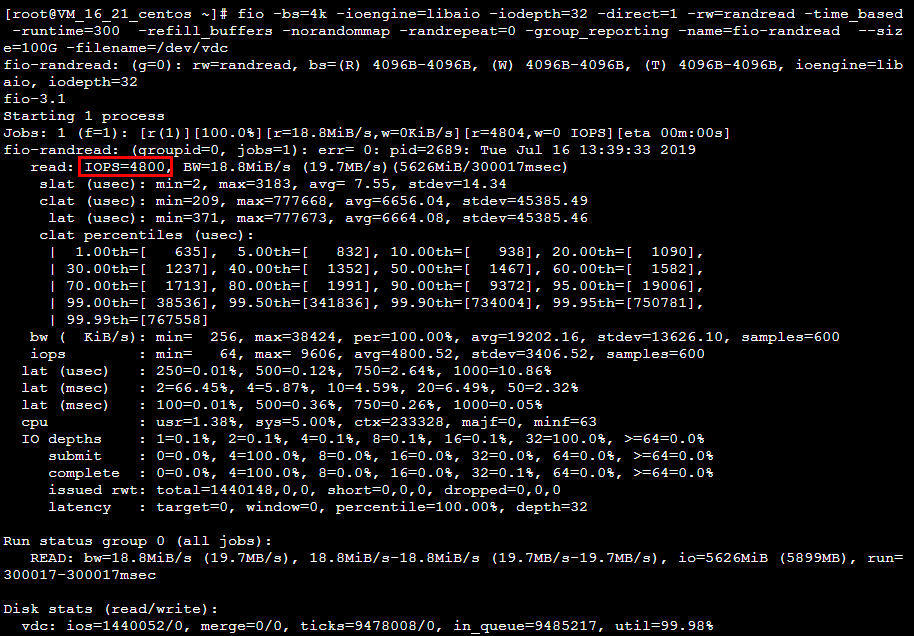
bs = 4k iodepth = 32: Random read/write test, which can reflect the disk IOPS.
Warning:
To avoid damaging important files in the system, do not perform FIO test on the system disk.
To avoid data corruption due to damaged metadata of the underlying file system, do not perform stress tests on the business data disk. Instead, use the cloud disk with no business data stored for tests and create a snapshot in advance to protect your data.
Run the following command to test the random read IOPS of the disk: