Collecting Business Logs
Download
フォーカスモード
フォントサイズ
This document describes how to create and configure business log collection rules in a container environment through Tencent Cloud Log Service (CLS) to achieve structured log collection and shipping.
Operation Steps
1. Log in to the Serverless Cloud Function (SCF) console. In the left sidebar, choose Data Engineering > Workflow.
2. On the Workflow page, click the service name to go to the workflow details page.
3. Select Log Management and click Add Collection Configuration.
4. In the Create Log Collection Rule pop-up window, specify a custom name for the collection rule.
5. Configure the CLS consumer as follows:
Type: CLS.
Log Region: CLS supports cross-region log shipping. Select the target region for log shipping from the drop-down list.
Logset: Based on the selected region, the system displays logsets you have created. If no existing logset is suitable, you can create a new one in the CLS console. For more information, see Creating a Logset.
Log Topic: Select an existing log topic under the selected logset.
Note:
CLS does not support cross-region log shipping between regions in China and regions outside China.
A single log topic supports only one type of log. Business logs and event logs cannot use the same topic, as this may cause overwriting. Make sure that the selected log topic is not occupied by other collection configurations. If a logset already has 500 log topics, you can no longer create a log topic.
6. Select the collection type and configure the log source. Supported collection types include container standard output and container file path.
Note:
Standard output logs from a container support only stderr and stdout logs.
The log source supports All Containers and Specified Pod Labels, as shown in the following figure:
All Containers

Namespace Specification Method: Select a namespace specification method. Specify Namespace and Exclude Namespace are supported.
Associated Namespace: Specify the namespace.
Specified Pod Labels
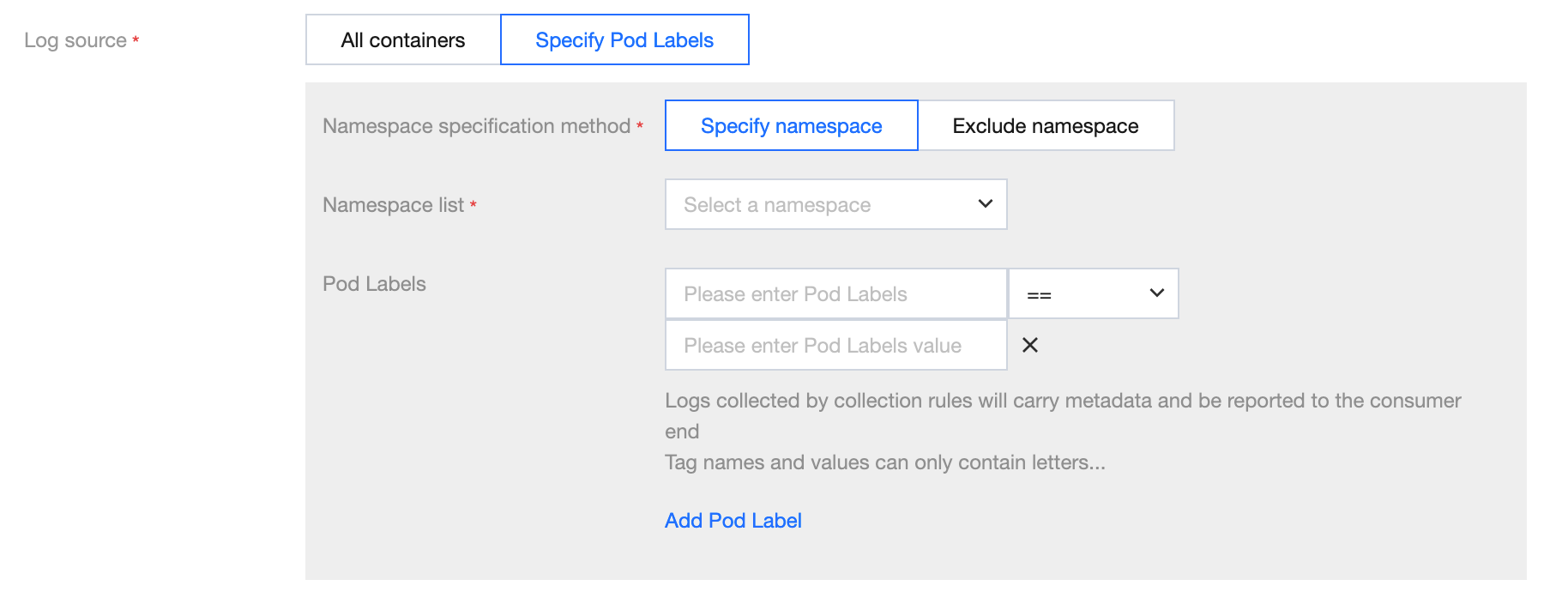
Namespace Specification Method: Select a namespace specification method. Specify Namespace and Exclude Namespace are supported.
Associated Namespace: Specify the namespace.
Pod Label: Add a Pod label to match. By default, all containers matching this label are collected.
The log source supports Specified Pod Labels only.
The collection file path supports both specific paths and wildcard rules. For example, if the container file path is
/opt/logs/*.log, you can specify the collection path as /opt/logs and the filename as *.log, as shown in the following figure: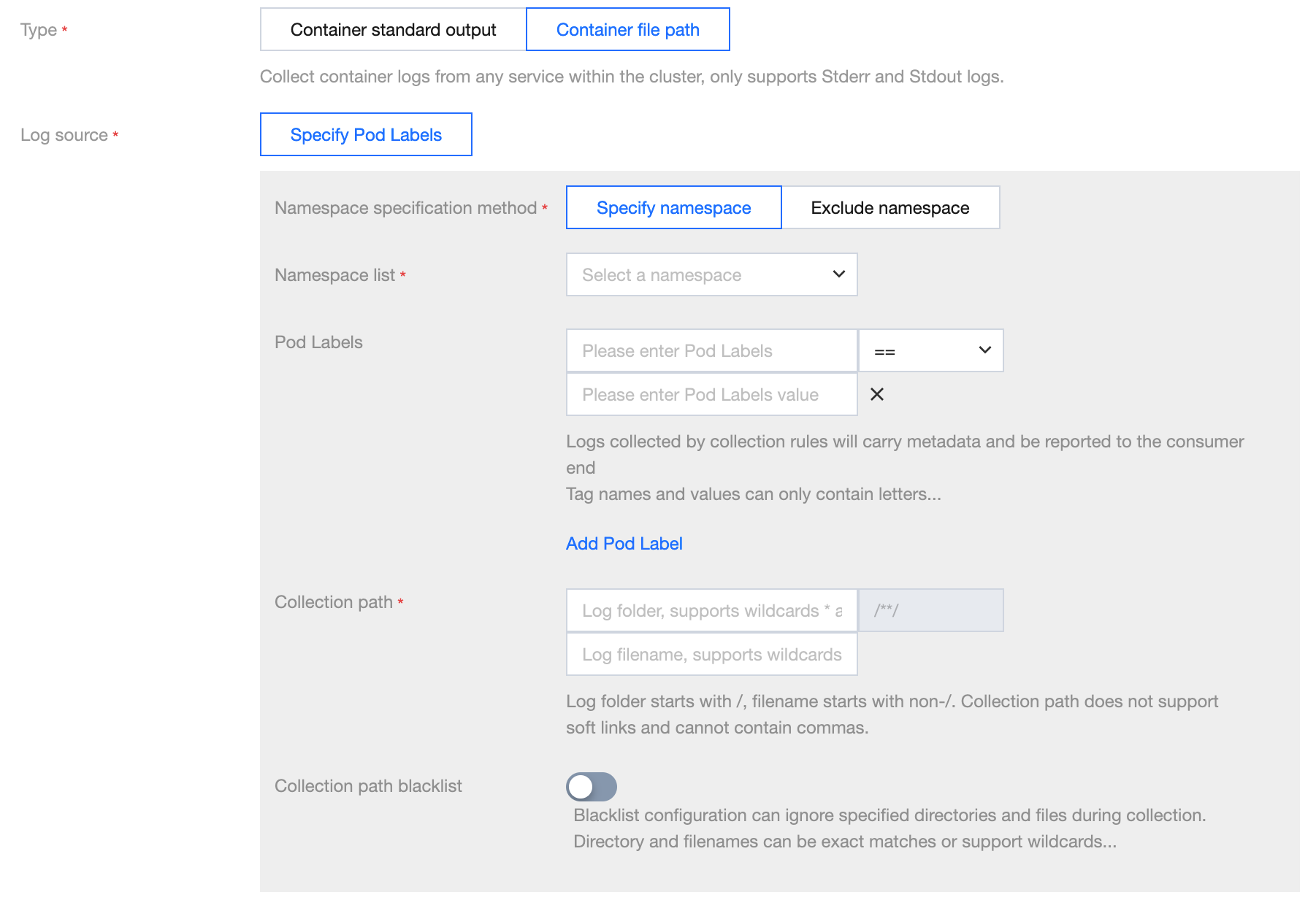
Note:
The container file path cannot be a symbolic link or hard link. Otherwise, the actual path of the soft link will not exist in the collector's container, resulting in a log collection failure.
7. Metadata configuration: support custom metadata or select all metadata.
Field Name | Meaning |
container_id | Container ID to which logs belong. |
container_name | Container name of the log. If multiple containers under a pod mount the same path, metadata will concatenate the container names with ';'. |
image_name | Image name/IP of the container to which logs belong. |
namespace | The namespace of the pod to which logs belong. |
pod_uid | UID of the pod to which logs belong. |
pod_name | Name of the pod to which logs belong. |
pod_ip | IP address of the pod to which logs belong. |
cluster_id | Cluster ID to which logs belong. |
pod_label_{label name} | Label of the pod to which logs belong. For example, if a pod has two labels: app=nginx and env=prod, then the uploaded log will be accompanied by two metadata entries: pod_label_app:nginx and pod_label_env:prod. |
When using an existing log topic, you can set suitable indexes as needed. The recommended configuration is
pod_name, namespace, container_name, making it easy for log retrieval.8. Configure the collection policy. You can choose full or incremental.
Full: Full collection collects data from the beginning of the log file.
Incremental: Incremental collection starts collecting from 1M before the end of the file (if the log file is smaller than 1M, it is equivalent to full collection).
Note:
Full collection scenario
Collection rule takes effect with a delay: To ensure all key logs during Pod startup are collected, configure a full collection policy. The full collection policy enables collecting all log data indiscriminately before the rule takes full effect, effectively avoiding log loss.
Incremental collection scenario
Collection path is CBS: When the collection path is on CBS, use the incremental collection strategy to avoid re-collection caused by Pod reconstruction.
Abnormal scenarios
Collection path is CFS: Full collection can lead to re-collection, and multiple Pods may submit identical logs simultaneously, resulting in duplicate billing in CLS. It is advisable not to use CFS for log sources.
9. Click Next and select the log parsing method.
Encoding Mode: UTF-8 and GBK are supported.
Extraction Mode: Multiple types of extraction modes are supported. The details are as follows:
Parsing mode | Description | Documentation |
Multi-line full-text | A complete log spans multiple lines and is matched using the first-line regular expression. When a line of log matches the preset regular expression, it is considered to be the beginning of a log. The next line beginning is used as the end identifier of the log, and a default key-value CONTENT is also set. The log time is based on collection time. Support automatically generated regular expression. | |
JSON | JSON format logs automatically extract the first-level key as the field name and the first-level value as the field value. The entire log will be structured in this way, and each complete log will end with a line break character \\n. |
Filter: LogListener only collects logs that meet filter rules. Keys support exact matching, and filtering rules support regular expression matching. For example, you can configure the filter to only collect logs where ErrorCode is set to 404. You can enable the filter and configure rules as needed.
Note:
A log topic currently supports only one collection configuration. Ensure that the logs of all containers that use this log topic can adopt the selected log parsing method. If you create a different collection configuration under the same log topic, the old collection configuration is overwritten.
10. Click Done to complete the creation of the container log collection rule sent to CLS.
フィードバック