Log Collection Overview
Download
フォーカスモード
フォントサイズ
Scenarios
The log collection feature sends logs from the standard output of containers or from specific file paths within the container cluster where the workflow service is deployed to Tencent Cloud Log Service (CLS).
This feature is suitable for users who need to store and analyze task running logs.
The log collection feature should be manually enabled and configured with collection rules for each workflow service cluster. After the feature is enabled, a log collection agent runs within the cluster. Based on the collection source, CLS log topic, and log parsing method configured in the collection rules, the agent collects logs from the specified source and sends the content to the log consumer. You can refer to the following steps to enable the log collection feature for a cluster.
Basic Concepts
Log Types
You can enable either business logs or event logs.
Business logs: used to collect standard output (stdout) and standard error (stderr) logs from containers. Multiple collection rules can be configured. Logs are shipped to the specified log topic.
Event logs: used to collect events from the Kubernetes cluster where the workflow runs, including important events such as Pod creation, deletion, and scheduling.
Log Collection Agents
The agent used to collect log information is LogListener.
Log Rules
You can use log rules to specify the log collection source, log topic, log parsing mode, and filter configuration. The log collection agent monitors changes to log collection rules, and any changes take effect within a maximum of 10 seconds.
Note:
When you use an existing log topic, the indexing rules for different log types are as follows:
Business logs: It is recommended to configure pod_name, namespace, and container_name as indexes, making it easy to search.
Event logs: Indexes are automatically created, overriding the existing indexes of the topic. For more information, see Event Log Index Description.
It is recommended to create an independent log topic for log collection to avoid mixing with other online business operations.
Log Sources
Log sources include the standard output of specified containers and file paths within containers.
When you collect standard output logs from containers, you can select logs from all containers or from container services within specified Pod Labels as the collection source.
When you collect logs from container file paths, you can specify logs from file paths of containers within Pod Labels as the collection source.
Consumers
You can select a logset and log topic of CLS as the consumer.
Extraction Modes
The log collection agent supports sending collected logs to the user-specified log topic in the form of multi-line full text or JSON.
Filters
After the filter is enabled, you can collect only a subset of logs based on specified rules. The key supports exact matching, and the filtering rules support regular expression matching. For example, you can collect only logs where
ErrorCode = 404.Operation Steps
Enabling Log Collection
1. Log in to the Serverless Cloud Function (SCF) console. In the left sidebar, choose Data Engineering > Workflow.
2. On the Workflow page, click the service name to go to the workflow details page.
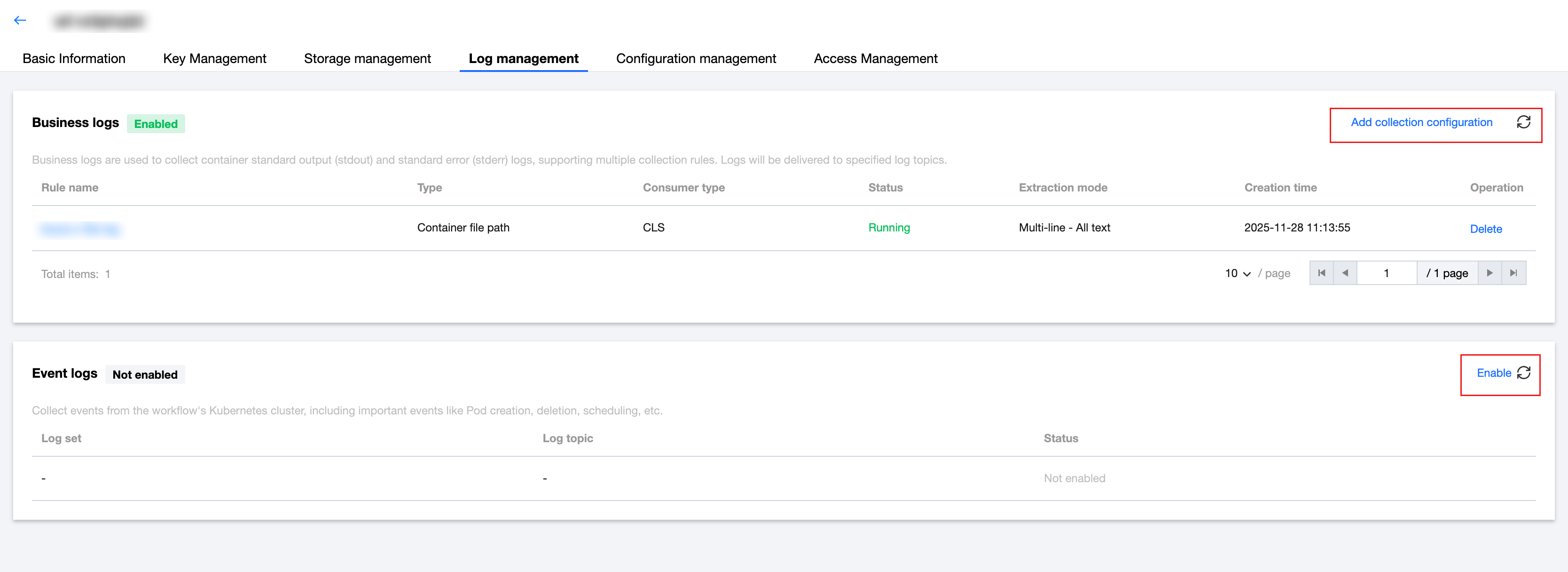
3. Select Log Management, and then choose to either add a business log collection configuration or enable event log collection, as shown in the following figure:
フィードバック