tencent cloud

TencentDB for TcaplusDB

Release Notes
Product Introduction
Product Overview
Benefits
Use Cases
Architecture
Regions
Purchase Guide
Product Pricing
Payment Overdue
Getting Started
Basic Concepts
Creating Cluster
Creating Table Group
Creating Table
Get Connection Information
Accessing TcaplusDB
Operation Guide
Managing Cluster and Table Group
Managing Table
Monitoring and Alarming
Access Management
Tag
Task List
TcaplusDB Client
Accessing by Client Tool
Client Tool Commands
TcaplusDB SDK
Release History
SDK Download
C++ SDK API
TcaplusDB Error Codes
SDK Installation
Directions for Protobuf Table SDK for C++
Directions for TDR Table SDK for C++
TcaplusDB RESTful APIs
Description
Go
Java
PHP
Python
Downloading RESTful API Samples in Multiple Languages
Practical Tutorial
Best Practice for Table Structure Design
Best Practice for Database Interaction
FAQs
Database Features
Database Use
Database Principles
API Documentation
History
Introduction
API Category
Making API Requests
Table Group APIs
Other APIs
Table APIs
Cluster APIs
Data Types
Error Codes
Service Agreement
Service Level Agreement
Terms of Service
Glossary
Contact Us

Get Connection Information

PDF
포커스 모드
폰트 크기
마지막 업데이트 시간: 2024-12-04 10:12:05
This document describes how to get TcaplusDB access information in the console.
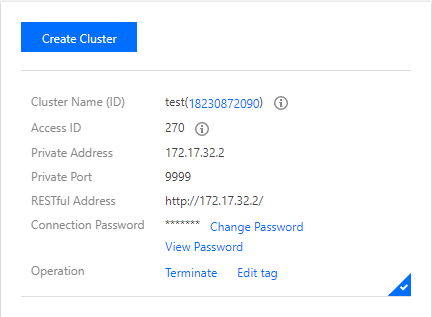
The Cluster List page provides some cluster information. The "Access ID", "Connection password", "Private Address", and "Private Port" displayed on this page are important parameters for a client to connect to TcaplusDB.
Access ID: access ID to which the cluster belongs.
Connection Password: application password.
Private address: the address to connect to TcaplusDB.
Private port: the port to connect to TcaplusDB.


도움말 및 지원

문제 해결에 도움이 되었나요?

피드백