Livy Overview
Download
포커스 모드
폰트 크기
Apache Livy is a service that enables easy interaction with a Spark cluster over a REST interface. It enables easy submission of Spark jobs or snippets of Spark code, synchronous or asynchronous result retrieval, as well as Spark Context management, all via a simple REST interface or an RPC client library. Apache Livy also simplifies the interaction between Spark and application servers, thus enabling the use of Spark for interactive web/mobile applications.
Livy Features
Additional features include:
Have long running Spark Contexts that can be used for multiple Spark jobs, by multiple clients.
Share cached RDDs or Dataframes across multiple jobs and clients.
Multiple Spark Contexts can be managed simultaneously, and the Spark Contexts run on the cluster (YARN/Mesos) instead of the Livy Server, for good fault tolerance and concurrency.
Jobs can be submitted as precompiled jars, snippets of code or via java/scala client API
Ensure security via secure authenticated communication.
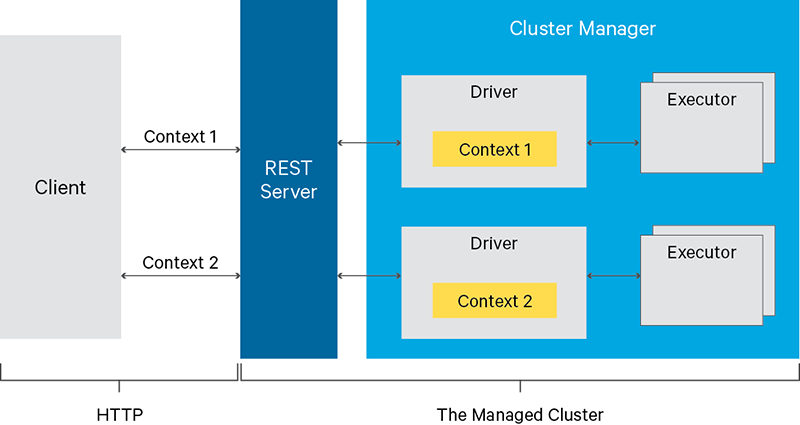
Using Livy
1. Access
http://IP:8998/ui to enter the UI of Livy (this IP is the public IP. You need to apply for a public IP for the server where Livy is installed and set the security group policy to open the port for access).2. Create an interactive session.
curl -X POST --data '{"kind":"spark"}' -H "Content-Type:application/json" IP:8998/sessions
3. View the alive sessions on Livy.
curl IP:8998/sessions
4. Execute the code snippet to perform a simple addition operation (here, specify session 0, or specify another session if there are multiple sessions).
curl -X POST IP:8998/sessions/0/statements -H "Content-Type:application/json" -d '{"code":"1+1"}'
5. Calculate the pi (execute the JAR package).
Step 1. Upload the JAR package to HDFS, such as to
/usr/local/spark-examples_2.11-2.4.3.jar.
Step 2. Run the following command:curl -H "Content-Type: application/json" -X POST -d'{ "file":"/usr/local/spark-examples_2.11-2.4.3.jar","className":"org.apache.spark.examples.SparkPi" }' IP:8998/batches
6. Check whether the code snippet has been successfully executed. You can also view it on the UI at
http://IP:8998/ui/session/0.curl IP:8998/sessions/0/statements/0
7. Delete the session.
curl -X DELETE IP:8998/sessions/0
Notes
Open configuration files
Currently, open configuration files include
livy.conf and livy-env.sh, both of which can be used to modify the configuration through configuration distribution. Check the EMR console for the actual open configuration files.Changing the port used by Livy
By default, Livy runs on port 8998, which can be changed with the
livy.server.port configuration option in the livy.conf configuration file.If Hue is installed in the cluster, due to the connectivity between Hue and Livy, the port for Hue also needs to be changed with the
livy_server_port=8998 configuration option in the pseudo-distributed.ini configuration file at /usr/local/service/hue/desktop/conf. The service needs to be restarted after the change.Unless necessary, we don't recommend you modify the port used by Livy. Instead, you can control the access by using a security group. Any change may cause other potential problems.
Livy deployment
Currently, Livy is deployed on all master nodes by default. You can also deploy it on router nodes by scaling out router nodes.
피드백