If you want to process live streams using MPS, you need to create a live orchestration, configure a task such as live stream recording, and specify the output bucket and directory.
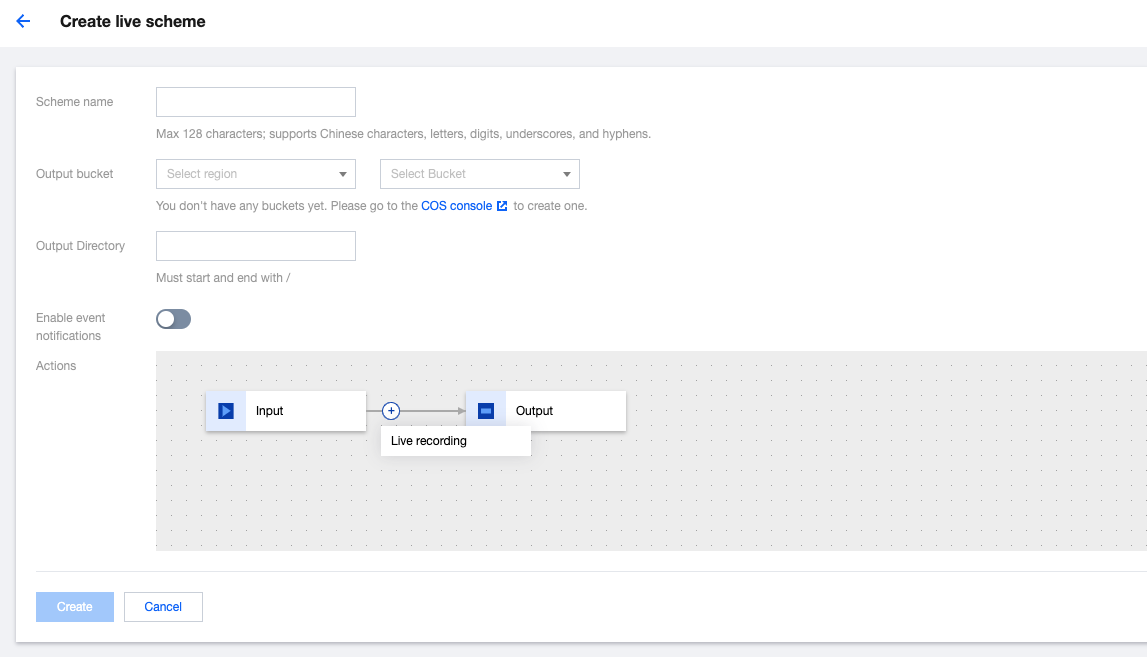
2. On the Create Live Orchestration page, you can create a orchestration process and configuration information that meet your specific business scenario needs.
Configure Basic Information
Configuration Item
Required
Configuration Description
Scheme name
Yes
You can enter a combination of letters, digits, underscores (_), and hyphens (-). The length cannot exceed 128 characters. Example: "MPS".
Output bucket
Yes
By default, the output bucket is the same as the trigger bucket. You can also select another bucket in the same region of the trigger bucket corresponding to the specified APPID as the output bucket. Newly generated video files will be stored in the bucket you select once the scheme execution is completed.
Output directory
No
The directory should start and end with a forward slash (/).
You can quickly build a business process by defining process nodes and templates of the orchestration.
Configure Actions
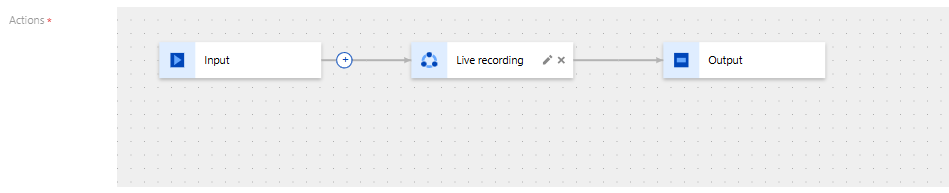
In this area, you can define the process for the entire service, add different service nodes (such as live recording), and configure different templates for each node. The detailed configuration instructions are as follows:
1. Click the + button to select the required action from the drop-down list and add it.
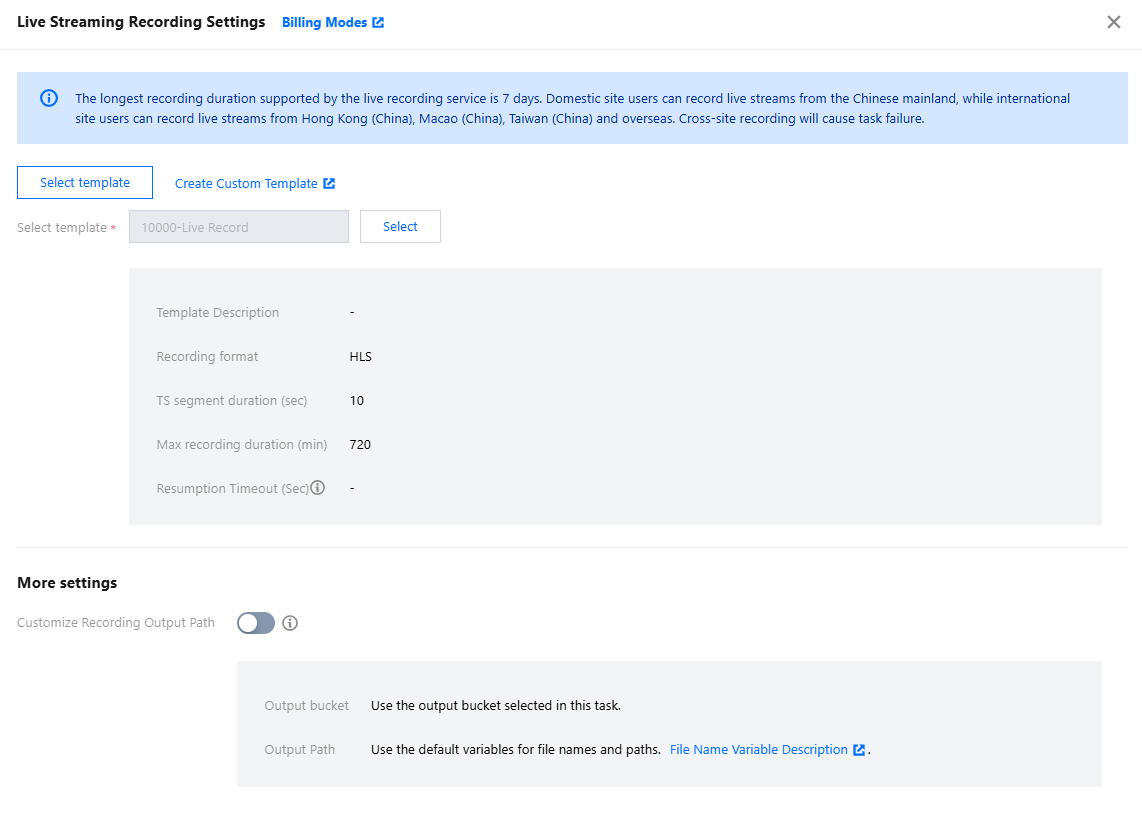
2. Click the edition button on the right of the added action for detailed configuration. Fill in the information on the detailed configuration page and click Save.
3. In addition, for the node of the live recording type, in More Settings, you can also customize the recording output path. Currently, it supports saving recording files to Tencent Cloud Object Storage (COS) and AWS S3. Here, the customized recording output path has a higher priority than the output path of the live task. If the Customize Recording Output Path is not enabled, the output path of the recording files will remain consistent with the output path of the live task by default.
Tencent Cloud COS
Configuration Item
Overview
Output Bucket
Select a region.
Select Bucket.
Output path
If you need to customize the output path or file name, please fill in the specific output path and output filename. The format should be: /custom path/filename_{variable name}.{format}.
The default output path is: /{taskId}/{rand}/{streamId}_record_{definition}.{format}. The {rand} here is a random number variable. If you remove {rand}, under the same conditions of other variable parameters, it may lead to mutual overlap of multiple recording result files. Modify or delete {rand} with caution.
If you don't need to define the file output path and file name, you can also set the value in this input box to empty. The recording files will be stored in the root directory of the output Bucket.
AWS S3
Configuration Item
Overview
Subaccount Info
AWS subaccount info: secretID, secretKey.
Output S3 Bucket
S3 region: Please fill in the S3 region. Refer to the specification on the AWS website for the fill-in format. For example: ap-southeast-1.
S3 name: Please fill in the name of the S3 you maintain in AWS.
Output file path
If you select the output path type as AWS S3, this output file path is required information.
Please fill in the specific output path and output filename. The format should be: /custom path/filename_{variable name}.{format}.
The default output path is: /{taskId}/{rand}/{streamId}_record_{definition}.{format}. The {rand} here is a random number variable. If you remove {rand}, under the same conditions of other variable parameters, it may lead to mutual overlap of multiple recording result files. Modify or delete {rand} with caution.
4. After the aforementioned information is configured, click Create to create the orchestration.