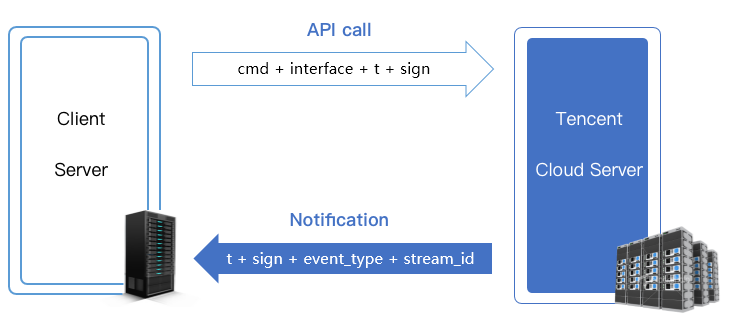
Your server can communicate with the Tencent Cloud server using the methods below.
API call: Tencent Cloud provides a series of live streaming APIs for your backend server to query and manage stream status, among others.
Notification: Tencent Cloud can send messages (JSON) to your backend server when particular events occur, for example, when the status of a live stream changes or when a recording file is generated. You only need to register a callback URL in Tencent Cloud to receive event notifications.
API Call
Tencent Cloud offers a series of live streaming APIs for your backend sever to query and manage stream status, among others. For details, please see API Category.
Calling method
You can call the APIs on your server using the HTTP GET method (i.e., inserting the query parameters in the request URL). For the specific method, see the sample code in the API documentation.
Security mechanism
Using HTTP for API calls can ensure performance, but it’s essential to introduce a mechanism to secure the communication between your server and the Tencent Cloud backend.
All live streaming cloud APIs use the same security mechanism: t + sign verification.
t (expiration time): If the current time is later than the t value specified in an API request or notification, the request or notification is considered invalid. This can prevent network replay attacks. The value of t is a Unix timestamp, i.e., the number of seconds that have elapsed since 00:00:00 UTC/GMT, January 1, 1970.
sign (security signature):sign = MD5 (key + t). This means splicing the encryption key and t into a string and calculating its MD5 checksum. The encryption key is the CGI calling key, which can be specified in the CSS console. The directions below show how to configure authentication for stream publishing.
1.1 Click Domain Management, find your publishing domain, and click Manage.
1.2 Click Push Configuration and, in the Authentication Configuration section, and click Edit.
Note:
To configure authentication for a playback domain name, click Domain Management, find your playback domain, click Manage to go to the details page, select Access Control, and click Edit in the Authentication Configuration** section.
How it works
MD5 is an irreversible hash algorithm, so as long as the key is not disclosed, even if attackers have multiple pairs of t and sign values, they cannot calculate the keys and therefore cannot launch spoofing attacks.
Calculation example
Assume that the current time is 11:46:00, July 21, 2021 and the validity period is 1 minute. That means requests or notifications carrying the t value after 11:47:00, July 21, 2021 would be considered invalid.
t ="2021-07-21 11:47:00"=1626839220
Assume that the key is 5d41402abc4b2a76b9719d911017c592. The signature value would be:
To ensure security, verification is required for API calls. If this error occurs during browser verification, check whether there is skey in the cookies.
404
Not Found
Check whether the request includes a host.
Common API errors
Error Message
Description
appid is invalid
appid is invalid because the feature is not activated.
Frontend API access errors
Error Message
Description
cmd is invalid
cmd is invalid because the feature is not activated.
The verification is successful, but the URL has expired. For details, see security mechanism.
Backend API query errors
Error Code
Error Message
Description
0
query data successfully
The query is successful and the data queried is returned.
1000
user is not registered for statapi
The user has not registered statapi. Please submit a ticket to activate it.
1001
user service for statapi was stopped
The statapi access service is suspended for the user.
1201
internal/system error
Internal system error. Report the problem to your service provider by submitting a ticket.
1202
invalid request/request frequency exceeds limit
The request is invalid, usually because the API rate limit is reached. You can apply to relax the limit.
1204
invalid input param
The request parameters are invalid. Check whether the parameters passed in meet the requirements.
1301
has not live stream
This error code is returned if there is no active stream when a real-time API is called.
10003
query data is empty
Query is successful at the backend, but no data is returned. For example, if no audio/video is played for some time and the Get_LivePlayStatHistory API is called, this error code will be returned.
Note:
The above error codes apply only to the APIs listed in this document and do not include event notifications.