tencent cloud

International Partners

Release Notes
Introduction to Channel Partners
Partner Type and Level
Partner Platform Function Overview
User Guide (Reseller)
Become a Partner
Sign in to Partner Center
Account and Organization Information Management
Customer Management
Reseller Management
Managing Reseller
Expense Management
Commission Management
Agreement Management
User Guide (Customer)
Invited to Bind as a Customer
Unbind Reseller
Account Management
Product Purchase
Renewal Management
Bill Management
Cost Management
Agreement Management
User Guide (Partner Academy)
Partner Academy Guide
Becoming an MSP
Becoming a CSP
Agreement Management
Security and Compliance
Access Management
API Documentation
History
Introduction
API Category
Making API Requests
Customer Management APIs
Credit Management APIs
Agent APIs
Bill Management APIs
Voucher Management APIs
Commission Management APIs
Data Types
Error Codes
FAQs
Partner Onboarding
End Customer Relationship Management
Credit Management
Vouchers
Purchase Transactions
Discount Management
About Bills
Organization Management
Contact Us
Glossary

Overview

PDF
포커스 모드
폰트 크기
마지막 업데이트 시간: 2025-11-19 11:00:58
Resellers can manage organization employee information, including addition of personnel and role setting, on the Partner Center Console > Employee Management page. By creating employee accounts with different permissions, resellers can achieve decentralized management of accounts.
Note:
Only in the Partner Center console > Employee Management page can you add employees and assign roles for decentralized management.
Do not directly add or delete users in the Cloud Access Management (CAM) service, otherwise lead to permission conflict with Partner Center employee management.

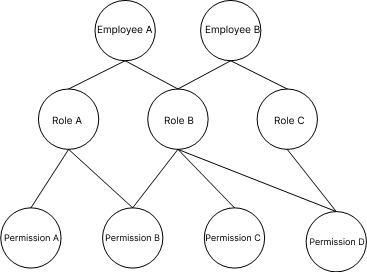
Relationship among Employee, Roles and Permissions

A role is a collection of permissions and can be customized. Each employee can possess up to three roles, with each role containing multiple permissions.


Example: If Employee A is assigned the role of Customer Manager (Role B), Customer Manager (Role B) has permission to view customer basic information (Customer Query Permission B), indicating that Employee A possesses Customer Query Permission B.
도움말 및 지원

문제 해결에 도움이 되었나요?

피드백