tencent cloud

Cloud Contact Center

Announcement
What's New
Cloud Contact Center Terminology Update
What is Tencent Cloud Contact Center
Overview
Feature List
Terms Introduction
Handling Firewall Restrictions
AI Voicebot
Billing Guide
Voice Call Billing Overview
Desk Billing Overview
View Billing
Refund Policy
New User Guide
Voice Guide
Desk Guide
Use Case
Inbound: Customer Experience
Outbound: Telemarketing
Auto Dialer: Voice Notification
Integration Use Case (SDK)
Administrator Guide
Voice Guide
Desk Guide
Member Guide
Voice Guide
Desk Guide
AI Voice Agent Guide
Introducing AI Voice Agent
AI Voice Agent Practical Tutorial
Set Up Your AI Voice Agent
Activate AI Voice Agent Call
AI Voice Agent Call Logs
Developer Guide
SDK Development Guide
Data Push
Voice API Reference
History
Introduction
API Category
Making API Requests
Agent APIs
Skill Group APIs
Number APIs
Dual Call APIs
Predictive Outbound Call APIs
SIP Phone APIs
Call Service Record APIs
Billing APIs
Other APIs
Outbound Call APIs
Speech Intelligent Agent APIs
Data Types
Error Codes
Desk API Reference
API Reference
Callback Configuration
FAQs
Data Deletion Guide
Legal
Privacy Policy
Data Processing And Security Agreement
Service Level Agreements
TENCENT CLOUD CONTACT CENTRE TERMS OF USE
Glossary
Contact Us

Mapping to User ID Protection

PDF
포커스 모드
폰트 크기
마지막 업데이트 시간: 2024-03-28 20:52:39
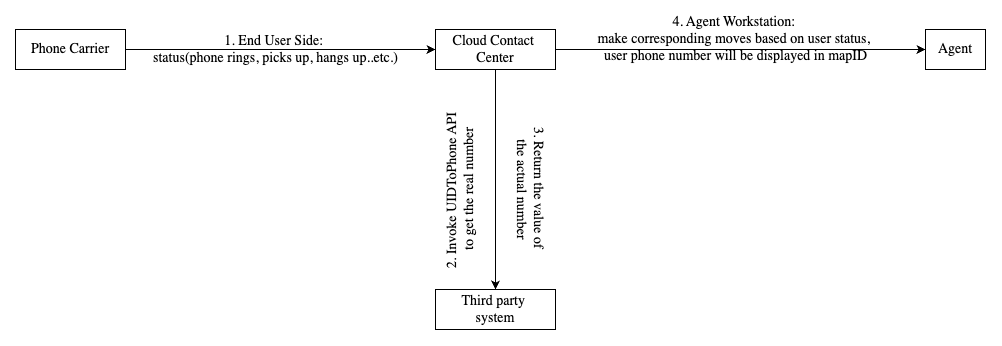
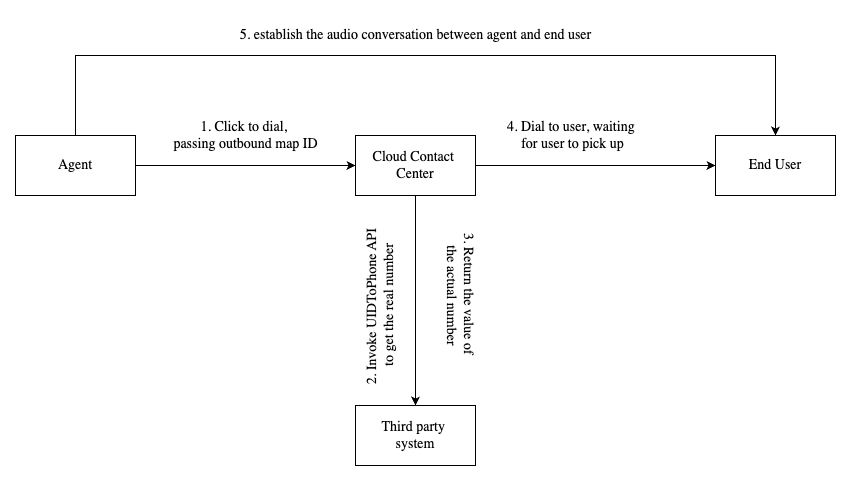
Enterprises can map the actual mobile numbers of users to the user ID and provide an interface. Cloud Contact Center will obtain and display the user ID corresponding to the actual number through this interface. The agent workstation displays the user ID, and the agent cannot view the user's actual number, but the management workbench still shows the customer's actual mobile number.

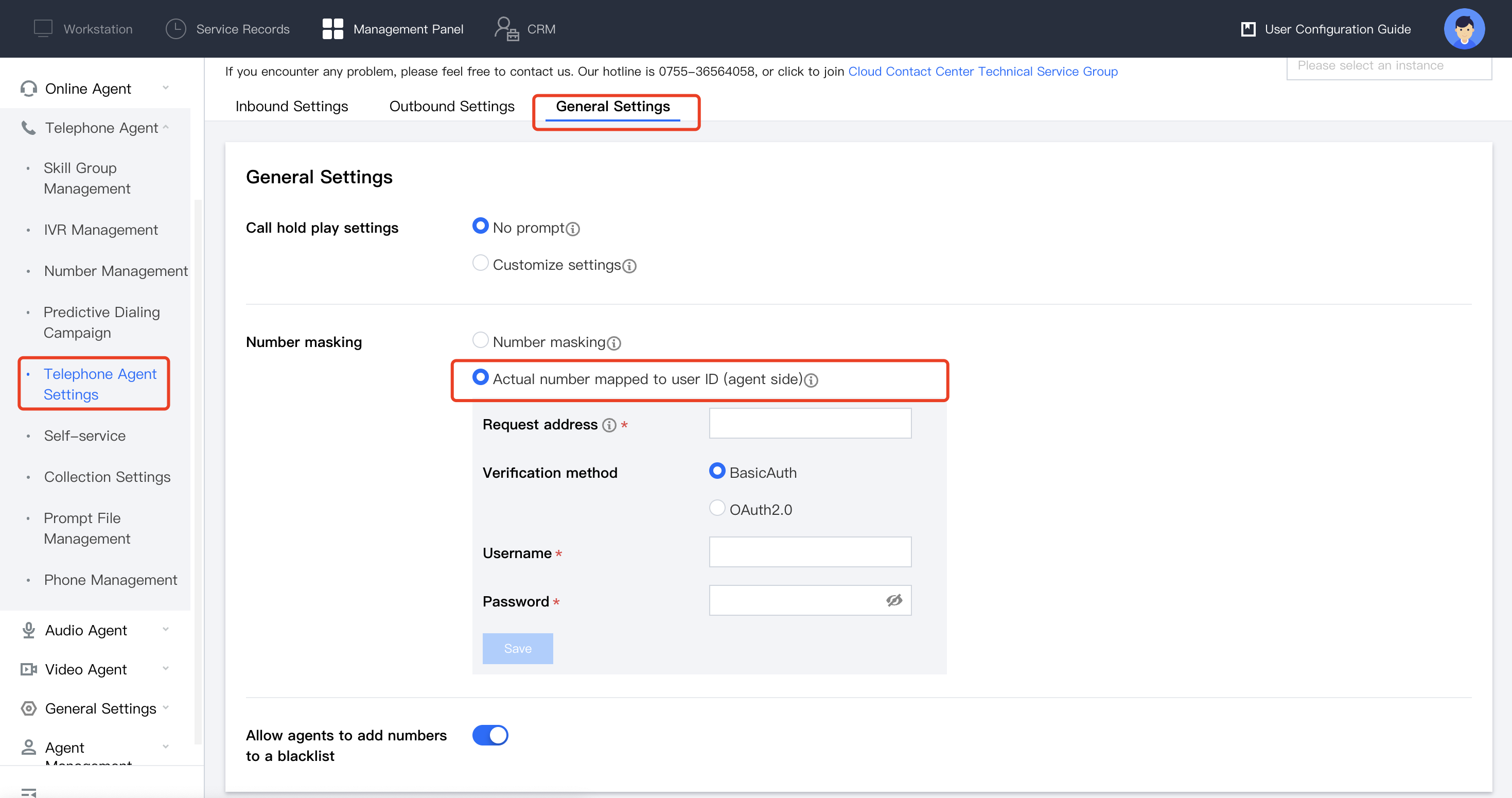
Actual Number Mapped to User ID (Agent Side)

Go to the Cloud Contact Center management panel, choose Telephone Agent > Telephone Agent Settings > General Settings in the left navigation bar, and select Actual number mapped to user ID (agent side) in the number protection settings.


User ID outbound process:


Process for phone call-in/call-out status event synchronization with agent:


API Description

Cloud Contact Center calls a third-party interface that can be accessed over a public network using the http post method when needed. The interface needs to provide two capabilities: to map the actual number to the ID and to convert the ID to the actual number. Authentication: The username and password correspond to the username and password of BasicAuth.
Note:
In the PhoneToUID mode, there could be a situation where a completely new number is input. If the input number does not exist in the third-party database, you need to generate the mapping ID for this number.
In the UIDToPhone mode, you need to ensure that the returned plaintext number format is [country code + number], for example: 008613988888888

Input Parameters

Name
Type
Description
Numbers
String array
Number List
Mode
String
Mode: PhoneToUID: The actual number is mapped to an ID.
UIDToPhone: The ID is converted to the actual number.
Return Parameters

Name
Type
Description
Code
Integer
Return code. Success returns 0, error returns others
Results
Object array
Format as below

Result Format

Name
Type
Description
Key
String
Content before conversion
Value
String
Result after conversion
// Request
{
"Numbers": ["13988888888","13788888888"],
"Mode":"PhoneToUID"
}

// Return
{
"Code":0,
"Results":[{
"Key":"13988888888",
"Value":"139abcdefg"
},{
"Key":"13788888888",
"Value":"137mnbvcxz"
}]
}


도움말 및 지원

문제 해결에 도움이 되었나요?

피드백