tencent cloud
최신 혜택
상품
솔루션
가격
파트너
마켓플레이스
더 알아보기
Prev
Next
About Console
Console Introduction
Operation Guide
Registration and Login
Changing the Password
Bill Information
Message Subscription
문서
About Console
Operation Guide
Bill Information
Bill Information
PDF
포커스 모드
폰트 크기
마지막 업데이트 시간: 2025-08-19 15:52:04
Overview
This document guides you to obtain your consumption bill on Tencent Cloud through the Tencent Cloud console.
Operation Entry
Method 1:
Log in to the
Billing Center Console
to enter the cost center page.
Method 2:
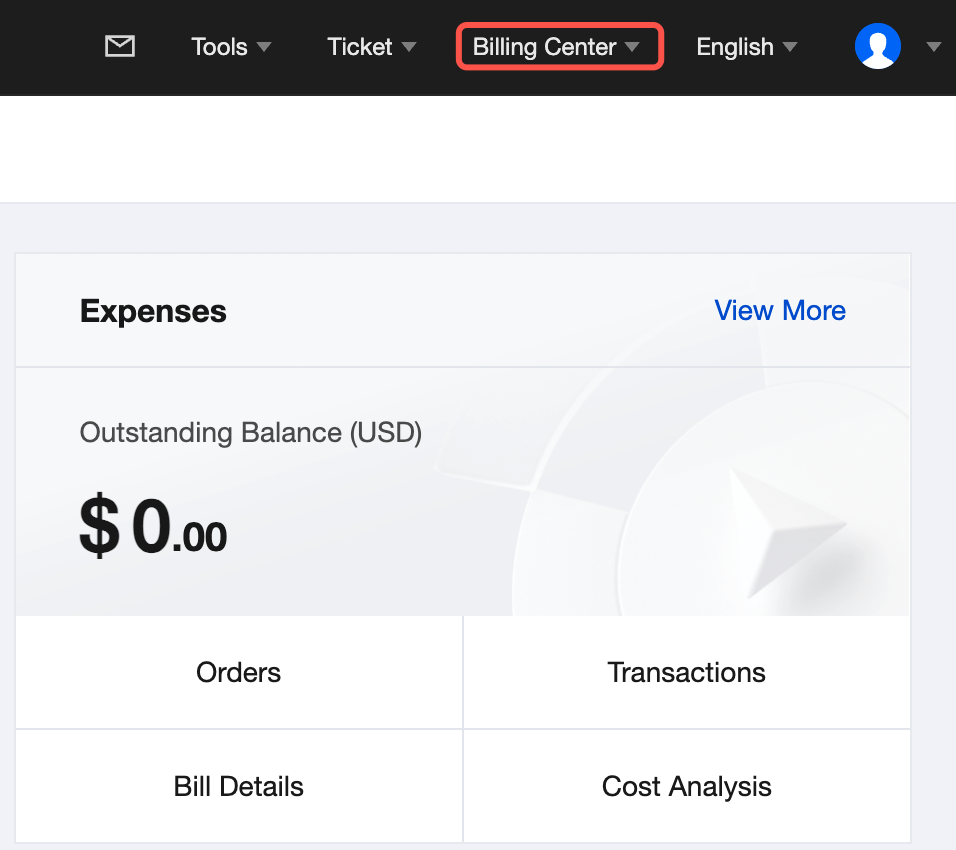
Logged-in users can click
Billing
on the right side of the top navigation bar in the
Tencent Cloud console
to enter the
Billing Center
page.
Main Usage Scenarios for Bills
Use Case
Documentation
Learn about billing statements and billing cycles
Billing Introduction
View my bills
View Bills
Fields in bills meaning
Fields in Bills
View usage details for pay-as-you-go products
Usage Details
Download my bill details
Bill Download
Grant bill permissions to the sub-account
Granting Billing-related CAM Access
Invoice request
Self-Service Invoice
For more billing-related information, please refer to the
About Billing
documentation.
이전 주제: Changing the Password
다음 주제: Message Subscription Management
도움말 및 지원
문제 해결에 도움이 되었나요?
예
아니오
더 자세한 내용은
문의하기
또는
티겟 제출
을 통해 문의할 수 있습니다.
피드백