Adjusting the Instance Configuration
Download
포커스 모드
폰트 크기
When the compute or storage resources of your TDSQL Boundless instance cannot meet your business requirements, you can adjust the instance configuration via the console. The supported configuration items include:
Hybrid Node Specs: Adjust the CPU and memory configuration of each peer node to match changes in business computing requirements.
Hybrid Node Disk: Adjust the disk type or capacity of each peer node to meet storage performance or capacity requirements.
Prerequisites
The TDSQL Boundless instance has been created and its status is Running.
Use Limits
Peer node specifications (CPU, memory) and peer node disks (disk type, capacity) cannot be adjusted simultaneously. You must perform these operations separately.
When a disk is scaled down, the adjusted disk capacity must not be less than the currently used data volume.
After you adjust the configuration, the kernel version remains unchanged, and the number of replicas remains unchanged.
Note:
When you adjust peer node specifications, the nodes undergo a rolling restart, which may cause brief connection interruptions. We recommend performing this operation during off-peak business hours and ensuring that your application is configured with an automatic reconnection mechanism.
Steps
Adjusting the Hybrid Node Specs
1. Log in to the TDSQL Boundless Console. In the Instance List, locate the target instance and click its Instance ID to go to the Instance Details page.
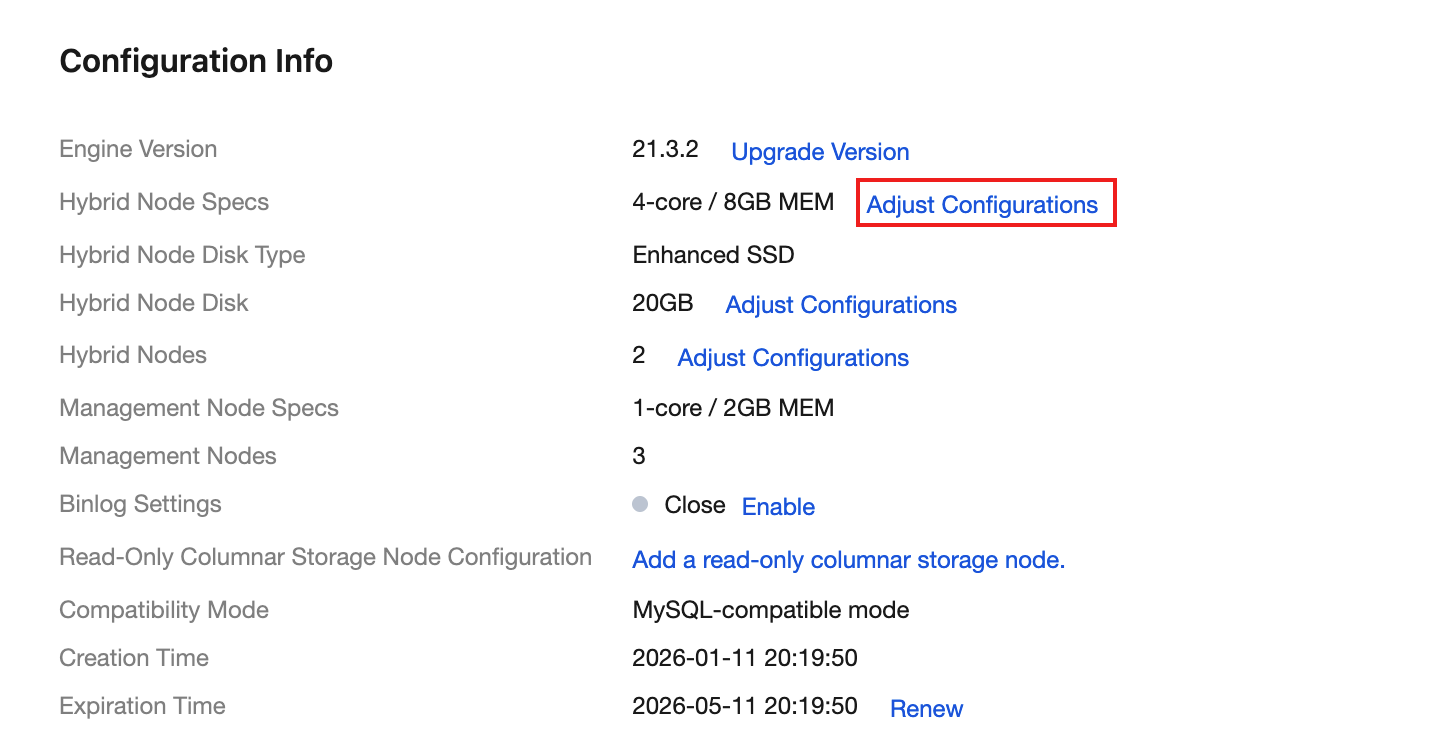
2. In the Configuration Info section, locate Hybrid Node Specs and click Adjust Configurations on the right.
3. On the Adjust Instance Configuration page, select New Configuration of Hybrid Node. Then, from the dropdown list, select the target specification (CPU, memory), for example, changing from "1-core, 2 GB" to "2-core, 4 GB".
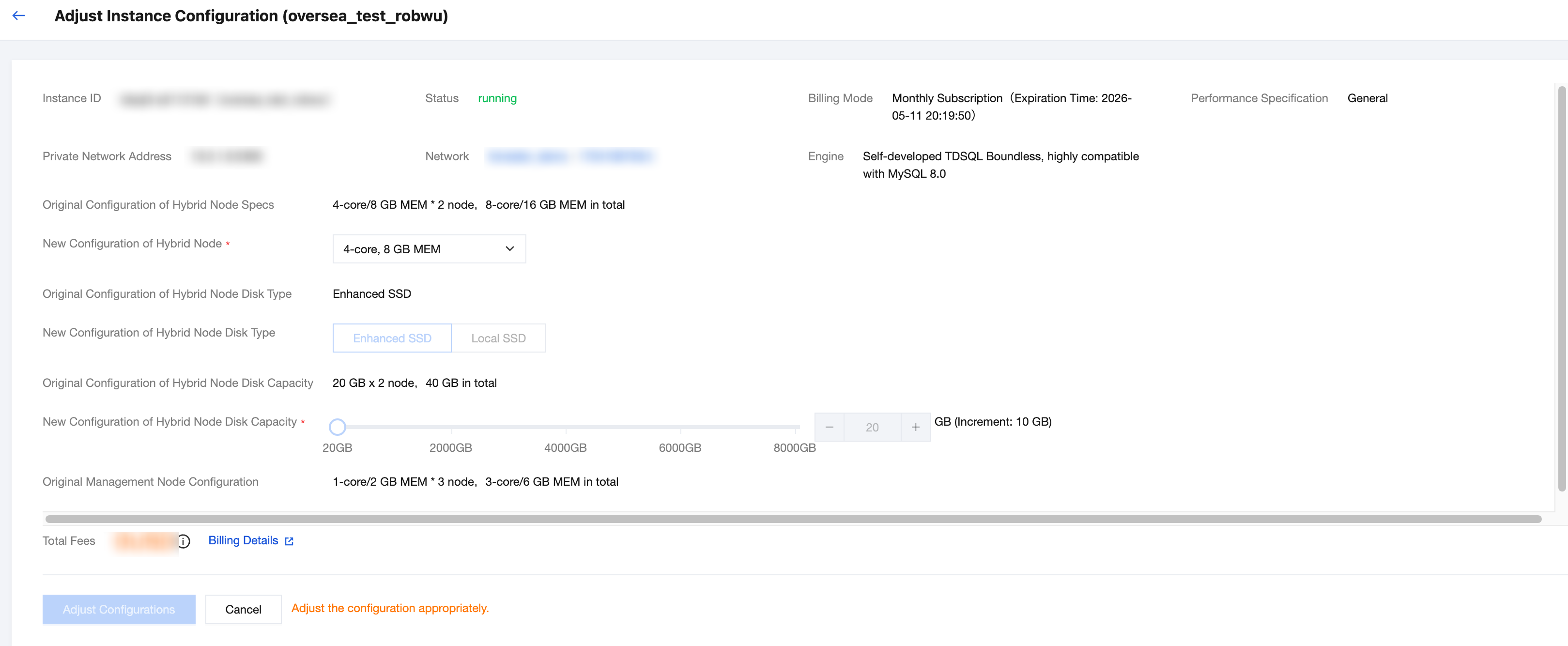
4. Confirm the post-adjustment configuration and billing information, then click Adjust Configurations.
5. You are returned to the instance list, and the instance status changes to Adjusting configuration. After the adjustment is complete, the status returns to Running, indicating a successful adjustment.
Adjusting the Hybrid Node Disk
1. Log in to the TDSQL Boundless Console. In the Instance List, locate the target instance and click its Instance ID to go to the Instance Details page.
2. In the Configuration Info section, locate Hybrid Node Disk and click Adjust Configurations on the right.
3. On the Adjust Instance Configuration page, adjust the following parameters as needed:
Parameter | Description |
New Configuration of Hybrid Node Disk Type | Select the target disk type. Supported types include General Purpose SSD CBS, Local SSD, and Enhanced SSD. |
New Configuration of Hybrid Node Disk Capacity | Drag the slider or enter a value to set the disk capacity. |
4. Confirm the post-adjustment configuration and billing information, then click Adjust Configurations.
5. You are returned to the instance list, and the instance status changes to Adjusting configuration. After the adjustment is complete, the status returns to Running, indicating a successful adjustment.
FAQs
How Long Does It Take to Adjust the Configuration?
Adjusting peer node specifications (CPU, memory) typically takes 5 to 10 minutes. The time required to adjust a peer node disk depends on the data volume. Scaling out can be completed relatively quickly, while scaling in involves data migration and takes longer.
Does Adjusting the Configuration Affect Business Operations?
When you adjust peer node specifications, the nodes undergo a rolling restart. During this process, brief connection interruptions (approximately 30 seconds) may occur. We recommend configuring your application with an automatic reconnection mechanism. Scaling out a peer node disk does not affect normal read and write operations.
What Happens If the Configuration Adjustment Fails?
The system automatically rolls back to the original configuration. If the rollback fails, the instance enters an abnormal state. In this case, contact technical support for assistance.
Why Can't I Adjust the Hybrid Node Specs and Disk Simultaneously?
Peer node specifications (CPU, memory) and peer node disks represent resource changes of different dimensions. To ensure stability during the adjustment process, the system requires that these operations be performed separately.
How to Verify Whether the Configuration Adjustment Takes Effect
You can view the adjusted peer node specifications and disk information in the Configuration Info section on the instance details page to confirm that the configuration has been updated.
피드백