What are the standards and certifications of TencentDB for MariaDB?
TencentDB for MariaDB has earned many Chinese and international certifications on behalf of TencentDB, including but not limited to:
Software Copyright
ISO22301 Certification
ISO27001 Certification
ISO20000 Certification
ISO9001 Certification
Trusted Cloud Service Certification
Cybersecurity Classified Protection Certification
STAR Certification
Some features of TencentDB for MariaDB are designed based on the following standards:
GBT 20273-2006 Information Security Technology - Security Techniques Requirement for Database Management System
JRT 0072-2012 Testing and Evaluation Guide for Classified Protection of Information System of Financial Industry
Why does an error occur when I specify some storage engines for a TencentDB for MariaDB instance?
Consistency requirements are first matched when TencentDB for MariaDB initializes parameters, but some storage engines may cause data inconsistency; therefore, an error may occur in some storage engines when you create a table. You can use the SHOW ENGINES command to view the storage engines supported by the current database. For more information, please see Precautions > Notes > Storage engine.
Why does a newly purchased TencentDB for MariaDB instance with two GB memory only have about one GB cache capacity after initialization?
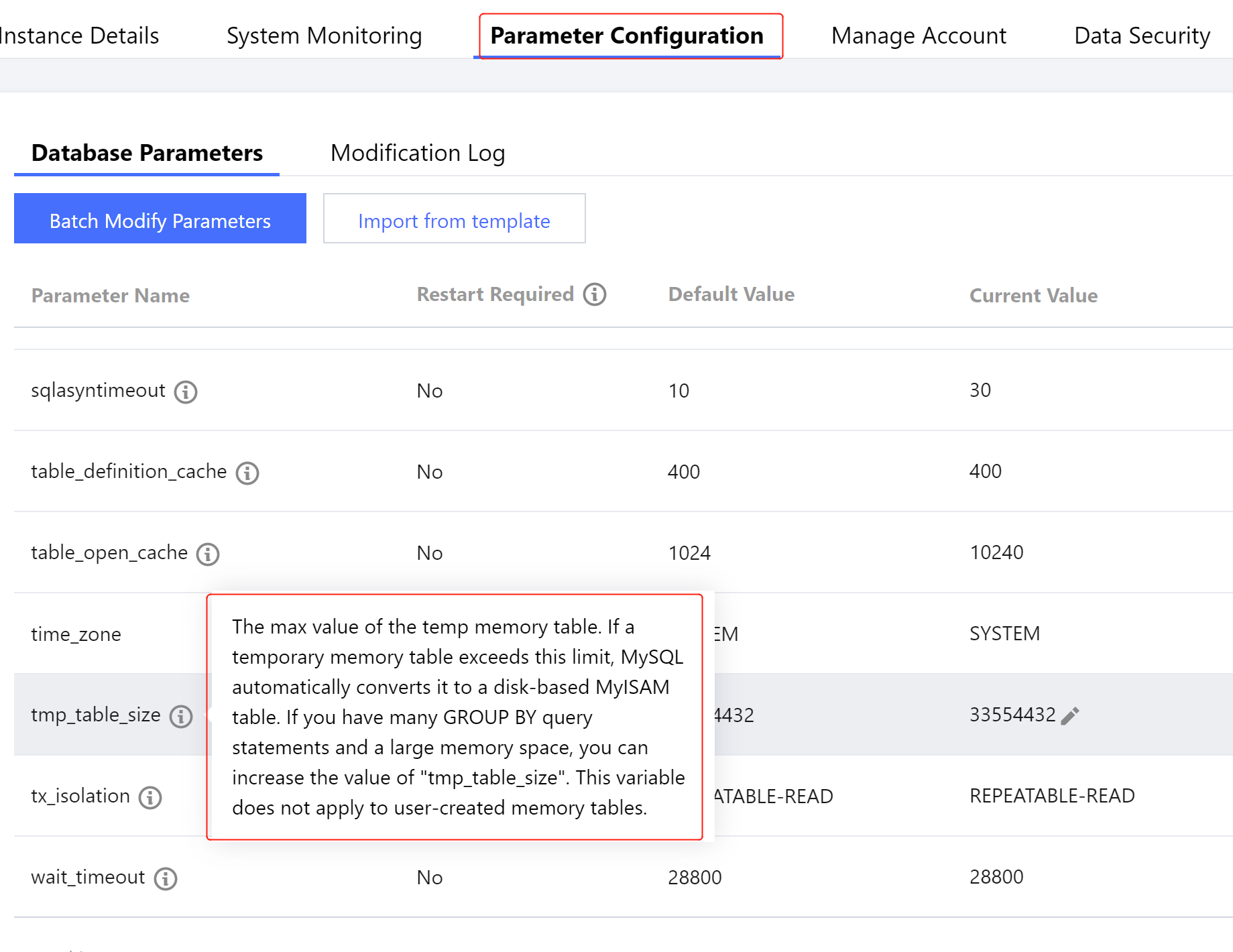
Please see Parameter Settings of the corresponding instance in the TencentDB for MariaDB console. One GB out of the two GB memory will be assigned to the threads executed by SQL, such as temporary table variables in the figure below.
Why does the max_tmp_size parameter have a size of at most 60 MB in a TencentDB for MariaDB instance with 6 GB memory?
The default value of this parameter in TencentDB for MariaDB system is 64 MB. You are not recommended to set it to a greater value.
If you need to set a specific value for this parameter, you can submit a ticket for application.
Why does the CPU utilization reach 50% when there is no operation on the TencentDB for MariaDB instance?
Due to the TencentDB architecture design, binlogs and slow logs are analyzed and uploaded once every five minutes; therefore, there will be one minute with high CPU utilization every five minutes.
The monitoring page in the console displays the maximum value in five minutes, so the utilization seems high; however, the actual utilization is lower than the displayed value.
Why is only one IP address displayed for the TencentDB for MariaDB Standard Edition (one primary and one replica)?
The replica server does not provide an IP address. You can purchase read-only replicas if needed.
Why doesn't the available disk capacity increase after I delete content from tables in a TencentDB for MariaDB instance?
Data deletion does not release available physical capacity (similar to other databases). You can use Percona Toolkit to perform the alter table xxxx engine=innodb operation on the desired table.
The download link for a TencentDB for MariaDB instance is valid for only 15 minutes. What can I do if there is a high volume of data that cannot be fully downloaded within 15 minutes?
To ensure security of the download link, the URL is valid for only 15 minutes; however, if the download has already started, the connection will remain valid throughout the download (a copied URL will be invalid).
Why does the available cache capacity keep decreasing even to 0 or –1?
The actual captured capacity is the available capacity for Innodb_buffer. As the database generally uses the LRU scheduling scheme, this value tends to be 0 in normal cases, and you do not need to worry about it. Please first check whether the cache hit rate is too low, e.g., lower than 90%.
When a large transaction is processed, this value may be negative, which means that the database memory usage exceeds the assigned value. This is because some idle memory resources are overused in the physical space to ensure proper operation of your business. Therefore, overuse does exist.
Can I change the previously configured character set and the number of bytes during initialization of a TencentDB for MariaDB instance?
To change the character set, you can modify character_set_server in parameter settings or specify the character set when creating a table; to modify the innodb_page_size parameter, you need to submit a ticket
(for reinstalling the instance).
What will happen if the number of connections to a TencentDB for MariaDB instance is too large? Or how do I avoid the problem where new business requests cannot properly connect to the database?
The maximum number of connections is 4,096 for a running client. After the threshold is reached, new connections will be denied. In this case, please view the following monitoring metrics: number of active connections and connection utilization. You can analyze this problem based on the following situations:
If the client is a short connection application, please check whether there are unclosed connections (in this case, the number of active connections usually increases linearly to 4,096). If metrics such as number of query requests increase drastically at the same time, please check whether there is a sudden increase in the number of requests.
If the client is a persistent connection application, please check the number of connections in all connection pools to the instance. If the connection utilization in monitoring metrics is low, the number of connections to a connection pool is too large.
How can I verify that read/write separation has been performed on the replica server in a TencentDB for MariaDB instance?
You can check the number of (SELECT) queries on the replica server through the corresponding monitoring metric in the console. If read/write separation is enabled, this value will be greater than 0.
What are the differences between the aggregated, primary node, and replica node data in monitoring metrics of a TencentDB for MariaDB instance? Why are some monitoring values obviously different?
The aggregated data is the aggregation of all monitoring data of the entire instance and may be the sum of values of all primary nodes, or all primary and replica nodes.
Primary and replica node data is data of a single node; therefore, the values are certainly different.
What should I do if my TencentDB for MariaDB instance expires?