tencent cloud

Tencent Cloud Distributed Cache (Redis OSS-Compatible)

Release Notes and Announcements
Release Notes
Announcements
User Tutorial
Product Introduction
Overview
Product Strengths
Use Cases
Storage Engine
Product Series
Product Versions
Specifications and Performance
Read/Write Separation
Multi-AZ Deployment
Regions and AZs
Terms
Service Regions and Service Providers
Purchase Guide
Billing Overview
Pricing Center
Instance Purchasing
Renewal (Yearly/Monthly Subscription)
Refund (Yearly/Monthly Subscription)
Overdue Payments
Switching from Pay-as-You-Go to Yearly/Monthly Subscription
Getting Started
Quickly Creating an Instance
Connecting to Redis Instance
Operation Guide
Operation Overview
Connecting to a Database Instance
Managing Instances
Upgrade Instance
Management Node (Redis/ValKey Edition)
Multi-AZ Deployment Management
Backup and Restoration
Managing Accounts
Parameter Configuration
Slow Query
Access Management
Network and Security
Monitoring and Alarms
Event Management (Redis/ValKey Edition)
Data Migration
Global Replication for Redis Edition
Database Audit
Performance Optimization
Sentinel Mode
Development Guidelines
Naming Rules
Basic Usage Guidelines
Design Principles of Key and Value
Command Usage Guidelines
Design Principles of Client Programs
Connection Pool Configuration
Command Reference
Command Reference Overview
Redis Edition and Valkey Edition Command Compatibility
Version Command Usage Differences
Differences Between the Proxy Architecture and Direct Connection Mode
More Command Operations (Redis/Valkey Edition)
Memcached Edition Command Compatibility
Practical Tutorial
Building TencentDB for Redis® Client Monitoring Based on Spring Boot
Redis Client Connection Configuration Policy and Practice
Global SCAN Guide for Cluster Architecture
Eliminating Instances Securely
Hot Key and Big Key
AZ Migration Scheme
Troubleshooting
Connection Exception
Exception Analysis and Solution of Redisson Client Timeout Reconnection
Performance Troubleshooting and Fine-Tuning
API Documentation
History
Introduction
API Category
Making API Requests
Instance APIs
Parameter Management APIs
Other APIs
Backup and Restoration APIs
Region APIs
Monitoring and Management APIs
Log APIs
Data Types
Error Codes
FAQs
General
Connection and Login
Purchase
Service Agreement
Service Level Agreement
Terms of Service
Glossary
Contact Us

Assigning Instance to Project

PDF
포커스 모드
폰트 크기
마지막 업데이트 시간: 2026-03-17 17:45:56

Overview

A project is a set of applications or services that share resources. Each project is unique, with its own applications, services, and resources isolated from and unaffected by those in other projects.
You can specify an appropriate project for your database instances to facilitate collaboration. In this way, you can easily manage your resources globally and stay on top of the billing details of the entire project.
Tencent Cloud Distributed Cache supports assigning instances to different projects for easier management. Assigned instances can be reassigned to other projects.
Note:
Assigning and reassigning TencentDB instances will not affect the services provided by the instances.

Prerequisites

You have created a Tencent Cloud Distributed Cache instance and assigned it to a project. Unassigned instances belong to the Default Project. For more information, see Creating Tencent Cloud Distributed Cache Instance.
The database instance is in Running status, with no ongoing tasks.
You have created the target project in Project Management.

Directions

2. Above the instance list on the right, select the region.
3. In the instance list, find the target instance.
4. In the Instance ID/Name column of the target instance, click the instance ID in blue font to enter the Instance Details page.
5. In the Basic Info section on the Instance Details page, click Assign to Project after Project.
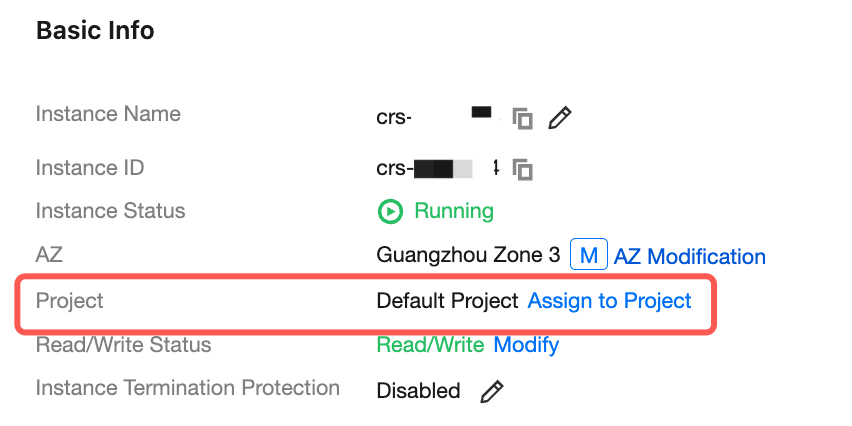
6. In the pop-up window, click View Details, confirm the information of the instance to be moved, search for the target project by name, select it, and click OK.
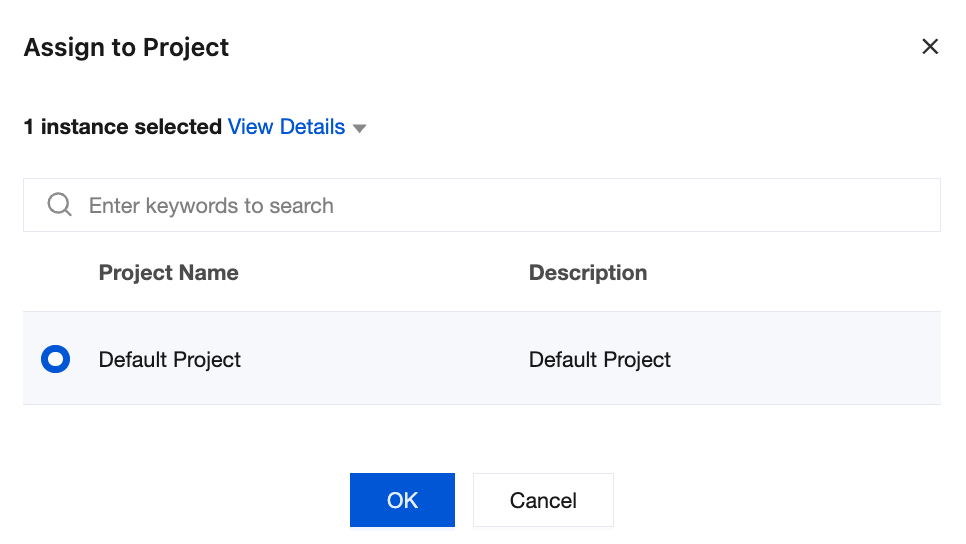
7. Wait for the project transfer to complete. Then, you can see that the project name has been changed.

Related APIs

API Name
Description
Modifies the information of an instance

도움말 및 지원

문제 해결에 도움이 되었나요?

피드백