Secure Sockets Layer (SSL) authentication is a process that authenticates the connection from the user client to the TencentDB server. After SSL encryption is enabled, you can get a CA certificate and upload it to the server. Then, when the client accesses the database, the SSL protocol will be activated to establish an SSL secure channel between the client and the server. This implements encrypted data transfer, prevents data from being intercepted, tampered with, and eavesdropped during transfer, and ultimately ensures the data security for both the client and the server.
Note:
The Memcached edition does not support SSL encryption.
Billing Details
SSL encryption is free of charge.
Precautions
Enabling SSL encryption ensures the security of data access and transfer but may slightly affect the instance performance. We recommend you enable it only when encryption is required.
When SSL encryption is enabled, password-free access cannot be supported.
After the SSL encryption feature is disabled, clients using encrypted connections will not be able to connect properly.
The SSL certificate is valid for 20 years.
Version and Architecture Requirements
Version Description
New instances: SSL encryption can be enabled directly for compatible version 4.0 and above..
Existing instances:
If the compatible version is 2.8, you need to upgrade to version 4.0 or above to enable SSL encryption. For more information, see Upgrading Instance Version.
For compatible version 4.0 or above, the proxy version must be upgraded to 5.6.0 to support this feature.. For more information, see Upgrading Proxy.
Architecture
Both standard architectures and cluster architecture support SSL encryption.
Prerequisites
The database instance is in Running status, with no ongoing tasks.
The operation is performed in off-peak hours, or the client has an automatic reconnection mechanism.
2. Above the Instance List on the right, select the region.
3. In the instance list, find the target instance.
4. In the Instance ID/Name column of the target instance, click the instance ID to enter the Instance Details page.
5. Click the SSL Encryption tab. If the system prompts you to upgrade the version under SSL Encryption Settings, click Upgrade Version, and wait until the version is successfully upgraded.
6. After Encryption Status, click
to display Download Certificate.
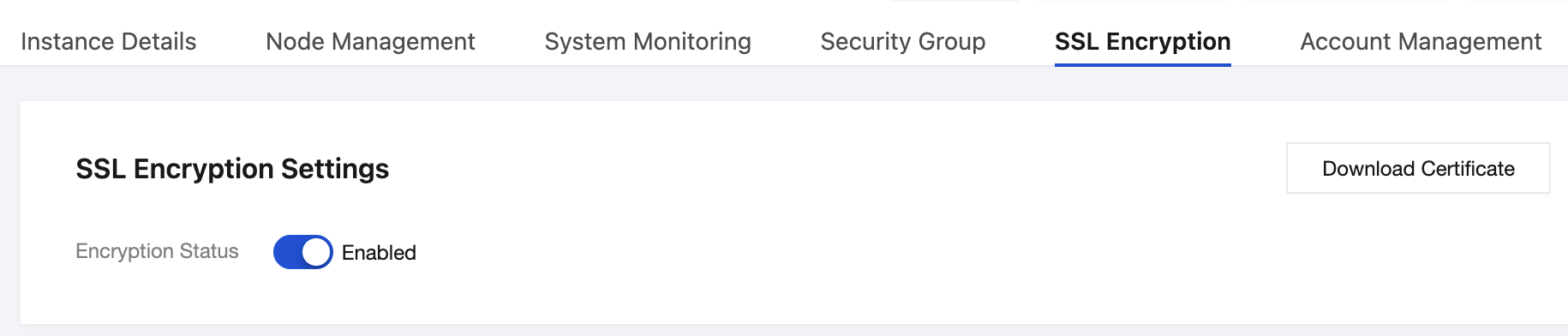
7. Wait until the Encryption Status shows as Enabled, as shown in the figure below. Click Download Certificate in the upper-right corner.
8. Apply the obtained certificate on the server and access the database using SSL encryption. For a Java client connection code example, see Java Connection Example. For a Python client connection code example, see Python Connection Example.