Configuring Backup File Download Method
Download
포커스 모드
폰트 크기
Features and Scenarios
Tencent Cloud Distributed Cache allows you to configure download conditions for backup files, controlling which network environments and servers can download backup data to prevent unauthorized access. On this page, you can configure the following download rules by region:
Public Network Download Switch: Disabled by default. You can enable public network download with one click to quickly download files directly to your local or third-party environments.
VPC Restriction: Private network download specifies the VPC (private network) that allows backup file downloads, and only servers within that VPC can initiate downloads.
IP Restriction: Private network download specifies the allowed IP addresses or IP address ranges/CIDR blocks for downloads, supporting both inclusion and exclusion conditions.
After configuration is complete, when users initiate backup file downloads, the system will generate download links according to the rules configured here.
Note:
Currently, you can't configure backup file download methods in the following regions: Tianjin, Nanjing, Hangzhou, Shenzhen, Virginia, and Jakarta.
Directions
1. Log in to the Tencent Cloud Distributed Cache console.
2. In the left sidebar, select Database Backup.
3. At the top of the Distributed Cache(Redis OSS-Compatible) - Database Backup page on the right, select a region, and click the Download Settings tab, click Edit next to the Download Settings to configure the download conditions..
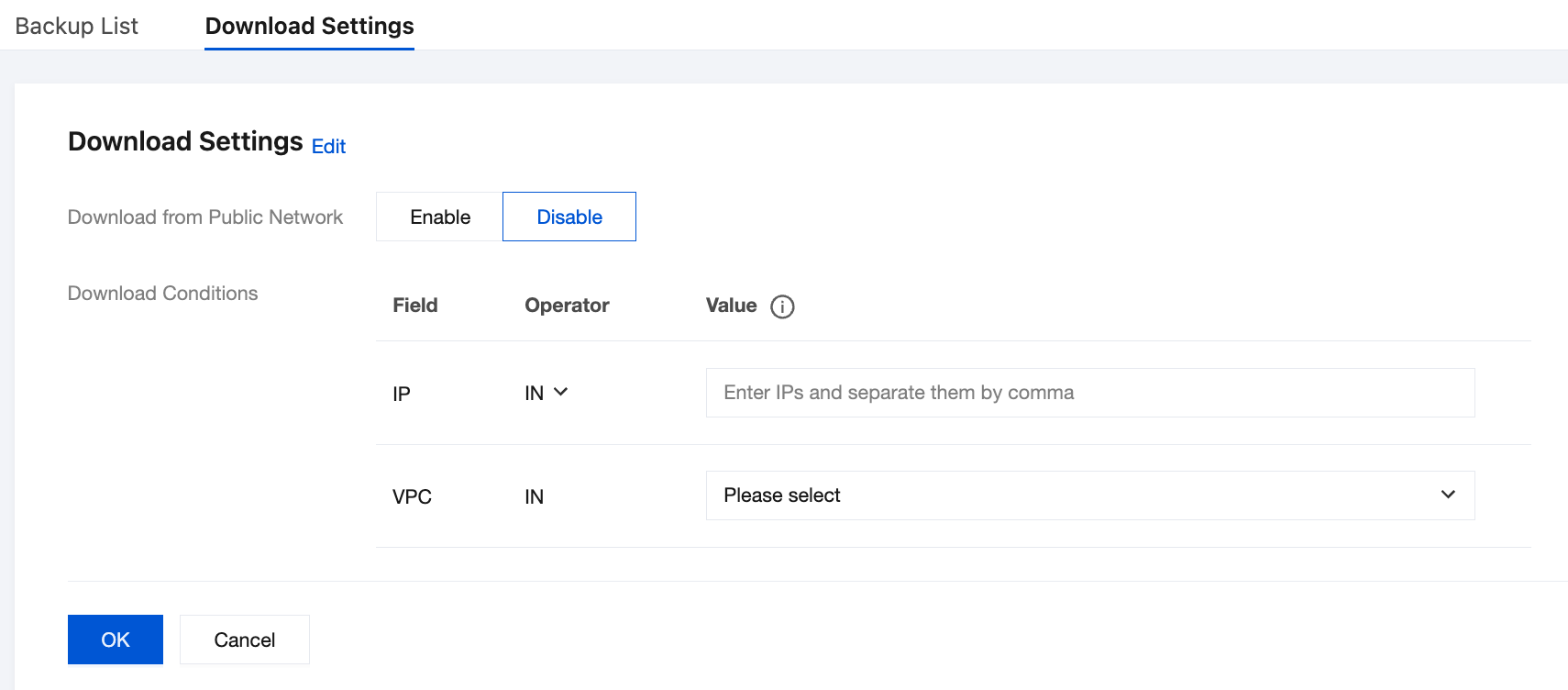
Download from Public Network: You can choose Enable or Disable.
Enable Public Network Access: You can download backup files over both public and private networks.
Disable Public Network Access: You can download backup files over the private network only.
Download Conditions: Customize the VPC and IP address for downloading backup files.
Field is IP: In the Operator column, select IN or NOT IN, and enter the included or excluded IP addresses in the Value column.
Note:
You should separate the values of an IP condition with commas.
IP address conditions support IP addresses and IP address ranges as conditions.
If you don't specify any value, the condition won't take effect.
Field is VPC: Operator defaults to IN, and select the included VPC in the drop-down list of Value.
4. Click OK to complete the settings.
Related APIs
API | Feature Description |
Query download source restrictions for backup files | |
Modify download source restrictions for backup files |
피드백