tencent cloud

TencentDB for MongoDB

Release Notes and Announcements
Release Notes
Announcements
User Guide
Product Introduction
Overview
Strengths
Use Cases
Cluster Architecture
Product Specifications
Features
Regions and AZs
Terms
Service Regions and Service Providers
Purchase Guide
Billing Overview
MongoDB Pricing
Billing Formula
Payment Overdue
Backup Space Billing
Configuration Adjustment Billing
Getting Started
Quickly Creating an Instance
Connecting to a TencentDB for MongoDB Instance
Reading/Writing Database
Operation Guide
Access Management
Instance Management
Node Management
Version Upgrade
Network Configuration
Monitoring
Backup and Rollback
Database Audit
Data Security
SSL Authentication
Log Management
Database Management
Multi-AZ Deployment
Disaster Recovery/Read-Only Instances
Parameter Configuration
Recycle Bin
Task Management
Performance Optimization
Data Migration Guide
Practical Tutorial
Optimizing Indexes to Break Through Read/Write Performance Bottlenecks
Troubleshooting Mongos Load Imbalance in Sharded Cluster
Considerations for Using Shard Clusters
Sample of Reading and Writing Data in MongoDB Instance
Methods for Importing and Exporting Data Based on CVM Connected with MongoDB
What to Do for Errors of Repeated Instance Creation and Deletion of Databases with the Same Names?
Troubleshooting MongoDB Connection Failures
Shard Removal Task: Guide for Confirming the Progress and Troubleshooting Issues
Performance Fine-Tuning
Ops and Development Guide
Development Specifications
Command Support in Sharded Cluster v3.2
Command Support in v3.6
Development Ops
Troubleshooting
Increased Slow Queries
Number of Connections Exceeding Limit
API Documentation
History
Introduction
API Category
Making API Requests
Instance APIs
Backup APIs
Account APIs
Other APIs
Task APIs
Introduction
Data Types
Error Codes
Instance Connection
Shell Connection Sample
PHP Connection Sample
Node.js Connection Sample
Java Connection Sample
Python Connection Sample
Python Read/Write Sample
Go Connection Sample
PHP Reconnection Sample
Product Performance
Test Environment
Test Method
Test Result
FAQs
Cost
Features
Sharded Cluster
Instance
Rollback and Backup
Connection
Data Migration
Others
Service Agreement
Service Level Agreement
Terms of Service
Glossary
Contact Us

Automatic Backup

PDF
포커스 모드
폰트 크기
마지막 업데이트 시간: 2025-11-24 17:13:41

Scenarios

The automatic backup feature of TencentDB for MongoDB can back up data regularly based on a preset policy, providing reliable data for data recovery in key scenarios, such as data recovery, disaster recovery (DR) switch, development testing, and compliance audit.
Note:
During instance creation, an automatic backup operation is triggered based on the default backup policy of the instance.
A new automatic backup operation is triggered after specification scaling or cross-AZ migration.
The automatic backup policy is enabled by default. After the policy is modified, the new policy applies only to newly generated backup sets.
Note:
The backup service of TencentDB for MongoDB will be officially commercialized starting from 00:00:00, November 20, 2025 (UTC+8), and advanced backup features (such as customizing the backup retention period, incremental backup downloading, full backup set deletion, and backup alarm reporting) are launched. The storage capacity occupied by backup data that exceeds the free backup storage quota will be billed in pay-as-you-go mode.

Prerequisites

The status of the TencentDB for MongoDB instance is Running.

Setting an Automatic Backup Policy (General Edition)

2. In the left sidebar, choose MongoDB > Replica Set Instance or Shard Instance. The operations for replica set instances and sharded cluster instances are similar.
3. At the top of the instance list page on the right, select a region. In the instance list, locate the target instance.
4. Click the target instance ID to go to the Instance Details page, switch to the Backup and Rollback page, and select the Auto-Backup Settings tab.
5. (Optional) Click Enable Advanced Backup in the upper-right corner. In the pop-up window, you can learn about the main advanced backup features and billing policies. Select I have read and confirmed the Backup Billing Policy, and enabling of advanced backup. Click Enable Advanced Backup to go to the backup policy editing page.
Note:
Advanced Backup cannot be disabled once it is enabled. Please confirm the operation.
Advanced Backup cannot be enabled for TencentDB for MongoDB instances of the cloud disk edition.

6. Click Edit to configure the specific backup policy. For detailed configuration methods, see the following table.

Area
Parameter
Parameter Description
Remarks
Full Backup Settings
Backup Mode
The options include Logical Backup and Physical Backup, and the default value is Logical Backup.
For specific version information, see Backup Introduction.
Backup Start Time
Sets the start time for automatic backup tasks.
Backup window: After the backup start time is configured, a one-hour backup window starting from this time point is displayed on the page.
Default rule: In the range of 00:00 to 04:00 (UTC+8), a full-hour backup time (such as 02:00) is assigned to each new instance randomly.
Note:
The start time of backup tasks may be delayed from the preset time point due to the system resource scheduling policy.
Backup Cycle
Sets the specific date for automatic backup tasks by week.
By default, all days in a week are selected. That is, automatic backup tasks are performed every day from Monday to Sunday.
You can flexibly select any day from Monday to Sunday as the backup execution day from the drop-down list. You can select one day or multiple days (such as only Wednesday or Monday + Wednesday + Friday).

Note:
A too long backup interval may cause a slow data rollback speed. To ensure data security, specify at least two backup operations per week.
Backup Frequency
Sets the number of backup execution times (N) on a backup day. The value is 1 or 2.
When Backup Frequency is set to 1, one backup operation is performed at the selected backup start time.
When Backup Frequency is set to 2, the second backup operation is performed approximately 24 hours after the first backup operation.
-
Backup Retention Period
Sets the retention period for full backup files. The files are deleted upon expiration. Second-level rollback is supported only within the backup retention period.
Default value: 7 days
Value range: 7–365
Note:
Backup files are stored in Cloud Object Storage (COS) and do not occupy the storage space of the TencentDB for MongoDB instance. For details about COS, see Cloud Object Storage.
Long-Term Backup
Click

to enable the long-term backup feature, which allows you to select backup data on a specific date by week or month (such as backup data on the 1st or 15th day of each month) to retain it for a longer period.
Long-Term Backup Cycle: Select the specific long-term backup dates by week or month in the input box. As shown in the following figure, set the long-term backup cycle by month.
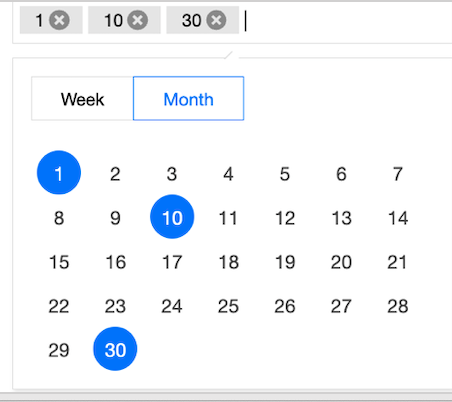
Long-Term Backup Retention Period: sets the retention period for long-term backup data. The value range is 30 to 1075.


Note:
The value of Long-Term Backup Retention Period should be greater than that of Backup Retention Period. The selected backup sets are automatically deleted upon expiration.
Incremental Backup Settings
Incremental Backup
Click

to enable the incremental backup feature, which allows you to back up changed data since the last full backup.
Second-level rollback is supported only within the backup retention period.
Incremental Backup Retention Period
Sets the retention period for incremental backup files. They are deleted upon expiration.
Default value: 7 days
Value range: 7–365
-
Excessive Backup Alarm
Click

to enable the excessive backup alarm switch.
-
Backup Alarm Quota
Sets the alarm threshold for utilization of the backup data set storage space. By default, an alarm is triggered when the backup data volume reaches 100% of physical disks (for instances of the general edition) or 200% of cloud disks (for instances of the cloud disk edition).
Note:
Backup Alarm Quota only serves as an alarm threshold. To report an excessive backup alarm, configure event alarms on Tencent Cloud Observability Platform (TCOP).
7. Select I have read and agree to the Backup Billing Rules and click Save. The automatic backup policy is set.

Setting a Backup Policy (Cloud Disk Edition)

2. In the left sidebar, choose MongoDB > Replica Set Instance or Shard Instance. The operations for replica set instances and sharded cluster instances are similar.
3. At the top of the instance list page on the right, select a region.
4. In the instance list, locate the target instance.
5. Click the target instance ID to go to the Instance Details page.
6. Select the Backup and Rollback tab to go to the Backup Task List page.
7. Select the Auto-Backup Settings tab, click Edit, and specify Backup Mode and Backup Start Time, as shown in the following figure.
Note:
An instance of the cloud disk edition is used as an example in the following figure, and Logical backup is unavailable for Backup Method.

Parameter
Description
Data Backup Retention
By default, backup data is retained for 7 days.
In the drop-down list, you can customize a backup retention period. The value range is 7 to 180 days.
Backup Mode
Selects a backup method. The options include Physical backup and Snapshot backup.
For details on how to select a backup policy, see the description in Backup Introduction and select a policy that meets your requirements.
The supported backup methods vary depending on the version. For details, see Version Description.
Backup Start Time
The default start time is 22:00 to 02:00. That is, the system starts backup tasks in the range of 22:00 to 02:00 every day.
You can select different time periods to start data backup based on the actual business situation.
The specific start time varies depending on backup task scheduling.
8. Click Save to save the settings. Subsequent backup tasks are performed automatically based on the set backup rules.

Related APIs

API
Description
DescribeDBBackups
CreateBackupDBInstance
DescribeBackupDownloadTask
CreateBackupDownloadTask

도움말 및 지원

문제 해결에 도움이 되었나요?

피드백