What is the default sending frequency limit of SMS?
To ensure business and channel security and minimize potential financial losses caused by malicious calls of SMS APIs, the default SMS sending frequency limit is as detailed below:
For SMS messages with the same content, a maximum of one such message can be sent to the same mobile number within 30 seconds.
A maximum of 2 messages can be sent to the same mobile number on a calendar day.
SMS bombing (cheating) refers to using malicious programs or tools and exploiting vulnerabilities in website clients or servers to send a large number of SMS verification codes to many irrelevant mobile numbers in a period of time (for example, within a day), which cause harassment to such users.
SMS bombing (cheating) not only causes harassment to innocent users, but also leads to a high number of complaints, which makes the SMS channel unavailable and results in economic losses to customers; therefore, preventive measures should be taken in advance.
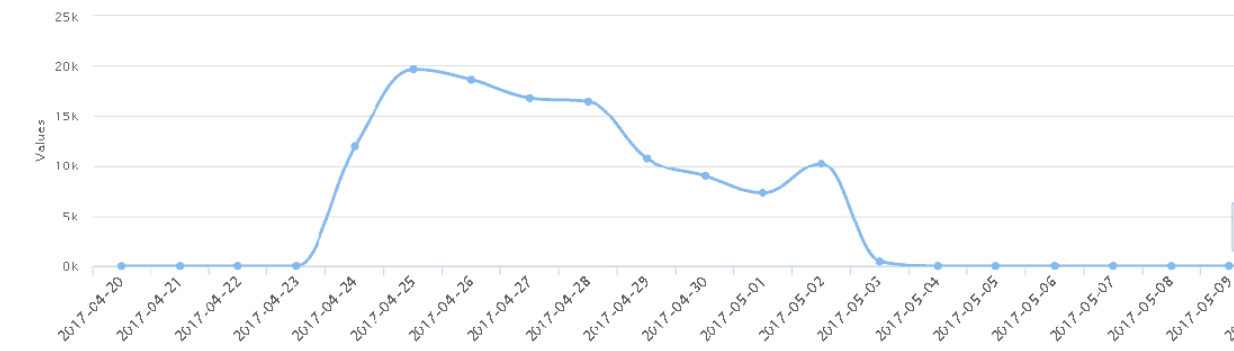
The figure below shows a real case encountered by a customer (only dozens of messages are sent per day under normal circumstances, but tens of thousands of messages were sent per day during a bombing attack):
In view of the fact that SMS bombing (cheating) attacks are generally initiated by servers, the following comprehensive measures are recommended for defense:
Log in to the SMS console to regularly (for example, once every day) view specific statistics and check SMS deliveries. If an exception is found, you can disable the SMS service in the console in emergency circumstances.
What are the differences between Chinese Mainland SMS and Global SMS?
An SMS signature must be carried in Chinese Mainland SMS messages due to the requirements of carriers, while this is optional and up to you for Global SMS messages.
Before sending a Global SMS message, you must first create a body template and get it approved. If you want to carry a signature, you also need to create a signature and get it approved.
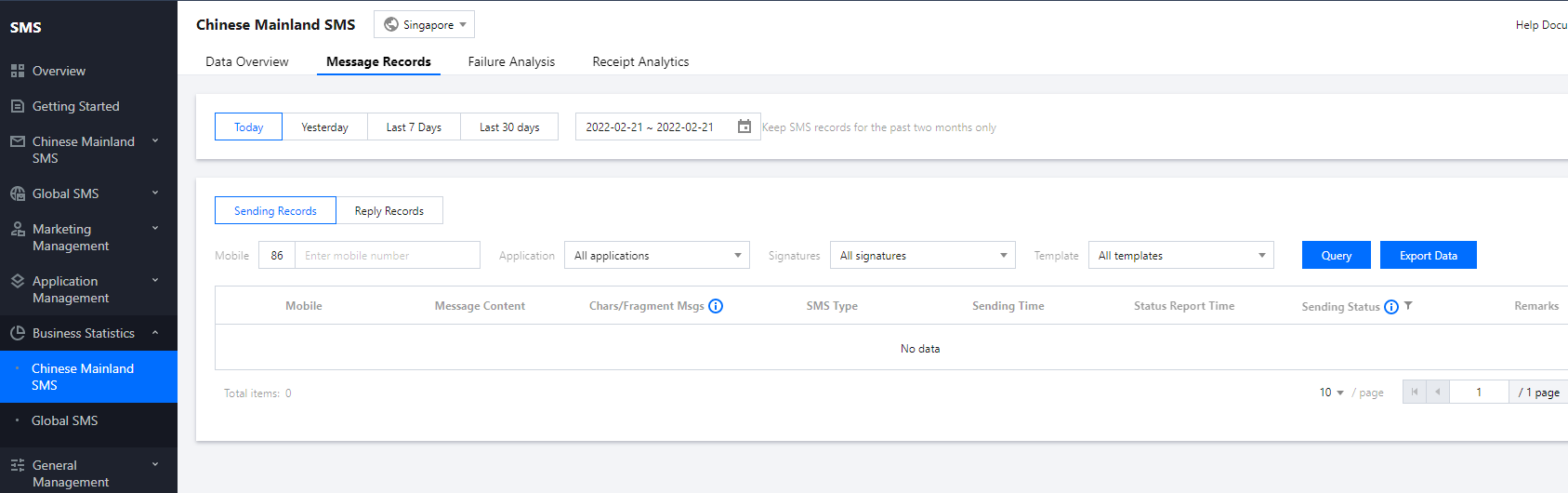
How do I check the sending records for individual mobile numbers?
You can log in to the SMS console, click the name of the target application to enter the application details page, and select one the following methods to query according to your actual needs:
Chinese Mainland SMS: select Business Statistics > Chinese Mainland SMS > Message Records and enter a mobile number to query as shown below:
Global SMS: select Business Statistics > Global SMS > Message Records to query.
How do I create and view an application (SDK AppID)?
SDK AppID is used to identify applications. Each SMS application has a unique SDK AppID, which is automatically generated by the system after the application is created. For detailed directions, please see Creating Application.
You can log in to the SMS console, select Application Management > Application List, and click the name of the target application to enter the application details page and view its SDK AppID.
How do I enable the rate limit allowlist for testing and alarming mobile numbers?
If you need to remove the rate limit for testing mobile numbers, please contact SMS Helper.
How do I check whether a specific mobile number has received a message?
You can log in to the SMS console, click the name of the target application to enter the application details page, and select one the following methods to query or export records according to your actual needs:
Chinese Mainland SMS: select Business Statistics > Chinese Mainland SMS > Message Records to query or export records within a specified time period.
Global SMS: select Business Statistics > Global SMS > Message Records to query or export records within a specified time period.
Is there a limit on the number of Global SMS messages that can be sent?
Up to 1,000 Global SMS messages can be sent per day under one Tencent Cloud account. If you need to adjust this limit, please contact SMS Helper.