VPC Communication
Download
포커스 모드
폰트 크기
Overview
SCF is deployed in the public network by default. This document describes how to enable SCF to access resources in the private network through VPC configuration, such as TencentDB, CVM, TencentDB for Redis, and CKafka, which helps ensure the data and connection security.
Notes
When configuring a VPC, pay attention to the following points:
A function deployed in a VPC is isolated from the public network by default. If you want the function to have access to both private and public networks, you can do so in the following two ways:
Configure the public network access of SCF and make sure that the egress address for public network access is unique. For more information, please see Fixed Public Outbound IP.
Add a NAT gateway through VPC. For more information, please see Granting a Function in VPC Access to Public Network.
Currently, functions cannot be connected with resources on the classic network.
Prerequisites
Directions
Modifying network configuration
1. Log in to the SCF console and click Function Service on the left sidebar.
2. Select the region at the top of the page and click the name of the function to be configured.
3. On the Function Configuration page, click Edit in the top-right corner.
4. Enable VPC and select the VPC to be accessed and the subnet you want to use.
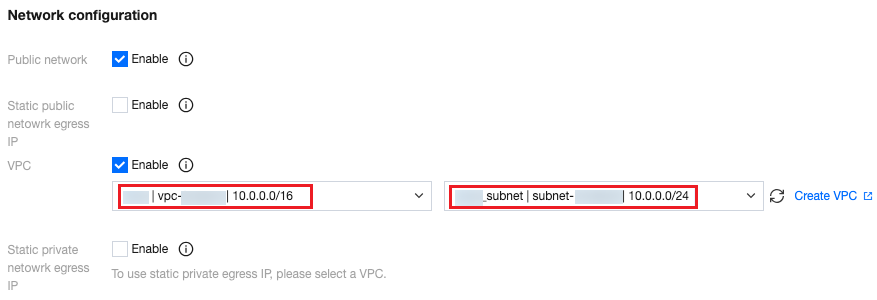
Using VPC
After you configure the private network access for a function and start to use the VPC, the function will switch from the current independent network environment to the configured VPC. When the function starts, an IP address in your VPC subnet will be used as the IP address of the function runtime environment. In order to reduce the function's usage of subnet IP addresses, running function instances will share a proxy pair and scale the proxy pair based on the network bandwidth utilization.
After the function is started, you can use the code and private IP address to access resources whose access entries are in the VPC, such as Tencent Cloud Distributed Cache (Redis ®* OSS-Compatible), TDSQL, and CVM.
The following is the sample code for accessing Tencent Cloud Distributed Cache (Redis ®* OSS-Compatible), where the IP address of the Redis instance in the VPC is
10.0.0.86.# -*- coding: utf8 -*-import redisdef main_handler(event,context):r = redis.StrictRedis(host='10.0.0.86', port=6379, db=0,password="crs-i4kg86dg:abcd1234")print(r.set('foo', 'bar'))print(r.get('foo'))return r.get('foo')
Accessing custom domain name in VPC
In VPC, if you need to access a self-built service on the private network at a domain name, you can use the Private DNS provided by Tencent Cloud to configure and resolve the custom domain name on the private network.
If you want to connect to a custom DNS server, you need to customize the
name server configuration in the SCF environment. Currently, you can implement this by configuring the OS_NAMESERVER environment variable as shown below:Environment Variable | Value Rule | Description |
OS_NAMESERVER | It can be one or more IP addresses or domain names separated by ;. A maximum of 5 custom name servers can be configured. | It configures the custom name server. |
As shown in the following code implemented in Python, the configuration can be checked for effect by printing out the
/etc/resolv.conf file.with open("/etc/resolv.conf") as f:print(f.readlines())
Relevant Operations
Viewing network configuration
1. Log in to the SCF console and click Function Service on the left sidebar.
2. Select a region at the top of the page and click the name of the function for which private network access has been configured to view the specific configuration through the corresponding network and subnet.
피드백