tencent cloud

Tencent Real-Time Communication

소식 및 공지 사항
제품 업데이트
Tencent Cloud 오디오/비디오 단말 SDK 재생 업그레이드 및 권한 부여 인증 추가
TRTC 월간 구독 패키지 출시 관련 안내
제품 소개
제품 개요
기본 개념
제품 기능
제품 장점
응용 시나리오
성능 데이터
구매 가이드
Billing Overview
무료 시간 안내
Monthly subscription
Pay-as-you-go
TRTC Overdue and Suspension Policy
과금 FAQ
Refund Instructions
신규 사용자 가이드
Demo 체험
Call
개요(TUICallKit)
Activate the Service
Run Demo
빠른 통합(TUICallKit)
오프라인 푸시
Conversational Chat
온클라우드 녹화(TUICallKit)
AI Noise Reduction
UI 사용자 정의
Calls integration to Chat
Additional Features
No UI Integration
Server APIs
Client APIs
Solution
ErrorCode
릴리스 노트
FAQs
라이브 스트리밍
Billing of Video Live Component
Overview
Activating the Service (TUILiveKit)
Demo 실행
No UI Integration
UI Customization
Live Broadcast Monitoring
Video Live Streaming
Voice Chat Room
Advanced Features
Client APIs
Server APIs
Error Codes
Release Notes
FAQs
RTC Engine
Activate Service
SDK 다운로드
API 코드 예시
Usage Guidelines
API 클라이언트 API
고급 기능
RTC RESTFUL API
History
Introduction
API Category
Room Management APIs
Stream mixing and relay APIs
On-cloud recording APIs
Data Monitoring APIs
Pull stream Relay Related interface
Web Record APIs
AI Service APIs
Cloud Slicing APIs
Cloud Moderation APIs
Making API Requests
Call Quality Monitoring APIs
Usage Statistics APIs
Data Types
Appendix
Error Codes
콘솔 가이드
애플리케이션 관리
사용량 통계
모니터링 대시보드
개발 보조
Solution
Real-Time Chorus
FAQs
과금 개요
기능 관련
UserSig 관련
방화벽 제한 처리
설치 패키지 용량 축소 관련 질문
Andriod 및 iOS 관련
Web 관련
Flutter 관련
Electron 관련
TRTCCalling Web 관련
멀티미디어 품질 관련
기타 질문
Protocols and Policies
컴플라이언스 인증
보안 백서
정보 보안에 관한 참고 사항
Service Level Agreement
Apple Privacy Policy: PrivacyInfo.xcprivacy
TRTC 정책
개인 정보 보호 정책
데이터 처리 및 보안 계약
용어집

React Native

PDF
포커스 모드
폰트 크기
마지막 업데이트 시간: 2025-05-07 17:01:12
This document primarily introduces how to perceive the quality of the current network.

Detecting Network Quality during Call

TRTC provides a callback event called onNetworkQuality, which reports the current network quality to you every two seconds. Its parameters include two parts: localQuality and remoteQuality.
localQuality: Represents your current network quality, which is divided into 6 levels, namely Excellent, Good, Poor, Bad, VeryBad, and Down.
remoteQuality: Represents the network quality of remote users. This is an array where each element represents the network quality of a remote user.
Quality
Name
Description
0
Unknown
Unperceived
1
Excellent
The current network is excellent.
2
Good
The current network is good.
3
Poor
The current network is moderate.
4
Bad
The current network is poor, and obvious lag and call latency may occur.
5
VeryBad
The current network is very poor. TRTC can only barely keep-alive, but cannot guarantee communication quality.
6
Down
The current network fails to satisfy the minimum requirements of TRTC, and normal audio and video calls cannot be performed.
You only need to listen to TRTC's onNetworkQuality and provide corresponding notifications on the interface:
// Create a TRTC instance.
const trtcCloud = TRTCCloud.sharedInstance();
// Listen to the onNetworkQuality callback and perceive changes in the current network status.
const onRtcListener = useCallback((type: TRTCCloudListener, params: any) => {
if (type === TRTCCloudListener.onNetworkQuality) {
console.log("local user", params.localQuality);
params.remoteQuality.forEach((user: any) => {
console.log("remote user", "id=" + user.userId + ",quality=" + user.quality);
});
}
}
// Register a callback
trtcCloud.registerListener(onRtcListener);

Detecting Network Quality before Call

Principle of Speed Test


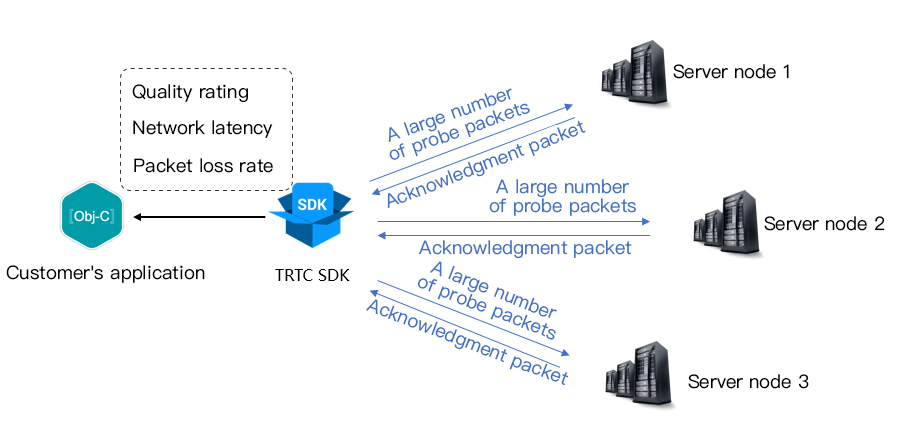
The principle of speed test is that the SDK sends a batch of probe packets to the server node, then calculates the quality of the returned packets, and notifies the speed test results through the callback API.
The speed test results will be used to optimize the SDK's subsequent server selection strategy. Therefore, it is recommended that you perform a speed test before the user's first call. This will help us select the best server. Meanwhile, if the test results are highly unsatisfactory, you can prompt the user through a prominent UI to choose a better network.
Speed test result (TRTCSpeedTestResult) includes the following fields:
Field
Meaning
Description
success
Whether it is successful
Whether this test is successful.
errMsg
Error message.
Detailed error information of the bandwidth test.
ip
Server IP address
IP address of the testing server
quality
Network quality scoring
The network quality calculated by the evaluation algorithm, with lower loss and smaller rtt, results in a higher score.
upLostRate
Uplink packet loss rate
Range is [0 - 1.0]. For example, 0.3 means when sending 10 packets to server, 3 may be lost midway.
downLostRate
Downstream packet loss rate
Range is [0 - 1.0]. For example, 0.2 means when receiving 10 packets from server, 2 may be lost midway.
rtt
Network delay
Time consumed for SDK to communicate with server round-trip. The smaller this value is, the better. The normal value is between 10 ms and 100 ms.
availableUpBandwidth
Uplink bandwidth
Predicted uplink bandwidth, unit: kbps. -1 indicates an invalid value.
availableDownBandwidth
Downstream bandwidth
Predicted downstream bandwidth, unit: kbps. -1 indicates an invalid value.

How to Conduct a Speed Test

1.You can start the speed test feature through the startSpeedTest functionality of TRTCCloud.
// Call startSpeedTest to start the speed test.
const trtcCloud = TRTCCloud.sharedInstance();
const param: TRTCSpeedTestParams = {
expectedDownBandwidth: 10, // Expected downstream bandwidth (kbps, value ranges from 10 to 5000, no test when it is 0)
expectedUpBandwidth: 10, // Expected uplink bandwidth (kbps, value ranges from 10 to 5000, no test when it is 0).
scene: 1, // 1: Delay test. 2: Delay and bandwidth test. 3: Online chorus testing.
sdkAppId: 0, // Application identifier
userId: "", // User identity
userSig: "", // User signature
}
trtcCloud.startSpeedTest(param);
const onRtcListener = useCallback((type: TRTCCloudListener, params: any) => {
if (type === TRTCCloudListener.onSpeedTestResult) {
console.log('Speed test result:', params);
setSpeedTestResult(params);
}
}

2.The speed test result will be returned through the onSpeedTestResult callback function.
// Return results through the onSpeedTestResult callback function
const trtcCloud = TRTCCloud.sharedInstance();
const onRtcListener = useCallback((type: TRTCCloudListener, params: any) => {
if (type === TRTCCloudListener.onSpeedTestResult) {
console.log('Speed test result:', params);
setSpeedTestResult(params);
}
}
trtcCloud.registerListener(onRtcListener);
Enumeration Types
Description
availableDownBandwidth
Downstream bandwidth (kbps, -1: invalid value).
availableUpBandwidth
Uplink bandwidth (kbps, -1: invalid value).
downJitter
Downlink packet Jitter (ms), indicating the stability of data communication under the current network environment for the user. The smaller this value, the better. The normal value range is 0 ms - 100 ms. -1 means the speed test did not successfully measure a valid value. Generally, the Jitter of a WiFi network is slightly larger than that in a 4G/5G environment.
downLostRate
Downstream packet loss rate. The value ranges from [0 - 1.0]. For example, 0.2 means when receiving 10 packets from the server, 2 may be lost midway.
errMsg
Error information of the bandwidth test.
ip
Server IP address.
quality
Internal network quality calculated by the evaluation algorithm. Details as follows:
quality = 0: undefined.
quality = 1: The current network is excellent.
quality = 2: The current network is good.
quality = 3: The current network is moderate.
quality = 4: The current network is poor.
quality = 5: The current network is very poor.
quality = 6: The current network fails to satisfy the minimum requirements of TRTC.
rtt
Latency (ms): Refers to the Round-Trip Time (RTT) from the current device to the TRTC server. The smaller the value is, the better. The normal value range is 10ms - 100ms.
success
Whether the test is successful.
upJitter
Uplink packet Jitter (ms): Refers to the stability of data communication under the current network environment of the user. The smaller the value is, the better. The normal value range is 0ms - 100ms. -1 represents that no valid value was successfully measured in this speed test. Generally, the Jitter of a WiFi network is slightly larger than that in a 4G/5G environment.
upLostRate
Uplink packet loss rate. The value ranges from [0 - 1.0]. For example, 0.3 means when sending 10 packets to the server, 3 may be lost midway.

도움말 및 지원

문제 해결에 도움이 되었나요?

피드백