Audience List (Android)
Download
포커스 모드
폰트 크기
LiveAudienceStore is a module in AtomicXCore designed for managing audience information in live streaming rooms. With LiveAudienceStore, you can implement a comprehensive audience list and management system for your live streaming application.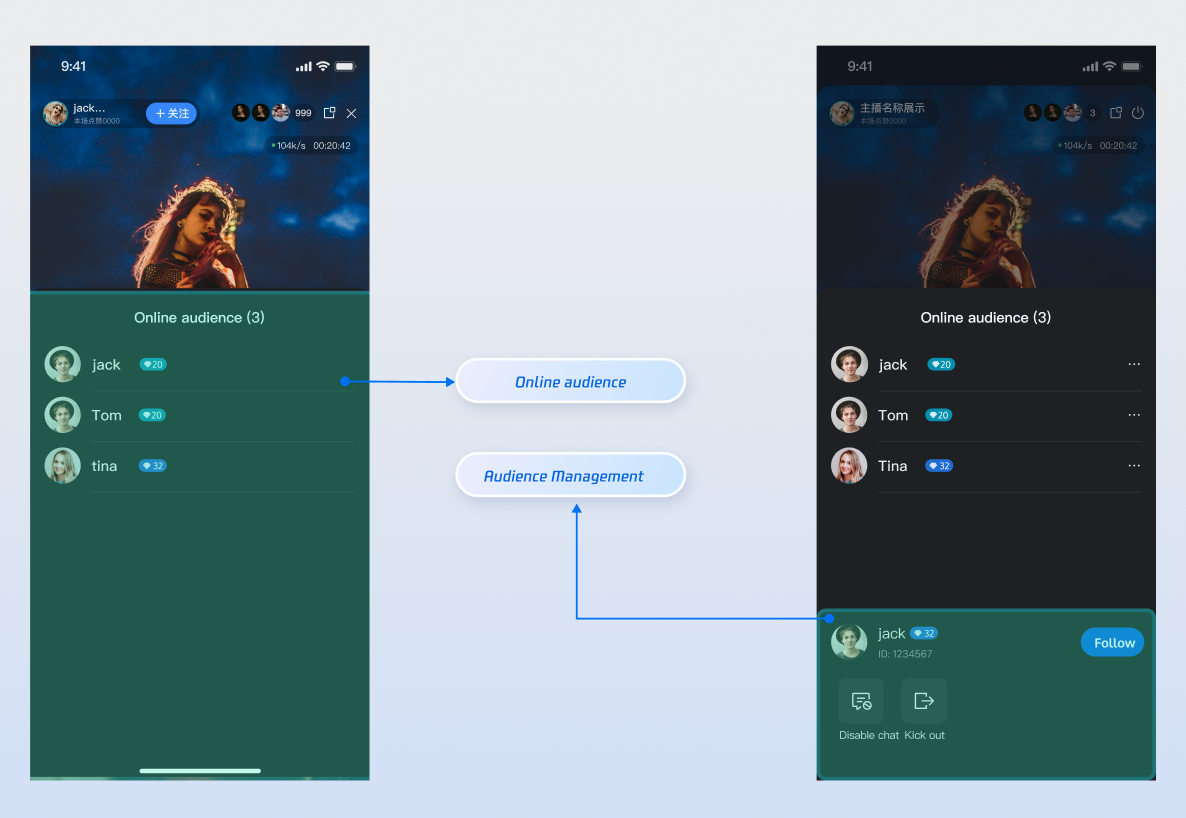
Core Features
Real-Time Audience List: Retrieve and display all audience information currently present in the live room.
Audience Count Statistics: Access the accurate, real-time total number of viewers in the live room.
Audience Activity Monitoring: Subscribe to events to instantly detect when viewers join or leave.
Administrator Privileges: The host can promote regular viewers to administrators or revoke their admin status.
Room Management: The host or administrator can remove (kick out) any regular viewer from the live room.
Core Concepts
Core Concept | Type | Core Responsibilities & Description |
LiveUserInfo | data class | Represents the basic information model of an audience member (user). It contains the user's unique identifier ( userID), nickname (userName), and avatar URL (avatarURL). |
LiveAudienceState | data class | Represents the current state of the audience module. Its core property audienceList is a StateFlow that stores the real-time state of the audience list; audienceCount represents the real-time state of the current total number of viewers. |
LiveAudienceListener | abstract class | Represents real-time audience activity events. It includes onAudienceJoined (audience joins) and onAudienceLeft (audience leaves), used for incremental updates to the audience list. |
LiveAudienceStore | abstract class | This is the core management class for interacting with audience list functionality. Through it, you can obtain audience list snapshots, perform management operations, and subscribe to its LiveAudienceListener for real-time updates. |
Implementation Guide
Step 1: Component Integration
Video Live Streaming: Please refer to Quick Start to integrate AtomicXCore
Voice Chat Room: Please refer to Quick Start to integrate AtomicXCore.
Step 2: Initialize and Retrieve the Audience List
Obtain a
LiveAudienceStore instance bound to the current live room's liveId, and fetch the current audience list for the initial display.import kotlinx.coroutines.*import kotlinx.coroutines.flow.*import io.trtc.tuikit.atomicxcore.api.CompletionHandlerimport io.trtc.tuikit.atomicxcore.api.live.LiveAudienceStoreimport io.trtc.tuikit.atomicxcore.api.live.LiveUserInfoclass AudienceManager(private val liveId: String) {private val audienceStore: LiveAudienceStore = LiveAudienceStore.create(liveId)private val scope = CoroutineScope(Dispatchers.Main)// Expose the [full] audience list state flow for UI layer subscriptionprivate val _audienceList = MutableStateFlow<List<LiveUserInfo>>(emptyList())val audienceList: StateFlow<List<LiveUserInfo>> = _audienceList.asStateFlow()// Expose the audience count state flowprivate val _audienceCount = MutableStateFlow(0)val audienceCount: StateFlow<Int> = _audienceCount.asStateFlow()init {// 1. Subscribe to state and events, see next section for implementationsubscribeToAudienceState()subscribeToAudienceEvents()// 2. Actively fetch initial data for the first screenfetchInitialAudienceList()}/// Actively fetch a snapshot of the audience list onceprivate fun fetchInitialAudienceList() {audienceStore.fetchAudienceList(object : CompletionHandler {override fun onSuccess() {println("Successfully fetched the initial audience list")// After success, the data will be automatically updated via the state subscription channel below}override fun onFailure(code: Int, desc: String) {println("Failed to fetch the initial audience list: $desc")}})}// ... subsequent code}
Step 3: Listen to Audience List State and Real-Time Activity
Subscribe to the
liveAudienceState of audienceStore and add a LiveAudienceListener to receive full list snapshots and real-time audience join/leave events. Use these updates to drive UI changes.class AudienceManager {/// Subscribe to state for audience count and list snapshotsprivate fun subscribeToAudienceState() {scope.launch {// audienceList is a full snapshotaudienceStore.liveAudienceState.audienceList.collect { audienceList ->_audienceList.value = audienceList}}scope.launch {// audienceCount is the real-time totalaudienceStore.liveAudienceState.audienceCount.collect { count ->_audienceCount.value = count}}}private val liveAudienceListener = object : LiveAudienceListener() {override fun onAudienceJoined(newAudience: LiveUserInfo) {println("Audience ${newAudience.userName} joined the live room")// Incremental update: add the new audience member to the end of the current listval currentList = _audienceList.value.toMutableList()if (!currentList.any { it.userID == newAudience.userID }) {currentList.add(newAudience)_audienceList.value = currentList}}override fun onAudienceLeft(departedAudience: LiveUserInfo) {println("Audience ${departedAudience.userName} left the live room")// Incremental update: remove the departed audience member from the current listval currentList = _audienceList.value.toMutableList()currentList.removeAll { it.userID == departedAudience.userID }_audienceList.value = currentList}}/// Subscribe to events to handle real-time audience join/leaveprivate fun subscribeToAudienceEvents() {audienceStore.addLiveAudienceListener(liveAudienceListener)}}
Step 4: Manage Audience (Kick and Set Administrator)
As a host or administrator, you can manage viewers in the live room.
4.1 Kick a Viewer Out of the Live Room
Call the
kickUserOutOfRoom method to remove a specified user from the live room.class AudienceManager {fun kick(userId: String) {audienceStore.kickUserOutOfRoom(userId, object : CompletionHandler {override fun onSuccess() {println("Successfully kicked user $userId out of the room")// After a successful kick, you will receive an onAudienceLeft event}override fun onFailure(code: Int, desc: String) {println("Failed to kick user $userId: $desc")}})}}
4.2 Set or Revoke Administrator Status
Use the
setAdministrator and revokeAdministrator methods to manage a user's administrator status.class AudienceManager {/// Promote user to administratorfun promoteToAdmin(userId: String) {audienceStore.setAdministrator(userId, object : CompletionHandler {override fun onSuccess() {println("Successfully promoted user $userId to administrator")}override fun onFailure(code: Int, desc: String) {println("Failed to set administrator: $desc")}})}/// Revoke user's administrator statusfun revokeAdmin(userId: String) {audienceStore.revokeAdministrator(userId, object : CompletionHandler {override fun onSuccess() {println("Successfully revoked administrator status for user $userId")}override fun onFailure(code: Int, desc: String) {println("Failed to revoke administrator: $desc")}})}}
Advanced Features
Display a Welcome Message in the Barrage Area When a Viewer Joins
When a new viewer enters the live room, a welcome message such as
"Welcome [user nickname] to the live room" is automatically displayed locally in the barrage/chat area.Implementation
Add a listener for the audience join event
LiveAudienceListener.onAudienceJoined in LiveAudienceStore to receive real-time notifications when a new viewer joins. When triggered, extract the new viewer's nickname and call the appendLocalTip method of BarrageStore to insert the message locally.import io.trtc.tuikit.atomicxcore.api.live.LiveAudienceListenerimport io.trtc.tuikit.atomicxcore.api.live.LiveAudienceStoreimport io.trtc.tuikit.atomicxcore.api.live.LiveUserInfoimport io.trtc.tuikit.atomicxcore.api.barrage.Barrageimport io.trtc.tuikit.atomicxcore.api.barrage.BarrageStoreimport io.trtc.tuikit.atomicxcore.api.barrage.BarrageTypeclass LiveRoomManager(private val liveId: String) {init {// Initialize two core managerssetupWelcomeMessageFlow()}private val liveAudienceListener = object : LiveAudienceListener() {override fun onAudienceJoined(audience: LiveUserInfo) {// 3. Create a local tip messageval welcomeTip = Barrage().apply {liveID = liveIdmessageType = BarrageType.TEXTtextContent = "Welcome ${audience.userName} to the live room."}// 4. Get an instance of BarrageStore (this will be the same instance due to internal mechanisms)val barrageStore = BarrageStore.create(liveId)// 5. Use BarrageStore's method to insert it into the barrage listbarrageStore.appendLocalTip(welcomeTip)}}private fun setupWelcomeMessageFlow() {// 1. Get an instance of LiveAudienceStoreval audienceStore = LiveAudienceStore.create(liveId)// 2. Subscribe to audience eventsaudienceStore.addLiveAudienceListener(liveAudienceListener)}}
API Documentation
For detailed information on all public interfaces, properties, and methods of LiveAudienceStore and its related classes, refer to the official API documentation included with the AtomicX Core framework. The relevant Stores used in this document are as follows:
Store/Component | Feature Description | API Documentation |
LiveCoreView | Core view component for live video stream display and interaction: responsible for video stream rendering and view widget handling, supporting scenarios such as host streaming, audience co-hosting, and host-to-host connection. | |
LiveAudienceStore | Audience management: obtain real-time audience list (ID / name / avatar), count audience numbers, and listen for audience join/leave events. | |
BarrageStore | Barrage feature: send text/custom barrage, maintain barrage list, and listen to barrage status in real time. |
FAQs
How is the online audience count (audienceCount) in LiveAudienceState updated? What are the timing and frequency?
The update of
audienceCount is not always strictly real-time. The mechanism is as follows:Active Join/Leave: When a user actively joins or leaves the live room, the audience count change notification is triggered instantly. You will quickly observe the change in
audienceCount in LiveAudienceState.Unexpected Disconnection: If a user disconnects unexpectedly due to network issues, app crashes, and so on, the system determines their actual status using a heartbeat mechanism. Only when the user has no heartbeat for 90 consecutive seconds does the system consider them offline and trigger a count change notification.
Update Mechanism and Frequency Control:
Whether triggered instantly or with a delay, all audience count change notifications are broadcast as messages within the room.
There is an upper limit to the total number of messages per second in a room, with a per-room message rate limit of 40 messages per second.
Key Point: In scenarios with extremely high message traffic, such as "barrage storms" or rapid-fire gifting, if the message rate in the room exceeds the 40 messages/second threshold, to ensure the delivery of core messages (such as barrage), audience count change messages may be dropped by the rate-limiting policy.
What does this mean for developers?
audienceCount is a near real-time, high-precision estimate, but in extreme high-concurrency scenarios, there may be brief delays or data loss. We recommend using it for UI display only, and not as the sole basis for billing, statistics, or other scenarios requiring absolute accuracy.피드백