Scale-Out and Scale-In
Download
Modo Foco
Tamanho da Fonte
Overview
Tencent Cloud TCHouse-D cluster provides a scale-in and scale-out feature, which helps you to scale the number of nodes in the cluster.
Scale-out refers to reducing the number of service nodes. If the current scale and performance of the cluster do not meet usage requirements, you can enhance the performance through scale-out.
Scale-in refers to reducing the number of service nodes. If the current usage of the cluster is low, and there is no significant demand for a long period, you can use scale-in to reduce cluster scale and save cost.
Before scale-in and scale-out operations, please ensure the following:
The cluster is in a stable operating state.
The main account is not in arrears and there are no outstanding orders.
Scale out
In the Scale-out process, the system can read and write, but there may be some fluctuations. The operation generally takes about 5-15 minutes. Please carry it out during non-peak business hours.
When the business is facing double growth in data storage volume and query volume, it is recommended to choose scale-out as a priority.
Note:
For a non-high-availability cluster (with only one FE node), expanding to 3 or more FE nodes will by default switch to a read high-availability pattern.
If read-write high availability is not specified, even when expanding to more than 5 FE nodes, it will remain in the read high-availability pattern.
Operation Guide
1. Sign in to Tencent Cloud TCHouse-D Console, and choose Operation > Scale-out for the cluster you wish to operate.

2. In the cluster scale-out pop-up window, select the type and quantity of nodes to be scaled out, and you can calculate the change fee in real time. The standalone configuration of the new scale-out node is the same as the existing configuration of the cluster.
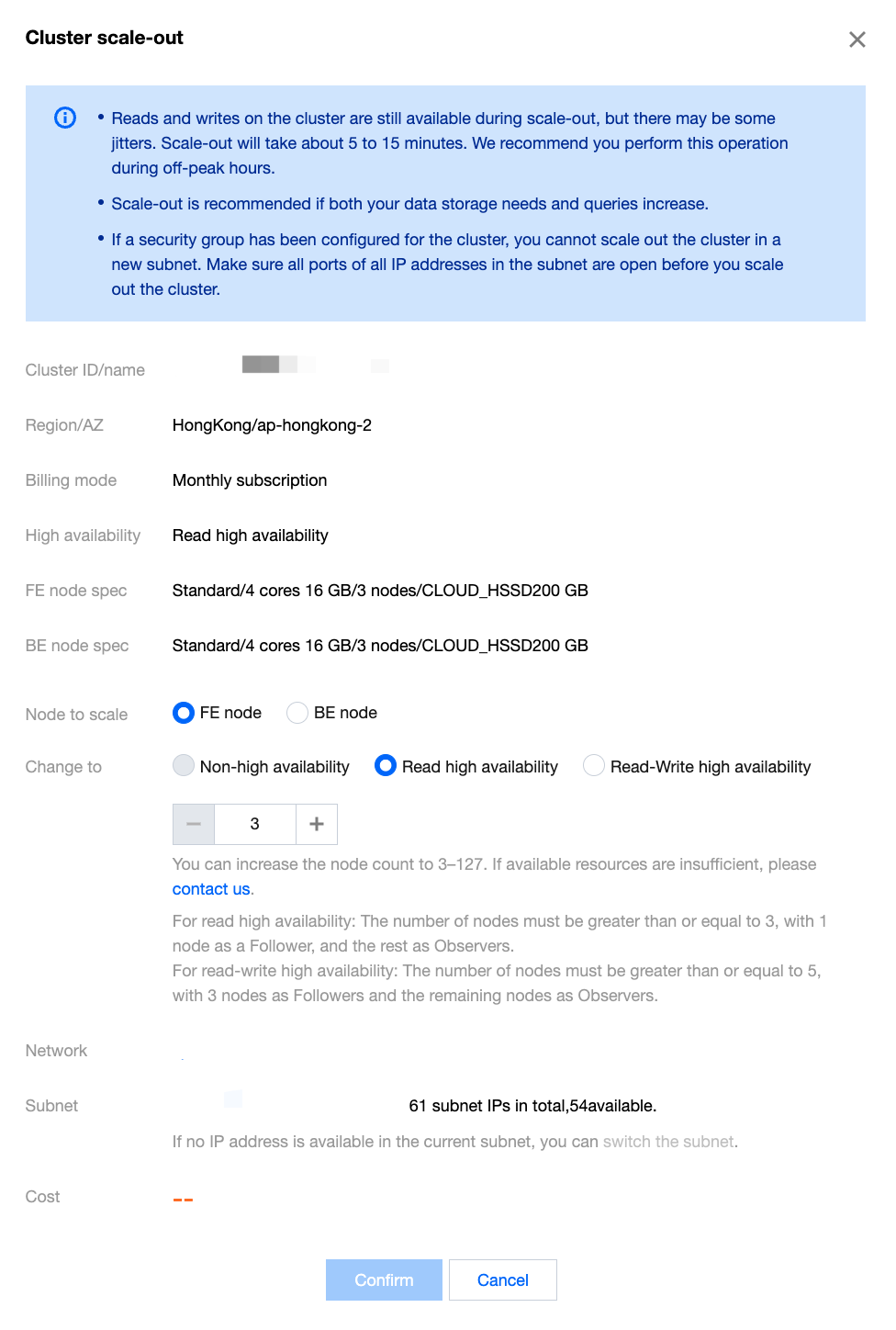
3. Click Confirm. After completing the payment, the cluster will start the scale-out process, which generally takes about 5-15 minutes.
4. After the scale-out is complete, go to the cluster details page where you can peek at the list of nodes after scale-out.
Scale-in
It is recommended to perform scale-in operations on one node at a time. During the scale-in process, system reading and writing can still be carried out, but there might be some fluctuations.
Based on the requirements for architectural stability, there are the following requirements for the number of target nodes after scale-in:
The number of FE nodes needs to be odd.
The number of FE and BE nodes in a high-availability pattern cluster should be equal to or greater than 3.
Minimum quantity requirements for node types: At least 1 FE node and at least 3 BE nodes are required.
To ensure the safety of data and a reasonable number of replicas, before scale-in, the storage data of the node to be removed needs to be migrated to the normal node. The specific time of scale-in execution depends on the size of the data, ranging from a few minutes to several hours. Please carry it out during non-peak business hours.
Operation Guide
1. Sign in to Tencent Cloud TCHouse-D Console, choose Operation > Scale-in in the cluster you want to operate.

2. On the cluster scale-in page, select the node to be scaled in; the fee will be displayed in real-time.
3. Click Confirm. The cluster will begin the data migration and scale-in operations.
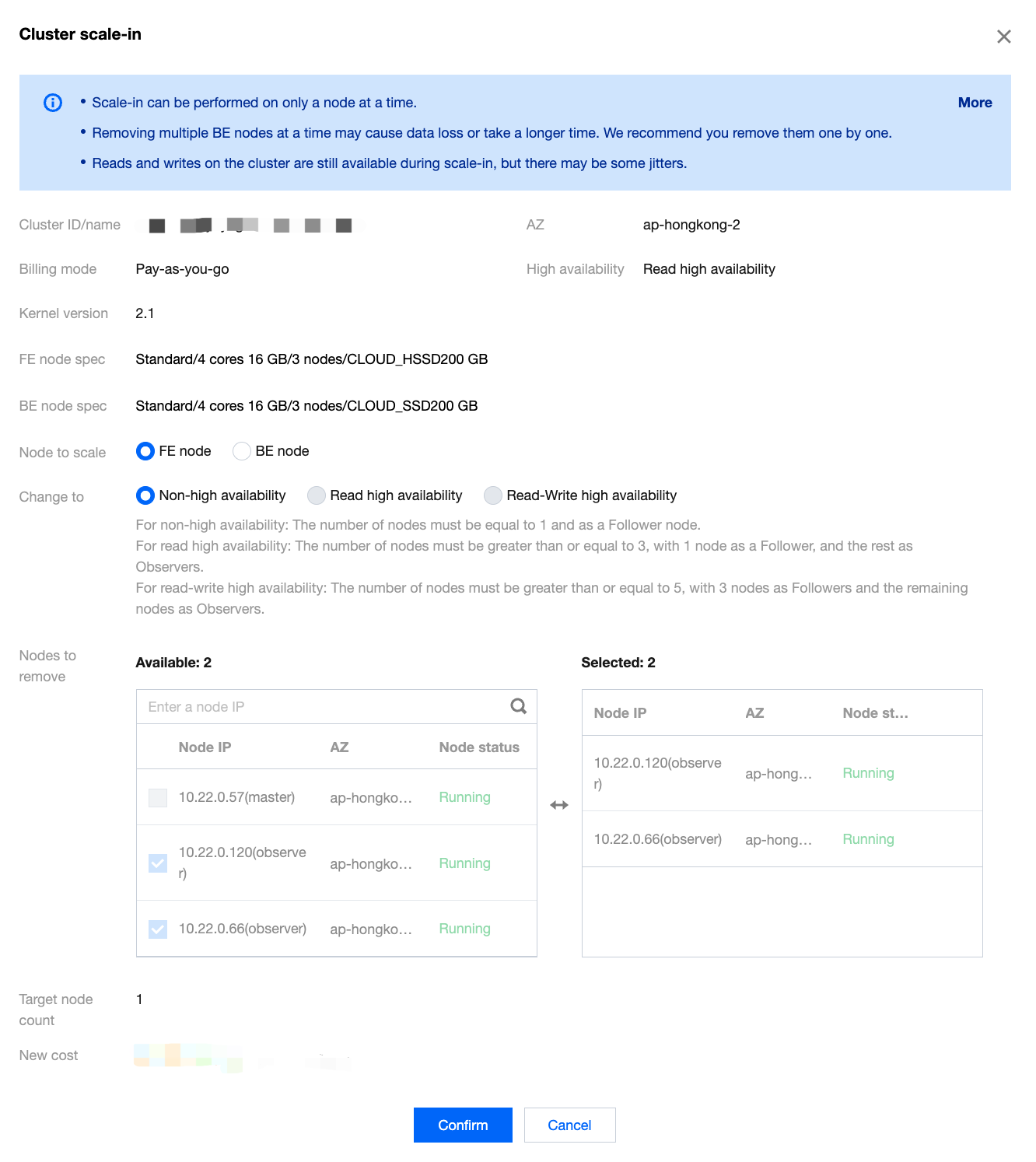
4. After the scale-in is complete, go to the cluster details page, where you can view the list of nodes after scale-in.
Ajuda e Suporte
Esta página foi útil?
Você também pode entrar em contato com a Equipe de vendas ou Enviar um tíquete em caso de ajuda.
comentários