Call Data
Download
포커스 모드
폰트 크기
Tencent Cloud Contact Center (TCCC) Call Data Dashboard delivers real-time, accurate insights to help business monitor call trends, optimize service process, and improve efficiency.
The call data dashboard consists of three parts:
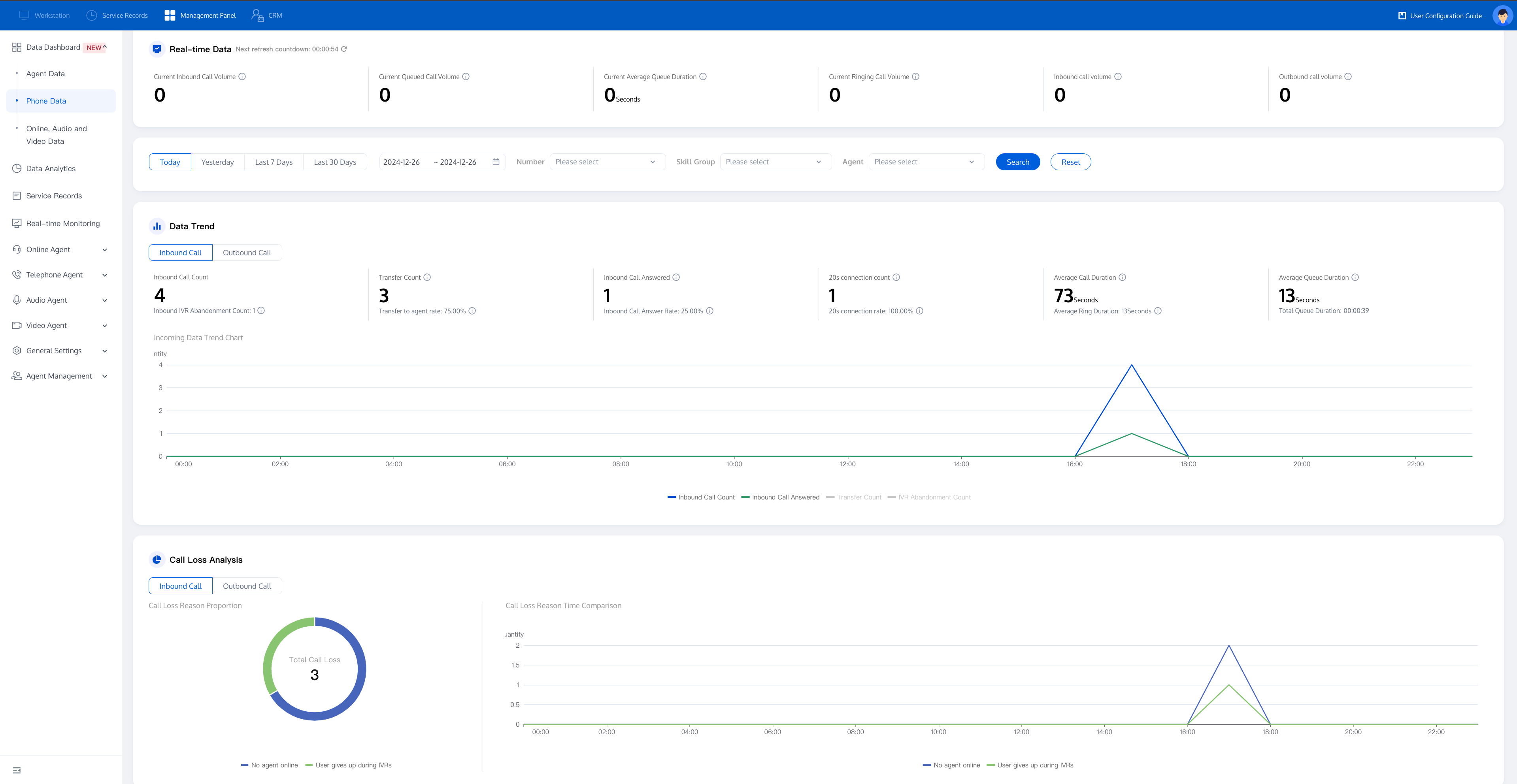
Data Monitoring: Tracks key metrics, highlights call trends, and analyzes call loss.
Data Detail: Breaks down inbound and outbound call metrics for deeper insights.
Number Health Check: Examines call failure reasons to support service improvements.
I. Data Monitoring
Data Monitoring provides a clear view of call trends and key metrics, offering in-depth analysis of call loss reason. It serves as a powerful tool for optimizing call workflows and enhancing service efficiency.
1. Real-Time Data
This module displays real-time call indicators, covering inbound call count, queued call count, average queue duration, ringing call count, and calls in progress. Admin can monitor current call status to make timly action.

Detail as follow:
Data Metrics | Explaination |
Current Inbound Call Count | The number of inbound calls in the IVR process at present |
Current Queued Call Count | The number of inbound calls currently queued for agents. |
Current Average Queue Time | The total queue time for inbound calls currently queued for agents / current queued call count. |
Current Ringing Call Count | The number of calls currently ringing. |
In-Call Count (Inbound) | Number of inbound calls currently handled by agents (user answers). |
In-Call Count (Outbound) | Number of outbound calls currently handled by agents (user answers). |
2.Data Trend
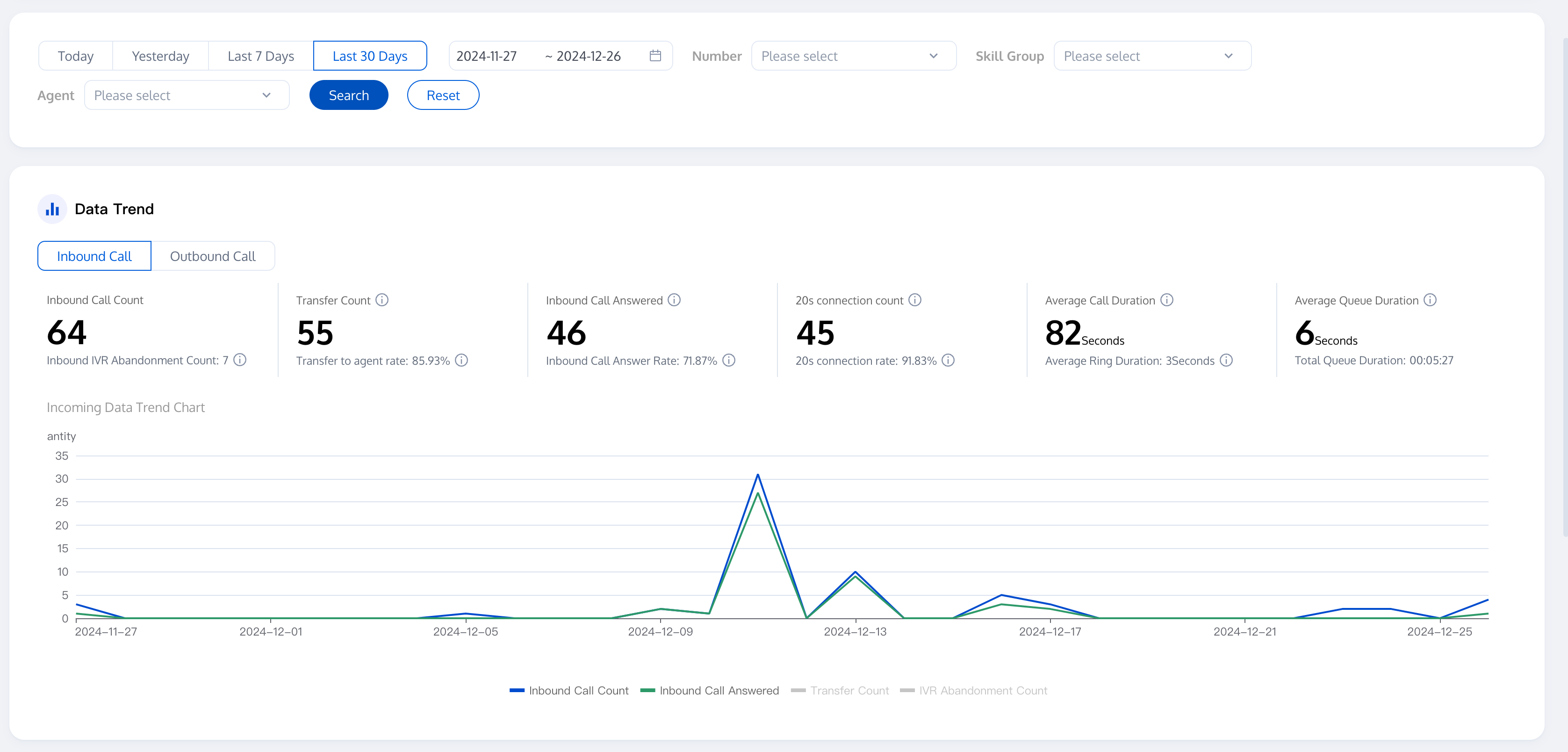
This module consists of core call indicators and call volume trends, you can filter by date range, number, skill group, and agent, allowing admin to directly understand the overall call situation.
Core Call Indicators: Displays core metrics such as current inbound call volume, inbound call connection volume, and total queue duration.
Call Volume Trends: Shows the trends of metrics like inbound call volume and inbound call connection volume over a certain period through line charts.
Detail as follow:
Call Type | Data Metrics | Explaination |
Inbound | Inbound Call Count | The number of inbound calls entering the IVR process within the selected range. |
| Inbound IVR Abandonment | The number of inbound calls abandoned during the IVR stage without being transferred to an agent. |
| Inbound Call Transfer Count | The number of inbound calls entering the IVR transfer to agent module within the selected range. |
| Inbound Call Transfer Rate | Number of inbound calls transferred to an agent/Number of inbound calls within the selected range |
| Inbound Call Answered Count | The number of inbound calls with a duration greater than 0 within the selected range |
| Inbound Call Answer Rate | Number of inbound calls answered/Number of inbound calls within the selected range |
| 20-Seconds Answer Count | The number of calls successfully answered within 20 seconds (inclusive) from the start of ringing. |
| 20-Second Answer Rate | Calls Answered Within 20 Seconds / Total Ringing Inbound Calls. |
| Average Inbound Call Duration | Total Ring Time for inbound Calls / Number of inbound Calls That Rang |
| Average Ring Time for Inbound Calls | Total ring duration of inbound calls within the selected range/Number of inbound calls that rang |
| Average Inbound Queue Time | Total inbound queue time/number of calls queuing for agents with queue time greater than 0 |
| Total Inbound Queue Time | The total time of all calls transferred to agents while queuing |
Outbound | Outbound Call Count | The total number of all outbound calls |
| Outbound Connection Count | Number of outbound calls for this agent with a duration greater than 0. |
| Outbound Connection Rate | Number of outbound calls answered/Number of outbound calls within the selected range |
| Outbound Call Loss | The number of outbound calls with a call duration of 0 |
| Outbound Call Loss Rate | Number of abandoned outbound calls/Number of outbound calls within the selected range |
| Total Outbound Ringing Duration | The sum of ringing durations for all outbound calls (Ringing Duration = Answer Time - Ring Start Time) |
| Average Outbound Ringing Duration | Total Outbound Ringing Duration / Number of Outbound Calls with Ringing Duration > 0 |
| Total Duration of Outbound Calls | Total duration of all outbound calls within the selected range |
| Average Outbound Call Duration | Total Outbound Call Duration / Number of Answered Outbound Calls |
Call Loss Analysis
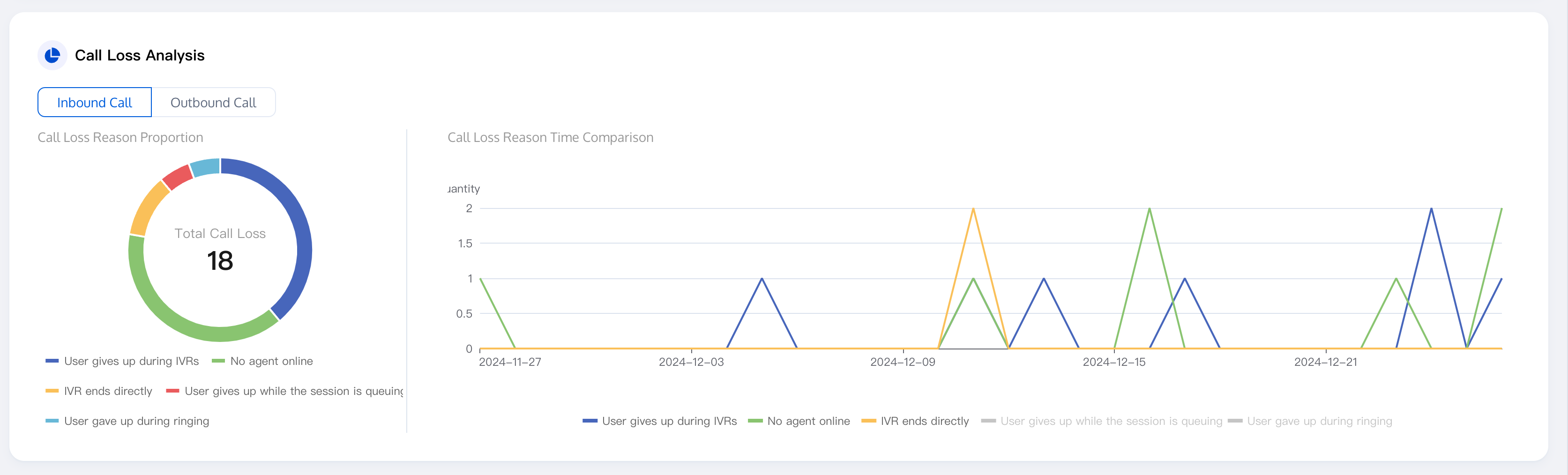
Call Loss Analysis is divided into two main parts
Proportion of Call Loss Reasons: The pie chart shows call loss reasons by color and proportion.
Time Comparison of Call Loss Reasons: The line chart uses different colors to represent call loss reasons and shows each reason changes over time.
2. Data Detail
This module display call detail records for specific dates, supporting filtering by date range, number, skill group, and agent, as well as exporting reports.
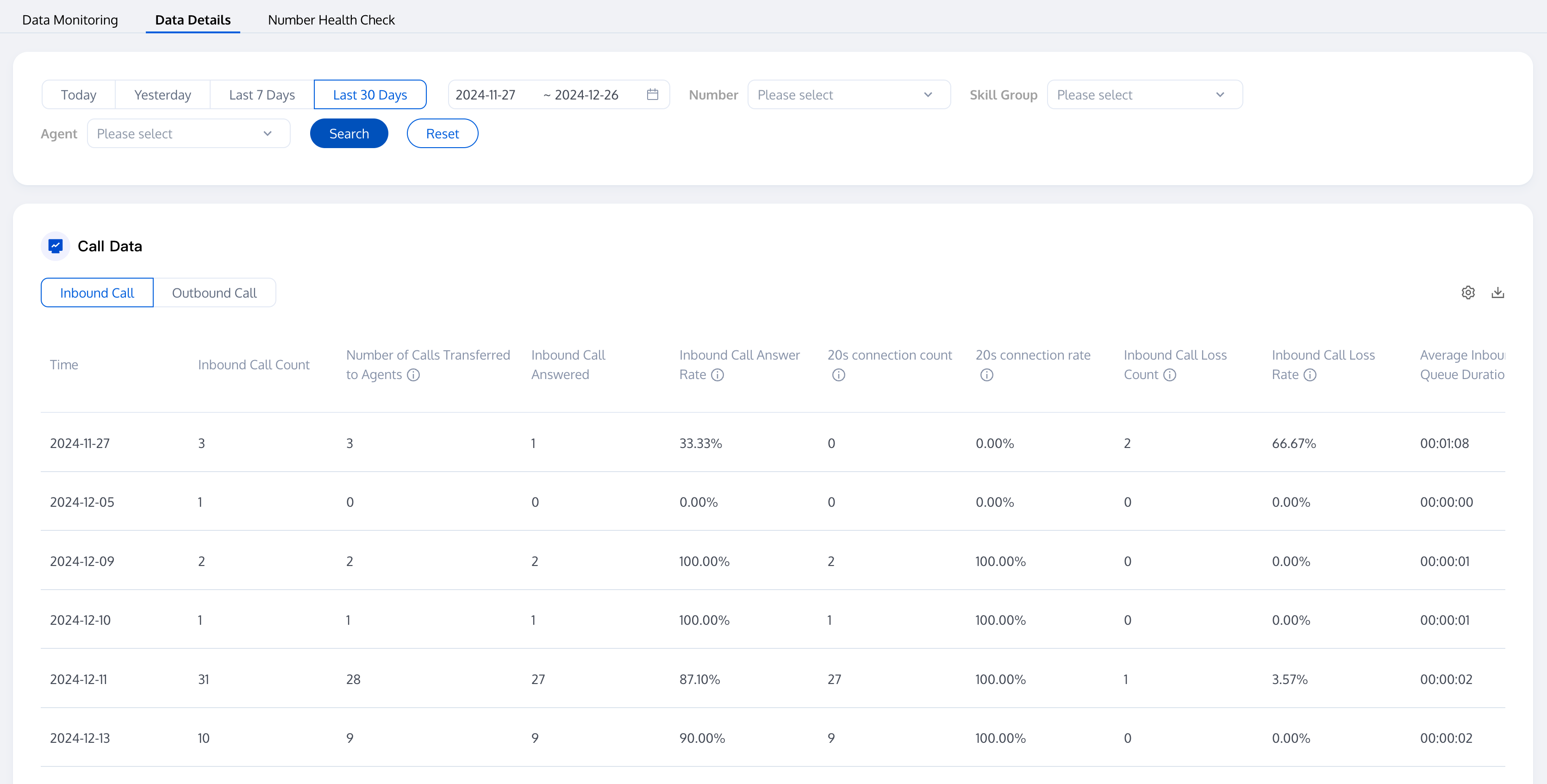
You can select the data to display/hide through the custom indicator button at the top right of the list (as shown in the figure below).
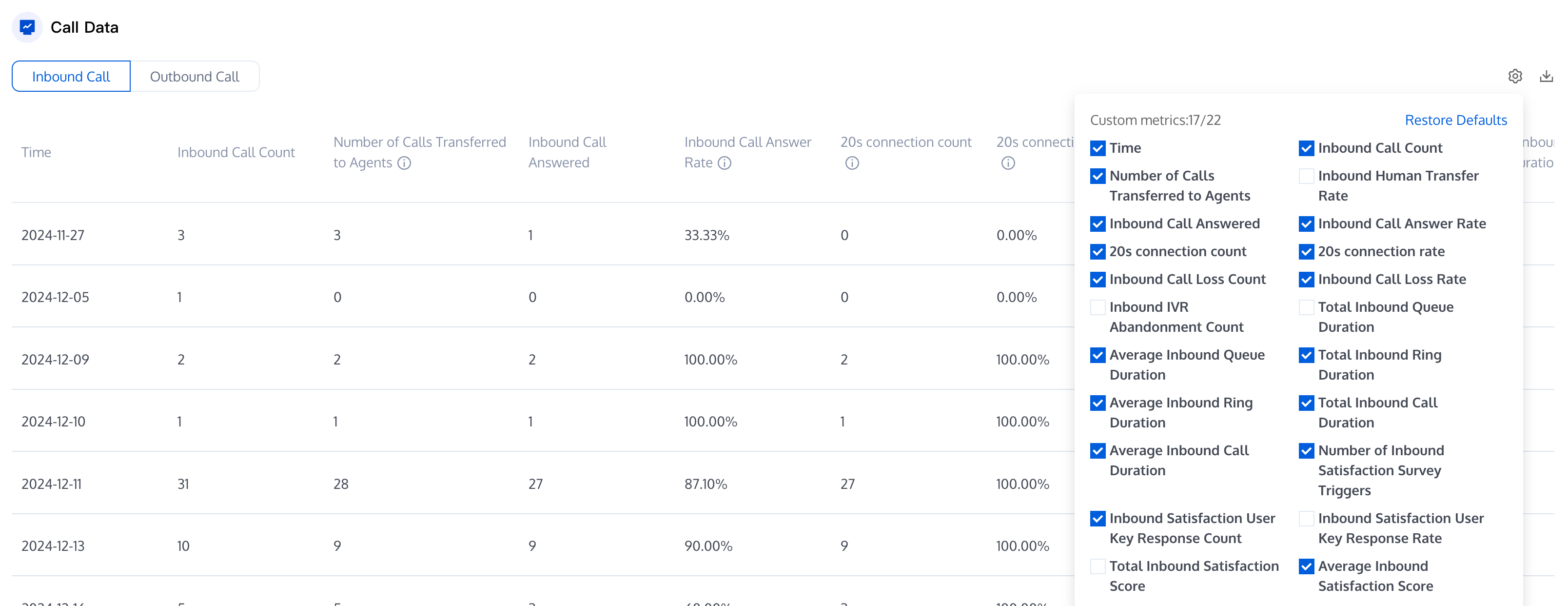
The detailed data are as follows:
Call Type | Data Metrics | Metric notes |
Inbound | Inbound Call Count | The number of inbound calls entering the IVR process within the selected range. |
| Inbound Call Transfer Count | The number of inbound calls entering the IVR transfer to agent module within the selected range. |
| Inbound Call Transfer Rate | Number of inbound calls transferred to an agent/Number of inbound calls within the selected range |
| Inbound Call Answered Count | The number of inbound calls with a duration greater than 0 within the selected range |
| Inbound Call Answer Rate | Number of inbound calls answered/Number of inbound calls within the selected range |
| 20-Seconds Answer Count | The number of calls successfully answered within 20 seconds (inclusive) from the start of ringing. |
| 20-Second Answer Rate | Calls Answered Within 20 Seconds / Total Ringing Inbound Calls. |
| Inbound IVR Abandonment | Number of calls transferred to an agent but not answered, i.e., calls that entered the IVR transfer to agent node but were not answered within the selected range. |
| Inbound Call Loss Rate | The number of inbound calls abandoned during the IVR stage without being transferred to an agent. |
| Inbound IVR Abandonment | The number of inbound calls abandoned during the IVR stage without being transferred to an agent. |
| Total Inbound Queue Time | The total time of all calls transferred to agents while queuing |
| Average Inbound Queue Time | Total queue duration of inbound calls within the selected range/Number of inbound calls transferred to queue |
| Total inbound ring duration | Total inbound ring duration within the selected range (ring duration = answer time - ring start time). |
| Average Ring Time for Inbound Calls | Total ring duration of inbound calls within the selected range/Number of inbound calls that rang |
| Total Inbound Call Duration | The sum of all inbound call durations |
| Average Inbound Call Duration | Total Inbound Call Duration / Number of Answered Inbound Calls. |
| Inbound Satisfaction Survey Trigger Count | Number of inbound calls that triggered a satisfaction survey. |
| Inbound Satisfaction Response Count | Total number of inbound calls where users responsed satisfaction survey. |
| Inbound Satisfaction Response Rate | Ratio of user responses to total inbound calls. |
| Total Inbound Satisfaction Score | Total response score from satisfaction survey for all inbound calls |
| Average Inbound Satisfaction Score | Total inbound satisfaction score / Total number inbound user responses. |
Outbound | Outbound Call Count | The total number of all outbound calls |
| Outbound Connection Count | Number of outbound calls for this agent with a duration greater than 0. |
| Outbound Connection Rate | Number of outbound calls answered/Number of outbound calls within the selected range |
| Outbound Call Loss | Number of outbound calls with a duration of 0 within the selected range |
| Outbound Call Loss Rate | Number of abandoned outbound calls/Number of outbound calls within the selected range |
| Total Outbound Ringing Duration | Total outbound ring duration within the selected range (ring duration = answer time - ring start time). |
| Average Outbound Ringing Duration | Total outbound ring duration within the selected range/Number of outbound calls that rang. |
| Total Duration of Outbound Calls | Total duration of all outbound calls within the selected range. |
| Average Outbound Call Duration | Total Outbound Call Duration / Number of Answered Outbound Calls |
| Outbound Satisfaction Survey Trigger Count | Number of outbound calls transferred to this agent that triggered a voice satisfaction survey |
| Outbound Satisfaction Response Count | Total number of outbound calls where users responsed satisfaction survey. |
| Outbound Satisfaction Response Rate | Ratio of user responses to total outbound calls. |
| Total Outbound Satisfaction Score | Total response score from satisfaction survey for all outbound calls. |
| Average Outbound Satisfaction Score | Total outbound satisfaction score / Total outbound user responses. |
Number Health Monitoring
This module monitors call connection rates, helping businesses track performance, spot issues, and improve workflows.
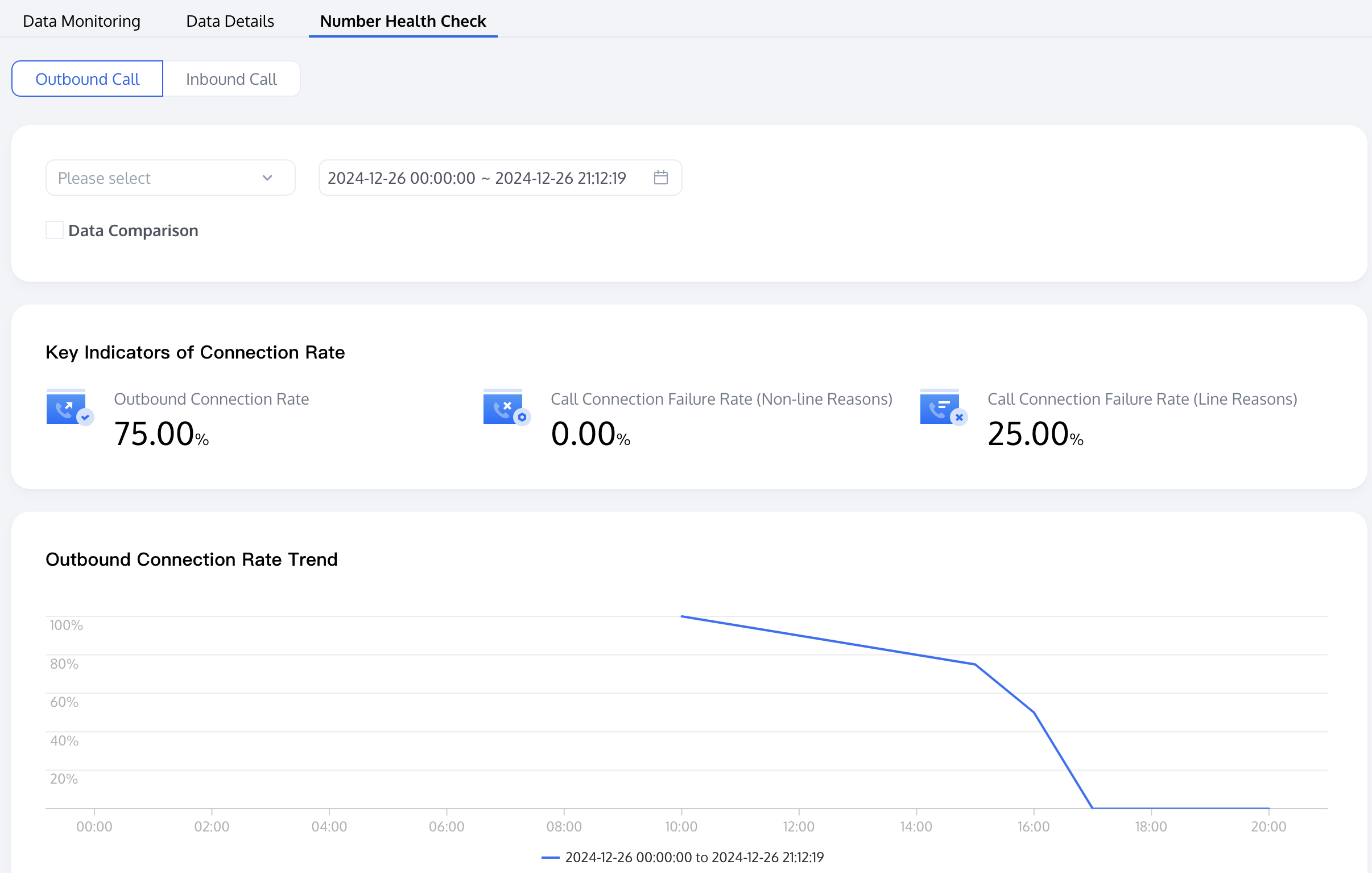
The detailed data metrics are as follows:
Call Type | Data Metrics | Explaination |
Inbound | Inbound Call Count | Number of all inbound calls to the number within the selected range. |
| Inbound Call Answered Count | Number of inbound calls to the number with a duration greater than 0 within the selected range. |
| Inbound Call Answer Rate | Number of inbound calls answered/Number of inbound calls within the selected range |
| Inbound IVR Abandonment | Number of unanswered inbound calls to the number within the selected range. |
| Inbound Call Loss Rate | Number of inbound call loss / Number of inbound calls |
Outbound | Outbound Call Count | Number of outbound calls from the number within the selected range. |
| Outbound Connection Count | Number of outbound calls from the number with a duration greater than 0 within the selected range. |
| Outbound Connection Rate | Number of outbound calls answered/Number of outbound calls within the selected range |
| Number of abandoned outbound calls (non-line reasons) | Number of unanswered outbound calls from the number due to non-line reasons within the selected range. |
| Outbound Call Abandon Rate (non-line reasons) | Number of abandoned outbound calls (non-line reasons)/Number of outbound calls within the selected range. |
| Number of abandoned outbound calls (line reasons) | Number of unanswered outbound calls from the number due to line reasons within the selected range. |
| Outbound Call Abandon Rate (line reasons) | Number of abandoned outbound calls (line reasons)/Number of outbound calls within the selected range. |
피드백