Connecting Through a URI Connection String
Baixar
Modo Foco
Tamanho da Fonte
This method applies to connecting to TencentDB for MongoDB instances using drivers for various programming languages in application code.
Obtaining a Standard URI Connection String
1. Log in to the TencentDB for MongoDB console.
2. Locate the target instance in the instance list.
3. Go to the Instance Details page. In the Network Configuration section, copy the complete connection string under Access Address, as shown in the figure below.
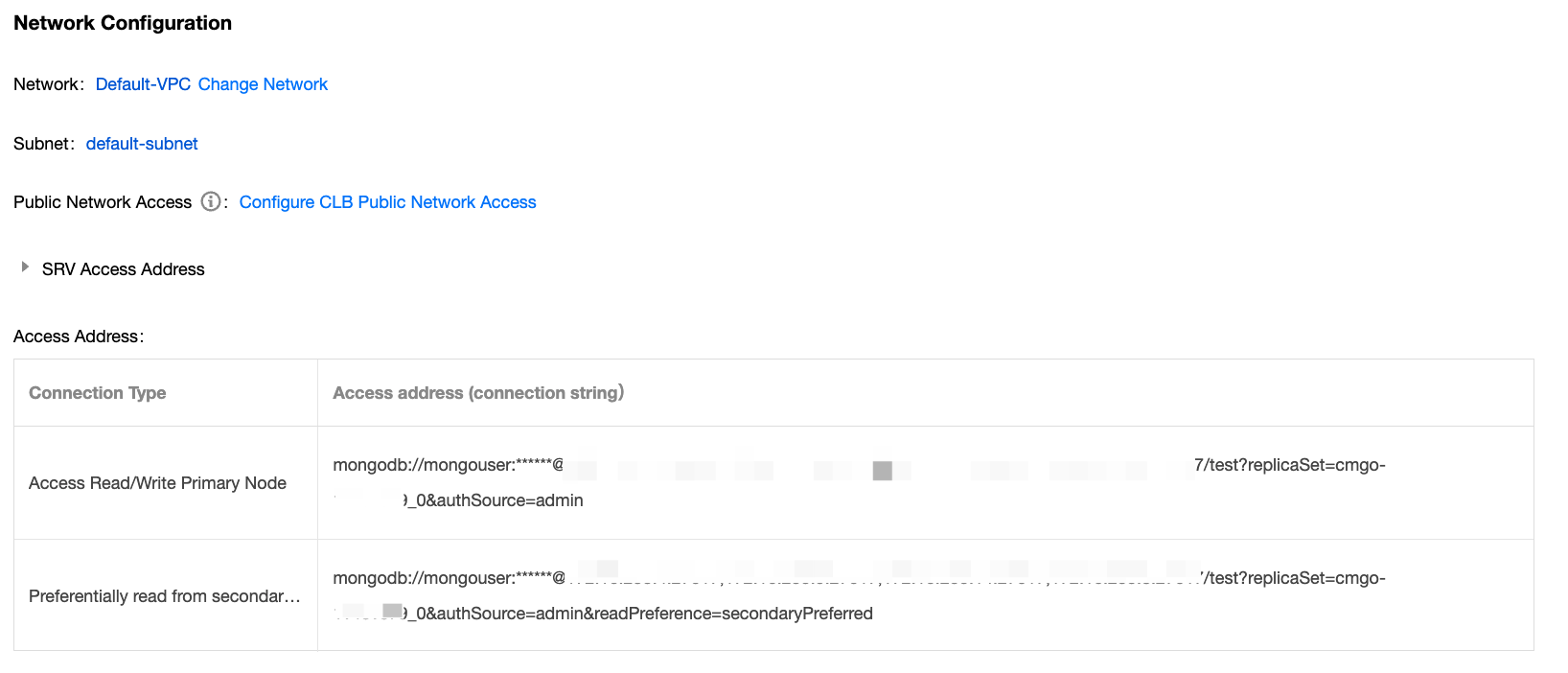
The following table describes the key connection parameters. For more information, see MongoDB Official Documentation.
Parameter | Description | Required or Not | Remarks |
mongodb:// | MongoDB protocol identifier | Yes | - |
username:password | Database authentication information | Yes | Default user: TencentDB for MongoDB has a built-in default user mongouser. Custom user: On the Database Management page in the TencentDB for MongoDB console, you can create users. For detailed operations, see Account Management. |
host:port | Instance node address | Yes | Multiple addresses are supported, separated by commas. |
/admin or authSource=admin | Authentication database | Yes | Users created in the console: The authentication database is uniformly set to admin, and the authSource=admin setting should be specified during connection to the database. Users created using the command line: The authentication database is the database where the user was created. (For example, if the user is created in the test database, the authentication database is the test database.) |
replicaSet | Replica set ID | Yes | Identify the replica set name of the instance. |
authMechanism=SCRAM-SHA-1 | Authentication mechanism | No | Authentication mechanisms: SCRAM-SHA-1 and SCRAM-SHA-256 |
readPreference | Read preference setting | No | Control the routing of read requests. For example: mongodb://.../admin?readPreference=secondaryPreferredprimary: (Default) All read requests are only sent to the primary node. primaryPreferred: Read requests are sent to the primary node first; if the primary node is unavailable, read requests will be routed to secondary or read-only nodes. secondary: Read requests are routed to secondary or read-only nodes. If secondary nodes are unavailable, read requests will return an error. secondaryPreferred: Read requests are sent to secondary or read-only nodes first; if secondary or read-only nodes are unavailable, read requests will be routed to the primary node. |
Multilingual Connection Examples
You can use this connection string to connect to databases with MongoDB drivers for different programming languages.
Driver download: Use the latest version of the client driver to ensure optimal compatibility. This includes the Shell suite, Java JAR packages, PHP extensions, and Node.js modules. For details, see MongoDB Official Driver Documentation.
Connection examples in different languages.
FAQs
If the connection fails, see Troubleshooting MongoDB Connection Failures to resolve the issue step by step. For more issues, see Connection.
Ajuda e Suporte
Esta página foi útil?
Você também pode entrar em contato com a Equipe de vendas ou Enviar um tíquete em caso de ajuda.
comentários