tencent cloud

Game Multimedia Engine

Product Introduction
Overview
Strengths
Features
Scenarios
Compliance
Console Guide
Usage Querying
Activating Services
Getting Started
Quick Integration of SDK
Quick Integration of Sample Project
Basic Feature Development Guide
Authentication Key
Voice Chat Role Configuration
Sound Quality
Client API
SDK for Unity
SDK for Unreal Engine
Cocos2D SDK
SDK for Windows
SDK for iOS
SDK for Android
SDK for macOS
H5 SDK
Electron SDK
SDK for Flutter
SDK Version Upgrade Guide
Error Codes
Toolchain
Server APIs
History
Introduction
API Category
Usage APIs
Recording APIs
Making API Requests
Voice Chat APIs
Application APIs
Data Types
Error Codes
FAQ
Product Features
Troubleshooting Guide
Billing
Sample Project Usage
General
Authentication
Voice Chat Room Entry Failure
Sound and Audio
Network
Speech-to-text Conversion
Program Export
Service Agreement
Service Level Agreement
Política GME
Contrato de Privacidade e Segurança de Dados
Política de privacidade

Project Configuration

PDF
Modo Foco
Tamanho da Fonte
Última atualização: 2024-01-18 15:13:51
This document describes how to configure a macOS project for the GME APIs for macOS.

SDK Preparations

1. Download the applicable demo and SDK. For more information, please see Download Guide.
2. Decompress the obtained SDK resources.
3. The extracted GMESDK.framework is the resource related to GME.

Configuration Guide

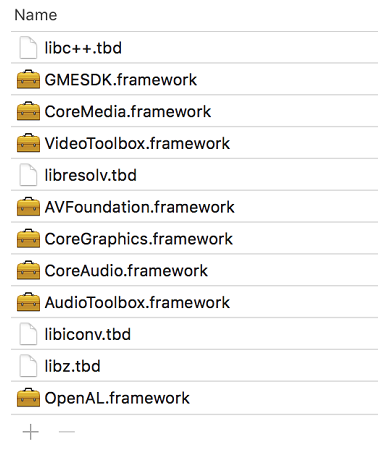
Add the following dependent libraries to Link Binary With Libraries in Xcode as needed and configure Framework Search Paths to point to the directory where the SDK is located as shown below:


Ajuda e Suporte

Esta página foi útil?

comentários