步骤3:使用 SDK 收发消息
下载
聚焦模式
字号
在控制台上完成集群、用户权限等资源配置后,您可以使用我们提供的 SDK Demo 连接集群,进行消息收发测试。本文以调用 Java SDK 为例在 VPC 网络环境下介绍消息收发的操作步骤,帮助您更好地理解消息收发的完整过程。
前提条件
已完成前期的 MQTT 集群资源创建。
已参考准备工作完成相关环境配置。
操作步骤
1. 下载 SDK Demo。
2. 将下载下来的 Demo 上传到同一个 VPC 下的 Linux 服务器,然后登录 Linux 服务器,进入
src/***/tdmq/mqtt/example目录下。3. 配置消息收发程序
QuickStart.java 的参数。此处以 paho/v5 目录下的简单消息收发程序为例。package com.tencent.tdmq.mqtt.example.paho.v5;import java.nio.ByteBuffer;import java.nio.charset.StandardCharsets;import java.util.List;import java.util.concurrent.TimeUnit;import org.eclipse.paho.mqttv5.client.IMqttToken;import org.eclipse.paho.mqttv5.client.MqttCallback;import org.eclipse.paho.mqttv5.client.MqttClient;import org.eclipse.paho.mqttv5.client.MqttConnectionOptions;import org.eclipse.paho.mqttv5.client.MqttDisconnectResponse;import org.eclipse.paho.mqttv5.client.persist.MemoryPersistence;import org.eclipse.paho.mqttv5.common.MqttException;import org.eclipse.paho.mqttv5.common.MqttMessage;import org.eclipse.paho.mqttv5.common.packet.MqttProperties;import org.eclipse.paho.mqttv5.common.packet.UserProperty;public class SubscriberQuickStart {public static void main(String[] args) throws MqttException, InterruptedException {// 从MQTT控制台获取接入点:// 通过Private Link实现VPC网络打通的用户, 使用内网接入点;// 通过公网访问的用户, 确保公网安全策略允许, 程序运行机器由公网接入;String serverUri = "tcp://mqtt-xxx.mqtt.tencenttdmq.com:1883";// 合法的Client Identifier包含 数字0-9, 小写英文字母a-z, 以及大写英文字母A-Z, 总长度为1-23个字符// 参考 https://docs.oasis-open.org/mqtt/mqtt/v5.0/os/mqtt-v5.0-os.html#_Toc3901059String clientId = "SubscriberQuickStart";// 在控制台 --> 认证 Tab页创建账户, 复制用户名和密码String username = "user0";String password = "secret0";// MQTT topic filtersString[] topicFilters = new String[]{"home/test", "home/#", "home/+"};int[] qos = new int[]{1, 1, 1};MqttClient client = new MqttClient(serverUri, clientId, new MemoryPersistence());client.setTimeToWait(3000);MqttConnectionOptions options = new MqttConnectionOptions();options.setUserName(username);options.setPassword(password.getBytes(StandardCharsets.UTF_8));options.setCleanStart(true);options.setAutomaticReconnect(true);client.setCallback(new MqttCallback() {@Overridepublic void disconnected(MqttDisconnectResponse response) {System.out.println("Disconnected: " + response.getReasonString());}@Overridepublic void mqttErrorOccurred(MqttException e) {e.printStackTrace();}@Overridepublic void messageArrived(String topic, MqttMessage message) {byte[] payload = message.getPayload();String content;if (4 == payload.length) {ByteBuffer buf = ByteBuffer.wrap(payload);content = String.valueOf(buf.getInt());} else {content = new String(payload, StandardCharsets.UTF_8);}System.out.printf("Message arrived, topic=%s, QoS=%d content=[%s]%n",topic, message.getQos(), content);List<UserProperty> userProperties = message.getProperties().getUserProperties();printUserProperties(userProperties);}@Overridepublic void deliveryComplete(IMqttToken token) {System.out.println("Delivery complete for packet-id: " + token.getMessageId());}@Overridepublic void connectComplete(boolean reconnect, String serverURI) {System.out.println(reconnect ? "Reconnected" : "Connected" + " to " + serverURI);try {// SubscribeIMqttToken token = client.subscribe(topicFilters, qos);int[] reasonCodes = token.getReasonCodes();for (int i = 0; i < reasonCodes.length; i++) {System.out.printf("Subscribed to topic %s with QoS=%d, Granted-QoS: %d%n",topicFilters[i], qos[i], reasonCodes[i]);}if (token.isComplete()) {List<UserProperty> userProperties = token.getResponseProperties().getUserProperties();printUserProperties(userProperties);}} catch (MqttException e) {e.printStackTrace();}}@Overridepublic void authPacketArrived(int i, MqttProperties properties) {System.out.println("Received auth packet with id: " + i);}});client.connect(options);TimeUnit.MINUTES.sleep(5);client.disconnect();client.close();}static void printUserProperties(List<UserProperty> userProperties) {if (null != userProperties) {for (UserProperty userProperty : userProperties) {System.out.printf("User property: %s = %s%n", userProperty.getKey(), userProperty.getValue());}}}}
说明:
参数 | 说明 |
serverUri | Broker 的连接地址,在控制台集群的基本信息页面的接入信息模块复制。此处使用 VPC 接入点,格式为: tcp://mqtt-xxxxxx-nj-vpce-el3qumzs.mqtt.tencenttdmq.com:1883。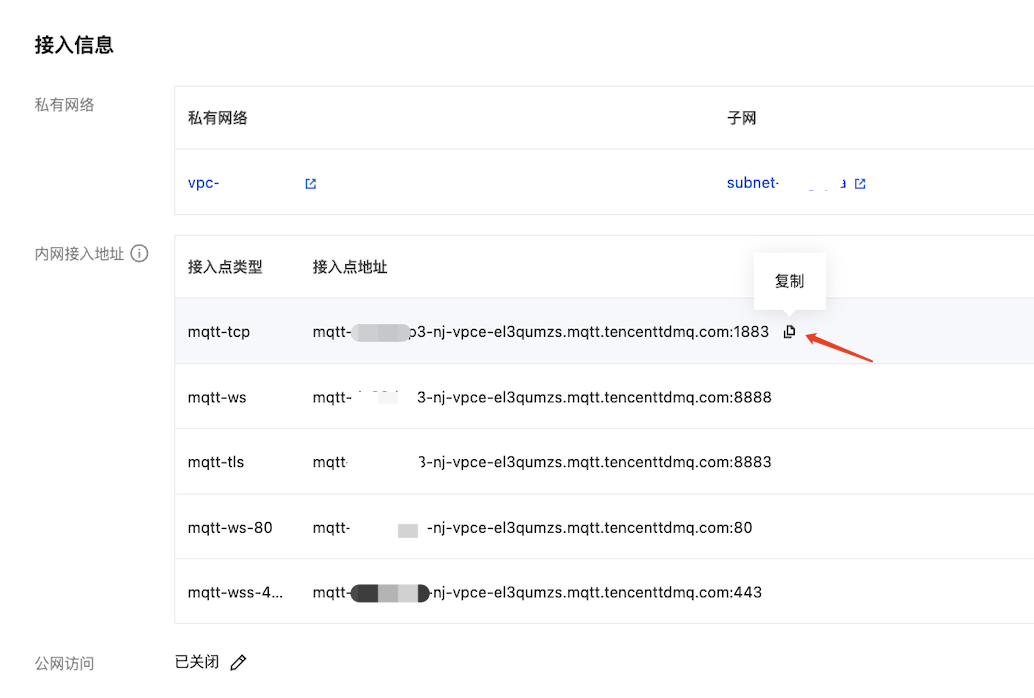 |
username | 连接的用户名,在控制台集群的认证管理页面复制。 |
password | 连接用户名匹配的密码,在控制台集群的认证管理页面复制。  |
topicName | 填写 Topic 名称,一级 Topic 需要在控制台提前创建,二级 Topic 名称您可以自定义。 |
4. 编译并运行生产消息程序
PublisherQuickStart.java,运行结果如下:Connected to tcp://mqtt-xxx.mqtt.tencenttdmq.com:1883Subscribed to topic home/test with QoS=1, Granted-QoS: 1Subscribed to topic home/# with QoS=1, Granted-QoS: 1Subscribed to topic home/+ with QoS=1, Granted-QoS: 1Prepare to publish message 0Published message 0Message arrived, topic=home/test, QoS=1 content=[Hello MQTT 0]Prepare to publish message 1Published message 1Message arrived, topic=home/test, QoS=1 content=[Hello MQTT 1]Prepare to publish message 2Published message 2Message arrived, topic=home/test, QoS=1 content=[Hello MQTT 2][... 中间消息省略 ...]Prepare to publish message 14Published message 14Message arrived, topic=home/test, QoS=1 content=[Hello MQTT 14]Prepare to publish message 15Published message 15Message arrived, topic=home/test, QoS=1 content=[Hello MQTT 15]Disconnected: Normal disconnection
文档反馈