接入点格式
Download
聚焦模式
字号
场景说明
本文介绍常见消息队列 MQTT 版的接入点获取方式和各语言 SDK 在不同协议下的 MQTT 接入点格式,帮助您快速在不同开发环境中配置和连接 MQTT 服务,确保设备与云端的安全可靠通信。
接入点获取方式
1. 登录 MQTT 控制台。
2. 在左侧导航栏选择资源管理 > 集群管理,选择好地域后,单击目标集群的“ID”,进入基本信息页面。
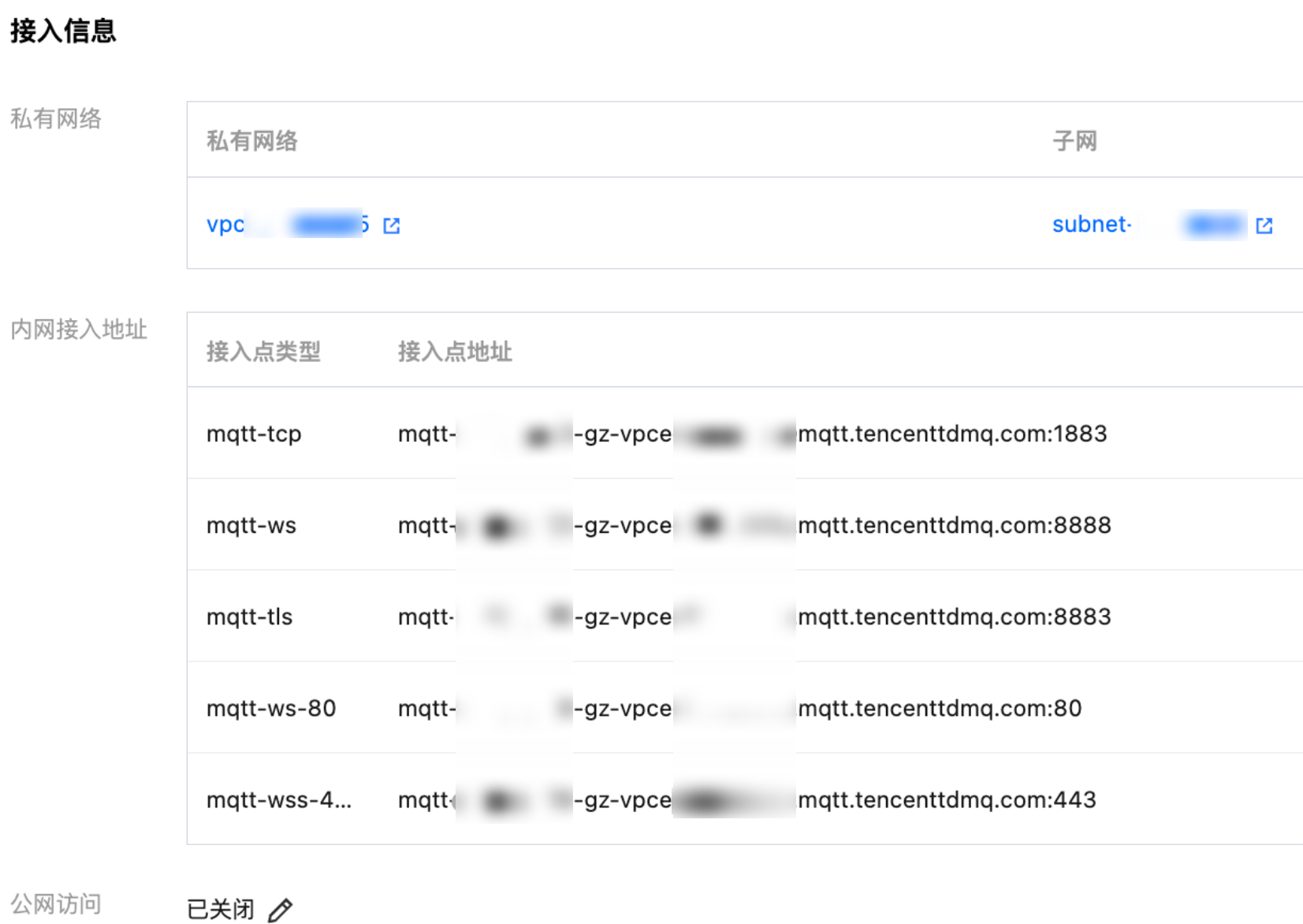
3. 在接入信息模块,可以获取 MQTT 接入点。
Java SDK
环境准备:
<dependency><groupId>org.eclipse.paho</groupId><artifactId>org.eclipse.paho.client.mqttv3</artifactId><version>1.2.5</version></dependency>
implementation group: 'org.eclipse.paho', name: 'org.eclipse.paho.client.mqttv3', version: '1.2.5'
接入点格式:
String serverUri = "tcp://mqtt-xxx.mqtt.tencenttdmq.com:1883";
String serverUri = "ssl://mqtt-xxx.mqtt.tencenttdmq.com:8883";
String serverUri = "ws://mqtt-xxx.mqtt.tencenttdmq.com:80/mqtt";
String serverUri = "wss://mqtt-xxx.mqtt.tencenttdmq.com:443/mqtt";
C
环境准备:
git clone https://git.eclipse.org/r/paho/org.eclipse.paho.mqtt.cmakesudo make install
接入点格式:
/*** Return code: protocol prefix in serverURI should be:* @li @em tcp:// or @em mqtt:// - Insecure TCP* @li @em ssl:// or @em mqtts:// - Encrypted SSL/TLS* @li @em ws:// - Insecure websockets* @li @em wss:// - Secure web sockets** The TLS enabled prefixes (ssl, mqtts, wss) are only valid if the TLS* version of the library is linked with.*/
tcp://mqtt-xxx.mqtt.tencenttdmq.com:1883ormqtt://mqtt-xxx.mqtt.tencenttdmq.com:1883
ssl://mqtt-xxx.mqtt.tencenttdmq.com:1883ormqtts://mqtt-xxx.mqtt.tencenttdmq.com:1883
ws://mqtt-xxx.mqtt.tencenttdmq.com:80/mqtt
wss://mqtt-xxx.mqtt.tencenttdmq.com:443/mqtt
C++
环境准备:
$ git clone https://github.com/eclipse/paho.mqtt.c.git$ cd paho.mqtt.c$ git checkout v1.3.13$ cmake -Bbuild -H. -DPAHO_ENABLE_TESTING=OFF -DPAHO_WITH_SSL=ON -DPAHO_HIGH_PERFORMANCE=ON$ sudo cmake --build build/ --target install
接入点格式:
The library supports connecting to an MQTT server/broker using TCP, SSL/TLS, and websockets (secure and insecure). This is chosen by the URI supplied to the connect() call. It can be specified as:"mqtt://<host>:<port>" - TCP, unsecure"tcp://<host>:<port>" (same)"mqtts://<host>:<port>" - SSL/TLS"ssl://<host>:<port>" (same)"ws://<host>:<port>" - Unsecure websockets"wss://<host>:<port>" - Secure websocketsThe "mqtt://" and "tcp://" schemas are identical. They indicate an insecure connection over TCP. The "mqtt://" variation is new for the library, but becoming more common across different MQTT libraries.Similarly, the "mqtts://" and "ssl://" schemas are identical. They specify a secure connection over SSL/TLS sockets.Note that to use any of the secure connect options, "mqtts://, "ssl://", or "wss://" you must compile the library with the `PAHO_WITH_SSL=ON` CMake option to include OpenSSL. In addition, you _must_ specify `ssl_options` when you connect to the broker - i.e. you must add an instance of `ssl_options` to the `connect_options` when calling `connect()`.
Golang
环境准备:
go get github.com/eclipse/paho.mqtt.golang
接入点格式:
import ("fmt"mqtt "github.com/eclipse/paho.mqtt.golang")var broker = "mqtt-xxx.mqtt.tencenttdmq.com"var port = 8883opts := mqtt.NewClientOptions()opts.AddBroker(fmt.Sprintf("ssl://%s:%d", broker, port))opts.SetClientID("golang_mqtt_client")
import ("fmt"mqtt "github.com/eclipse/paho.mqtt.golang")var broker = "mqtt-xxx.mqtt.tencenttdmq.com"var port = 8883opts := mqtt.NewClientOptions()opts.AddBroker(fmt.Sprintf("ssl://%s:%d", broker, port))opts.SetClientID("golang_mqtt_client_ssl")
Rust
环境准备:
cargo add paho-mqtt
接入点格式:
use std::time::Duration;use anyhow::Context;use paho_mqtt::{Client, ConnectOptionsBuilder, CreateOptionsBuilder, DisconnectOptionsBuilder, Message,};fn main() -> Result<(), anyhow::Error> {env_logger::init();let connect_options = ConnectOptionsBuilder::new_v3().connect_timeout(Duration::from_secs(3)).clean_session(true).max_inflight(128).user_name("xxx").password("XXXX").automatic_reconnect(Duration::from_secs(1), Duration::from_secs(3)).server_uris(&["tcp://mqtt-xxx.mqtt.tencenttdmq.com:1883"]).finalize();let client = Client::new(CreateOptionsBuilder::new_v3().client_id("rust-quick-start").finalize(),).context("Failed to create client")?;Ok(())}
use std::time::Duration;use anyhow::Context;use paho_mqtt::{Client, ConnectOptionsBuilder, CreateOptionsBuilder, DisconnectOptionsBuilder, Message,SslOptionsBuilder,};fn main() -> Result<(), anyhow::Error> {env_logger::init();let ssl_opt = SslOptionsBuilder::new().finalize();let connect_options = ConnectOptionsBuilder::new_v3().connect_timeout(Duration::from_secs(3)).clean_session(true).max_inflight(128).user_name("xxx").password("XXX").automatic_reconnect(Duration::from_secs(1), Duration::from_secs(3)).server_uris(&["ssl://mqtt-xxx.mqtt.tencenttdmq.com:8883"]).ssl_options(ssl_opt).finalize();let client = Client::new(CreateOptionsBuilder::new_v3().client_id("rust-ssl").finalize(),).context("Failed to create client")?;Ok(())}
MQTT.js
环境准备:
npm install mqtt
接入点格式:
import mqtt from 'mqtt';var opts = {username: 'my-username',password: 'my-password'};const client = mqtt.connect('mqtt://mqtt-xxx.mqtt.tencenttdmq.com', opts);
import fs from 'fs';import mqtt from 'mqtt';const options = {protocol: 'mqtts',host: 'mqtt-xxx.mqtt.tencenttdmq.com',port: 8883,ca: [fs.readFileSync('/path/to/ca.crt')],cert: fs.readFileSync('/path/to/client.crt'),key: fs.readFileSync('/path/to/client.key'),};const client = mqtt.connect(options);
import mqtt from 'mqtt';var opts = {username: 'my-username',password: 'my-password'};const client = mqtt.connect(‘ws://mqtt-xxx.mqtt.tencenttdmq.com:80/mqtt’, opts);
import mqtt from 'mqtt';var opts = {username: 'my-username',password: 'my-password'};const client = mqtt.connect(‘wss://mqtt-xxx.mqtt.tencenttdmq.com:443/mqtt’, opts);
Dart
环境准备:
dart pub add mqtt_client
接入点格式:
import 'dart:async';import 'dart:io';import 'package:mqtt_client/mqtt_client.dart';import 'package:mqtt_client/mqtt_server_client.dart';final client = MqttServerClient('mqtt-xxx.mqtt.tencenttdmq.com', '1883');Future<int> main() async {client.logging(on: true);client.keepAlivePeriod = 60;client.onDisconnected = onDisconnected;client.onConnected = onConnected;client.pongCallback = pong;final connMess = MqttConnectMessage().withClientIdentifier('dart_client').withWillTopic('willtopic').withWillMessage('My Will message').startClean().withWillQos(MqttQos.atLeastOnce);print('client connecting....');client.connectionMessage = connMess;try {await client.connect();} on NoConnectionException catch (e) {print('client exception - $e');client.disconnect();} on SocketException catch (e) {print('socket exception - $e');client.disconnect();}if (client.connectionStatus!.state == MqttConnectionState.connected) {print('client connected');} else {print('client connection failed - disconnecting, status is ${client.connectionStatus}');client.disconnect();exit(-1);}return 0;}/// The unsolicited disconnect callbackvoid onDisconnected() {print('OnDisconnected client callback - Client disconnection');if (client.connectionStatus!.disconnectionOrigin ==MqttDisconnectionOrigin.solicited) {print('OnDisconnected callback is solicited, this is correct');}exit(-1);}/// The successful connect callbackvoid onConnected() {print('OnConnected client callback - Client connection was sucessful');}/// Pong callbackvoid pong() {print('Ping response client callback invoked');}
Python
环境准备:
pip install paho-mqtt
接入点格式:
import paho.mqtt.client as mqtt# The callback for when the client receives a CONNACK response from the server.def on_connect(client, userdata, flags, reason_code, properties):print(f"Connected with result code {reason_code}")# Subscribing in on_connect() means that if we lose the connection and# reconnect then subscriptions will be renewed.client.subscribe("$SYS/#")# The callback for when a PUBLISH message is received from the server.def on_message(client, userdata, msg):print(msg.topic+" "+str(msg.payload))mqttc = mqtt.Client(mqtt.CallbackAPIVersion.VERSION2)mqttc.on_connect = on_connectmqttc.on_message = on_messagemqttc.connect("mqtt-xxx.mqtt.tencenttdmq.com:1883", 1883, 60)# Blocking call that processes network traffic, dispatches callbacks and# handles reconnecting.# Other loop*() functions are available that give a threaded interface and a# manual interface.mqttc.loop_forever()
文档反馈