tencent cloud

Cloud Object Storage

Release Notes and Announcements
Release Notes
Announcements
Product Introduction
Overview
Features
Use Cases
Strengths
Concepts
Regions and Access Endpoints
Specifications and Limits
Service Regions and Service Providers
Billing
Billing Overview
Billing Method
Billable Items
Free Tier
Billing Examples
Viewing and Downloading Bill
Payment Overdue
FAQs
Getting Started
Console
Getting Started with COSBrowser
User Guide
Creating Request
Bucket
Object
Data Management
Batch Operation
Global Acceleration
Monitoring and Alarms
Operations Center
Data Processing
Content Moderation
Smart Toolbox
Data Processing Workflow
Application Integration
User Tools
Tool Overview
Installation and Configuration of Environment
COSBrowser
COSCLI (Beta)
COSCMD
COS Migration
FTP Server
Hadoop
COSDistCp
HDFS TO COS
GooseFS-Lite
Online Tools
Diagnostic Tool
Use Cases
Overview
Access Control and Permission Management
Performance Optimization
Accessing COS with AWS S3 SDK
Data Disaster Recovery and Backup
Domain Name Management Practice
Image Processing
Audio/Video Practices
Workflow
Direct Data Upload
Content Moderation
Data Security
Data Verification
Big Data Practice
COS Cost Optimization Solutions
Using COS in the Third-party Applications
Migration Guide
Migrating Local Data to COS
Migrating Data from Third-Party Cloud Storage Service to COS
Migrating Data from URL to COS
Migrating Data Within COS
Migrating Data Between HDFS and COS
Data Lake Storage
Cloud Native Datalake Storage
Metadata Accelerator
GooseFS
Data Processing
Data Processing Overview
Image Processing
Media Processing
Content Moderation
File Processing Service
File Preview
Troubleshooting
Obtaining RequestId
Slow Upload over Public Network
403 Error for COS Access
Resource Access Error
POST Object Common Exceptions
API Documentation
Introduction
Common Request Headers
Common Response Headers
Error Codes
Request Signature
Action List
Service APIs
Bucket APIs
Object APIs
Batch Operation APIs
Data Processing APIs
Job and Workflow
Content Moderation APIs
Cloud Antivirus API
SDK Documentation
SDK Overview
Preparations
Android SDK
C SDK
C++ SDK
.NET(C#) SDK
Flutter SDK
Go SDK
iOS SDK
Java SDK
JavaScript SDK
Node.js SDK
PHP SDK
Python SDK
React Native SDK
Mini Program SDK
Error Codes
Harmony SDK
Endpoint SDK Quality Optimization
Security and Compliance
Data Disaster Recovery
Data Security
Cloud Access Management
FAQs
Popular Questions
General
Billing
Domain Name Compliance Issues
Bucket Configuration
Domain Names and CDN
Object Operations
Logging and Monitoring
Permission Management
Data Processing
Data Security
Pre-signed URL Issues
SDKs
Tools
APIs
Agreements
Service Level Agreement
Privacy Policy
Data Processing And Security Agreement
Contact Us
Glossary

Template Operations

PDF
Focus Mode
Font Size
Last updated: 2024-02-02 16:51:03

Overview

This document provides an overview of APIs and SDK code samples for media processing jobs in CI, with the animated image job as an example.
API
Operation
Description
Creating template
Creates template
Deleting template
Deletes template
Querying templates
Queries template list
Modifying template
Modifies template

Basic Operations

Creating template

Feature description

This API is used to create a template.

Method prototype

public MediaTemplateResponse createMediaTemplate(MediaTemplateRequest request);

Parameter description

Request has the following sub-nodes:
Node Name (Keyword)
Parent Node
Description
Type
Required
Tag
Request
Template type: Animation (animated image); Snapshot (screenshot); Transcode (transcoding); Watermark (watermark); SmartCover (intelligent thumbnail)
String
Yes
Name
Request
Template name, which can contain letters, digits, underscores (_), hyphens (-), and asterisks (*).
String
Yes
Container
Request
Container format
Container
Yes
Video
Request
Video information
Container
No
TimeInterval
Request
Time interval
Container
No
Snapshot
Request
Screenshot
Container
No
Watermark
Request
Watermark
Container
No
Audio
Request
Audio information
Container
No
TransConfig
Request
Transcoding configuration
Container
No
Container has the following sub-nodes:
Node Name (Keyword)
Parent Node
Description
Type
Required
Format
Request.Container
Container format. Valid values: gif, hgif (hgif indicates higher-definition gif), webp
String
Yes
Video has the following sub-nodes:
Node Name (Keyword)
Parent Node
Description
Type
Required
Default Value
Constraints
Codec
Request.Video
Codec format
String
Yes
None
gif, webp
Width
Request.Video
Width
String
No
Original video width
Value range: [128, 4096]
Unit: px
If only Width is set, Height is calculated according to the original video aspect ratio.
Height
Request.Video
Height
String
No
Original video height
Value range: [128, 4096]
Unit: px
If only Height is set, Width is calculated according to the original video aspect ratio.
Fps
Request.Video
Frame rate
String
No
Original video frame rate
Value range: (0, 60]
Unit: fps
This parameter is optional. If it is not set, the video is played at the speed as per the original timestamp. This parameter specifies the frame rate for animated image playback.
AnimateOnly
KeepKeyFrame
Request.Video
Keep only keyframes for animated images
String
No
None
Valid values: true, false
Specifies whether to keep only keyframes for animated images
AnimateTime
IntervalOfFrame
Request.Video
Frame sampling interval for animated images
String
No
None
(0, video duration]
Frame sampling interval for animated images
The value of this parameter must be less than the value of TimeInterval.Duration if TimeInterval.Duration is set.
AnimateFrames
PerSecond
Request.Video
Number of frames sampled per second for animated images
String
No
None
(0, video frame rate)
Frame sampling frequency for animated images
Priority: AnimateFramesPerSecond > AnimateOnlyKeepKeyFrame > AnimateTimeIntervalOfFrame
Quality
Request.Video
Relative quality
String
No
None
[1, 100)
This parameter is valid for WEBP images and is not available for GIF images.
TimeInterval has the following sub-nodes:
Node Name (Keyword)
Parent Node
Description
Type
Required
Default Value
Constraints
Start
Request.TimeInterval
Start time
String
No
0
[0, video duration]
Unit: second
Supports the float format, accurate to the millisecond.
Duration
Request.TimeInterval
Duration
String
No
Video duration
[0, video duration]
Unit: second
Supports the float format, accurate to the millisecond.
Snapshot has the following sub-nodes:
Node Name (Keyword)
Parent Node
Description
Type
Required
Default Value
Constraints
Mode
Request.Snapshot
Screenshot mode
String
Yes
Interval
Valid values: {Interval, Average}
Interval: Interval mode. Average: Average mode
Interval mode: The Start, TimeInterval, and Count parameters are valid. If Count is set and TimeInterval is not set, all frames will be captured, and the total number of images captured is specified by Count.
Average mode: The Start and Count parameters are valid, indicating to capture a total of Count images at an average interval from Start to the end of the video.
Start
Request.Snapshot
Start time
String
Yes
0
[0, video duration]
Unit: second
Supports the float format, accurate to the millisecond.
TimeInterval
Request.Snapshot
Screenshot time interval
String
No
None
(0, 3600]
Unit: second
Supports the float format, accurate to the millisecond.
Count
Request.Snapshot
Number of screenshots
String
Yes
None
(0, 10000]
Width
Request.Snapshot
Width
String
No
Original video width
Value range: [128, 4096]
Unit: px
If only Width is set, Height is calculated according to the original video aspect ratio.
Height
Request.Snapshot
Height
String
No
Original video height
Value range: [128, 4096]
Unit: px
If only Height is set, Width is calculated according to the original video aspect ratio.
Watermark has the following sub-nodes:
Node Name (Keyword)
Parent Node
Description
Type
Required
Default Value
Constraints
Type
Request.Watermark
Watermark type
String
Yes
None
Text: text watermark. Image: image watermark
Pos
Request.Watermark
Reference position
String
Yes
None
TopRight, TopLeft, BottomRight, BottomLeft
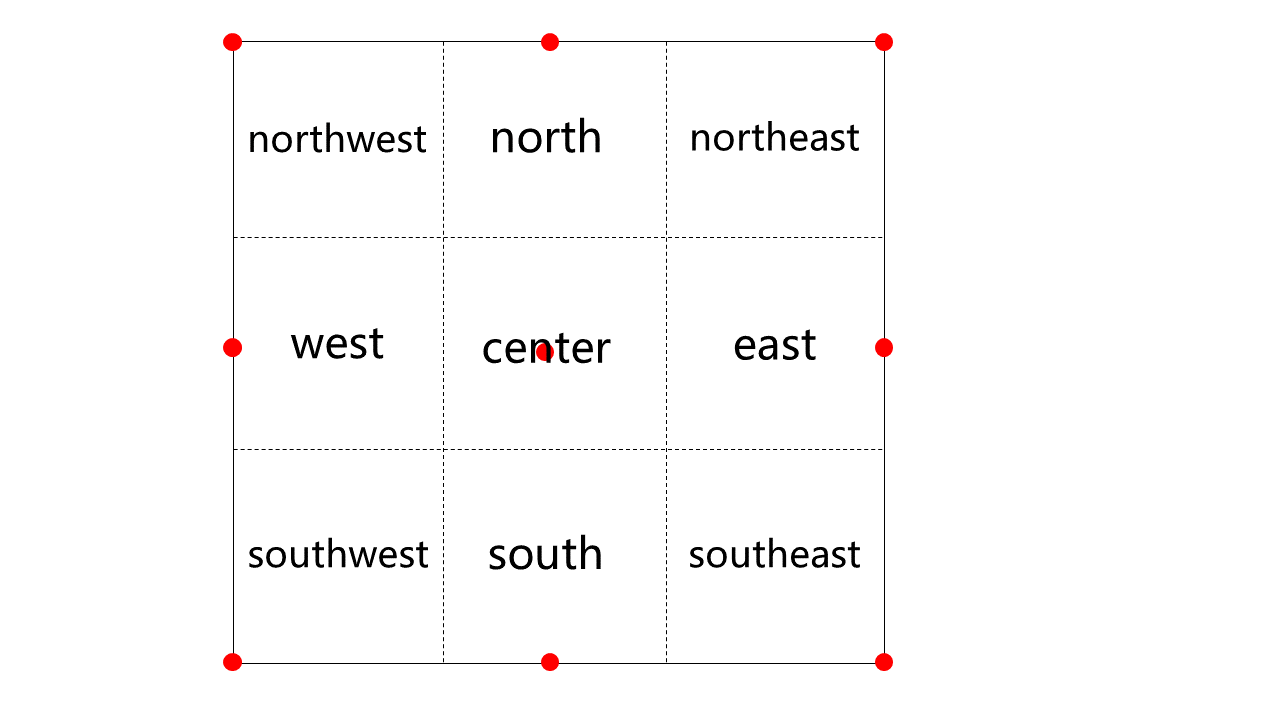
LocMode
Request.Watermark
Offset mode
String
Yes
None
Relativity: proportionally.
Absolute: fixed position.
Dx
Request.Watermark
Horizontal offset
String
Yes
None
If locMode is Relativity, the unit is %, and the value range is [0, 100]
If locMode is Absolute, the unit is px, and the value range is [0, 4096].
Dy
Request.Watermark
Vertical offset
String
Yes
None
If locMode is Relativity, the unit is %, and the value range is [0, 100]
If locMode is Absolute, the unit is px, and the value range is [0, 4096].
StartTime
Request.Watermark
Watermark start time
String
No
0
[0, video duration]
Unit: second
Supports the float format, accurate to the millisecond.
EndTime
Request.Watermark
Watermark end time
String
No
Video end time
[0, video duration]
Unit: second
Supports the float format, accurate to the millisecond.
Image
Request.Watermark
Image watermark node
Container
No
None
None
Text
Request.Watermark
Text watermark node
Container
No
None
None
Image has the following sub-nodes:
Node Name (Keyword)
Parent Node
Description
Type
Required
Default Value
Constraints
Url
Request.Watermark.Image
Watermark image address
String
Yes
None
Same as the watermark image address of the bucket.
Mode
Request.Watermark.Image
Dimension mode
String
Yes
None
Original: original size
Proportion: scaled proportionally
Fixed: fixed size
Width
Request.Watermark.Image
Width
String
No
None
If Mode is Original, this parameter is the watermark image width.
If Mode is Proportion, the unit is %, and the value range is [1, 100].
If Mode is Fixed, the unit is px, and the value range is [1, 4096].
If only Width is set, Height is calculated according to the original video aspect ratio.
Height
Request.Watermark.Image
Height
String
No
None
If Mode is Original, this parameter is the watermark image height.
If Mode is Proportion, the unit is %, and the value range is [1, 100].
If Mode is Fixed, the unit is px, and the value range is [1, 4096].
If only Height is set, Width is calculated according to the original video aspect ratio.
Transparency
Request.Watermark.Image
Transparency
String
Yes
None
Value range: [1, 100]. Unit: %
Watermark position description:
image.png


Text has the following sub-nodes:
Node Name (Keyword)
Parent Node
Description
Type
Required
Default Value
Constraints
FontSize
Request.Watermark.Text
Font size
String
Yes
None
Value range: [5, 100]. Unit: px
FontType
Request.Watermark.Text
Font type
String
Yes
None
See the table below.
FontColor
Request.Watermark.Text
Font color
String
Yes
None
Format: 0xRRGGBB
Transparency
Request.Watermark.Text
Transparency
String
Yes
None
Value range: [1, 100]. Unit: %
Text
Request.Watermark.Text
Watermark content
String
Yes
None
The value can be up to 64 letters, digits, underscores (_), hyphens (-), and asterisks (*).
FontType has the following sub-nodes:
Font Name
Supported Language
Description
simfang.ttf
Chinese/English
FangSong
simhei.ttf
Chinese/English
SimHei
simkai.ttf
Chinese/English
KaiTi
simsun.ttc
Chinese/English
SimSun
STHeiti-Light.ttc
Chinese/English
STHeiti-Light
STHeiti-Medium.ttc
Chinese/English
STHeiti-Medium
youyuan.TTF
Chinese/English
YouYuan
ariblk.ttf
English
None
arial.ttf
English
None
ahronbd.ttf
English
None
Helvetica.dfont
English
None
HelveticaNeue.dfont
English
None
Audio/Video formats supported by different container formats are as follows:
Container
Audio Codecs
Video Codecs
flv/mp4/ts/hls
AAC, MP3
H.264
AAC
AAC
Not supported
MP3
MP3
Not supported
Audio has the following sub-nodes:
Node Name (Keyword)
Parent Node
Description
Type
Required
Default Value
Constraints
Codec
Request.Audio
Codec format
String
No
aac
Valid values: aac, mp3
Samplerate
Request.Audio
Sample rate
String
No
44100
Unit: Hz
Valid values: 11025, 22050, 32000, 44100, 48000, 96000
Different container formats support different MP3 sample rates, as shown in the table below.
Bitrate
Request.Audio
Original audio bitrate
String
No
None
Unit: Kbps
Value range: [8, 1000]
Channels
Request.Audio
Number of sound channels
String
No
None
If Codec is aac, the value can be 1, 2, 4, 5, 6, or
If Codec is mp3, the value can be 1 or 2.
Remove
Request.Audio
Whether to delete the audio stream
String
No
false
Valid values: true, false
Y indicates supported, and N indicates unsupported.
Container Format/Audio Sample Rate
11025
22050
32000
44100
48000
96000
flv
Y
Y
N
Y
N
N
mp4
N
Y
Y
Y
Y
N
avi/hls/ts/mp3
Y
Y
Y
Y
Y
N
TransConfig has the following sub-nodes:
Node Name (Keyword)
Parent Node
Description
Type
Required
Default Value
Constraints
AdjDarMethod
Request.TransConfig
Resolution adjustment method
String
No
none
Valid values: scale, crop, pad, none
If the aspect ratio of the output video is different from that of the original video, the resolution needs to be adjusted according to this parameter.
IsCheckReso
Request.TransConfig
Whether to check the resolution
String
No
false
Valid values: true, false
If the value is false, transcoding is performed based on settings.
ResoAdjMethod
Request.TransConfig
Resolution adjustment method
String
No
0
Valid values: 0, 1. 0 indicates to use the original video resolution. 1 indicates to return the transcoding failure message.
This parameter is valid only when IsCheckReso is true.
IsCheckVideoBitrate
Request.TransConfig
Whether to check the video bitrate
String
No
false
true, false
If the value is false, transcoding is performed based on settings.
VideoBitrateAdjMethod
Request.TransConfig
Video bitrate adjustment method
String
No
0
Valid values: 0, 1. 0 indicates to use the original video bitrate. 1 indicates to return the transcoding failure message.
This parameter is valid only when IsCheckVideoBitrate is true.
IsCheckAudioBitrate
Request.TransConfig
Whether to check the audio bitrate
String
No
false
true, false
If the value is false, transcoding is performed based on settings.
AudioBitrateAdjMethod
Request.TransConfig
Audio bitrate adjustment method
String
No
0
Valid values: 0, 1. 0 indicates to use the original audio bitrate. 1 indicates to return the transcoding failure message.
This parameter is valid only when IsCheckAudioBitrate is true.
Video has the following sub-nodes:
Node Name (Keyword)
Parent Node
Description
Type
Required
Default Value
Constraints
Codec
Request.Video
Codec format
String
No
H.264
H.264
Width
Request.Video
Width
String
No
Original video width
Value range: [128, 4096]
Unit: px
If only Width is set, Height is calculated according to the original video aspect ratio.
Height
Request.Video
Height
String
No
Original video height
Value range: [128, 4096]
Unit: px
If only Height is set, Width is calculated according to the original video aspect ratio.
Fps
Request.Video
Frame rate
String
No
None
Value range: (0, 60]
Unit: fps
Remove
Request.Video
Whether to delete the video stream
String
No
false
true, false
Profile
Request.Video
Encoding level
String
No
high
Valid values: baseline, main, high
baseline: Suitable for mobile devices.
main: Suitable for standard resolution devices.
high: Suitable for high resolution devices.
Only H.264 supports this parameter.
Bitrate
Request.Video
Bitrate of the video output file
String
No
None
Value range: [10, 50000]
Unit: Kbps
Crf
Request.Video
Bitrate, which is a quality control factor
String
No
None
Value range: (0, 51]
If Crf is set, the setting of Bitrate becomes invalid.
Gop
Request.Video
Maximum number of frames between two keyframes
String
No
None
Value range: [1, 100000]
Preset
Request.Video
Video algorithm preset
String
No
medium
Only H.264 supports this parameter.
Valid values: veryfast, fast, medium, slow, slower
Bufsize
Request.Video
Buffer size
String
No
None
Value range: [1000, 128000]
Unit: Kb
Maxrate
Request.Video
Peak video bitrate
String
No
None
Value range: [10, 50000]
Unit: Kbps
HlsTsTime
Request.Video
HLS segment time
String
No
5
(0, video duration]
Unit: second
Pixfmt
Request.Video
Video color format
String
No
None
Valid values: yuv420p, yuv422p, yuv444p, yuvj420p, yuvj422p, yuvj444p

Response description

Success: The MediaTemplateResponse object response information is returned, which contains the details of the created template.
Failure: An error (such as the bucket does not exist) occurs, throwing the CosClientException or CosServiceException exception. For more information, see Troubleshooting.

Sample request

//1. Create a template request object
MediaTemplateRequest request = new MediaTemplateRequest();
//2. Add request parameters as detailed in the API documentation
request.setBucketName("examplebucket-1250000000");
request.setTag("Animation");
request.setName("TestTemplate40");
request.getContainer().setFormat("gif");
request.getVideo().setCodec("gif");
request.getVideo().setWidth("1280");
request.getVideo().setFps("15");
request.getVideo().setAnimateOnlyKeepKeyFrame("true");
request.getTimeInterval().setStart("0");
request.getTimeInterval().setDuration("60");
//3. Call the API to get the template response object
MediaTemplateResponse response = client.createMediaTemplate(request);

Deleting template

Feature description

This API is used to delete a template.

Method prototype

public Boolean deleteMediaTemplate(MediaTemplateRequest request);

Parameter description

Parameter
Description
Type
Required
bucketName
Bucket name in the format of BucketName-APPID. For more information, see Bucket Overview.
String
Yes
templateId
ID of the template to be deleted
String
Yes

Response description

Success: A boolean type is returned, which is true upon deletion success.
Failure: An error (such as authentication failure) occurs, throwing the "CosClientException" or "CosServiceException" exception. For more information, see Troubleshooting.
Sample request

MediaTemplateRequest request = new MediaTemplateRequest();
request.setBucketName("examplebucket-1250000000");
request.setTemplateId("t19c4a60ae1a694621a01f0c7130c*****");
Boolean response = client.deleteMediaTemplate(request);

Querying template list

Feature description

This API is used to query the template list.

Method prototype

public MediaJobResponse describeMediaJob(MediaJobsRequest req);

Parameter description

Parameter
Description
Type
Required
bucketName
Bucket name in the format of BucketName-APPID. For more information, see Bucket Overview.
String
Yes
tag
Template tag: Animation (animated image); Snapshot (screenshot); Transcode (transcoding); Watermark (watermark); SmartCover (intelligent thumbnail)
String
Yes
category
Template category. Valid values: Custom (default), Official
String
No
ids
Template ID. If you enter multiple IDs, separate them with commas (,).
String
No
name
Template name prefix
String
No
pageNumber
Page number
Integer
No
pageSize
Number of entries per page
Integer
No

Response description

Success: A template response wrapper class is returned, which contains the template details set templateList.
Failure: An error (such as authentication failure) occurs, throwing the "CosClientException" or "CosServiceException" exception. For more information, see Troubleshooting.

Sample request

//1. Create a job request object
MediaTemplateRequest request = new MediaTemplateRequest();
request.setBucketName("examplebucket-1250000000");
MediaListTemplateResponse response = client.describeMediaTemplates(request);
List<MediaTemplateObject> templateList = response.getTemplateList();

Modifying template

Feature description

This API is used to modify a template.

Method prototype

public Boolean updateMediaTemplate(MediaTemplateRequest request);

Parameter description

Node Name (Keyword)
Description
Type
Required
bucketName
Bucket name in the format of BucketName-APPID. For more information, see Bucket Overview.
String
Yes
templateId
ID of the template to be modified
String
Yes
Note:
Other parameters are the same as those of the template creation API.

Response description

Success: true is returned upon modification success.
Failure: An error (such as authentication failure) occurs, throwing the "CosClientException" or "CosServiceException" exception. For more information, see Troubleshooting.

Sample request

MediaTemplateRequest request = new MediaTemplateRequest();
request.setBucketName("examplebucket-1250000000");
request.setTemplateId("t19c4a60ae1a694621a01f0c7130*****");
request.setTag("Animation");
request.setName("updateName");
request.getContainer().setFormat("gif");
Boolean aBoolean = client.updateMediaTemplate(request);


Help and Support

Was this page helpful?

Help us improve! Rate your documentation experience in 5 mins.

Feedback