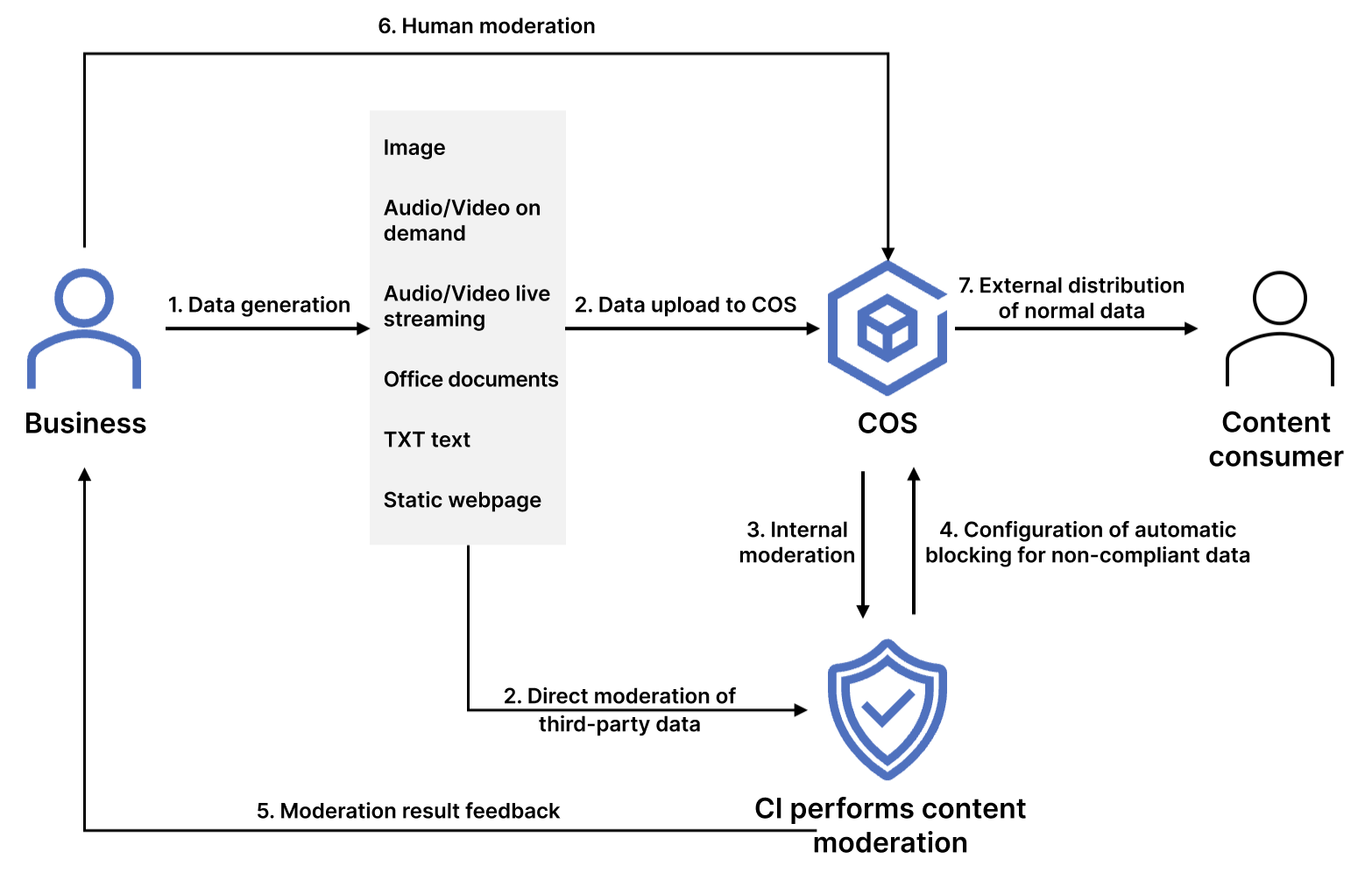
The COS content moderation service intelligently moderates the multimedia content of images, videos, audios, text, documents, and webpages. It helps you effectively identify non-compliant content such as pornographic, vulgar, terrorist, illegal, disgusting, and offensive information to avoid operational risks. Currently, files in the following formats can be moderated:
File Type
Limit
Image
PNG, JPEG, JPG, BMP, WEBP, GIF, HEIF, and HEIC formats are supported.
Image files below 32 MB are supported for moderation. For images above 5MB, use the large-image-detect parameter when calling requests.
Image resolution should be no less than 20 x 20 and no more than 40,000 x 40,000 (synchronous moderation no more than 10,000 x 10,000). It is recommended that the resolution be greater than 256 x 256, otherwise the recognition effect may be affected.
Video
MP4, AVI, MKV, WMV, RMVB, FLV, and M3U8 formats are supported.
The video size cannot exceed 5 GB, and the number of captured frames cannot exceed 10,000.
Audio
Audio format: Currently supported are MP3, WAV, AAC, FLAC, AMR, 3GP, M4A, WMA, OGG and APE.
Audio bitrate: 128–256 Kbps.
Audio size: The file must be below 600 MB. The maximum duration is 3 hours.
Audio file content languages: Mandarin, English and Cantonese are supported.
When a video file is input, it supports separating the audio track from the video file and independent moderation of the audio content.
Text
Encoding in Base64 should be performed first. The length of the original text must not exceed 10,000 UTF-8 encoded characters.
HTML and TXT formats are supported. Encoding in UTF8 and GBK is supported. The size of files can not exceed 1 MB.
Chinese, English, and Arabic numerals are supported.
Live stream
Live stream duration: less than 5 hours.
Live stream protocols: RTMP, HLS, HTTP, HTTPS and other major protocols.
Live stream resolution: up to 1920x1080 (1080p).
Default concurrency moderation route limit: 10 routes. If the number of concurrency moderation routes are exceeded, the interface will return an error.
Document
Documents are converted to images for moderation through the document processing service. Currently, dozens of document formats such as PDF, PPT, and Excel are supported. For more information, see Document Preview Overview.
Webpage
The system can automatically detect webpage files and recognize non-compliant content in OCR, object detection (such as object, advertising logo, and QR code), and image recognition dimensions based on the deep learning technology.
Note:
Content moderation is billed by CI.
After enabling the moderation service, you can perform the following operations:
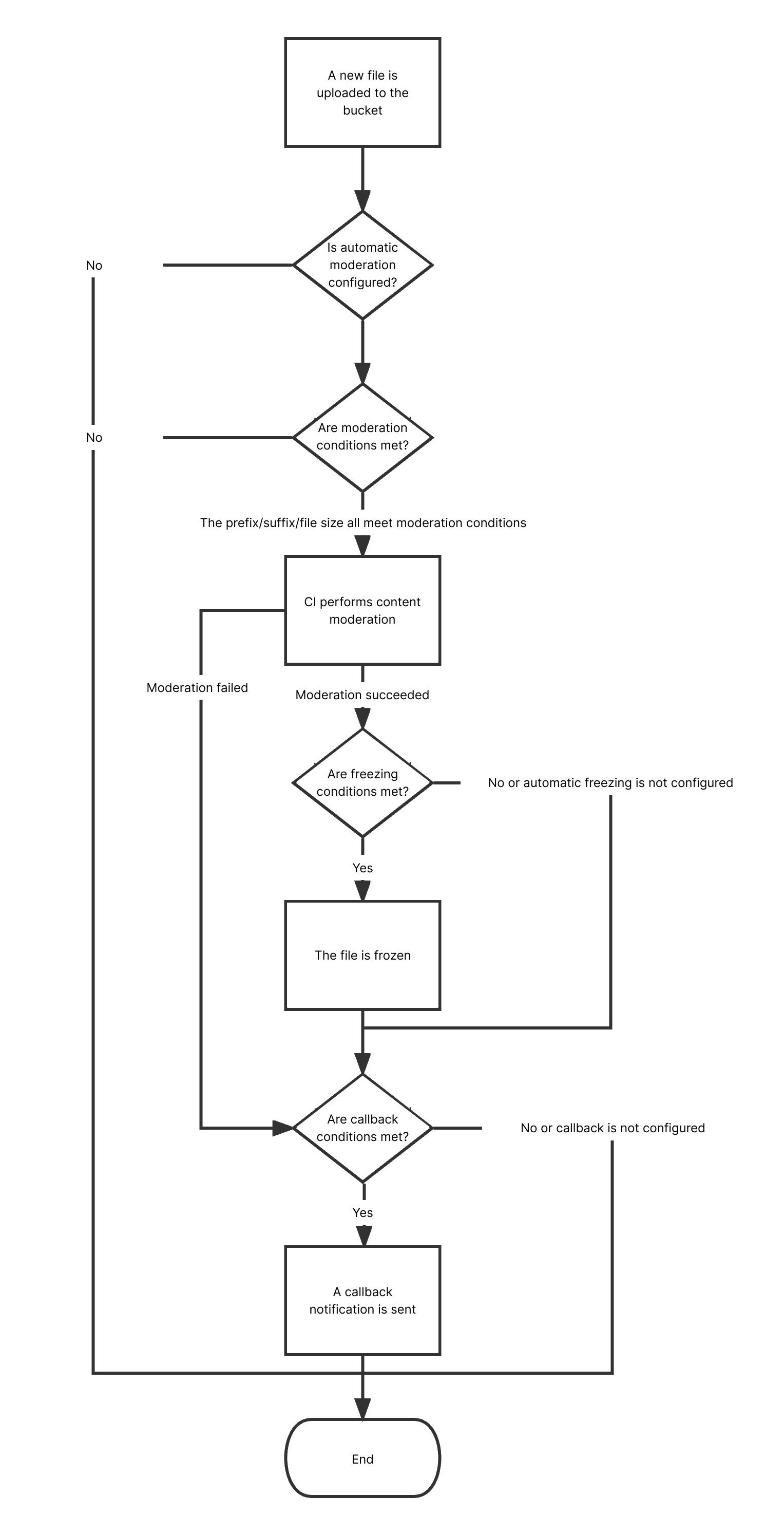
Configure automatic moderation to automatically moderate the data uploaded to the bucket and block non-compliant data.
Call APIs to moderate third-party data.
Perform one-time batch moderation on historical data in the bucket.
Use Cases
This feature is suitable for social networking, ecommerce, advertising, and gaming fields. It can check files in the above types for pornographic, illegal, and advertising content.
Available Regions
The following regions are supported:
Region
Code
Chinese mainland
Beijing
ap-beijing
Nanjing
ap-nanjing
Shanghai
ap-shanghai
Guangzhou
ap-guangzhou
Chengdu
ap-chengdu
Chongqing
ap-chongqing
Hong Kong (China) and overseas
Hong Kong (China)
ap-hongkong
Singapore
ap-singapore
Frankfurt
eu-frankfurt
If you want to use the content moderation feature in other regions, submit a ticket.
How to Use
Using COS console
Automatic moderation
You can enable the automatic moderation service in the COS console to automatically moderate newly uploaded images, videos, audios, files, documents, and webpages. For more information, see Automatic Moderation.
Historical data moderation
You can enable the historical data moderation service in the COS console to perform a one-time batch moderation on images, videos, audios, text, documents, and webpages already stored in the bucket.
Using APIs
You can use APIs to moderate the content of images, videos, audios, text, documents, and webpages. For more information, see the following API documents:
For a file that is found to be sensitive after moderation, we recommend that you choose one of the following methods to process it:
Change the file's access permission to private read to prevent users from accessing it anonymously over the public network. For more information, see PUT Object acl.
Move the file to the backup directory. The file is moved by copying the original file to the specified directory and then deleting the original file. For more information, see PUT Object - Copy and DELETE Object.
Delete the file. For more information, see DELETE Object.