Enabling TDE
Download
Mode fokus
Ukuran font
Overview
TencentDB for PostgreSQL comes with the transparent data encryption (TDE) feature. Transparent encryption means that the data encryption and decryption are transparent to users. TDE supports real-time I/O encryption and decryption of data files. It encrypts data before it is written to disk, and decrypts data when it is read into memory from disk, which meets the compliance requirements of static data encryption.
Prerequisites
TDE can be enabled only during instance creation and cannot be disabled once enabled.
Only the kernel version PostgreSQL v10.17_r1.2、v11.12_r1.2、v12.7_r1.2、v13.3_r1.2、v14.2_r1.0 supports TDE.
KMS must be activated. If it is not activated, you can purchase and activate it here.
To use TDE with a sub-account, you must create a service role for authorizing TencentDB for PostgreSQL to manipulate KMS. You can create a role here with your root account.
The sub-account must have the
cam:PassRole, kms:GetServiceStatus, and kms:GetRegions permissions. If a permission is not granted, use the root account to grant it to the sub-account.Note:
The keys used for encryption are generated and managed by KMS. TencentDB for PostgreSQL does not provide keys or certificates required for encryption.
TDE does not incur fees, but KMS may. For more information, see Billing Overview.
If your account has overdue payment, you can't get keys from KMS, which may cause migration, upgrade, and other tasks to fail. For more information, see Notes on Arrears.
Notes
Once enabled, TDE cannot be disabled. If you revoke the key authorization, TDE will become unavailable after the database is restarted.
After TDE is enabled, data backups will also be encrypted, so even if a backup file is leaked, you don't need to worry about data leakage. To restore data from a backup, use the instance cloning feature of TencentDB for PostgreSQL.
TDE enhances the security of static data while compromising the read-write performance of encrypted databases. Therefore, use the feature based on your actual needs. Tests show that the average performance loss is around 2%–3%.
If the primary instance is associated with a read-only instance, TDE will be automatically enabled for and cannot be disabled by the read-only instance.
After TDE is enabled, your account balance must be greater than or equal to zero. Otherwise, instance migration may fail as KMS is inaccessible.
To avoid accidental instance deletion, Tencent Cloud supports key protection. If an instance is configured with data encryption, the key won't be immediately unbound after the instance is isolated and eliminated. The key cannot be deleted from KMS until three days after the instance is eliminated from the recycle bin.
Directions
1. Log in to the TencentDB for PostgreSQL purchase page and enable the database encryption feature in Enable Encryption.
2. In the pop-up window, select a key and click Encrypt.
Note:
An instance with TDE enabled cannot be restored from a physical backup to a self-created database on another server.
Once you enable TDE, you cannot disable it.
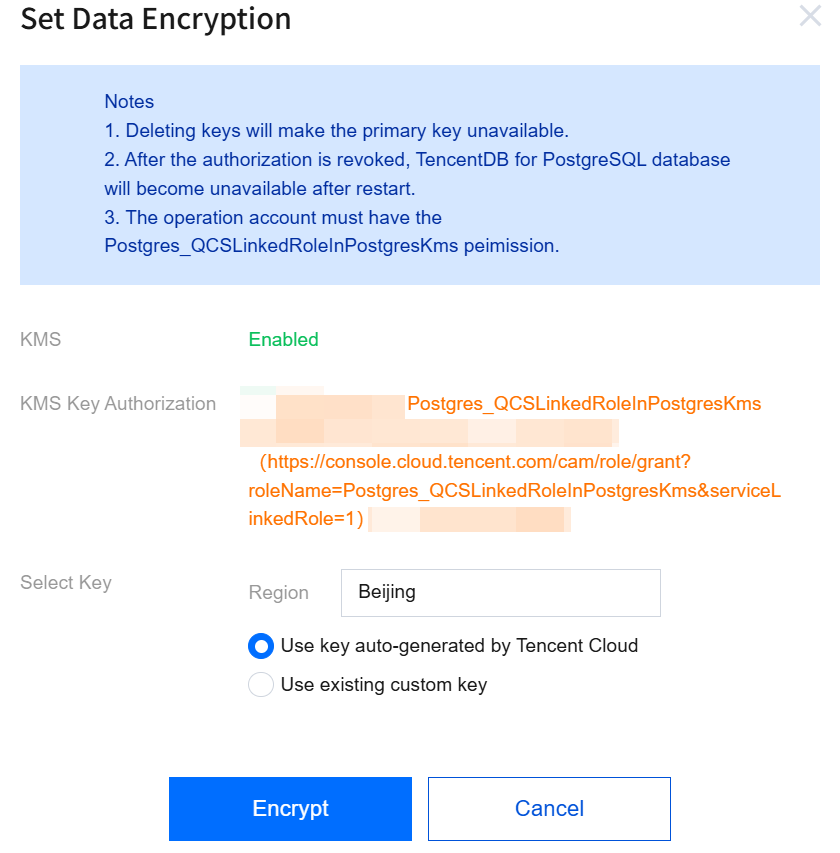
KMS: If KMS is not activated, you need to purchase it first.
KMS Key Authorization: If a message indicating that you are not authorized is displayed, you can click the authorization link to enter the role authorization page and authorize TencentDB for PostgreSQL to manipulate KMS with a service role.
Select Key:
Select the KMS region based on your instance region. If No KMS service in the region is displayed, KMS is unavailable in the selected region, and you cannot enable encryption.
If you select Use key auto-generated by Tencent Cloud, the key will be auto-generated by Tencent Cloud.
If you select Use existing custom key, you can select a key created by yourself.
Note:
If there are no custom keys, click "click here to create one" to create keys in the KMS console. For more information, see Creating a Key.
Bantuan dan Dukungan
Apakah halaman ini membantu?
Anda juga dapat Menghubungi Penjualan atau Mengirimkan Tiket untuk meminta bantuan.
masukan