Tencent Cloud COS is a web-based storage service accessed using the HTTP/HTTPS protocol. You can use RESTful APIs or COS SDKs to access COS.
Your COS access request must first pass the COS identification and authentication before COS starts to operate the resources. Therefore, depending on whether the identity is identifiable, COS access requests are divided into two types: anonymous request and signed request.
Anonymous request: If a request does not include Authorization or related parameters, or the user identity cannot be identified based on the related characteristics, the request will be treated as an anonymous request for authentication.
Signed request: A signed request must contain the Authorization field in the HTTP header or the request packet. The content of the field is generated based on Tencent Cloud security credentials (SecretID and SecretKey) and some characteristic values of the request via an encryption algorithm.
To access COS using COS SDKs, you only need to configure your security credentials before initiating the request. To access COS using the REST API, calculate the request signature according to Request Signature.
Obtaining Security Credentials
Cloud Access Management (CAM) provides features and services related to accounts and credentials for COS, to help customers manage the permissions to access resources under their Tencent Cloud accounts in a secure way. You can use CAM to create, manage and terminate users (or user groups), and manage other users' permissions to use Tencent Cloud resources through identity management and policy management.
Security credentials of the root account
After logging in to the root account, you can manage and obtain the security credentials (SecretID and SecretKey) of your root account on the Cloud API Key page of CAM. The following is a key pair example:
36-character access key ID (SecretID): ************************************
The access key can be used to identify the uniqueness of an account. After the signature is generated using the key and the request is sent, Tencent Cloud will identify the identity of the request initiator, and then perform verification and authentication for the identity, resources, operations, and conditions to determine whether to allow the operation.
Note:
The key of the root account has all the operation permissions for all resources under the root account. Disclosure of the key may cause loss of your cloud assets, so it is strongly recommended that you create sub-accounts and assign corresponding permissions for them, and then use the keys of sub-accounts to create requests for resource access and management.
Security credentials of sub-accounts
To manage users and cloud resources under your account in multiple dimensions, you can create multiple sub-accounts under your primary account to implement user-specific permission management. For more information on how to create a sub-account, see Sub-users in CAM.
Before using a sub-account to initiate an API request, you need to create a security credential for the sub-account, and then the sub-account will get a unique key pair, which can facilitate the identification of the identity. You can create user policies for different sub-accounts to control their access permissions to resources. You can also create user groups and associate one access policy to a user group to facilitate the central management of user grouping and resources.
Note:
With the corresponding permissions assigned, a sub-account can create or modify resources. The resources still belong to the primary account, and the resource cost will be deducted from the root account.
Temporary security credentials
In addition to using security credentials of the root account or sub-accounts to access resources, you can create roles and use the temporary security credentials of the roles to manage your Tencent Cloud resources. For more information on the role concept and how to use roles, see Role Overview.
As a virtual identity, a role does not have a permanent key. Tencent Cloud CAM provides a set of STS APIs used to generate temporary security credentials.
For more information on how to use the APIs and relevant examples, see Using Roles. See CreateRole to learn about how to generate temporary security credentials. Temporary security credentials contain only limited policies (operations, resources, and conditions), and are valid for a limited period (start and end time), so the generated temporary security credentials can be distributed or used directly.
You can call the API for generating temporary security credentials and get a temporary key pair (tmpSecretId/tmpSecretKey) and a security token (sessionToken), which form the security credential that can be used to access COS. The following is an example of a temporary security credential:
This API also returns the validity period of the temporary security credential via the expiration field, which means that this set of security credentials can only be used to initiate requests during this period.
Tencent Cloud COS provides a simple server-side SDK that can be used to generate temporary keys. You can visit COS STS SDK to obtain the SDK. To initiate the request using the REST API after getting the temporary security credential, you need to specify the value for the x-cos-security-token field in the HTTP header or the form-data of the POST request packet to identify the security token used by the request, and then use the temporary access key pair to generate the request signature. For more information on how to initiate requests using the COS SDK, see the relevant sections in each SDK documentation.
Access Endpoint Domain Names
RESTful APIs
The Region and Access Endpoints document provides a list of domain names that can be used to initiate access requests via RESTful APIs.
We recommend you use virtual hosting domain names to access COS buckets. When you initiate an HTTP request, the bucket to be accessed will be specified through the Host header, for example, <BucketName-APPID>.cos.<Region>.myqcloud.com. Using virtual hosting domain names implements the same feature as the root directory of a virtual server. Virtual hosting domain names can be used to host files such as favicon.ico, robots.txt, and crossdomain.xml, which are the content that many applications will retrieve from the root directory of the virtual server by default when identifying a hosted website.
You can also use a path request to access a bucket, for example, cos.<region>.myqcloud.com/<BucketName-APPID>/. The request Host and the signature must use cos.<region>.myqcloud.com. COS SDKs do not support this access method by default.
Domain names of static websites
If you enable the static website feature for a bucket, a virtual hosting domain name will be assigned for you to use relevant features. Unlike RESTful APIs, the domain name of a static website supports only a few operations, such as GET/HEAD/OPTIONS Object, in addition to specific index pages, error pages and redirection configurations. Uploading or configuring resources is not supported.
The format of a domain name of a static website is <BucketName-APPID>.cos-website.<Region>.myqcloud.com. You can also log in to the console and go to the bucket's Basic Configuration > Static Website Configuration to get the domain name.
Private network access
Tencent Cloud COS adopts intelligent resolution for COS endpoints. In this way, the optimal linkage can be provided for you to access COS with different ISPs.
If you have deployed a CVM within Tencent Cloud for accessing COS over a private network, you must first ensure that the CVM resides in the same region as the COS bucket, then use the nslookup command on the CVM to resolve the COS endpoint. If a private IP is returned, access between the CVM and COS is over a private network; otherwise, it is over a public network.
If your CVM resides in a different region from the COS bucket, but it is still in one of COS regions, you can use the COS private network global acceleration domain name to access files and achieve cross-region access between the CVM and COS.
How to determine whether access is via a private network
Tencent Cloud products within the same region can access each other over a private network, incurring no traffic fees. Therefore, we recommend choosing the same region when you purchase different Tencent Cloud products to save on costs.
Note:
The private networks of Public Cloud regions do not interconnect with those of Finance Cloud regions.
The following shows how to determine access over a private network:
For example, when a CVM accesses COS, to determine whether a private network is used for access, use the nslookup command on the CVM to resolve the COS endpoint. If a private IP is returned, access between the CVM and COS is over a private network; otherwise, it is over a public network.
Note:
Generally, a private IP takes the form of 10.*.*.* or 100.*.*.*, and a VPC IP takes the form of 169.254.*.*. These two types of IPs belong to private networks.
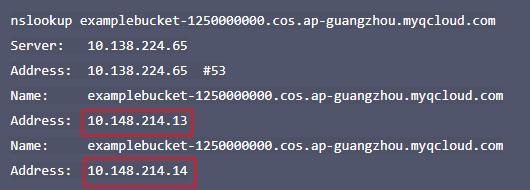
Assume that examplebucket-1250000000.cos.ap-guangzhou.myqcloud.com is the address of the destination bucket. After running the nslookup command, you can view the information as shown in the figure below.
In the command output, the 10.148.214.13 and 10.148.214.14 IPs indicate that the access to COS is over a private network.
Testing connectivity
Basic connectivity test
COS uses the HTTP protocol to provide services. You can use the most basic tool telnet to test the connectivity to port 80 of the COS access domain.
The following is an example of access through the public network:
Regardless of the access environment, if the command returns the Escape character is '^]'. field, it indicates that the connection is successful.
Test via the internet
The access to COS over the internet involves the ISP network, which may prohibit you from testing connectivity using tools such as ICMP ping or traceroute. Therefore, we recommend you use TCP tools to test connectivity.
Note:
The access via the Internet may involve multiple network environments. If the access is not smooth, check your local network linkage, or contact the local ISP.
If your ISP allows you to use the ICMP protocol, you can use the ping, traceroute or mtr tools to check your linkage. Otherwise, you can use the psping (Windows environment; download at the Microsoft official website) or such tools as tcping (cross-platform software) to test the latency.
Test via a private network
If you access the COS over the Tencent Cloud VPC in the same region, you may be unable to test connectivity using tools such as ICMP ping or traceroute. We recommend that you use the telnet command in the basic connectivity test to perform the testing.
You can also use tools such as psping or tcping to test the latency to port 80 of the access domain. Before the test, make sure that the access domain name has been correctly resolved to the private network address using the nslookup command.