Disaster Recovery and High Availability Architecture Based on Cross-Bucket Replication
Download
Mode fokus
Ukuran font
Terakhir diperbarui: 2024-03-25 15:11:17
Overview
Tencent Cloud Object Storage (COS) offers a service availability of 99.95% and reliability of 99.999999999%. Due to uncontrollable factors such as natural disasters and fiber-optic cable failures, neither the availability nor the reliability can reach 100% for in-cloud data; however, extremely high availability and reliability are required for certain businesses like finance.
Given this background, COS provides a high-availability disaster recovery solution based on cross-bucket replication. When using COS, you are advised to make disaster recovery plans and backups for your in-cloud data based on your actual needs to keep your business uninterrupted.
This document describes a COS backup and disaster recovery solution (i.e., master/slave switch for cloud-based businesses) as well as a COS high-availability solution based on cross-bucket replication. Different COS products and features such as cross-bucket replication, origin-pull, SCF, and CDN achieve high availability.
Backup and Disaster Recovery Solution Based on Cross-Bucket Replication
Disaster recovery entails three elements: redundancy, remote, and replication.
Redundancy: data should be backed up simultaneously to another available system.
Remote: data backups should be stored in another remote region, as disasters often extend geographically and only a long enough distance can guarantee the availability of redundant data.
Replication: data loss during backup should be reduced down to zero.
COS cross-bucket replication enables cross-bucket syncing of incremental data. Data uploaded to a bucket can be replicated to another bucket in seconds or minutes, depending on file size and distance. Cross-bucket replication allows you to make remote redundant backups of your data for disaster recovery and business continuity. For more information, please see Cross-Bucket Replication Overview. To enable this feature, you need to enable versioning first. For more information on versioning, please see Versioning Overview.
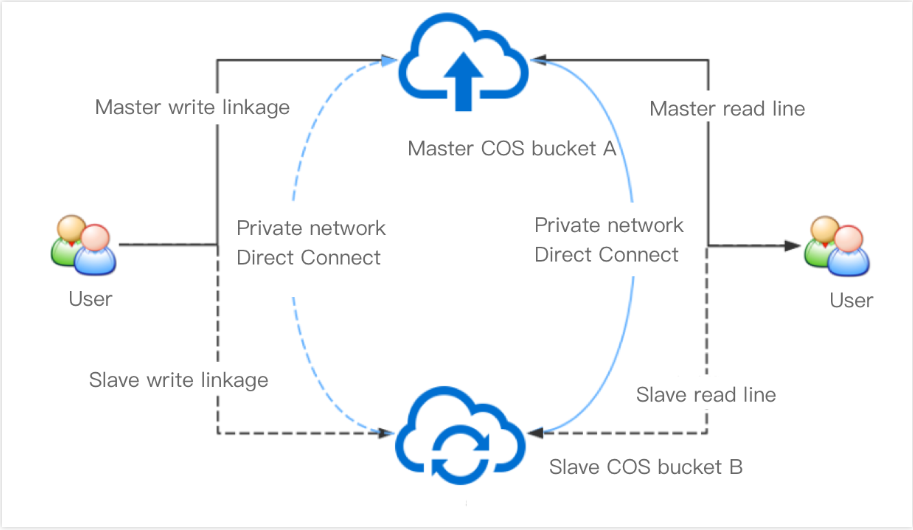
The schematic diagram of the backup and disaster recovery architecture based on cross-bucket replication is as shown below:
Under this architecture, your bucket A and bucket B mutually back up each other. If your data is stored in bucket A, then bucket B is the backup bucket. In order to ensure business continuity and stability, you have configured cross-bucket replication rules for bucket A and bucket B respectively. According to the rules, incremental data in bucket A will be automatically replicated to bucket B, and vice versa.
Note:
After the incremental data in bucket A is replicated to bucket B, although it is "incremental" in bucket B, it will not be replicated to bucket A.
Normally, all your read/write requests point to bucket A where all incremental data will be automatically replicated to bucket B as backups. You can add a network quality detection module to your upload or download program at the business side, allowing you to quickly switch to bucket B when a failure is detected in bucket A.
Note:
Network quality can be tested based on Serverless Cloud Function (SCF) by changing the automated testing addresses to the domain names of master and slave buckets, and modifying the alarm code snippets as needed.
High-Availability Solution Based on Cross-Bucket Replication
Despite all the benefits, the aforementioned solution may not always be able to guarantee high availability due to the complex, ever-changing real businesses. This section proposes a high-availability solution based on cross-bucket replication and used with different COS products and features such as origin-pull, SCF, and CDN.
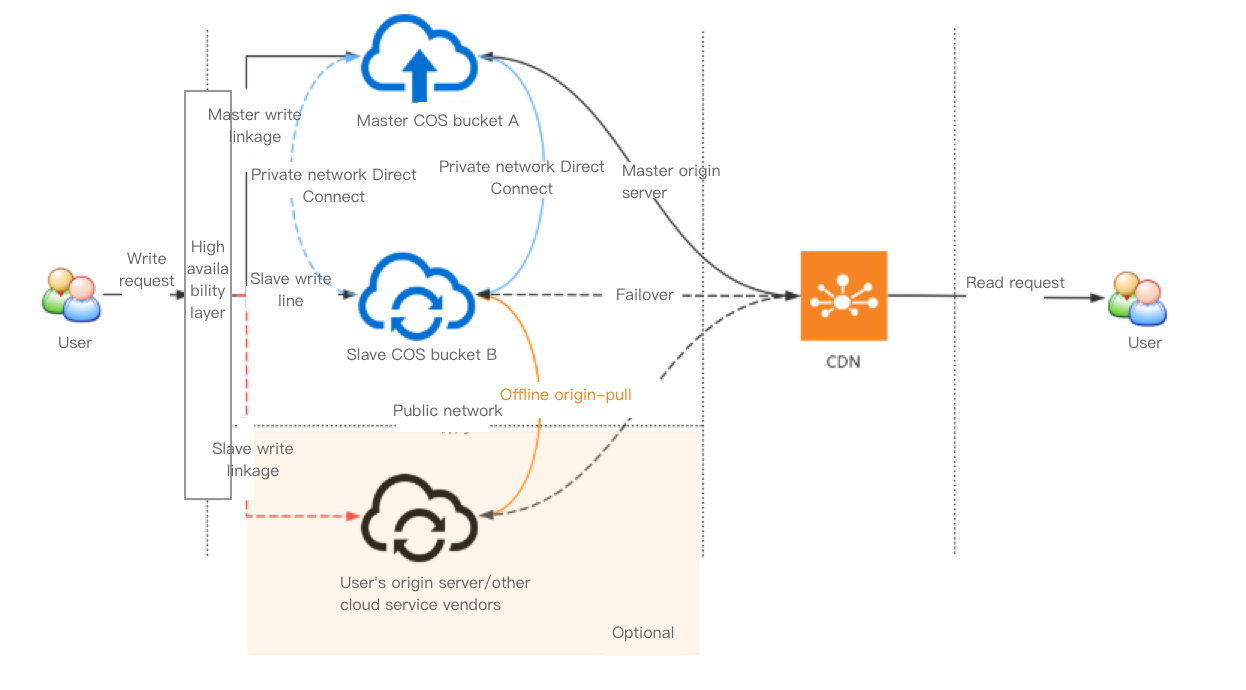
The schematic diagram of the high availability architecture based on cross-bucket replication is as shown below:
This architecture consists of the following layers:
High availability layer: integrates network detection and service scheduling and switches links based on metrics such as link connectivity, which can be implemented with the aid of SCF (as described in the previous section) or on the client side according to your business needs.
Storage layer: typically consists of COS buckets in different regions. You can also introduce buckets from external origin servers or other cloud vendors by setting origin-pull policies so as to further guarantee data consistency.
CDN layer: provides the nearest access through a massive number of edge servers in Tencent Cloud CDN, eliminating the need to directly access data on origin servers and thus ensuring data security.
The following explains how this architecture guarantees high availability:
1. Normally, all your write requests point to bucket A where all incremental data will be automatically replicated to bucket B as backups.
2. When the links to bucket A fail (for example, the quality of automated testing declines or an upload fails), the client can switch the links to bucket B. In this case, all incremental data in bucket B will also be automatically replicated to bucket A.
3. You can also choose to make a redundant backup of your data on an external origin server or in another cloud first and then configure an origin-pull policy for bucket B. If, in extreme cases, the links to both buckets A and B fail, bucket B can pull data from the origin server when the attempt to upload data to bucket B fails.
Note:
As full redundant backups are costly, you can choose to make redundant backups of only hot data (such as files uploaded in just a few hours) so as to reduce data storage costs.
If you choose an origin server as part of the high availability architecture, please be sure to assess the bandwidth of the origin server and the possible impact of the limit on it when designing the architecture.
4. You can read data from your bucket by directly accessing it or by binding a CDN acceleration domain name to your bucket, the latter of which enables nearest access through the edge servers in Tencent Cloud CDN. If your business data involves content delivery, or you don't want your end users to directly access your bucket, you are advised to use Tencent Cloud CDN.
Note:
If you want to read data from your bucket directly, your client should be able to follow 302 redirects in the HTTP protocol.
Tencent Cloud CDN boasts nearly a thousand edge servers which provide adjacent access nodes to increase the data read speed. You can bind multiple origin servers to CDN as master and slave servers in order to ensure high availability. For more information, please see Origin Server Configuration.
If you want to secure your origin servers as much as possible, you can set private-read/write permission for them and enable CDN origin-pull authentication so as to allow your end users to anonymously access the data cached on the CDN edge servers whiling protecting the security of the data on the origin servers.
References
The following documents can help you easily implement the high-availability disaster recovery architecture: