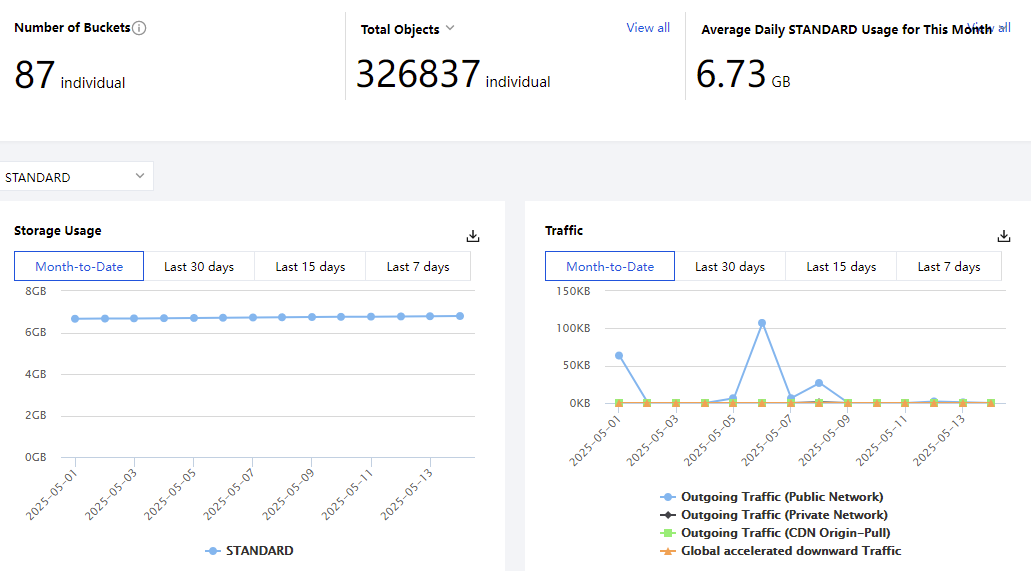
You can go to the Statistic page in the COS console to view the number of buckets/objects/requests, storage usage, traffic, and other data.
Note:
If a sub-account needs to view the statistics, it needs to have permission to access the bucket list. For more information, see Adding a Preset Policy in Accessing Bucket List Using Sub-Account.
Except for the number of buckets, other data is not real-time and has a delay of about 2 hours. The data is for monitoring purposes only. To view the accurate billing data, go to Billing Center.
Viewing Line Charts
Directions
1. Log in to the COS console and click Statistic > Basic Statistic on the left sidebar.
2. On the Basic Statistic page, you can view the following information:
Number of Buckets: number of buckets that have been created.
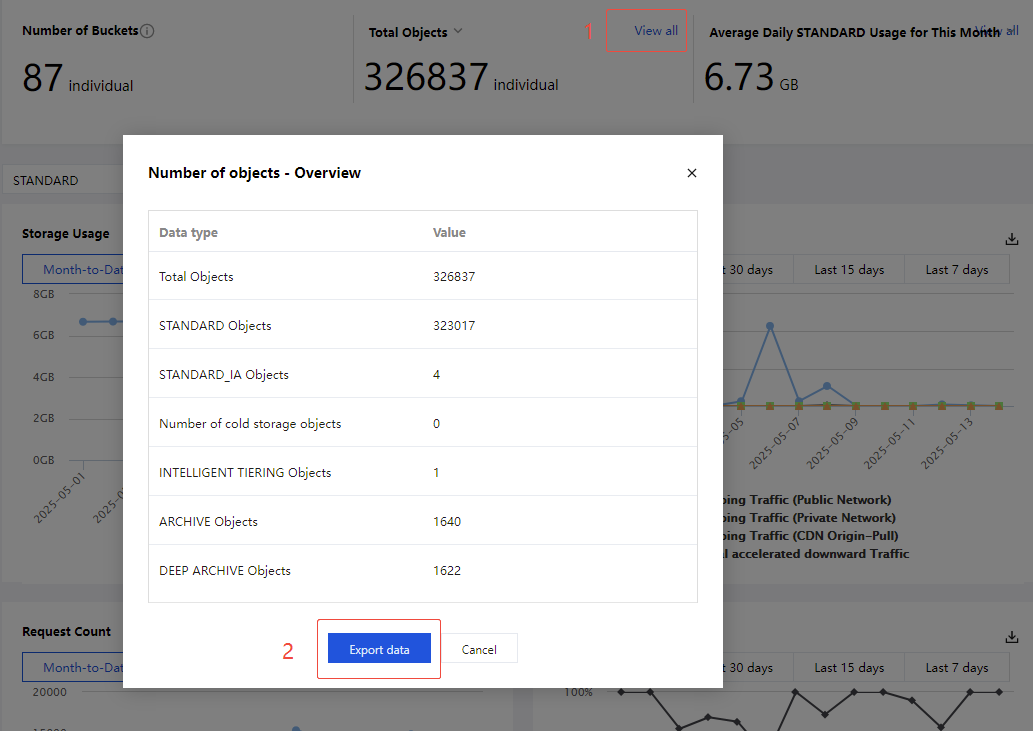
Total Objects: number of objects that have been created in all buckets. Supports drop-down selection to view the number of objects for different storage types. Click View All in the upper right corner to quickly view detailed data for each storage type and support data export. For details, see Viewing and Exporting Overview Data.
Average Daily Usage for This Month: The average daily usage by storage class (STANDARD, MAZ_STANDARD, STANDARD_IA, MAZ_STANDARD_IA, INTELLIGENT_TIERING, MAZ_INTELLIGENT_TIERING, ARCHIVE, MAZ_ARCHIVE and DEEP_ARCHIVE). Daily storage usage = sum of the "5-minute usage"/288 (number of statistical points). Average daily storage usage for this month = sum of the daily storage usage in this month/number of days in this month. Click View All to quickly view detailed data for each storage type and support data export. For details, see Viewing and Exporting Overview Data.
Storage Usage: Storage usage for STANDARD, MAZ_STANDARD, STANDARD_IA, MAZ_STANDARD_IA, INTELLIGENT_TIERING, MAZ_INTELLIGENT_TIERING, ARCHIVE, and DEEP_ARCHIVE. You can view the data for the past 90 days, and the time range for each query cannot exceed 31 days.
Traffic: Public/private downstream traffic,CDN origin-pull traffic and Global acceleration downstream traffic for STANDARD, MAZ_STANDARD, STANDARD_IA, MAZ_STANDARD_IA, INTELLIGENT_TIERING, and MAZ_INTELLIGENT_TIERING. You can view the data for the past 90 days, and the time range for each query cannot exceed 31 days.
Note:
Global acceleration downstream traffic is case-insensitive to storage type.
Request Count: Number of read/write requests for STANDARD, MAZ_STANDARD, STANDARD_IA, MAZ_STANDARD_IA, INTELLIGENT_TIERING, and MAZ_INTELLIGENT_TIERING. You can view the data for the past 90 days, and the time range for each query cannot exceed 31 days.
Request Success Rate: Request success rate for STANDARD and MAZ_STANDARD. You can view the data for the past 90 days, and the time range for each query cannot exceed 31 days.
Data Retrieval: The amount of data retrieved for STANDARD_IA, MAZ_STANDARD_IA, INTELLIGENT_TIERING, MAZ_INTELLIGENT_TIERING, ARCHIVE, and DEEP_ARCHIVE. For ARCHIVE, the amount is classified into expedited retrievals, standard retrievals, and bulk retrievals. You can view the data for the past 90 days, and the time range for each query cannot exceed 31 days.
3. You can click the download button in the upper-right corner of each chart to download the data.
View and Export Overview Data
Operation Steps
You can quickly view and export detailed data for each storage type of Total Objects and Average Daily STANDARD Usage for This Month in the following ways.
1. In the overview module on the Basic Statistic page, click View All in the upper right corner, and you will see the overview data .
2. Click Export data to download the overview data.
Viewing Bucket-Level Data
Directions
1. Log in to the COS console, click Bucket List on the left sidebar, and click Statistical Data.
2. On the Statistical Data page, you can view the bucket data such as storage usage, data retrievals, traffic, and request count within a specified period of time.